I play the viola, teach music, teach sunday school, & am fascinated by linguistics, statistics, fantastic literature, sci-fi, theology, portuguese, & the sky...
Where we are and where we’re headed is alarming.
However, there are things we can do to slow the surge:
- Cancel travel plans
- Don’t see people you don't live with
- ALWAYS wear a face covering when outside your home
We can do this together.
@Seesaw Tx. I'll experiment with that... If I assign an activity to Sample Student, and put that link in another activity, will the real student be able to access it?
@Seesaw Just ran into a new problem: student creates account with email (on phone). Tries to login on a computer; is denied access because any gmail account under a family plan is not allowed to access Seesaw. help pls!
@Seesaw Tx, will do. To clarify, I’m not talking about the Seesaw Family app. Gmail has a family plan for parents to supervise their kid’s gmail addresses. It’s the gmail family plan address that isn’t allowed access!
@LiquidTextCorp BTW just wanted to say thanks, I'm coming back to studying after a long break, haven't used LiquidText since last year, & find this bug is fixed! Yay. :-)
@LiquidTextCorp hey I'm having a display issue - words in a pdf in italics show up briefly while scrolling, and then disappear when I lift my finger. Any ideas on how to fix?
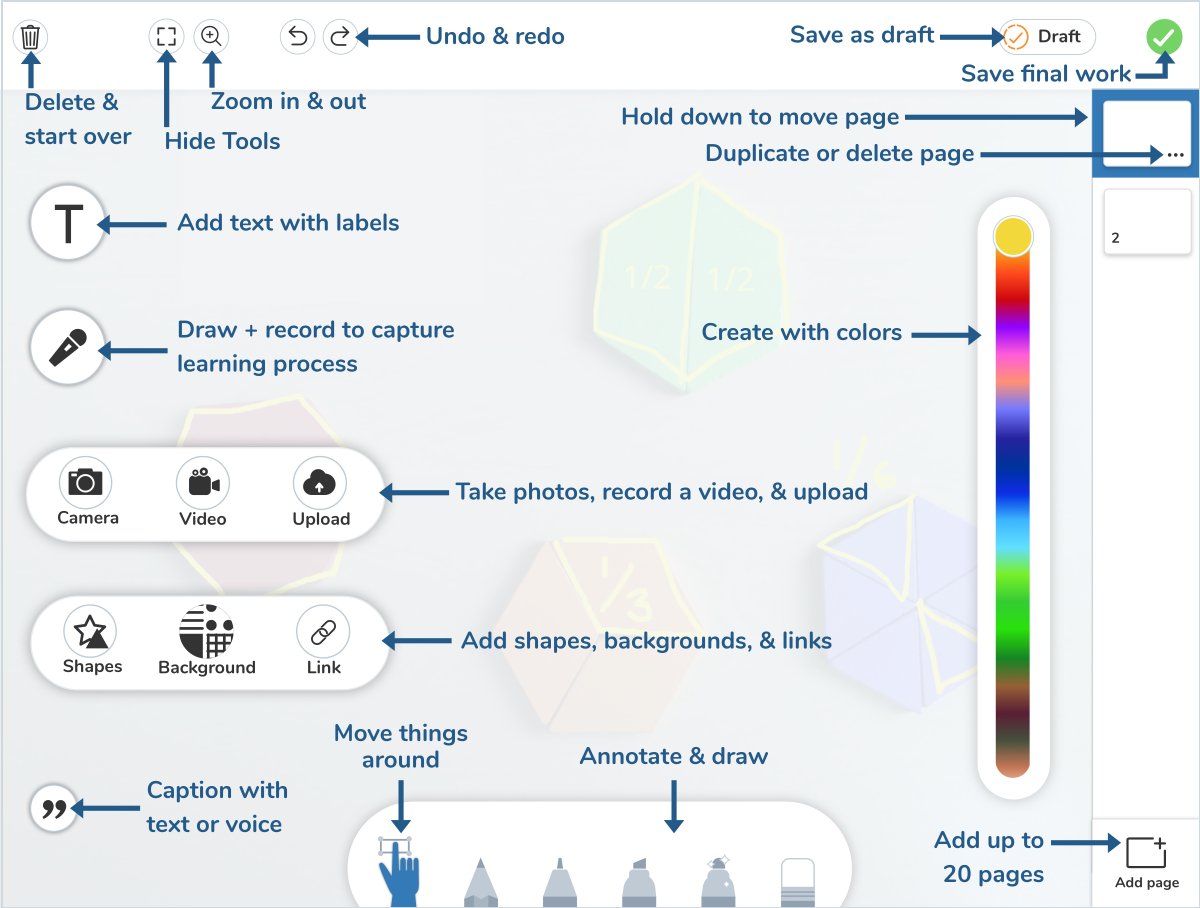
Curious about the new tools and where to find them? We’ve got you covered! Tap the green +, tap post student work, tap photo, drawing, video, or upload and have some fun trying them all out!
@acs624 @zoom_us If you have as many devices as you have breakout rooms, & enough bandwidth, you cd login each device (disconnect audio, no sharing video), assign each device to a breakout rm. You can then see each room (but no audio). Potential chaos if you forget to disconnect audio, though!
@benjaminedtech @Seesaw I would LOVE to have split screen available on the iPad when using Seesaw, too! It's so much easier to organize when I can have a quarter of the screen open to reference something else (calendar, messages, Slack, calculator, Notability, any website, email, YouTube, etc., etc!!)
@zoom_us is there a way to save desktop settings so that when I start a new meeting, the window size, chat & participant list view, placement & windows size, preference of gallery view or speaker view remain the same as when I last had a meeting?
@kelvarr_tramlaw @zoom_us shouldn't you be able to do this if you designate co-hosts when the meeting starts? (Though co-hosts can do more than just mute/unmute freely...)