Analysis is a loop, and this keeps the whole loop in one place.
/visualize builds charts and diagrams inline in Cursor's Agents Window. Ask the follow-up in that same chat and it answers with a new chart.
Three questions for your workflow:
1. Which decisions stall because the chart lives in a different tool than the data?
2. What do you always ask second, and where does that answer live today?
3. Who else needs to read the thread along with the image?
The thread becomes the record of how you got to the answer.
Take one dataset you already pulled this week and ask it three questions in a row.
https://t.co/OB3UfQmuUM
Every chart shows the query that built it.
Claude Dashboards is in beta on paid plans: connect a data platform or customer relationship management tool, ask in plain language, and Claude builds a dashboard that updates as your data changes.
Claude Motion is in beta on Team and Enterprise. It turns reports or walkthroughs into short animations written as code, no video model involved, so you can change any word, number, or timing and export an MP4.
Claude Docs, Slides, and Design left beta today on every plan including Free.
So: which recurring report are you rebuilding by hand every month? Build that one as a dashboard and read the query it writes.
https://t.co/TTiku49lnB
Speed turns into a feature the second a person is waiting on the other end of the call.
Ultrafast for GPT-6.1 Sol rolls out today in the API, Codex, and ChatGPT Work: near-Astra intelligence at up to 8x the speed of Sol Standard.
OpenAI points it at outage debugging, agents navigating apps, and live experiences where every second counts.
Two questions for your stack:
1. Which steps have a person waiting in real time?
2. Where does a faster answer change what that person does next?
In Codex and ChatGPT Work it runs on Pro 500, eligible usage-based Enterprise, and credit-based Edu plans.
Pick the one workflow where someone is waiting and run it on Ultrafast.
https://t.co/etsP7eFYHA
Ultrafast is rolling out today for GPT-6.1 Sol in the API, Codex, and ChatGPT Work.
Near-Astra intelligence at up to 8x faster speeds than Sol Standard, so you can build as fast as the ideas come.
Mean time to manually revoke a secret hovers around 40 days. Roughly one in five took more than 90.
GitHub's new ModernBERT classifier, built with Microsoft Applied Sciences, reads surrounding code context to catch secrets with no recognizable pattern. It checks candidate batches in under two milliseconds and is cost efficient enough to run at scale in the critical path.
It could more than double what push protection prevents.
So: where do your agents write config that carries live credentials, and who cleans it up?
Private preview now, then organizations with GitHub Secret Protection on Enterprise Cloud and GitHub Teams later this month.
Start with the repos your agents touch most.
https://t.co/J57STOHcM3
Devs and agents are moving faster than ever. Secret protection needs to keep pace.
GitHub’s new context-aware classifier checks candidate secrets in under 2 milliseconds and could more than double the number of secrets push protection prevents before they enter repository history.
https://t.co/7LeAg7nnAm
The pricing tier at 100k input tokens is the line to design around.
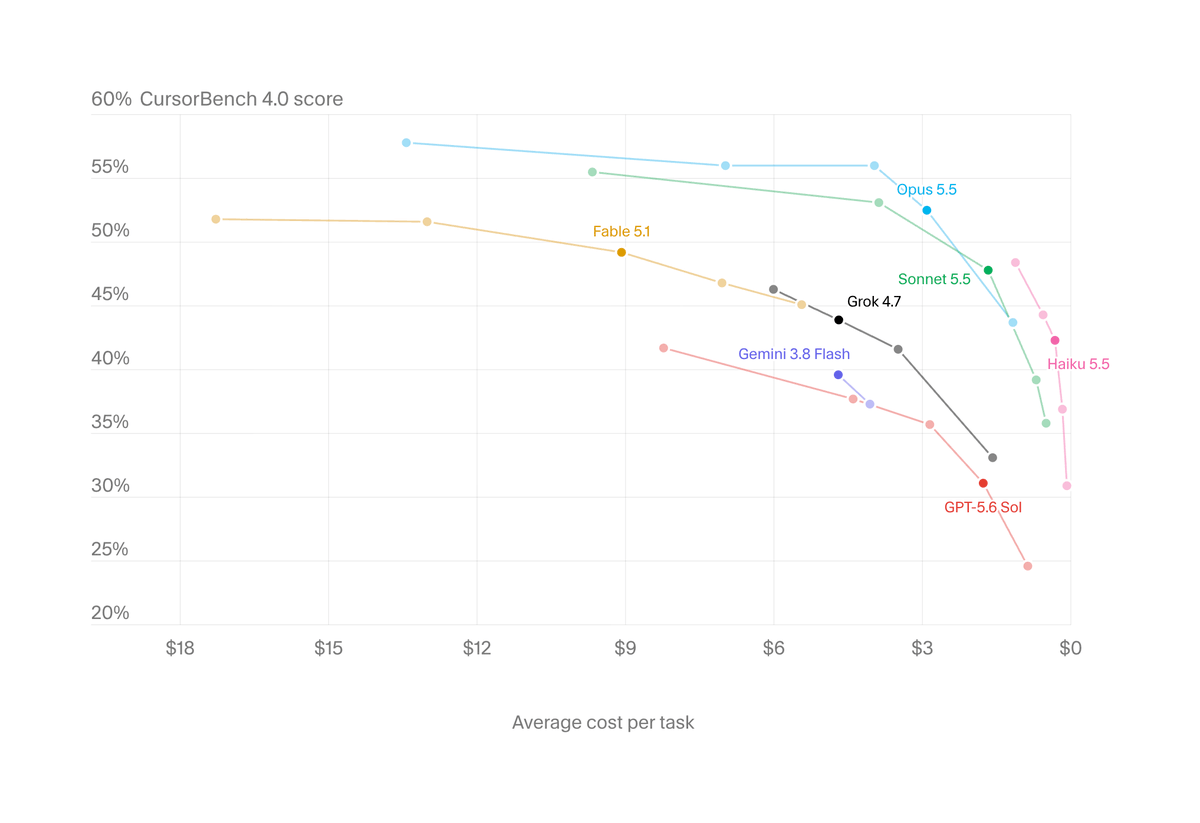
Claude Haiku 5.5 is live in Cursor at $0.10 per million input and $0.50 per million output, moving to $0.50 and $2.50 above 100k input tokens. On shorter requests, it costs 10x less than Haiku 4.5. Sonnet 5.5 cache reads also dropped to $0.10 per million, down from $0.20.
Three questions for your setup:
1. Which of your requests actually stay under 100k input?
2. What are you sending as context that the task never needed?
3. Which small jobs are still running on your heaviest model out of habit?
Turn it on in Cursor Settings > Models, then run one short task both ways and compare.
https://t.co/gSZAu5iVTB
The output of a chat stops being a wall of text. That changes what you can ask for.
With Intelligent UI, GPT-6 composes a response from text, visuals, and interactive elements. Charts, buttons, forms, and tools you use right in the thread.
Rollout: Plus, Pro, Business, and Enterprise today, Free and Go tomorrow. GPT-6 Sol powers the first four, GPT-6 Luna the last two.
Three questions for your work:
1. Which recurring questions are really asking for a calculator?
2. Where would a chart settle a debate faster than a paragraph?
3. What does your team keep after the thread closes?
Take one explanation you repeat weekly and ask for it as something people can click.
https://t.co/AgUAfHu0Pm
GPT-6 and Intelligent UI, now rolling out in ChatGPT for everyone.
Intelligent UI in ChatGPT delivers fast, interactive answers that make everyday questions more visual, complex topics easier to grasp, and interactive tools for your task available on the spot.
Adjustable effort on a small model changes how you design the whole workflow.
Claude Haiku 5.5 costs around 75% less to run than Haiku 4.5, and it is the first Haiku you can tune per task. Anthropic calls out especially good value under 100,000 tokens, around 90% of requests to the previous Haiku.
Three questions for your stack:
1. Which repetitive summaries and classification jobs sit on a bigger model today?
2. Where could Haiku 5.5 run as a subagent under Opus 5.5 or Sonnet 5.5 on coding?
3. Which tasks would you tune down for volume, and which would you tune up?
Effort is now a routing decision.
Pick one high-volume job this week and move it to Haiku 5.5.
https://t.co/BdqkNrS5CF
Introducing Claude Haiku 5.5: the cheapest, fastest, and most capable small model we’ve ever released.
On average, it costs around 75% less to run than Claude Haiku 4.5.
The deliverable at the end is the hard part of agent work, and that is where this release is aimed.
Mistral Large 4 runs general-purpose agents that gather information and produce finished deliverables across complex workflows. On AutomationBench it took on 657 business workflows across simulated workplace apps. On Harvey's Legal Agent Benchmark it is the top open source model.
Three questions to get more out of it:
1. Which of your workflows end in a document someone actually sends?
2. What does done mean for that document, written down?
3. Where does the information come from each time?
Pick one recurring workflow and define done for it this week.
https://t.co/nJLpjZIlm6
Provenance just became something you can check by uploading the file.
SynthID Detector is open to everyone. Upload an image and it reports whether a SynthID watermark is present. Upload video or audio and it reports which segments carry it. Coverage spans Google, Nvidia, OpenAI, and Kakao.
What it means for your workflow:
1. Segment results on video and audio point your review straight at the timestamps that matter.
2. Write down who checks, when, and what happens next.
A check is only useful when someone owns it.
Run one asset through it today and save the result with the file.
https://t.co/d8rTIY9Gwp
SynthID Detector is now available to everyone. 🌐
Check whether online content was generated using @GoogleAI, or with tools from our industry partners – including @OpenAI, @NVIDIA, Kakao and coming soon, @Apple.
Try it out → https://t.co/cPW2aNnqr6
Precision and recall pull against each other in code review, and ReviewBench lets you decide which one your team actually wants.
GitHub shaped the corpus from 103.9 million pull requests: 219 public pull requests across 19 languages, every finding labeled for severity and category. Senior engineers who did not build the dataset agreed with its true positive labels 96.6% of the time.
Three questions for your team:
1. Does noise or a missed issue cost you more today?
2. Which categories matter most: correctness, security, reliability?
3. What does your reviewer catch that nobody labeled?
The dataset, judge prompt, and runner are public. Bring your own agent and run it.
https://t.co/YjthIa05AD
How do you know whether an AI code reviewer catches the issues that matter without adding noise?
ReviewBench is a new open benchmark shaped by analysis of 103.9M GitHub pull requests, with 219 PRs across 19 languages.
Bring your own code review agent, evaluate it, and submit your results ⬇️
https://t.co/YVa464lyfx
Important note regarding Grok @Bot:
Going forward, @SpaceX will use the best back end model for any given task, including Claude Opus 5.5, MidJourney, Suno and other leading APIs.
Whatever is most likely to give you the best outcome.
The useful part of voice is that the task gets described while you are away from the desk.
Codex now takes voice input. One post showing it in use: sending off presentations by voice, from a sunroom.
Three questions that make voice input pay off:
1. Can you say the whole task in one pass, file names and acceptance check included?
2. What context does the agent already hold, so you are not dictating it again?
3. What work moves forward while you are walking, between meetings, outside?
Spoken instructions reward clear scope.
Take one task you already know cold and say it out loud this week.
https://t.co/xCxAeGt8AG
Open-source maintainers and individual researchers with a track record of reported vulnerabilities qualify here. That is the part to read twice.
The Cyber Verification Program now runs three tiers, each with access to Claude Opus 5.5, Claude Sonnet 5.5, and Claude Mythos 5.1.
1. Defense Access: security operations center work, incident response, reverse-engineering malware, vulnerability analysis. Anthropic aims to respond to applications within a few days.
2. Red Team Access: adds authorized penetration testing and red-teaming, for organizations. Qualifying organizations run in Defense Access during the few weeks of review.
The tier you pick is a scope statement. Match yours, then apply.
https://t.co/TVDdd4m15l
We’re expanding our Cyber Verification Program to give security professionals broader access to our most capable models.
Through this program, verified security professionals can access Claude Mythos 5.1, Opus 5.5, and Sonnet 5.5 with safeguards designed for defensive work.
We’re also opening up new tiers to allow for authorized offensive work, like penetration testing and red-teaming.
https://t.co/blaJtvxhJh
Rate limit headroom is usually what stalls a prototype before the product does. This lowers that wall.
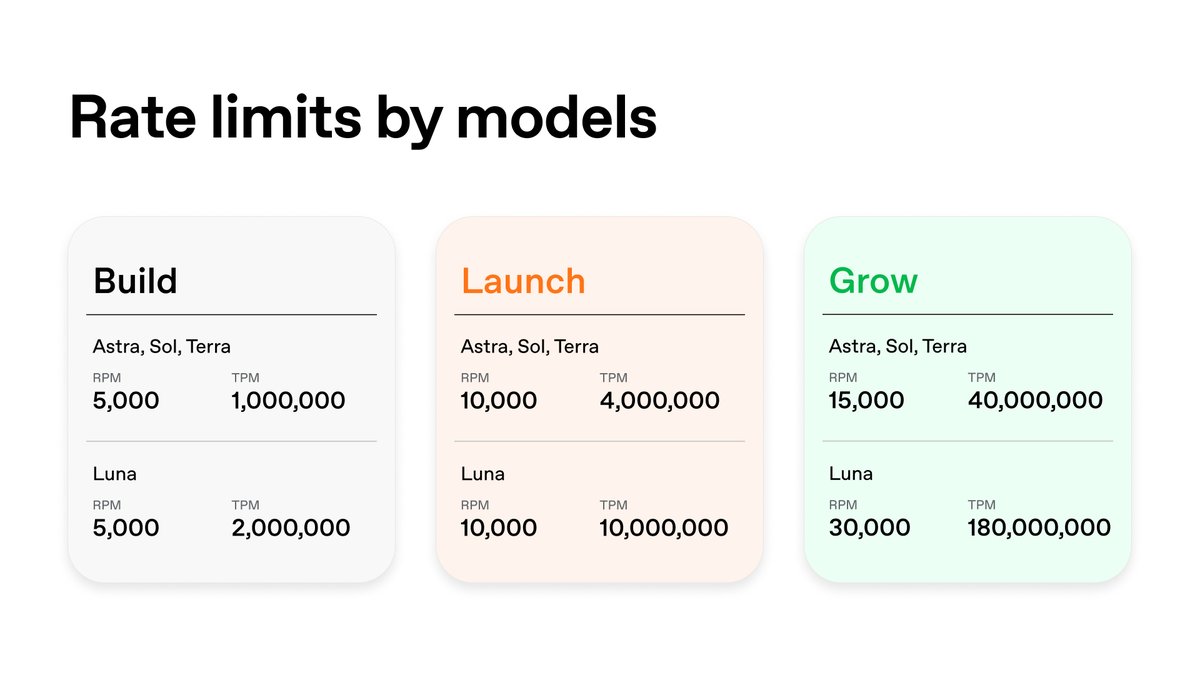
OpenAI's five paid usage tiers become three: Build, Launch, and Grow. Grow is the new top tier at $500 in total API payments, down from $1,000. If you are already on a paid tier, your organization moves automatically.
Two questions worth asking this week:
1. Which workflow have you been throttling on purpose to stay inside a limit?
2. What would you ship if throughput stopped being the constraint?
So check which tier you land in, then go reread the job you shrank to fit the old one.
https://t.co/4ZK3eBurDO
We’re making it easier to qualify for higher OpenAI API rate limits.
Five paid usage tiers become three: Build, Launch, and Grow.
You can qualify for Grow, our new highest tier, with $500 in total API payments—down from $1,000 for the previous highest tier.
The approval step before each edit is what makes this usable on documents other people depend on.
Claude now sits in a sidebar in Google Docs, Sheets, and Slides, reads the file you have open, and edits it in place. Paste a Google file link into Claude, or ask for a new doc, sheet, or deck, and it opens beside the chat. Access follows your Google sharing permissions. In beta on all paid plans.
Three questions to get more out of it:
1. Which files are your source of truth, and who owns them?
2. What does a good edit look like, written down, so approving takes one look at a standard?
3. Which recurring doc do you rebuild from scratch every month?
Start with that third one this week.
https://t.co/De20NVCmI8
Claude now works inside Google Docs, Sheets, and Slides, and those files also open inside Claude.
In Google Workspace, Claude sits in a sidebar next to your file, reads what you have open, and edits it in place. You can approve each edit before it lands.
The worktree part is the one that changes how you work. You can chase a second approach without wrecking the branch you already trust.
The Codex CLI walkthrough covers three moves: starting a task by voice, managing agents across projects, and exploring another direction in a separate worktree.
Three questions for your setup:
1. Which of your tasks are clear enough to kick off by voice while your hands are busy?
2. How many projects do you actually need running at once?
3. When an experiment pays off, how does it get back into the main line of work?
So: pick one branch you have been afraid to touch and run the alternate in its own worktree this week.
https://t.co/oi2xpU4da8
If you live in the terminal, this one’s for you.
Watch how to start tasks by voice, manage agents across projects, and explore another direction in a separate worktree with the Codex CLI.
Memory across conversations is the feature that turns a tool into a system. You stop re-explaining the deal, the firm, the format, every single time.
Hebbia shipped it in Max, paired with admin controls for firm governance. They also brought Hebbia into Microsoft Word and added data sources from ICE, Intralinks, and Dynamo.
Three questions if you run a team on this:
1. What context should persist across every conversation, and who writes it down?
2. Who owns the admin controls once memory is on?
3. Which steps happen in Word today because that is where the document lives?
Pick the one thing your team retypes most and make it persistent first.
https://t.co/92wxXfjEyx
We've had a busy end to Q3.
Max now remembers context across conversations, with admin controls that give your firm the governance it needs.
We also brought Hebbia into Microsoft Word, added new data sources from ICE, Intralinks, and Dynamo, plus more.
Correcting an agent mid-run without losing the work it already finished changes how you supervise long jobs.
Cursor's software development kit adds run.steer(), which puts your message into the agent's next turn. A subagent mid-task keeps working in the background, then reports to the parent as a follow-up turn on the same run.
Custom tools can carry Model Context Protocol annotations like readOnlyHint and destructiveHint, so the model can tell a lookup from a delete.
Cursor is enabling custom system prompts account by account. Rules, skills, and tool schemas still load.
Steering works with local TypeScript agents.
Read the changelog, then pick one agent to steer.
https://t.co/7eaT2iyOCj
You can now steer Cursor SDK agents while they run.
run.steer() adds your message to the next turn. If a subagent is mid-task, it moves to the background and keeps working.