I'm using DataDamp to learn the world's most in-demand data and AI skills for free! You can too—access 440+ courses and real-life projects until Sep. 3, no strings attached. https://t.co/gQqE4OOIVQ via @DataCamp
Thanks to @DorisandBertie, I just discovered the work of @Crescenzo.
And to me, you can’t beat the practical, down-to-earth communication advice they both share.
For instance, Steve says “Be conversational, not corporate.”
I agree 100%. (After all, bei…https://t.co/7ZclBGARSP
@TheJoelTruth BTW, coincidentally, I posted about the TM video on that page a while back. For instance, did you notice that the speaker used over 20 distinct gestures and facial expressions? I also suggested 2 ways to make her opening line much more attention-grabbing… https://t.co/ScmnllhAXT
@TheJoelTruth Great tips Joel. Loved the emphasis on pausing and on strong eye contact. Re point 5, you might be interested in this almost-unknown PPT feature that lets you customize an existing presentation to fit into various timeslots (without duplicating your file) https://t.co/Xf2qc7Mrxw
Check out this 6hr #Tableau course, for free. (Despite the title, looks highly suitable for #DataAnalysts too.) Covers discrete and continuous fields in depth, plus joins, extracts, calculations, parameters... https://t.co/VMDuO4tyuY
#analytics#FreeCourse#LinkedInLearning
After your “Data Storytelling 101” talk on Feb 1 @JohannaJoso, you might be interested in this. It uses a 3-step model (Simplify, Satisfy, Storify) & shares short clips from @storywithdata, @scottberinato & @LeilaGharani (++) in support. #DataStorytelling https://t.co/Uk68mhZiRC
@WilmariDeJesus Still looking? I JUST discovered the tut below. “Budget 1 to 3 hours to complete…” (SO much Tab content – makes good stuff hard to find!)
I like how it introduces concepts gradually, and explains new terms when they come up. See what you think https://t.co/KV0e9ueGRT
@ktkilroy Thanks for your great post Katie. Been using Tableau for about a year, and am still just slowly getting to understand it. (Very helpful that you explained the order of fields in the View Data dialog, as am very often mystified WHY it does stuff!) https://t.co/RBEm36yQvw
@WilmariDeJesus Like @yam_caroline, I recommend @sqlbelle and @TableauTim on YouTube. Here’s a couple of short videos which were extremely helpful to learn some of Tableau’s ESSENTIAL concepts: https://t.co/fjiWIrt9W7 Am about a year in, and still not finding it easy yet! Hope you fair better 😁
@maf2k Since my original reply, I've found out that (like Microsoft Office files) .TWBX files are zips, so you can rename them as such to then access the .TWB file that they contain. Bingo!
@maf2k Thanks Michelle – this looks *extremely* handy. Had no idea it was possible.
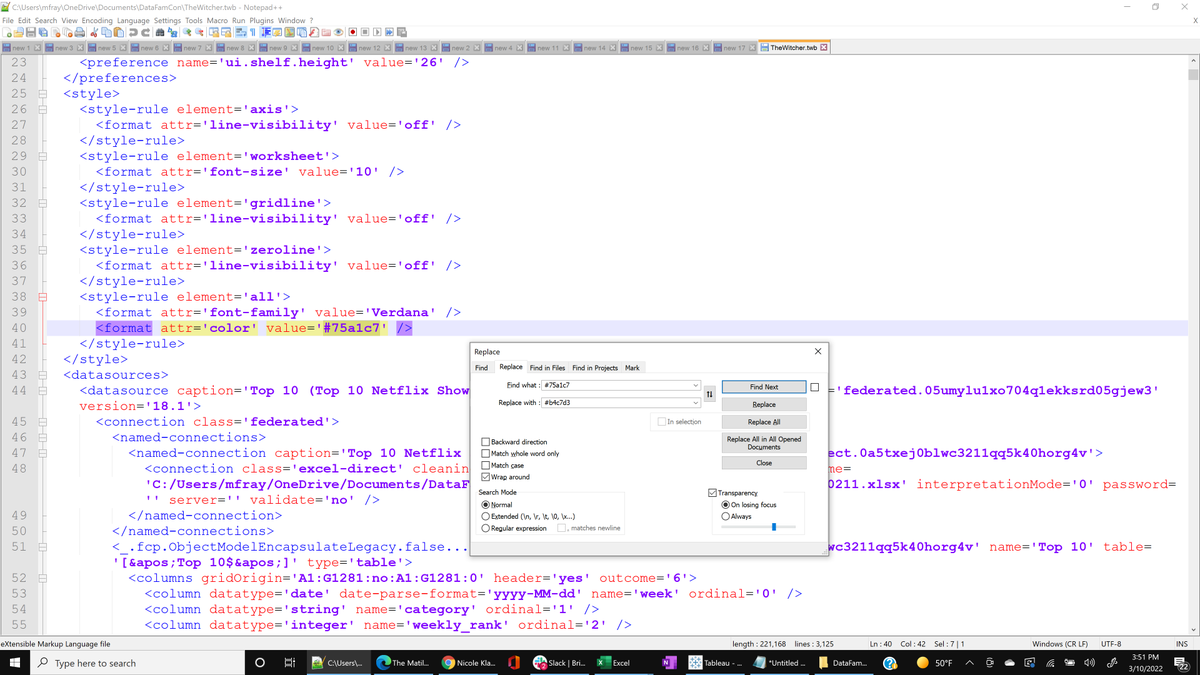
For anyone who's wondering, it seems the workbook needs to be a .TWB file, not .TWBX (and please take a backup copy before hacking away!)
@maf2k I once added the “Add apply button” to +100 filters across multiple workbooks in <5 sec. Absolutely one of my best aha moments with XML editing in tableau⌛️
#TinyTableauTip
Did you ever want to change your color palette across your viz? The workbook file can be opened in a text editor like Notepad++ and you can search and replace the existing hex codes with your new color codes. Make sure you replace all.
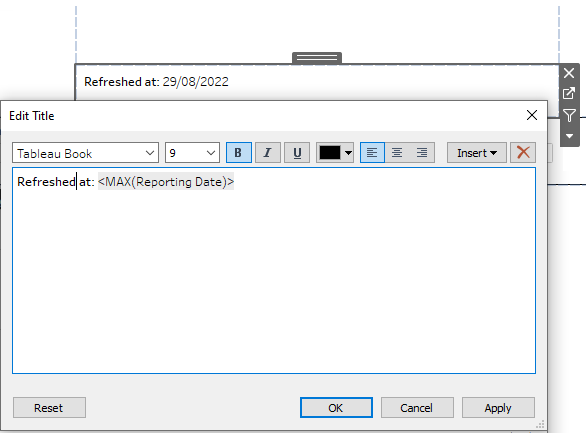
#TinyTableauTip It can be FAR easier to edit text with fields in it if you put them in a sheet’s Title (not its body). You can double-click the title to edit it – right on the dash! (No need to HUNT down the right sheet, THEN click Text, THEN click the ellipsis...) #Tableau#UX
@FlerlageKev Thanks Kevin! (What version of SQL are you using in the GIF? Most of the time, I use an old version of MS SQL Server that doesn't support this tip. But when I tried in a later version, it worked beautifully!)
@infolabUK Hi. https://t.co/myegftbKy2 says "Forbidden Action... Could not open the view because access to the data source has been denied or revoked. To establish your credentials, publish the view's workbook again."