LIST OF 40 WEBSITES TO FIND REMOTE JOBS
1. Linkedin. com
2. Indeed. com
3. Glassdoor. com
4. FlexJobs. com
5. weworkremotely. com
6. Remote. com
7. Upwork. com
8. Freelancer. com
9. Fiverr. com
10. Guru. com
11. Toptal. com
12. AngelList. com
13. Hubstafftalent. com
14. Simplyhired. com
15. Remotive. com
16. Virtualvocations. com
17. workingnomads. com
18. Hired. com
19. cloudpeeps. com
20. taskrabbit. com
21. talent. com
22. Remote OK - remoteok. io
23. DRemote - dremote. io
24. Jooble - jooble. org
25. stackoverflow. com/jobs
26. jobspresso. com
27. onlinejobs. ph
28. simplyhired. com
29. themuse. com
30. skipthedrive. com
31. zirtual. com
32. justremote. com
33. hireable. com
34. remoteworkhub. com
35. jobbatical. com
36. freelancewritinggigs. com
37. contentwritingjobs. com
38. problogger. com/jobs
39. behance. net
40. designhill. com
Don't forget to follow @TehminaDEX to get more insightful Ai related tools and update.
🚨 𝗖𝗢𝗗𝗘 𝗢𝗡 𝗪𝗔𝗚𝗘𝗦 𝗔𝗟𝗘𝗥𝗧: 𝗢𝗻𝗲 𝗖𝗵𝗲𝗰𝗸𝗹𝗶𝘀𝘁 𝗘𝘃𝗲𝗿𝘆 𝗛𝗥 / 𝗣𝗮𝘆𝗿𝗼𝗹𝗹 / 𝗟𝗲𝗴𝗮𝗹 𝗧𝗲𝗮𝗺 𝗦𝗵𝗼𝘂𝗹𝗱 𝗞𝗲𝗲𝗽 𝗥𝗲𝗮𝗱𝘆!
Under the Code on Wages, 2019 read with the Code on Wages (Central) Rules, 2026, payroll compliance is no longer just a monthly salary activity.
It is a documented legal process.
━━━━━━━━━━━━━━━━━━━━
➠ 𝗪𝗵𝗮𝘁 𝗱𝗼𝗲𝘀 𝘁𝗵𝗶𝘀 𝗰𝗵𝗲𝗰𝗸𝗹𝗶𝘀𝘁 𝗰𝗼𝘃𝗲𝗿?
❶ 𝗘𝗾𝘂𝗮𝗹𝗶𝘁𝘆 & 𝗪𝗮𝗴𝗲 𝗕𝗮𝘀𝗶𝗰𝘀
↳ No gender discrimination in wages for same or similar work.
↳ No discrimination on sex in recruitment or employment conditions, except where legally restricted.
↳ Wages may be paid in cash, cheque, bank credit or electronic mode.
❷ 𝗠𝗶𝗻𝗶𝗺𝘂𝗺 𝗪𝗮𝗴𝗲𝘀 & 𝗙𝗹𝗼𝗼𝗿 𝗪𝗮𝗴𝗲
↳ No employee can be paid below the notified minimum wage.
↳ Daily rate ÷ 8 = hourly rate.
↳ Classification may be based on skill level and geographical area.
↳ VDA revision to be done before 1 April and 1 October every year.
↳ Floor wage is ordinarily revised within 5 years.
❸ 𝗪𝗼𝗿𝗸𝗶𝗻𝗴 𝗛𝗼𝘂𝗿𝘀, 𝗥𝗲𝘀𝘁 𝗗𝗮𝘆 & 𝗢𝘃𝗲𝗿𝘁𝗶𝗺𝗲
↳ Normal working day: 8 hours for daily-rated employees.
↳ Weekly working hours must not exceed 48.
↳ One rest day every week.
↳ Overtime must be at least twice the normal rate of wages.
↳ Night shift “day” and “rest day” are counted from shift-end time.
❹ 𝗪𝗮𝗴𝗲 𝗣𝗲𝗿𝗶𝗼𝗱 & 𝗣𝗮𝘆𝗺𝗲𝗻𝘁 𝗧𝗶𝗺𝗲𝗹𝗶𝗻𝗲𝘀
↳ Wage period may be daily, weekly, fortnightly or monthly.
↳ No wage period can exceed one month.
↳ Monthly wages must be paid before the 7th of the succeeding month.
↳ On removal, dismissal, retrenchment, resignation or closure-related unemployment, wages must be paid within 2 working days.
❺ 𝗗𝗲𝗱𝘂𝗰𝘁𝗶𝗼𝗻𝘀, 𝗙𝗶𝗻𝗲𝘀 & 𝗥𝗲𝗰𝗼𝘃𝗲𝗿𝗶𝗲𝘀
↳ Only authorised deductions are permitted.
↳ Total deductions cannot exceed 50% of wages in a wage period.
↳ Excess deductions must be carried forward.
↳ Fines require approved acts/omissions and 7 days’ opportunity to show cause.
❻ 𝗕𝗼𝗻𝘂𝘀
↳ Eligible employees must have worked at least 30 days in the accounting year.
↳ Minimum bonus: 8.33% of wages or ₹100, whichever is higher.
↳ Maximum bonus: 20% of wages.
↳ Bonus must be credited to bank account within 8 months from close of accounting year.
↳ Contractor default may shift minimum bonus liability to the proprietor after confirmation.
❼ 𝗖𝗹𝗮𝗶𝗺𝘀, 𝗔𝗽𝗽𝗲𝗮𝗹 & 𝗨𝗻𝗱𝗶𝘀𝗯𝘂𝗿𝘀𝗲𝗱 𝗗𝘂𝗲𝘀
↳ Group claims can be filed for same wage period or discrimination.
↳ Appeal may be filed within 90 days.
↳ Employer appeal requires deposit of claim amount.
↳ Nomination details must be kept updated.
❽ 𝗥𝗲𝗰𝗼𝗿𝗱𝘀, 𝗥𝗲𝘁𝘂𝗿𝗻𝘀 & 𝗘𝗻𝗳𝗼𝗿𝗰𝗲𝗺𝗲𝗻𝘁
↳ Maintain Employee Register, Wage Register and Attendance-cum-Muster Roll.
↳ Preserve registers for 5 years.
↳ Issue wage slip on or before payment of wages.
↳ Underpayment can attract fines and repeat offences may lead to imprisonment.
━━━━━━━━━━━━━━━━━━━━
📌 𝗞𝗲𝗲𝗽 𝘁𝗵𝗶𝘀 𝗰𝗵𝗲𝗰𝗸𝗹𝗶𝘀𝘁 𝗵𝗮𝗻𝗱𝘆.
20 Sites to Get Remote Jobs That Pay in USD 💵
1. JustRemote
2. AngelList
3. Working Nomads
4. Remote
5. OdeskWork
6. JobBoardSearch
7. JS Remotely
8. https://t.co/iGIz8kcfkx
9. Remote OK
11. Himalayas
12. We Work Remotely
13. FlexJobs
14. Fiverr
15. Upwork
16. Freelance Writing
17. Freelancer
18. Indeed
19. Outsourcey
20. ProBlogger
21. LinkedIn
Follow me 👤@Ambrose0_X for more AI ideas.,,✅
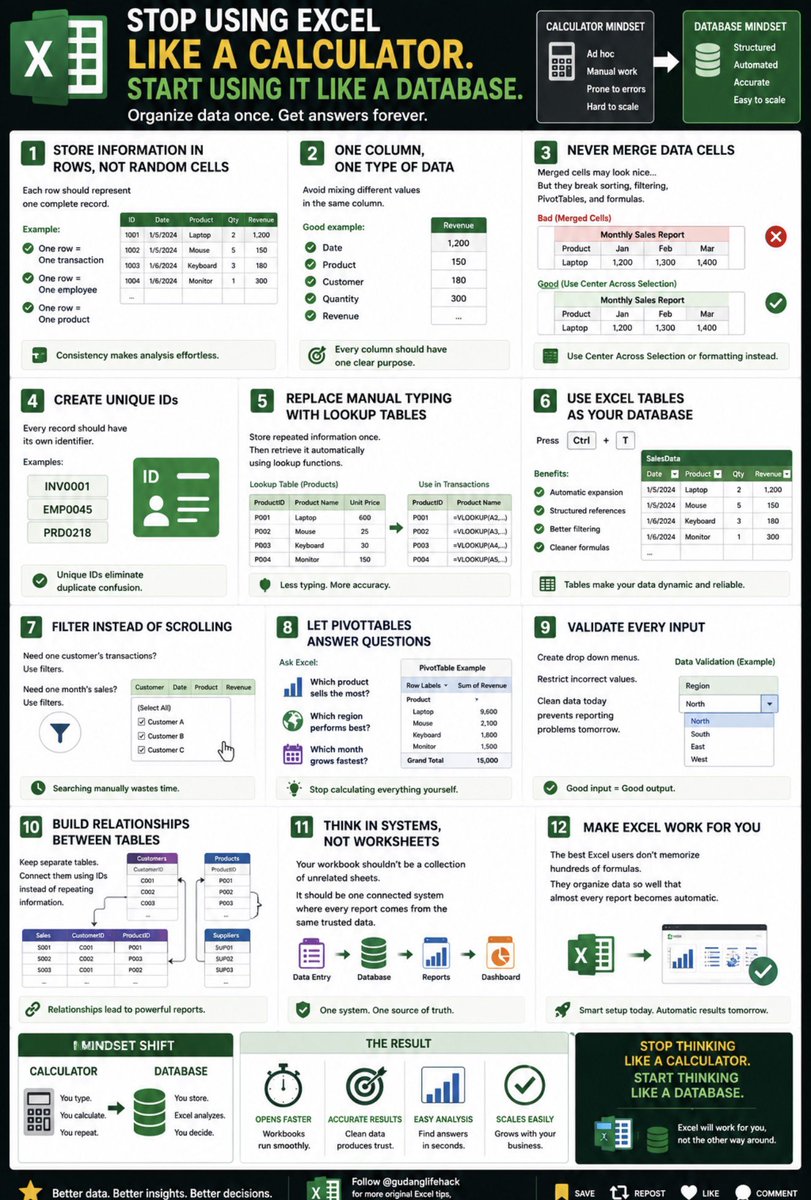
Stop Using Excel Like a Calculator. Start Using It Like a Database.
Most people treat Excel like a giant calculator.
Professionals treat it like a database.
That single mindset shift changes everything.
Here’s how. 🧵👇
1. Store information in rows, not random cells
Each row should represent one complete record.
Example:
One row = One transaction
One row = One employee
One row = One product
Consistency makes analysis effortless.
2. One column, one type of data
Avoid mixing different values in the same column.
Good example:
Date
Product
Customer
Quantity
Revenue
Every column should have one clear purpose.
3. Never merge data cells
Merged cells may look nice…
But they break sorting, filtering, PivotTables, and formulas.
Use Center Across Selection or formatting instead.
4. Create unique IDs
Every record should have its own identifier.
Examples:
INV0001
EMP0045
PRD0218
Unique IDs eliminate duplicate confusion.
5. Replace manual typing with lookup tables
Store repeated information once.
Then retrieve it automatically using lookup functions.
Less typing.
More accuracy.
6. Use Excel Tables as your database
Press Ctrl + T.
Benefits:
✔ Automatic expansion
✔ Structured references
✔ Better filtering
✔ Cleaner formulas
7. Filter instead of scrolling
Need one customer’s transactions?
Use filters.
Need one month’s sales?
Use filters.
Searching manually wastes time.
8. Let PivotTables answer questions
Ask Excel:
📊 Which product sells the most?
🌎 Which region performs best?
📅 Which month grows fastest?
Stop calculating everything yourself.
9. Validate every input
Create drop down menus.
Restrict incorrect values.
Clean data today prevents reporting problems tomorrow.
10. Build relationships between tables
Keep separate tables for:
👤 Customers
📦 Products
💰 Sales
🚚 Suppliers
Connect them using IDs instead of repeating information.
11. Think in systems, not worksheets
Your workbook shouldn’t be a collection of unrelated sheets.
It should be one connected system where every report comes from the same trusted data.
12. Make Excel work for you
The best Excel users don’t memorize hundreds of formulas.
They organize data so well that almost every report becomes automatic.
Excel becomes truly powerful the moment you stop thinking like a calculator…
…and start thinking like a database designer.
The Hidden Logic Behind Fast Excel Workbooks.
Ever wonder why some Excel files open in 2 seconds…
…while others freeze your computer?
It’s not because Excel is slow.
It’s because the workbook was built the wrong way.
Here’s the hidden logic behind fast Excel workbooks. 🧵👇
1. Structure before formulas
A well-organized workbook is always faster than a workbook full of clever formulas.
Start with a clean layout.
Think like an architect before thinking like an analyst.
2. Keep one source of truth
Store each piece of data only once.
Avoid copying the same information across multiple sheets.
Less duplication means fewer calculations and fewer errors.
3. Use Excel Tables instead of fixed ranges
Tables expand automatically when new rows are added.
Your formulas, PivotTables, and charts stay connected without manual updates.
4. Eliminate unnecessary formulas
Ask yourself:
“Does every row really need this calculation?”
Sometimes a PivotTable or a single summary formula can replace thousands of repeated formulas.
5. Avoid full-column references
Instead of calculating an entire column with over one million cells, limit formulas to the actual data range.
Smaller ranges = faster calculations.
6. Separate input from output
Keep these on different worksheets:
📥 Data Entry
⚙ Calculations
📊 Reports
📈 Dashboard
This makes workbooks easier to manage and troubleshoot.
7. Calculate once, reuse many times
If the same formula appears everywhere, create one helper column.
Reuse the result instead of recalculating it dozens of times.
8. Keep formatting simple
Too many colors, borders, and conditional formatting rules slow down both performance and readability.
Highlight only what matters.
9. Refresh instead of rebuilding
When new data arrives:
Paste it into your table.
Click Refresh All.
Everything should update automatically.
10. Build modular worksheets
Each sheet should have one responsibility.
Examples:
• Sales
• Inventory
• Finance
• Dashboard
Simple modules are easier to maintain.
11. Design for future growth
A workbook with 500 rows today may have 500,000 rows next year.
Build systems that scale without needing a redesign.
12. Measure success differently
A great Excel workbook isn’t the one with the most formulas.
It’s the one that:
⚡ Opens quickly
📊 Updates automatically
✅ Produces accurate results
😊 Is easy for anyone to understand
Speed is the result of good design, not powerful hardware.
Build smarter workbooks, and Excel will reward you with faster performance.
12 Websites that pay you daily💸💸
1. arise. com
2. kellyconnect. com
3. gaggle. net
4. paidwork. com
5. toptal. com
6. transcriptionhub. com
7. preply. com
8. omniinteractions. com
9. rev. com
10. taskrabbit. com
11. swagbucks. com
12. nexrep. com
13. clickworker. com
Follow me @Nusratjaha0
For more AI Update.✅
INSTEAD OF WATCHING NETFLIX TONIGHT.
Spend 1 hour with this.
Claude AI FULL COURSE that teaches you how to BUILD and AUTOMATE anything.
The people who watch this tonight will wake up tomorrow with a new skill.
Watch it and Bookmark it now.








![heyitsurya's tweet photo. Top YouTube Channels to Master Tech Skills
1. SQL
👉 https://t.co/kjxeztATg9
2. Excel
👉 https://t.co/729iXtsJEh
3. Statistics
👉 https://t.co/vv5OtFLGFq
4. Math
👉 https://t.co/hgwR4K9iiL…
5. Python
👉 https://t.co/ef9lMXf0hx
6. Data Analysis
👉 https://t.co/boomuzJtyY
7. Machine Learning
👉 https://t.co/32nFifl8JL…
8. Deep Learning
👉 https://t.co/nrJNtHeWnd
9. Java
👉 https://t.co/9p2KgiWA1t
10. Big Data
👉 https://t.co/OVwZ5KPbGb
11. Data Engineering
👉 https://t.co/77hUvpdWoy…
12. NLP (Natural Language Processing)
👉 https://t.co/QHGlpnLqDg
13. Computer Vision & AI
👉 https://t.co/DGjrxYOMzV…
14. Generative AI
👉 https://t.co/zeCBUN2o40
15. University-Level Courses
👉 https://t.co/bHuY5AibL1
👉 https://t.co/RbqgXz5VIL
16. All-in-One Learning
👉 https://t.co/XmyuOddgMz
Follow @coder_surya for more Updates.
[ SAVE FOR LATER]
#YUTUBE #COURSES #FREEECOURSES #LEARNING #FREELEARNING](https://pbs.twimg.com/media/HFsQ_6AbQAAoT01.jpg)