🚨 The creator of Claude Code just shared a full walkthrough on how to actually use it the right way.
30 minutes. Free. Straight from the person who built it.
Watch the workshop and save it for later.
You’ll likely get more practical value from this than from most expensive coding courses online.
Most people are only scratching the surface of what Claude Code can do.
Then check out the guide below.
🚀 Introducing the Qwen 3.5 Small Model Series
Qwen3.5-0.8B · Qwen3.5-2B · Qwen3.5-4B · Qwen3.5-9B
✨ More intelligence, less compute.
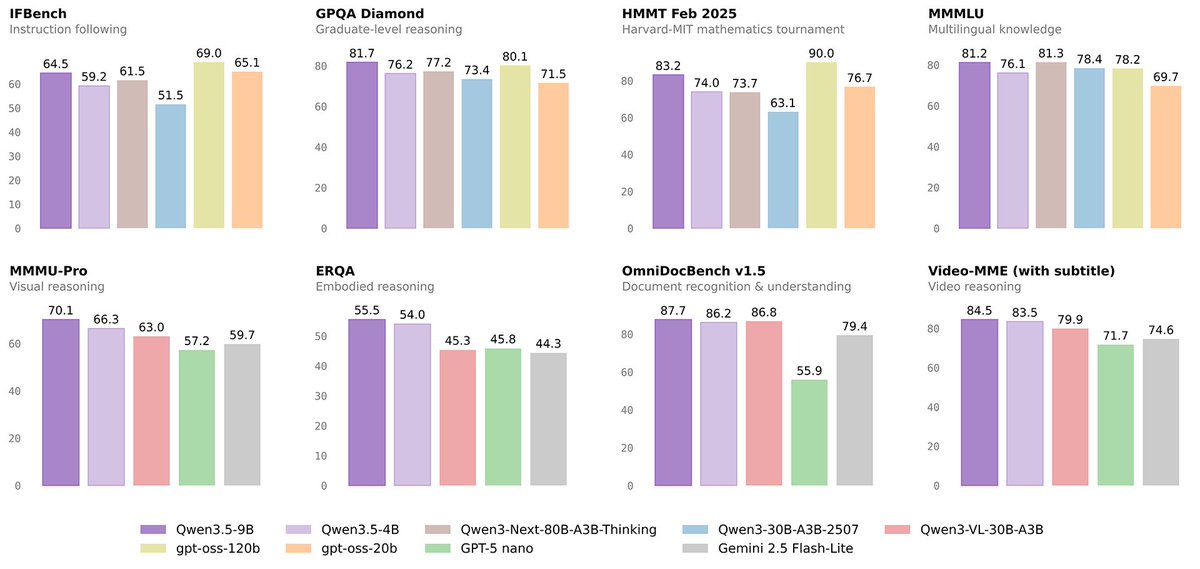
These small models are built on the same Qwen3.5 foundation — native multimodal, improved architecture, scaled RL:
• 0.8B / 2B → tiny, fast, great for edge device
• 4B → a surprisingly strong multimodal base for lightweight agents
• 9B → compact, but already closing the gap with much larger models
And yes — we’re also releasing the Base models as well.
We hope this better supports research, experimentation, and real-world industrial innovation.
Hugging Face: https://t.co/wFMdX5pDjU
ModelScope: https://t.co/9NGXcIdCWI
Sure, here's a simple step-by-step to reindex Spotlight on your Mac (macOS Ventura or later):
1. Click the Apple menu () > System Settings.
2. In the sidebar, select Siri & Spotlight.
3. Scroll down, click Spotlight Privacy.
4. Click + and add your main drive (e.g., Macintosh HD).
5. Wait 10-30 seconds, then select it and click - to remove.
6. Click Done. Spotlight will reindex (may take time).
For older macOS, use System Preferences > Spotlight > Privacy tab instead. If issues persist, try Terminal: sudo mdutil -E /
App Store Connect CLI new version is out with screenshot workflow!
Automates local capture, framing, and review so you can ship App Store screenshots faster and directly to the Store with fewer manual steps.
Still an experimental feature, so file issues as you go!
https://t.co/GaaqlXR7X1
Pernah merasa pengeluaran bulanan kamu gak terkendali?
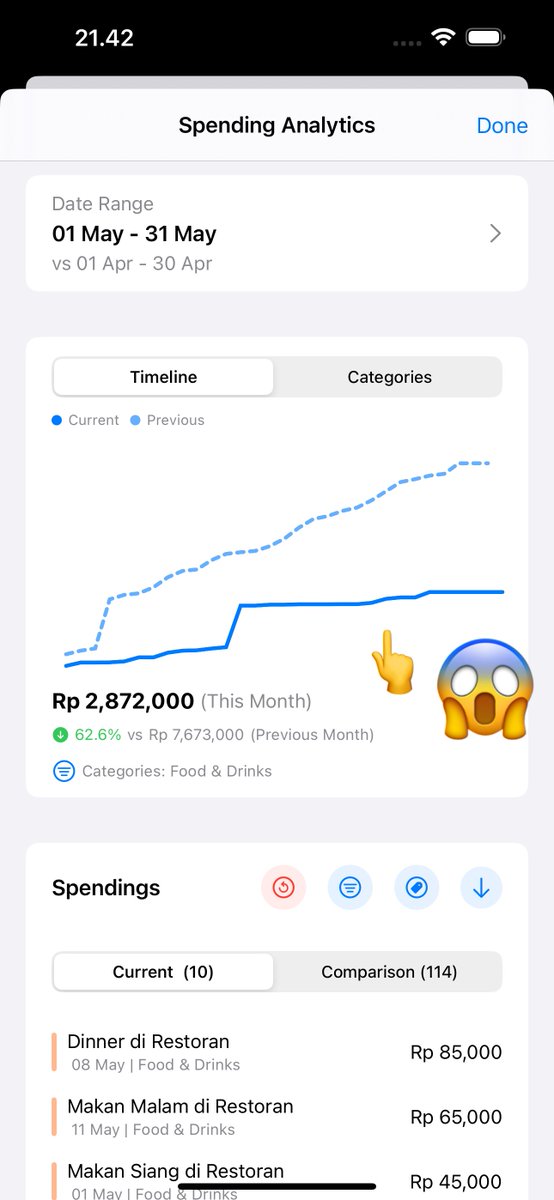
📈 Di bulan lalu, total pengeluaran sampe Rp7.673.000. Tapi bulan ini? Cumaa Rp2.872.000! 🎉
Bisa turun sampe 62.6%!
Check this out 👇
Mau punya kontrol kayak gini juga?
📲 SpendLimit bantu kamu:
Catat otomatis dari gambar
Lihat tren & kategori
Bandingkan antar bulan
Karena kamu berhak merasa tenang sama keuanganmu 💰✨