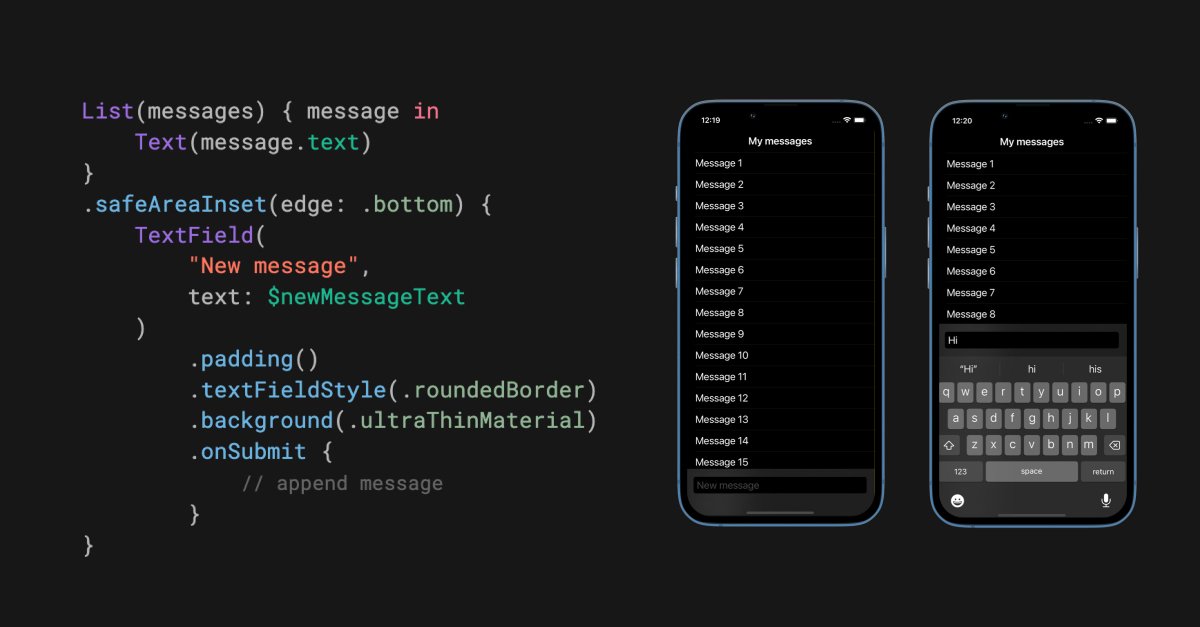
If we need to permanently pin a view to the bottom of the screen in SwiftUI, we can place it inside safeAreaInset(edge: .bottom) modifier.
If we use this method with a text field, it will also automatically move to the top of the keyboard when focused.
I had a quick spelunk and there’s a user defaults key that looks promising for turning off these adverts Apple has put into Xcode 🤞
defaults write https://t.co/JYrSUcQBNF.dt.Xcode XcodeCloudUpsellPromptEnabled -bool false
#Xcode Pro tips:
1 Use #warning("…") for reminders
2 Put emoji (e.g. 🧑💻) at start of #warning
3 "Create code snippet" for reusable code via right-click
4 Use <# placeholder #> in snippets as jump marks
5 "Show only errors" in sidebar via bottom right icon
See it all in action:
`typealias CompletionHandler<T> = (Result<T, Error>) -> Void`
Did you know that a typealias could use a generic type?
Let me show you how it works 🔥
What!! I was today year's old when I realized you can use the QuickLook framework to perform this custom view controller transition for you....
....with one delegate method 🤯
I have written this transition myself several times, and it is *not* trivial to get right!
A note on working with SF Symbols in SwiftUI: don’t use `resizable()` modifier. Image returned from `resizable()` is no longer a symbol image.
Use `font()` modifier to resize the symbol or `imageScale()` to set the scale relative to the font size.
How many Xcode 13 versions do you have on your machine?
If you have many, one easy way to identify them is to overlay the Xcode icon with the build number. You can do that via Xcode user defaults in Terminal #iosdev


![avielgr's tweet photo. #Swift 5.7 is here and it’s time for some #Xcode regex magic! 💫
Find: if let (.*) = \1([,\s])(?!as)
Replace All: if let $1$2
Done! 🎉 https://t.co/mpaSMDlNnp](https://pbs.twimg.com/media/FdHLBURWIAAFRoh.jpg)