Ad spend without tracking is just expensive noise.
Stop guessing. Start measuring. and Win.
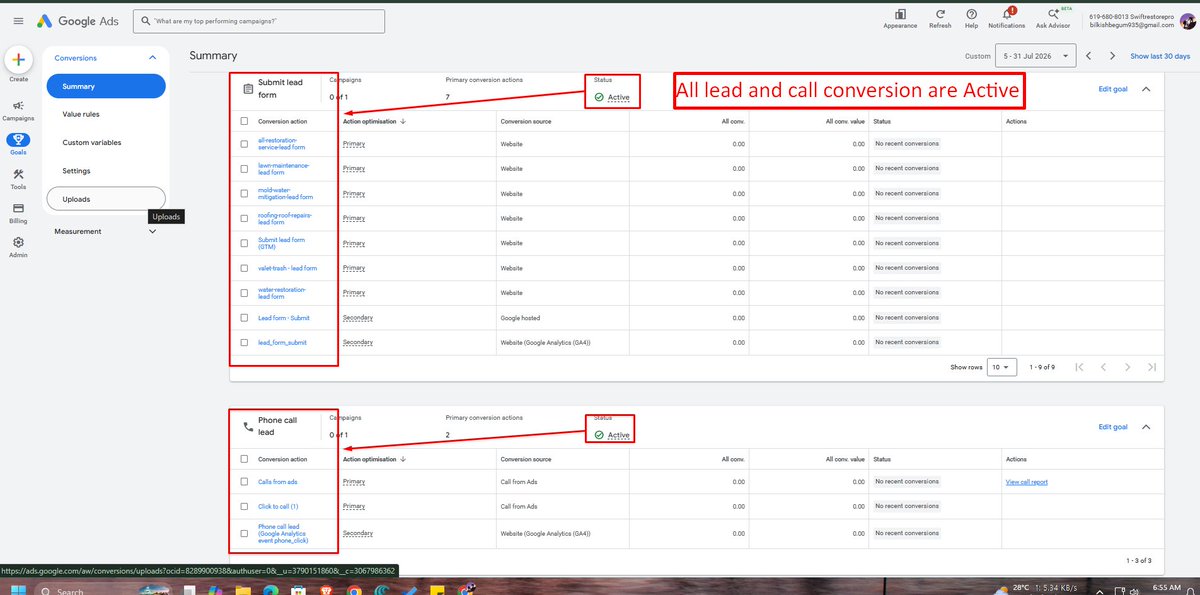
Help you track your Conversion (Lead, Purchase, Call)
DM me for free tracking Audit.
𝗚𝗼𝗼𝗴𝗹𝗲 𝗔𝗱𝘀 𝗷𝘂𝘀𝘁 𝗿𝗲𝗺𝗼𝘃𝗲𝗱 𝗼𝗻𝗲 𝗼𝗳 𝘁𝗵𝗲 𝗯𝗶𝗴𝗴𝗲𝘀𝘁 𝘃𝗶𝗱𝗲𝗼 𝗮𝗱 𝗵𝗲𝗮𝗱𝗮𝗰𝗵𝗲𝘀.
You can now turn a simple brief into on-brand video ads without leaving Google Ads.
That’s the new Gemini Omni inside Asset Studio.
The real money comes from phone calls.
And if calls aren’t tracked…
→ Google Ads learns from the wrong data
→ High-value keywords get ignored
→ Budget goes to low-intent traffic
→ ROI becomes impossible to measure
80% 𝗼𝗳 𝗹𝗼𝗰𝗮𝗹 𝗯𝘂𝘀𝗶𝗻𝗲𝘀𝘀 𝗹𝗲𝗮𝗱𝘀 𝗵𝗮𝗽𝗽𝗲𝗻 𝗼𝗻 𝘁𝗵𝗲 𝗽𝗵𝗼𝗻𝗲...
𝗕𝘂𝘁 𝗺𝗼𝘀𝘁 𝗚𝗼𝗼𝗴𝗹𝗲 𝗔𝗱𝘀 𝗮𝗰𝗰𝗼𝘂𝗻𝘁𝘀 𝗱𝗼𝗻’𝘁 𝘁𝗿𝗮𝗰𝗸 𝗮 𝘀𝗶𝗻𝗴𝗹𝗲 𝗰𝗮𝗹𝗹.
That’s why many campaigns look profitable in reports…
But not in real life.
𝗬𝗼𝘂𝗿 𝗮𝗱𝘀 𝗮𝗿𝗲𝗻’𝘁 𝗲𝘅𝗽𝗲𝗻𝘀𝗶𝘃𝗲.
𝗬𝗼𝘂𝗿 𝗱𝗮𝘁𝗮 𝗶𝘀 𝗯𝗿𝗼𝗸𝗲𝗻.
Most e-commerce and lead gen businesses think they have a traffic problem.
They don’t.
They have a 𝗺𝗲𝗮𝘀𝘂𝗿𝗲𝗺𝗲𝗻𝘁 𝗽𝗿𝗼𝗯𝗹𝗲𝗺.
Google Analytics is a decision engine.
Here’s what I see during audits:
• Conversions not recorded
• Purchase events firing twice
• Leads counted but not qualified
• Key events not marked properly
• GA4 tracking installed — but misconfigured
Most Google Ads accounts don’t lose money on ads its paying for clicks, not results.
Clicks go up.
Impressions look strong.
But revenue doesn’t move.
That’s when businesses panic and blame Google Ads.
The real issue usually starts after the click.
This is why GA4 issues are dangerous.
Events can fire perfectly… and still fail inside GA4.
If GA4 isn’t configured right, your data will lie to you.
𝗣.𝗦. If your purchase event works in a test property but not in your main GA4, would you want help fixing it fast?
𝗛𝗼𝘄 𝗜 𝗳𝗶𝘅𝗲𝗱 𝗶𝘁:
→ Audited GA4 property settings line by line
→ Compared the main property vs the test property behavior
→ Validated event parameters against GA4 schema
→ Corrected internal GA4 configuration
→ Re-tested purchases in DebugView and real-time reports
𝗪𝗵𝗮𝘁 𝘄𝗮𝘀 𝗮𝗰𝘁𝘂𝗮𝗹𝗹𝘆 𝘄𝗿𝗼𝗻𝗴:
↳ Incorrect event configuration in the main GA4 property
↳ Purchase event not marked correctly as an eCommerce event
↳ Conflicting settings between data streams
↳ Property-level configuration blocking revenue processing
𝗛𝗲𝗿𝗲’𝘀 𝘄𝗵𝗮𝘁 𝗺𝗮𝗱𝗲 𝘁𝗵𝗶𝘀 𝗰𝗮𝘀𝗲 𝘁𝗿𝗶𝗰𝗸𝘆:
↳ Purchase event was sent from the website
↳ All eCommerce parameters were present
↳ Add to cart, view item, begin checkout worked fine
↳ Purchase event worked perfectly in a GA4 test property