@YouTubeCreators
Honestly Youtube what are you doing forcing everyone to become the same talking heads with the Edward Munch-inspired faces and ALL CAPS titles awkwardly segwaying into sponsored content. And videos are forced upon people again and again until you watch.
Instead of watching an hour movie, watch this. In 14 minutes, an Anthropic engineer who wrote Building Effective Agents will teach you more about building agents right than most developers figure out on their own in months.
Google just dropped an AI tool that makes reading massive codebases feel illegal 🤯
It’s called CodeWiki.
Paste any GitHub repo… and it instantly transforms the entire project into interactive documentation.
Not just summaries either:
• Generates architecture diagrams automatically
• Explains every file, function, and dependency
• Creates step-by-step walkthroughs
• Understands the full system flow
• Builds an AI chatbot trained on the entire codebase
So instead of spending DAYS trying to understand someone else’s messy project…
You can navigate it in minutes. 🚀
This changes everything for developers, startups, and open-source teams.
Link below 👇
Nunca más voy a configurar skills manualmente 🧠
Gracias @midudev por compartir esto.
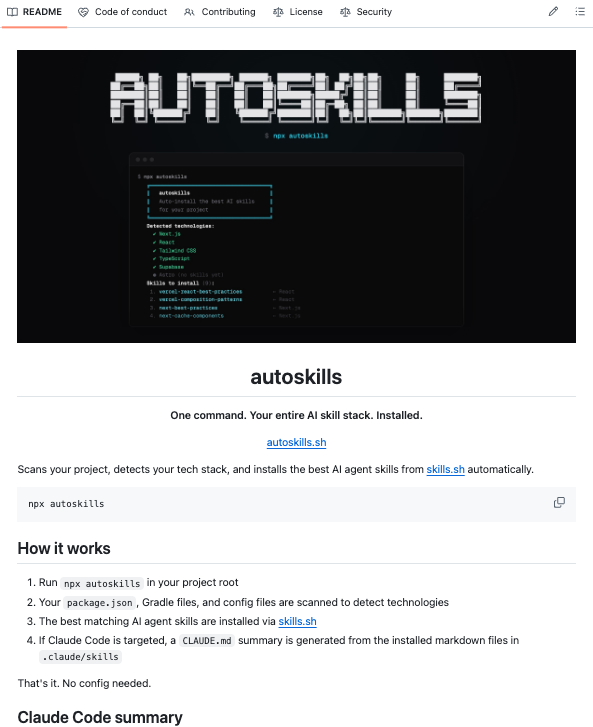
Alguien open-sourceo un solo comando que escanea tu proyecto, detecta todo tu stack y te instala los AI agent skills correctos para cada tecnología. Solo.
Se llama autoskills.
Ejecuta `npx autoskills` en la raíz de tu proyecto.
Eso es todo.
→ Lee tu package.json y archivos de config para fingerprintear tu stack
→ Matchea lo detectado contra un registry curado en https://t.co/pXJfAI28HK
→ Instala skills para 50+ tecnologías: React, Next.js, Vue, Svelte, Astro, Tailwind, Supabase, Neon, Playwright, Expo, Stripe, Prisma, Cloudflare, AWS, Vercel, GSAP, Bun, Deno, Hono, NestJS, Spring Boot y más
→ El flag `--dry-run` te muestra qué instalaría antes de tocar nada
Un comando.
Todo tu AI skill stack.
Instalado.
Repo🔗: https://t.co/XQ8etl4OPU
Introducing Claude Managed Agents: everything you need to build and deploy agents at scale.
It pairs an agent harness tuned for performance with production infrastructure, so you can go from prototype to launch in days.
Now in public beta on the Claude Platform.
🚨 BREAKING: Someone just built a web-based System Design Simulator.
It's called Paperdraw. It lets you drag and drop components to see how they handle real-world conditions like traffic, failures, latency, and scaling in real time.
100% free to try.
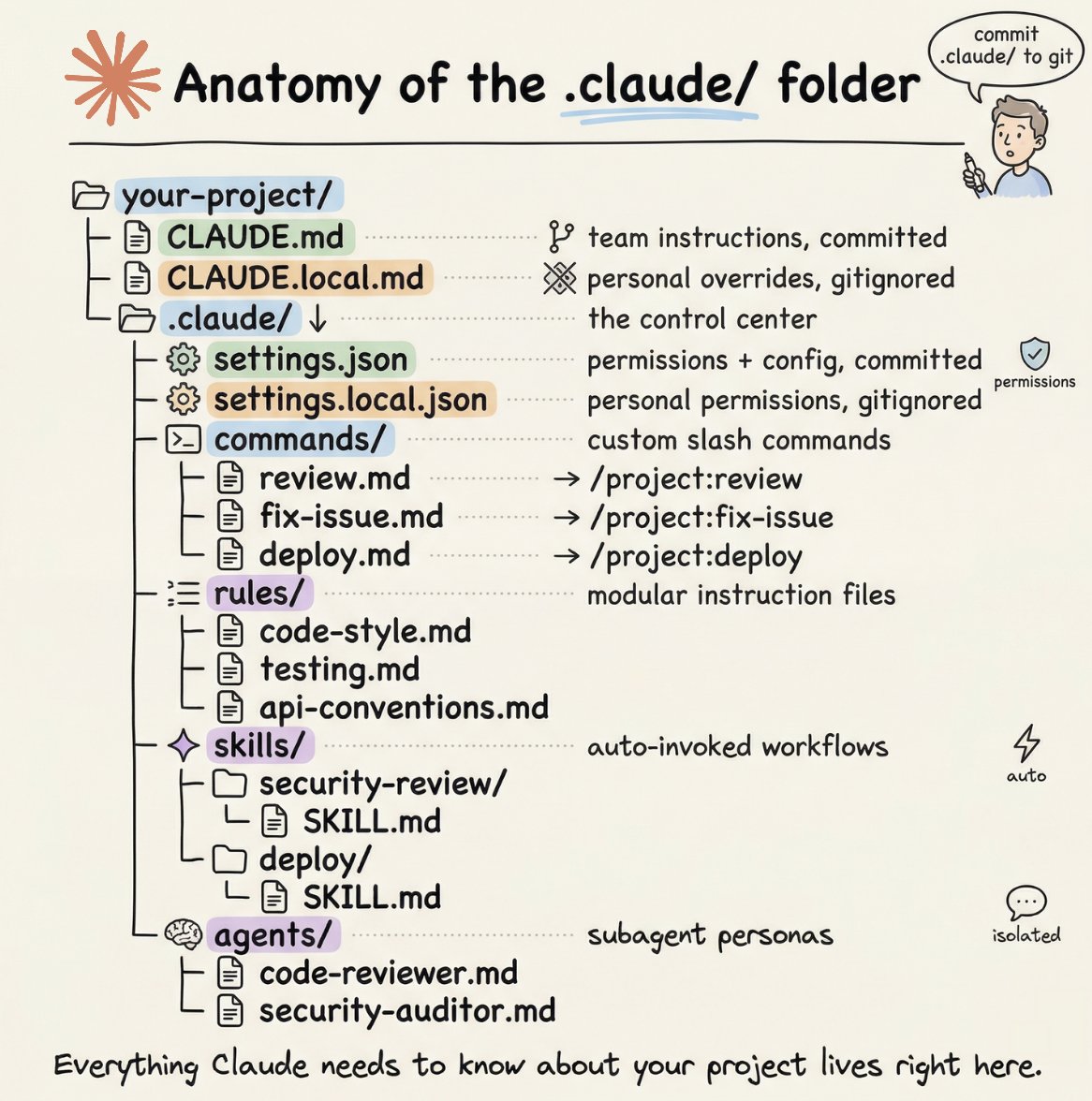
How to setup your Claude code project?
TL;DR
Most developers skip the setup and just start prompting. That's the mistake.
A proper Claude Code project lives inside a .𝗰𝗹𝗮𝘂𝗱𝗲/ folder. Start with 𝗖𝗟𝗔𝗨𝗗𝗘.𝗺𝗱 as Claude's instruction manual. Split it into a 𝗿𝘂𝗹𝗲𝘀/ folder as it grows. Add 𝗰𝗼𝗺𝗺𝗮𝗻𝗱𝘀/ for repeatable workflows, 𝘀𝗸𝗶𝗹𝗹𝘀/ for context-triggered automation, and 𝗮𝗴𝗲𝗻𝘁𝘀/ for isolated subagents. Lock down permissions in 𝘀𝗲𝘁𝘁𝗶𝗻𝗴𝘀.𝗷𝘀𝗼𝗻.
There are two .𝗰𝗹𝗮𝘂𝗱𝗲/ folders: one committed with your repo, one global at ~/.𝗰𝗹𝗮𝘂𝗱𝗲/ for personal preferences and auto-memory across projects.
The .𝗰𝗹𝗮𝘂𝗱𝗲/ folder is infrastructure. Treat it like one.
The article below is a complete guide to 𝗖𝗟𝗔𝗨𝗗𝗘.𝗺𝗱, custom commands, skills, agents, and permissions, and how to set them up properly.
Bij #kreatos zijn ze ook niet half-beschaamd. Mail: "We hebben geweldig nieuws voor je! Je abonnement past nu nog beter bij je! <prijsverhoging>"
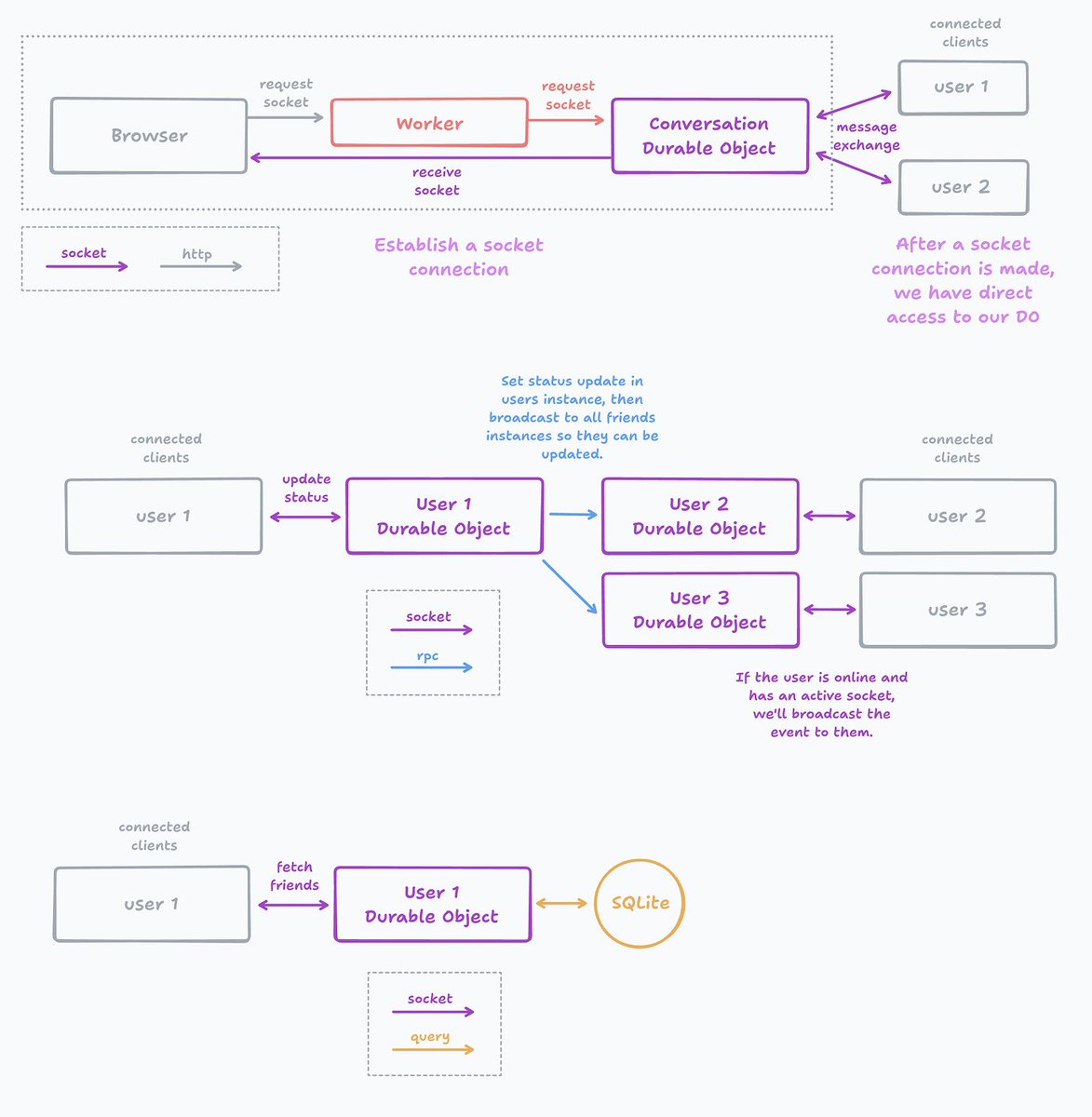
I built an Instant Messenger application all on @Cloudflare. It took 1 day, 3 files, 4 resources... and it's ready to scale from 0 to millions.
Worker → auth & routing
D1 database → store user/pass
User DO → user profile & friends
Conversation DO → messages
Blog in reply, but quick teaser here:
cloudflare/actors library made much of this a breeze with persist properties, easy web socket connection management, and sending messages to all listeners. But what did each piece do?
Auth & Routing (Worker + D1)
All requests come through the Worker either authenticated or not. If unauthenticated, actions available are to login or signup. When authenticated then it can pass the request through to either of our Durable Objects (user or conversation) to establish a web socket connection. All users authentication information is stored in a D1 database (kept it all CF for this example).
User Service (Durable Object)
Our friend list view connects directly to our user Durable Object via web socket. When we update our status we send a message to our individual DO which then can broadcast via RPC to our friends DO's and determine if they are online to send them a web socket message for live updating. Here is where we also store our friend list in a SQLite database scoped to our user.
Conversation Service (Durable Object)
Every individual conversation between two users gets its own DO instance. It's sole responsibility is to store messages, send notifications (via sockets) when new messages are sent, and send a notification when a user starts typing so we can see the "Person is typing..."
TLDR;
Building apps for fun for the sake of reliving nostalgic childhood memories is... worth it.
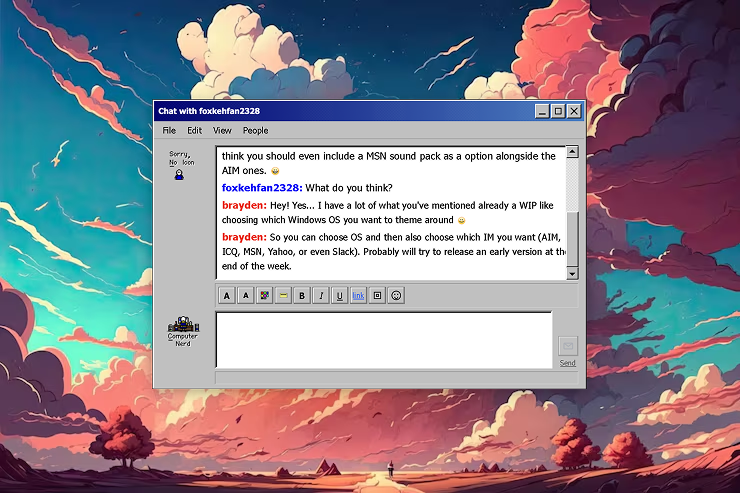
Introducing – Instant Messenger.
Add your friends, send messages, and immerse yourself in the nostalgic early 2000's vibes that our favorite instant messaging apps gave us.
We're talking buddy icons, emoticons, door creaks & xylophones. Customize your text to uniquely express yourself.
Add "brayden" as your first friend if you need one.
Cloudflare skill from @dillon_mulroy to give your coding agents more @cloudflaredev knowledge. Covers Workers, Pages, D1, R2, and 40+ other services. I'm using this in Opencode now 👍
https://t.co/pKjBPVj8KJ
You can now clone any website design in seconds with AI.
Just grab any live UI with the new MagicPath Extension and the AI will instantly create a working clone you can build on top of.
I literally just recreated Claude’s UI with it.
This is Figma completely redesigned.
Somebody wrote a prompt that's supposed to reduce ChatGPT hallucinations.
A Reality Filter
Has a Google Gemini and Claude version too.
it’s a directive scaffold that makes them more likely to admit when they don’t know.
"Reduce hallucinations mechanically—through repeated instruction patterns, not by teaching them “truth.”
The Reality Filter here is a permanent directive for GPT-4, Gemini Pro, Claude and a universal version. It requires labeling any content not directly verifiable with tags like [Unverified] or [Inference] and mandates “I cannot verify this” when lacking data.
---
From r/PromptEngineering/
@BridgestoneEU I was looking for an all seasons tire but DAMN what a banger music track you guys mounted under that video! Is it something custom? Love it! https://t.co/rCi2Fed4vD
AI just became your coding sidekick.
VS Code now runs GPT5 inside.
• Install latest VS Code first.
• Add the free AI Toolkit extension.
• Connect GPT5, Claude, or local models.
• Enable agent mode for full automation.
• Watch it refactor, test, and commit code.
Save this video, you’ll code ten times faster.
Want the SOP? DM me. 💬











![rohanpaul_ai's tweet photo. Somebody wrote a prompt that's supposed to reduce ChatGPT hallucinations.
A Reality Filter
Has a Google Gemini and Claude version too.
it’s a directive scaffold that makes them more likely to admit when they don’t know.
"Reduce hallucinations mechanically—through repeated instruction patterns, not by teaching them “truth.”
The Reality Filter here is a permanent directive for GPT-4, Gemini Pro, Claude and a universal version. It requires labeling any content not directly verifiable with tags like [Unverified] or [Inference] and mandates “I cannot verify this” when lacking data.
---
From r/PromptEngineering/](https://pbs.twimg.com/media/G5PPKvLbIAIS5gm.png)


