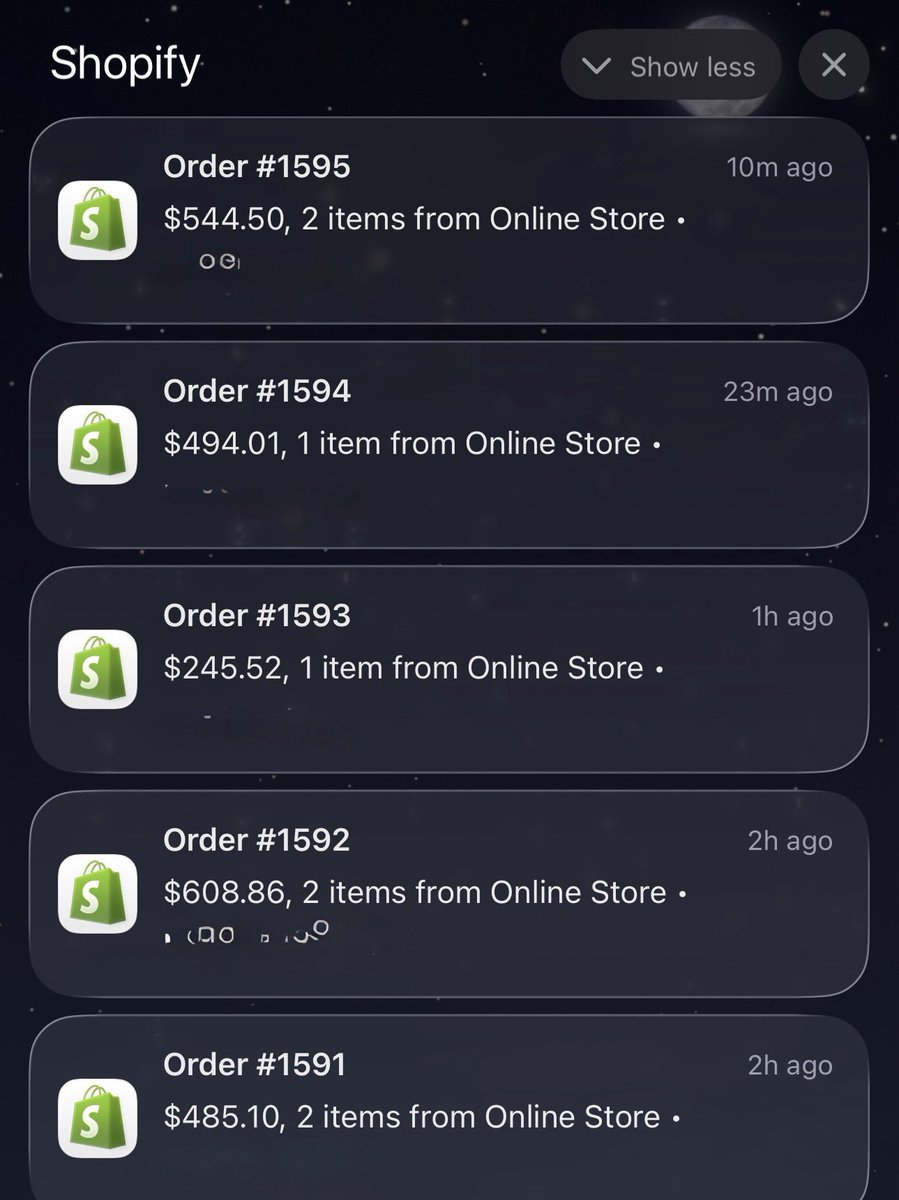
One thing about building a real brand:
You don’t wake up to $12 orders.
You wake up to $485… $608… $544… $494… back to back.
No discounts.
No tricks.
Just trust + product + brand.
This game hits different when you play it the right way.
Q3 is 6 weeks away. Your catalog is not ready.
I know that sounds harsh. But after working inside hundreds of Amazon catalogs, I can tell you most sellers head into peak season with problems they do not even know exist.
Suppressed listings nobody caught. Browse nodes that shifted after an Amazon update. Variation families quietly falling apart.
Search terms that have not been touched since last year. None of it shows up until the traffic hits.
And by then the damage is already done. I put together 6 catalog fixes every Amazon seller needs to do before Q3. Swipe through and check how many apply to you.
How many did you find in yours?
Amazon just updated your listing.
Without asking you.
Without telling you.
Without leaving any record of it anywhere.
And somewhere right now a seller is wondering why their conversion rate dropped this week.
They are going to test new images.
Write new bullet points.
Lower their price.
Increase their ad budget.
They are going to do everything except check whether Amazon silently rewrote their title last Tuesday.
I have been fixing Amazon catalog issues since 2019.
And the one thing that still genuinely shocks me is how many sellers have no idea that Amazon's automated systems regularly overwrite listing data without any seller action.
It is not a glitch.
It is not rare.
It is just how the platform works in 2026.
Amazon's AI systems scan listings constantly.
Looking for policy violations.
Looking for quality issues.
Looking for anything that does not match their catalog standards.
And when they find something — or think they find something — they change it.
No email.
No notification in Seller Central.
No entry in your account activity log.
Just a different title on your detail page than the one you carefully optimized.
The thing is — this used to happen occasionally.
Now it happens all the time.
Enforcement has scaled massively.
The AI making these decisions is moving faster than any human support team can keep up with.
And sellers are paying the price.
Here is my genuine frustration with this.
If Amazon has the technology to automatically change a seller's listing data —
they absolutely have the technology to send a notification when they do it.
They choose not to.
And I cannot for the life of me understand why a platform that sellers invest so much into cannot offer that basic level of transparency.
Has Amazon's automated system ever changed something on your listing without telling you?
Drop your experience below.
I want to know how many people this is actually happening to.
@nicktheriot_ This is pretty much the difference between random winning weeks and an actual scalable system. Seen a lot of accounts improve just by fixing one bottleneck instead of constantly chasing new hacks.
The creative system point is probably the hardest one to build consistently.
@vantamaracuja Honestly if things just stabilized after a rough few days, I’d probably avoid changing too many things at once. Seen this a lot where people finally get momentum back then reset the whole system again.
Small scale increases first usually tell you a lot.
@ecom_rickx Seen this work way better than random “spy tool hunting” honestly. Once you start tracking spend patterns and longevity, product research becomes a lot less emotional.
A lot of winning products look boring at first too.
@StrokmaEcom Honestly the backend/legal/tax setup days are part of the game too. Doesn’t feel productive in the moment but it saves a lot of pain later once things start scaling.
The bad days are usually where most people quit.
@ToriiRowe Seen this happen a lot at scale honestly. One creator starts eating all the spend and everyone else looks “bad” before they even get enough delivery to prove themselves.
Separate ad sets usually give a much clearer picture of who’s actually bringing net new customers.
@adamtaylorl Creative fatigue becomes very real once spend gets higher. Seen a lot of brands stuck because they keep trying to scale the same 2-3 winning ads for too long.
The systems behind creative production matter way more at that level.
@mannybarbas_ Honestly seen this a lot. One bad day makes people start duplicating, killing, changing budgets, touching creatives… then the account never gets a chance to stabilize again.
Sometimes doing nothing for 24 hours is the better optimization.
@antonioventre@Meta Audience Network has baited so many people with “good metrics” honestly. Seen this a lot where traffic looks amazing on paper but sales quality completely falls apart once you break placements down.
Always worth checking before killing creatives too.
@avcanthony_ Seen this a lot honestly. Once a product gets saturated with the same angle, the only thing that really moves the needle again is finding a different emotion or buyer type to speak to.
Most people quit before testing enough variations.
A product doing 40 units a day at $35 each.
That is $1,400 in daily revenue.
Listing gets suppressed on Friday evening.
Seller notices Monday morning.
3 days.
$4,200 gone.
And the worst part?
Amazon never sent a single notification.
This is not a made up scenario.
This is what suppression actually costs in real numbers.
And in 2025 and into 2026 Amazon has been suppressing listings faster than ever before.
Titles that were perfectly fine for years suddenly non compliant overnight.
Enforcement scaled across nearly every category with zero warning to sellers.
Listings losing visibility en masse while sellers blamed their ads, their reviews, their prices.
Never once thinking their listing had quietly disappeared from search.
Here is what makes this genuinely dangerous.
Most sellers only do reviews on a schedule.
Once a week. Once a month. Sometimes less.
Suppression does not wait for your review schedule.
It happens on a Friday evening and bleeds through the weekend while you are offline.
By the time you notice — the damage is already done.
We have seen sellers running active PPC campaigns to listings that were suppressed.
Paying for clicks.
Sending traffic to a product that was invisible in organic search.
Spending money to advertise something Amazon had already hidden.
Amazon's automated systems move fast.
Seller Support moves slow.
And the gap between those two things is where revenue disappears.
If you have not checked your suppressed listings filter in Seller Central this week —
stop what you are doing and check it right now.
Go to Manage All Inventory.
Filter by suppressed.
See what Amazon has been hiding from you.
Then come back and tell me what you found.
Because I have a feeling more people are going to be surprised than not.
300 ASINs.
All of them broken.
Wrong titles. Wrong categories. Wrong attributes.
Some completely suppressed.
Others showing but not converting because the data was a mess.
They had just migrated from another platform to Amazon.
Their agency had done the bulk upload.
Charged them a significant amount for it.
Then disappeared when everything went wrong.
This is what we walked into.
300 ASINs in various states of broken.
No documentation of what was uploaded or how.
No flat file records.
No notes on which feed types were used.
Just a Seller Central account full of errors and a seller who had no idea where to start.
The business had been planning this Amazon launch for 8 months.
Inventory already in FBA.
Marketing budget ready to go.
Launch date missed because nothing was working.
Here is how we approached it.
Step 1 — Full catalog audit
We pulled the complete inventory file and cross referenced every ASIN against the original product data.
Categorised every listing into three groups.
Fixable with a direct edit.
Fixable with a flat file.
Requiring a full relist.
Step 2 — Built a master flat file
Rather than fixing ASINs one by one we built a single master flat file covering all 300 products with the correct data, correct categories, correct attributes and correct feed type for each one.
This is the only way to fix bulk catalog issues at scale without spending weeks inside Seller Central.
Step 3 — Suppressed listings first
We prioritised getting suppressed listings back active before anything else.
No point optimizing a listing that is not even visible.
Step 4 — Phased submission
Submitting 300 ASINs at once creates its own problems.
We broke it into batches and monitored each submission for errors before moving to the next.
The result?
All 300 ASINs live and correct within 9 days.
Launch date pushed back by 2 weeks but the foundation was finally solid.
First month of sales came in strong because everything was set up properly from day one.
The agency that caused this mess charged more than we did to fix it.
If you are planning a large scale Amazon launch or migration —
the catalog setup is not something to rush or outsource to someone who will disappear when it breaks.
Drop "CATALOG" in the comments or DM us.
We have done this before and we will get it right.
$0 in sales for 11 weeks.
Full inventory sitting in FBA.
Healthy account. Competitive price. Great reviews.
Just no Buy Box.
And nobody, not even Amazon Seller Support, could tell them why.
This seller had done everything right.
3 years on the platform.
Never a policy violation.
Never a late shipment.
Never a metric out of place.
Then one morning the Buy Box was gone.
And 60% of their revenue disappeared with it.
They spent 11 weeks fighting Amazon support.
11 weeks of the same response.
"Your account meets all Buy Box eligibility requirements."
Great. So where is it then.
By the time they found us they were exhausted.
Considering shutting the ASIN down completely.
We audited the full catalog data in 24 hours.
One single incorrect attribute.
Buried deep in the backend.
From a bulk upload done 4 months earlier.
A fulfilment channel field that was creating a silent conflict between the listing data and the physical FBA inventory Amazon was holding.
Amazon saw the mismatch.
Pulled the Buy Box quietly.
Told nobody.
One flat file fix.
One correct field.
Buy Box back within 24 hours.
11 weeks of lost revenue.
Fixed in a single day.
The most dangerous Amazon problems are the ones you cannot see.
No error message. No warning. No notification.
Just silently broken while you keep spending on ads wondering what went wrong.
If your Buy Box disappeared and you have no idea why —
it is almost certainly hiding in your catalog data.
Drop "BUYBOX" in the comments or DM us.
We will find it.
Amazon Seller Support told a client to "try a different browser."
The issue was a broken parent-child variation that had split apart overnight.
Different browser.
For a catalog level issue that required a flat file fix and direct escalation to the catalog team.
I wish I was making this up.
This is the reality of dealing with Amazon Seller Support in 2026.
You open a case with a detailed explanation of the problem.
You attach screenshots.
You reference the specific ASIN.
You explain exactly what is wrong and what you have already tried.
And 48 hours later you get a response from someone who read none of it.
They send you a help article that has nothing to do with your issue.
Ask you to try clearing your cache.
Or in this case — suggest a different browser.
You respond explaining the issue again in even more detail.
Another 48 hours.
Another generic response.
Meanwhile the listing is broken.
Sales are dropping.
The clock is ticking.
And you are stuck in a loop with a support system that is not built to solve complex catalog problems.
Here is the part that genuinely frustrates me.
Amazon has built one of the most sophisticated eCommerce platforms in history.
The algorithm. The logistics network. The advertising platform.
All of it is genuinely impressive.
But Seller Support for catalog and listing issues is years behind everything else.
Sellers running serious businesses — sometimes doing millions in revenue — are being told to try a different browser when their catalog breaks.
There is a real gap between the platform Amazon has built and the support infrastructure that is supposed to maintain it.
And right now that gap is costing sellers real money every single day.
What is the worst Seller Support response you have ever received?
Drop it in the comments.
I have a feeling this thread is going to be very long.
@avcanthony_ Seen this happen a lot with bigger brands honestly. They overproduce polished content without validating the actual angle first.
In practice the messaging usually matters more than the production quality.
@adamtaylorl Seen this happen a lot with bigger brands honestly. They overproduce polished content without validating the actual angle first.
In practice the messaging usually matters more than the production quality.
@KodyNordquist This is pretty close to how we manage larger accounts too. Simple rules usually work better at scale than constantly reacting emotionally to every metric swing.
The weekly creative flow part is probably the most important piece here.
@LachezarVoynov Seen this a lot lately honestly. ABO can make creatives look way stronger than they actually are because they’re feeding off demand created somewhere else in the account.
CBO spend patterns usually tell the real story over time.