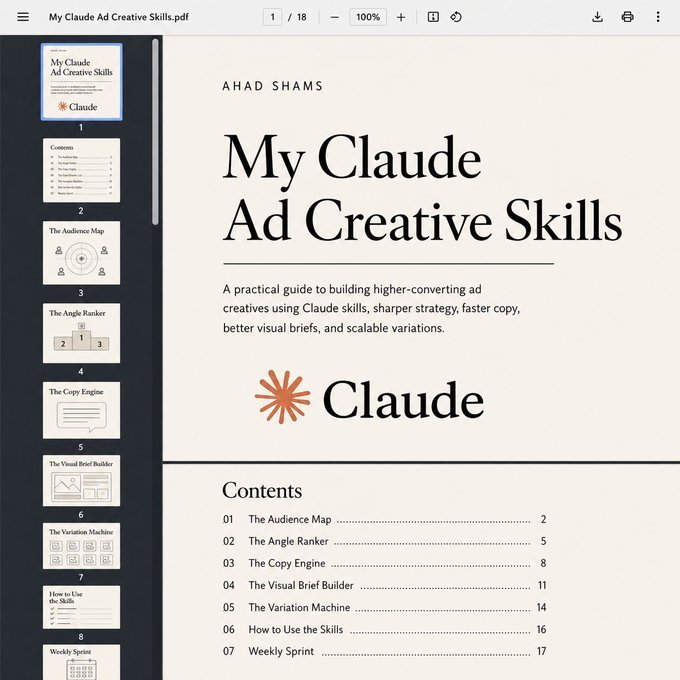
Claude is INSANE for ad creative strategy.
I built 5 Claude skills that handle the entire creative pipeline.
Not prompts you paste and forget. Skills you install once and they run automatically.
→ Full audience breakdown with real pain points and buying triggers
→ Ranked ad angles tied to different funnel stages
→ Production-ready copy in the buyer's voice
→ Visual direction specific enough to hand straight to design
→ Batch variations across hooks, tones, and formats
5 skills. One terminal. Finished ad creatives in minutes.
Prompts are one-time. Skills compound.
They carry context from every run. The strategy gets sharper every time you use them.
If you want the 5 skills:
Connect with me
Comment "MAP"
I'll send it to your DMs.
Repost for priority access.
Here's how to turn Claude into your reusable AI employee so you can finally stop typing the same prompt 47 times a week.
---
1. Claude Skills are reusable instruction packs, basically teaching Claude the job once instead of becoming its unpaid reminder department.
---
2. Create a Skill when you keep using the same prompt, workflow, documents, formatting, or checklist like it's Groundhog Day at work.
---
3. Every Skill revolves around a SKILL.md file that tells Claude what to do, when to do it, and how not to freestyle into another dimension.
---
4. Add templates, scripts, PDFs, spreadsheets, examples, images, or other resources so Claude has receipts instead of vibes.
---
5. Claude figures out what you're asking, finds the relevant Skill, loads it, follows the instructions, and gets to work like it actually read the onboarding manual.
---
6. Prompts are one-time instructions, while Skills are reusable workflows for people who have officially retired from copy-paste athletics.
---
7. Memory remembers things about you, while Skills execute predefined workflows, because remembering your preferences isn't the same as doing your job.
---
8. MCP connects Claude to external tools and services, while Skills tell Claude how the actual workflow should work without causing workplace chaos.
---
9. Keep each Skill focused, specific, modular, tested, and packed with examples because "just figure it out bro" is not documentation.
---
10. Build Skills for writing, coding, research, marketing, design, data analysis, productivity, and basically anything you repeatedly make Claude do.
---
To learn more, check the infographic.
---
Get all my visual guides for free here: https://t.co/p3DBZe1GLQ
---
Ever wanted a Qwen model that doesn't hold back? This 27B GGUF is uncensored, quantized, and ready for local use. 24k downloads and counting, it's the open source community's new favorite for unrestricted text generation. #AI#LLM
[OpenSource - React Admin Dashboards & UI Kits]
Building scalable, production-ready admin panels from scratch usually means wasting hours on boilerplate layouts, routing, and component styling. 🛑
shadcndashboard is a complete, open-source admin dashboard kit built with shadcn/ui, Base UI, Next.js, React, and Tailwind CSS v4.
Here is how this UI kit helps you go from zero to a fully functional admin panel in minutes. 🧵👇
1/4
Calculus is a powerful tool for understanding change, motion, and growth - and it's good to know as a dev.
In this College Calculus course, Ed teaches you the key concepts through the lens of Python.
You'll learn about limits, derivative rules, slope interpretation, various theorems, and how to apply symbolic math libraries like SymPy for graphing & computation.
https://t.co/KGvwu3EQwO
AI skills will be crucial for years to come.
Knowing how to use ChatGPT isn’t enough.
Learn these AI skills to future-proof your career:
(remember to 🔖 bookmark for later)
1. Prompt Engineering:
Write better instructions to help AI tools give you exactly what you need.
2. AI Workflow Automation:
Link different apps together to help you complete tasks automatically.
3. AI Agents:
Use AI systems that act like teammates to handle tasks together.
4. Retrieval Augmented Generation (RAG):
Link AI chatbots to your private files for more accurate answers.
5. Multimodal AI:
Use AI that understands pictures, sounds, and text all at once.
6. Fine-Tuning and AI Assistants:
Build custom AI models or assistants tailored to your needs.
7. Voice AI and Avatars:
Make realistic AI voices and avatars for videos and presentations.
8. AI Tool Stacking:
Use tools like Notion, Zapier, and ChatGPT together to work faster.
9. AI Video Content Generation:
Turn your ideas or blog posts into professional videos using AI.
10. SaaS Development:
Build small AI-powered apps using no-code tools.
11. LLM Management:
Keep track of how well your AI tools are working and their costs.
12. Stay Updated:
Follow top AI news sites to keep up with trends and new tools.
AI won’t replace you.
But someone with AI skills might.
📌 Learn 30 free AI tools in 30 days: https://t.co/7MJCwAPtaQ
👉 Follow me @AndrewBolis for more and 🔄 Repost this to help others learn AI
AMD's CEO held a mini PC on stage that runs a 235 billion parameter model. Locally. On a lunchbox-sized box.
This is the moment the AI industry's entire business model got challenged.
Every major AI company built the same playbook: rent our model, pay per token, send your data to our servers.
AMD just showed you can run comparable models on your desk. No cloud. No API key. No ongoing cost.
Ryzen AI Max+ 395. 128GB unified memory. Runs Qwen3 235B fully. Beat an NVIDIA RTX 5080 by 3x on inference.
And after this week where the US government pulled Claude Fable 5 overnight and millions lost access with zero warning local AI isn't just cheaper anymore.
It's the only AI nobody can take away from you.
The question isn't whether local AI is good enough. It clearly is. The question is why you'd keep renting when you can own.
vc: @adiix_official
There are 3 ways you can use AI in your workflows.
Non-Agentic (prompts), AI Agents and Agentic AI.
Each works differently and has specific use cases.
Here are the pros, cons and guidelines for using each.
[ bookmark 🔖 this post for later ]
💻 Non-Agentic AI
↳ Simple prompt-response AI with no memory or reasoning.
🛠️ How it works:
↳ User enters one prompt, system replies in isolation
↳ Output generated instantly without refinement
↳ Interaction ends with no context retained
🟢 Pros:
↳ Fast, cheap, and widely accessible
↳ No technical setup required
↳ Ideal for one-off, simple tasks
🛑 Cons:
↳ No reasoning or memory
↳ Quality depends on prompts
↳ Weak for multi-step work
📈 How to start using:
↳ Open ChatGPT, Claude, or Gemini
↳ Write clear, specific prompts
↳ Copy, edit, and reuse output
🤖 AI Agent
↳ Single-task AI worker built to automate one job.
🛠️ How it works:
↳ User defines one clear role (e.g., update CRM)
↳ Agent pulls inputs and uses integrated tools
↳ Executes and outputs without supervision
🟢 Pros:
↳ Automates repetitive tasks
↳ Specialized and very capable
↳ Easy to refine within roles
🛑 Cons:
↳ Limited scope, rigid use
↳ Breaks if inputs are unclear
↳ Needs coordination to work with other agents
📈 How to start using:
↳ Select one repetitive task
↳ Connect LLM via Zapier, LangChain, or API
↳ Link inputs/outputs and test
🚀 Agentic AI
↳ Self-managing AI that plans, executes, and improves.
🛠️ How it works:
↳ Goal broken into smaller sub-tasks
↳ Connects to tools, APIs, and data sources
↳ Refines results with memory and feedback
🟢 Pros:
↳ Handles complex, multi-step projects
↳ Integrates with tools and databases
↳ Produces consistent outcomes
🛑 Cons:
↳ Slower and more expensive
↳ More complex and resource-intensive
↳ Difficult to configure, needs regular maintenance
📈 How to start using:
↳ Use LangChain, CrewAI, or AutoGen
↳ Assign roles (Planner, Executor, Critic)
↳ Add memory and feedback loops
In short:
Non-Agentic AI = prompts
AI Agents = Automate one task
Agentic AI = Run complex workflows
Start with prompts. Then try AI Agents or Agentic AI.
Use all three to get the most out of AI.
📌 Get Advanced ChatGPT Guide (free): https://t.co/kOBWfKrBaX
👉 Follow me @AndrewBolis for more and 🔄 Repost this to help others use AI
Claude Managed Agents can operate in a sandbox you control, on your own infrastructure or with any provider you choose.
Today we added new guides for @blaxelAI, @e2b, @googlecloud, @namespacelabs, and @superserve_ai, so you can choose the best fit for your use case.
Live from Code with Claude: we're launching dreaming in Claude Managed Agents as a research preview.
Outcomes, multiagent orchestration, and webhooks are now in public beta.
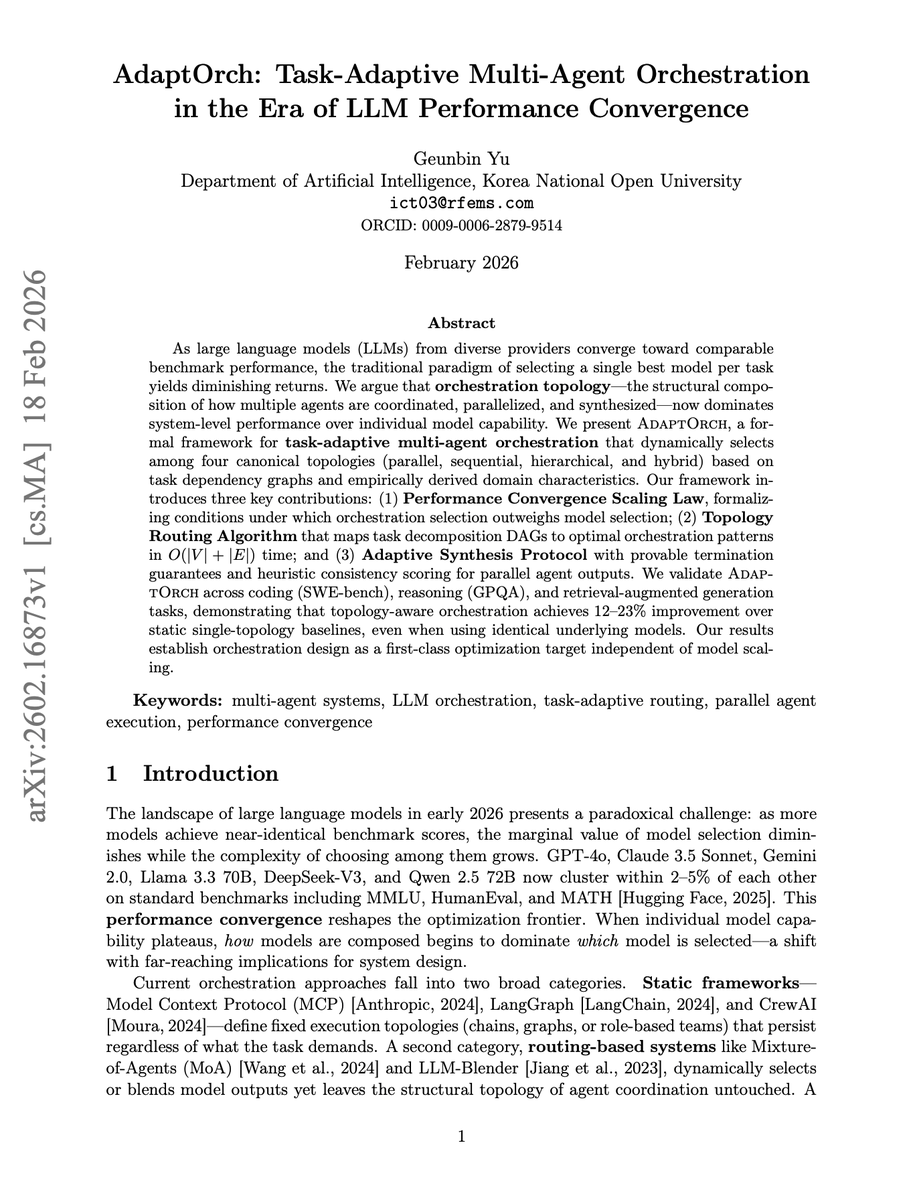
Orchestration design is now a first-class optimization target, independent of model scaling.
As LLMs from different providers converge toward comparable benchmark performance, picking the best model yields diminishing returns.
The real lever is orchestration topology, where you strategize how multiple agents are coordinated, parallelized, and synthesized.
This paper introduces a framework for task-adaptive multi-agent orchestration that dynamically selects among four canonical topologies (parallel, sequential, hierarchical, and hybrid) based on task dependency graphs.
It formalizes a Performance Convergence Scaling Law showing when orchestration selection outweighs model selection, and includes a Topology Routing Algorithm that maps tasks to optimal patterns in O(|V| + |E|) time.
Results: 12-23% improvement over static single-topology baselines, even when using identical underlying models.
Paper: https://t.co/LzIZvfI2aG
Learn to build effective AI agents in our academy: https://t.co/1e8RZKs4uX
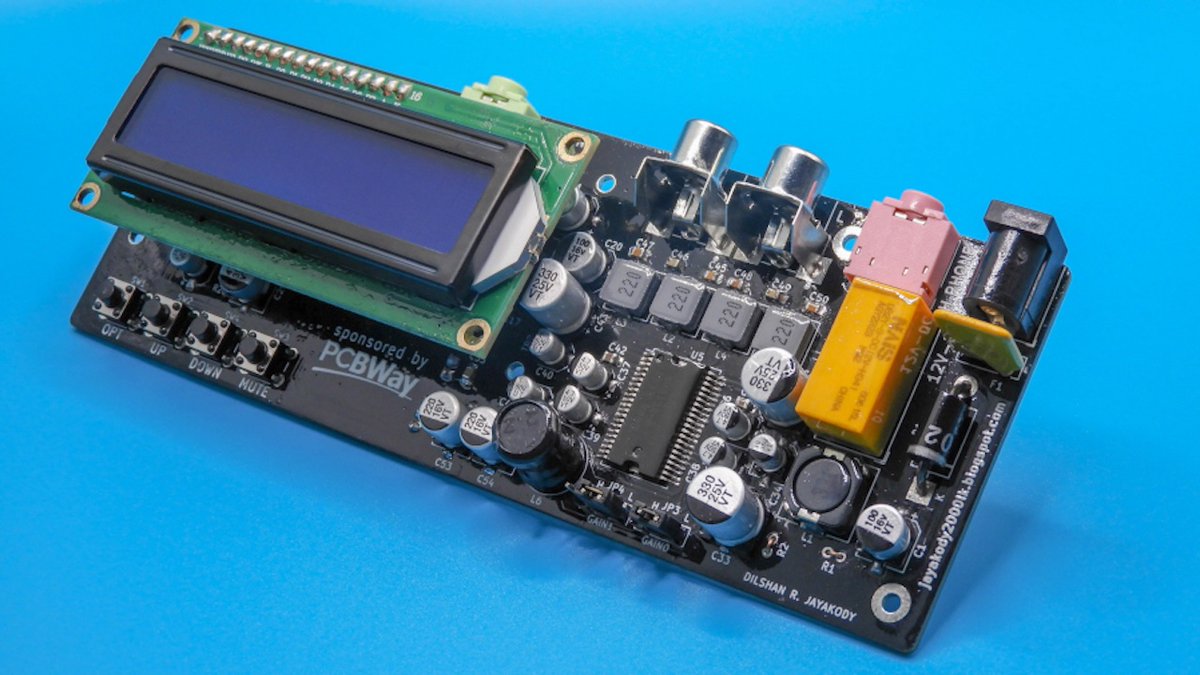
.@jayakody2000lk designed an open-source, Arduino Nano-based amplifier system that combines vintage analog audio processing with modern embedded control: https://t.co/q3M9KeuTSl
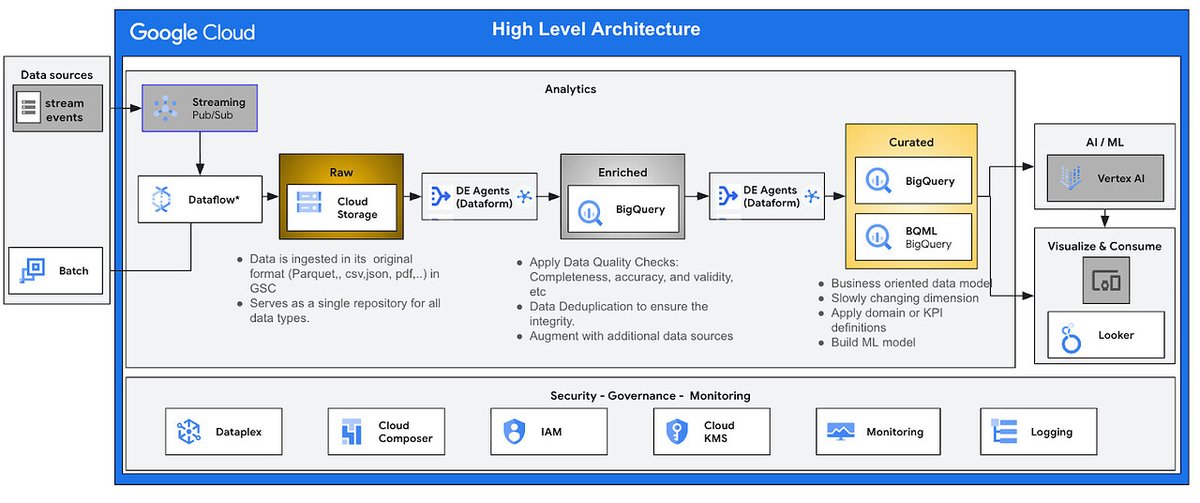
Go from raw data to analytics-ready in minutes ⏱️
Read this Google Cloud community article to learn how the new BigQuery Data Engineering Agent uses natural language to build a full medallion architecture (bronze, silver, and gold) for you → https://t.co/RpqlICfMbm









![AndrewBolis's tweet photo. There are 3 ways you can use AI in your workflows.
Non-Agentic (prompts), AI Agents and Agentic AI.
Each works differently and has specific use cases.
Here are the pros, cons and guidelines for using each.
[ bookmark 🔖 this post for later ]
💻 Non-Agentic AI
↳ Simple prompt-response AI with no memory or reasoning.
🛠️ How it works:
↳ User enters one prompt, system replies in isolation
↳ Output generated instantly without refinement
↳ Interaction ends with no context retained
🟢 Pros:
↳ Fast, cheap, and widely accessible
↳ No technical setup required
↳ Ideal for one-off, simple tasks
🛑 Cons:
↳ No reasoning or memory
↳ Quality depends on prompts
↳ Weak for multi-step work
📈 How to start using:
↳ Open ChatGPT, Claude, or Gemini
↳ Write clear, specific prompts
↳ Copy, edit, and reuse output
🤖 AI Agent
↳ Single-task AI worker built to automate one job.
🛠️ How it works:
↳ User defines one clear role (e.g., update CRM)
↳ Agent pulls inputs and uses integrated tools
↳ Executes and outputs without supervision
🟢 Pros:
↳ Automates repetitive tasks
↳ Specialized and very capable
↳ Easy to refine within roles
🛑 Cons:
↳ Limited scope, rigid use
↳ Breaks if inputs are unclear
↳ Needs coordination to work with other agents
📈 How to start using:
↳ Select one repetitive task
↳ Connect LLM via Zapier, LangChain, or API
↳ Link inputs/outputs and test
🚀 Agentic AI
↳ Self-managing AI that plans, executes, and improves.
🛠️ How it works:
↳ Goal broken into smaller sub-tasks
↳ Connects to tools, APIs, and data sources
↳ Refines results with memory and feedback
🟢 Pros:
↳ Handles complex, multi-step projects
↳ Integrates with tools and databases
↳ Produces consistent outcomes
🛑 Cons:
↳ Slower and more expensive
↳ More complex and resource-intensive
↳ Difficult to configure, needs regular maintenance
📈 How to start using:
↳ Use LangChain, CrewAI, or AutoGen
↳ Assign roles (Planner, Executor, Critic)
↳ Add memory and feedback loops
In short:
Non-Agentic AI = prompts
AI Agents = Automate one task
Agentic AI = Run complex workflows
Start with prompts. Then try AI Agents or Agentic AI.
Use all three to get the most out of AI.
📌 Get Advanced ChatGPT Guide (free): https://t.co/kOBWfKrBaX
👉 Follow me @AndrewBolis for more and 🔄 Repost this to help others use AI](https://pbs.twimg.com/media/HKm_d1TaUAALe0J.jpg)