this is f*cking dangerous
someone just revealed how to run a 10-person company with zero employees using one Claude Project
Anthropic's CEO bet on a $1B one-person company by the end of 2026.
less than 6 months left. solo founders are already past several hundred million.
here is how:
1) Create a Claude Project and add your files
2) Connect 10 MCP agents to your claude
3) You sit in the decision seat. the agents run the execution layer.
you don't need more employees. you need MCP agents that know the business.
save and bookmark it no matter what
then read the full article below on how to build your first company with AI without any employee: ↓
GOOD SITE FOR PEOPLE MAKING VIDEOS WITH AI
It has almost all the main camera movements with visual examples and ready-to-use prompts.
The site is called
https://t.co/s1CocYmjDa
You can just grab the movement you need and drop it straight into your generation.
Especially useful when you want to quickly add a specific camera move:
>push in
>orbit
>dolly
>zoom, etc
Instead of struggling to describe it every time, you copy the right technique and add it to your scene.
Useful both for beginners and for people who want to work with camera more intentionally in AI video.
I use 5 Claude features that most people
have never opened once.
They change how the entire tool works.
Here is what each one does (save this):
𝟭. 𝗠𝗲𝗺𝗼𝗿𝘆 (Free, all plans)
↳ Claude remembers your work context across chats
↳ Settings > Capabilities > Generate memory
↳ You stop re-explaining yourself every session
↳ Think of it like a coworker who never asks twice
𝟮. 𝗣𝗿𝗼𝗷𝗲𝗰𝘁𝘀 (Pro, Team, Enterprise)
↳ A saved workspace with your files and rules
↳ Claude already knows your context before you type
↳ Click Projects in the sidebar > Create
↳ Upload instructions, examples, reference files
↳ Best for: client accounts, content calendars
𝟯. 𝗦𝗸𝗶𝗹𝗹𝘀 (Pro and above)
↳ An instruction manual for one specific task
↳ Claude follows it the exact same way every time
↳ Think of it like handing a chef a recipe card
↳ Best for: weekly reports, audits, formatted emails
𝟰. 𝗠𝗖𝗣 (375+ connectors)
↳ Claude reaches into your other apps live
↳ Google Drive, Slack, Notion, Stripe, Figma
↳ Plus icon in chat > Connectors > toggle apps
↳ Sign in once. Claude remembers.
𝟱. 𝗔𝗿𝘁𝗶𝗳𝗮𝗰𝘁𝘀 (Free, all plans)
↳ Claude builds real working things next to the chat
↳ Code that runs. Diagrams that render. Apps that open.
↳ No setup needed. Just ask it to build something.
↳ Best for: dashboards, calculators, landing pages
Memory stops the re-explaining.
Projects hold your context.
Skills lock your process.
MCP connects your tools.
Artifacts build the output.
5 features. Most people use zero.
Which feature did you not know existed?
- Follow @coder_surya
- Save the post.
- Repost to your network.
- Join AI Community: https://t.co/ioQEJKhR1q
____________________________
You can buy this set of silver certificates on eBay for $31.99. According to Treasury Secretary Bessent, you can take each set to Fort Knox and claim your five silver dollars. Silver dollars sell for about $60 each on eBay. So a $32 purchase gets you $300 worth of silver dollars.
🔥 Conocí a alguien que gana 1,2 millones de dólares al año como Prompt Engineer.
Le pregunté cómo había aprendido a escribir prompts tan brutales.
Me mandó un curso de Anthropic de solo 2 horas.
Lo terminé anoche y a mitad del curso me quedé congelado…
Me di cuenta de que he estado usando Claude completamente mal todo este tiempo. 😳
Si usas Claude (aunque sea de vez en cuando), guarda este tweet.
Te va a cambiar cómo interactúas con la IA.
I SPENT THREE YEARS BUILDING A SECOND BRAIN. CLAUDE SCANNED IT IN 40 SECONDS AND FOUND 137 CONFLICTS
i'm serious. take any note from january and compare it to april. chances are they contradict each other. and you're making decisions based on both at the same time
nobody sees this. because nobody rereads their notes. we write them and hide them like letters in bottles
this isn't a notion problem. not an obsidian problem. it's a human problem - we are physically incapable of keeping more than 100 notes in an accurate state
the brain wasn't built to be a librarian
and that's why what quietly appeared on github two weeks ago matters more than any ai startup this year
obsidian's ceo released 5 files. not a plugin. not a subscription. five text files that teach claude code to work inside a vault the way an engineer works inside a codebase
what this means:
you drop anything into a folder. claude splits it and finds connections to notes from 8 months ago. ones you don't even remember writing
you ask "what do i know about X?" - you get an answer in your own words from your own files. no hallucination. no google. what you once thought yourself
and the big one, once a week it walks every page. compares. finds conflicts. deletes dead weight. links the forgotten
41,000 github stars. karpathy loaded 400,000 words. it maintained itself
notion raised billions. roam raised hype. mem raised a round
five files on github did what none of them could. your vault no longer waits for you. it works while you sleep
i break down finds like this every week. follow so you don't miss the next one
WHAT THE F*CK ARE YOU AFRAID OF
- Death : We’re all gonna die.
- Bankruptcy : You can make it all back.
- Shame : Everyone will forget in a week.
- Rejection : It happens to everyone.
- Failure : It’s part of the path.
- Judgment : They’ll judge anyway.
- Losing people : Not all are meant to stay.
- Making mistakes : You’ll survive them.
- Taking risks : Regret hurts more.
Live every day like it's your last day.
Claude has 3 levels of automation.
Here's how to (actually) set each up:
Level 1: Skills in Claude Chat
On-demand. You start it.
Step 1: Connect your tools in Settings → Connectors.
Step 2: Describe the workflow. Claude writes the skill.
Step 3: Type one word. Get a finished output.
Level 2: Scheduled Tasks in Cowork
On a timer. Runs unprompted.
Step 1: Tell Cowork which skill to run and when.
Step 2: Answer a few questions. The task goes live.
Step 3: It runs itself. No terminal or code needed.
Level 3: Claude Code
Runs while you sleep.
Step 1: Install with one terminal command.
Step 2: Type /schedule and pick a time.
Step 3: Manage every run from the browser.
The decision rule:
- You start it → Skills in Claude Chat
- Timer-based → Scheduled Tasks in Cowork
- Laptop closed → Claude Code
❤️ Like
🔁 Retweet
🔖 Bookmark
Follow @akhilesh9235 for more such posts
#AI #ArtificialIntelligence #GenerativeAI #CareerGrowth #Upskilling
50 Websites that feel illegal to know:
DOWNLOADS & MEDIA
1. https://t.co/9pHwkHkSdX — download any video from socials
2. https://t.co/ryaYjjVdlQ — Photoshop but completely free
3. https://t.co/rqwHmRe2aO — disposable email in one click
4. https://t.co/mVB7H74Vjs — 100+ free tools in one site
5. https://t.co/MuaRnFx1n9 — access any old webpage ever
6. https://t.co/Qil7VXzUCo — millions of free textbooks
7. https://t.co/cj0IS8gKWr — free research papers
8. https://t.co/hL6tnpmQrA — find free app alternatives
9. https://t.co/OqjB77GkXd — find where to stream anything
10. https://t.co/fOKebfqiHH — 70K free classic books
RESEARCH & LEARNING
11. https://t.co/68KlAzd2UR — free PDF downloads
12. https://t.co/5LLoqdrEYS — free courses from top unis
13. https://t.co/CCmwbmF1k7 — solve any math instantly
14. https://t.co/Vp08wtOG4p — remove backgrounds in one click
15. https://t.co/zLwuGvKBBo — erase objects from photos
16. https://t.co/GbCAMKu9C9 — remove video backgrounds free
17. https://t.co/acpaOPzP8B — compress any image free
18. https://t.co/0OeztlOzzx — hand draw diagrams free
19. https://t.co/1hzn2bxb2U — turn code into beautiful art
20. https://t.co/OfDk5Mqo3P — stunning code screenshots
TRAVEL, SHOPPING & SAFETY
21. https://t.co/U526lwqt6w — track any flight in real time
22. https://t.co/vqoSMhlWbw — track Amazon price history
23. https://t.co/6uF7OR8GA3 — check if you were hacked
24. https://t.co/uRZMvFrNbo — scan any file for malware
25. https://t.co/b7hxqw3beb — send self destructing messages
26. https://t.co/3W9fUB2OlD — share files that auto delete
27. https://t.co/TQ5MIYXnOb — save any webpage forever
28. https://t.co/P1O1UlBLhf — delete yourself from any site
29. https://t.co/4l1PbeoQcu — listen to any radio worldwide
30. https://t.co/rqYaQR8QDf — find songs from any show
ENTERTAINMENT & DISCOVERY
31. https://t.co/jqek4aETVC — music to focus with
32. https://t.co/GlFT5CFBJ3 — custom focus soundscapes
33. https://t.co/AwMjKZ8P6A — search every book ever written
34. https://t.co/tpBnWutRLG — AI research paper assistant
35. https://t.co/yCq5BrsW6G — search what science agrees on
36. https://t.co/CmWupKPSVB — map research visually
37. https://t.co/YnHIgFw7eA — free academic search
38. https://t.co/3sGJsa6ZKK — understand any research paper
39. https://t.co/o4s283agok — summarize any YouTube video
40. https://t.co/CT60ERAtfK — AI search for developers
DEVELOPER & PRODUCTIVITY
41. https://t.co/xQ25VJm1pe — test any regex instantly
42. https://t.co/ORAT22flgj — format any code cleanly
43. https://t.co/w59af6IS1S — understand terminal commands
44. https://t.co/rN6cAxVZK5 — infinite whiteboard in browser
45. https://t.co/LXOiZr7JHs — check if any site is down
46. https://t.co/7xXuqVxVPI — reverse image search
47. https://t.co/DvJdEl0z7X — check your internet speed
48. https://t.co/aKJfxTuEWK — edit PDFs free
49. https://t.co/Xd1lESFufj — merge and split PDFs
50. https://t.co/qLOVX5o364 — temp email in seconds
Follow me for more AI IDEA.
this is f*cking gold
my friend running a $40.000 MRR one-person business just shared his entire blueprint
no team, no office, just Claude Code, a folder of skills and the right workflow
the whole system in one image:
I turned Claude into an entire company.
42 skills, organised like a real org chart (links below):
Here is every department, and where to get each one.
Developers
Superpowers
→https://t.co/tGNwFVYsEa
Context7
→ https://t.co/oExBVynS4S
Skill Creator
→ https://t.co/iR9fyxUFvL
MCP Builder
→ https://t.co/iR9fyxUFvL
Webapp Testing
→ https://t.co/iR9fyxUFvL
Claude-Mem
→ https://t.co/emHpdPtiUO
Designers
UI UX Pro Max
→ https://t.co/54NvwKmBix
Taste
→https://t.co/gFud3Sa93j
Frontend Design
→ https://t.co/gFud3Sa93j
Transitions
→ https://t.co/kZP238n3Zy
Web Artifacts
→https://t.co/iR9fyxUFvL
Brand Guidelines
→ https://t.co/iR9fyxUFvL
Marketing
45 skills to run your marketing, from copywriting to SEO to lead magnets.
Access them all here
→ https://t.co/oBsac9TKK4
Social Media
17 skills to run your social media, from post writing to Reels to thumbnails.
Access them all here
→ https://t.co/ZwNtoUTdVm
Finance
8 skills to run your finances, from statements to reconciliation to audits.
Access them all here
→ https://t.co/qk0ioMAxim
Small Business
31 skills to run your small business, from cash flow to payroll to invoicing.
Access them all here
→ https://t.co/m9kHptmfv9
Legal
9 skills to handle your legal work, from contract review to NDAs to compliance.
Access them all here
→https://t.co/ucxqTYH4v9
Every skill on the chart is real and installable from the links above.
Repost ♻️ this to help your network build their own.
I just canceled five paid subscriptions.
Competitor research-Swipe files-SOPs-Agent outputs-Content ideas.
Five different tools, monthly bills, and zero connection between any of them. Every insight trapped in its own silo.
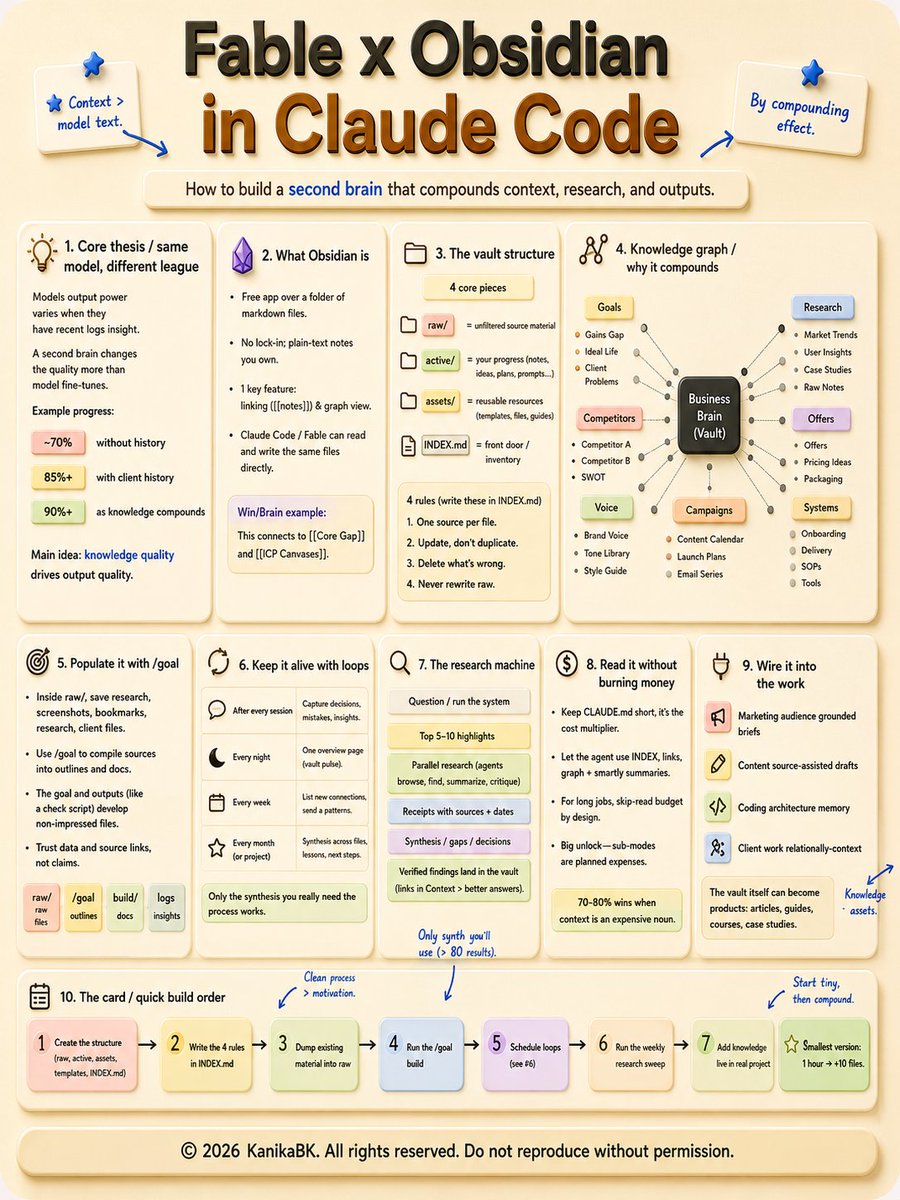
Then I spent 15 minutes connecting Fable 5 to Obsidian and suddenly everything changed.
One vault and all my research writes itself. Every insight connects automatically, everything searchable, and Growing smarter every single day.
I am never going back.
Fable 5 is the best long-running orchestration model on the planet and paired with Obsidian it turns scattered research chaos into a system that actually compounds.
My article is the full 15 minute setup that replaced $200/month in tools.
Full guide below.
🚨MrBeast reportedly spends over $10,000,000 producing a single video.
a 21-year-old spent $50 last month tracking which formats were already winning and cleared $11,900 running the pattern herself.
> the swipe feed logs which clips beat their own channel average: daily
> Claude turns the winning shape into 30 fresh concepts: minutes
> CapCut cuts the vertical, voice, and captions: automatic
> Make publishes everywhere and reports the score: scheduled
$50/month in tools. $11,900 last month.
mrbeast spends millions finding out what works by testing it live. she spends $50 finding out what already worked for someone else.
the outlier math is in the article below👇
THE CEO OF OBSIDIAN BUILT A CLAUDE CODE SKILL FOR HIMSELF. THEN HE PUBLISHED IT, AND IT PASSED 40,000 STARS.
Think about what this actually is. The guy who makes the notes app wrote a manual teaching AI how to take notes in his own app. MIT license, free, one command to install.
The problem it solves is real. Out of the box, Claude Code does not know Obsidian’s internals. Bases, the database feature. JSON Canvas, the format behind visual boards. Feed it a vault and it writes files that look right and break quietly.
obsidian-skills is the adapter. Two things that never quite fit, and one piece in between makes them click.
Three parts do the work. A CLI layer, so Claude adds, searches, and creates notes straight from the terminal. A Bases module, so generated database files come out in the correct format instead of almost-correct. And Canvas support, so Claude can draw mind maps and flowcharts as native Obsidian files.
The detail most people miss: this changes the kind of requests you can make. “Collect last week’s meeting notes and build a MAP page” becomes one sentence. Claude cross-references the vault and generates the page. The sorting ritual that used to eat a weekend closes in minutes.
Two honest caveats. Claude Code lives in the terminal, so complete beginners will feel the entry bar. And the skill edits files directly, so back up the vault before pointing it at anything you love.
But the shape of the setup is the point. Obsidian holds the second brain. Claude Code just became its secretary.
Most people are still copying notes into a chat window by hand. The author of the app already shipped the missing piece, and almost nobody noticed.
This is bigger than people realize. MUCH bigger.
Claude Code can now literally WATCH videos. YouTube, Zoom calls, Loom recordings. You paste a link and it watches the whole thing while you keep working.
An AI builder just dropped this skill and the way it works is genius:
→ Old tools grabbed 100 random frames per video, so Claude was basically reading the transcript blind
→ This one uses FFmpeg scene detection, it captures a frame every time the screen actually changes
→ Captions come straight from YouTube for free, Whisper handles Zoom and Loom
→ When it's done, it asks if you want to save the analysis into your knowledge base
I'm about to feed it every consulting call recording from this week and have the action items waiting in my second brain before I'm even off the call.
All the other skills I run inside Claude Code are in the article below.
If I were in my 30s or 40s right now and wanted to leverage AI to retire within 10 years, here's what I'd do:
1. Immediately form an LLC company. Not next month. Not once you're 'ready.' This week.