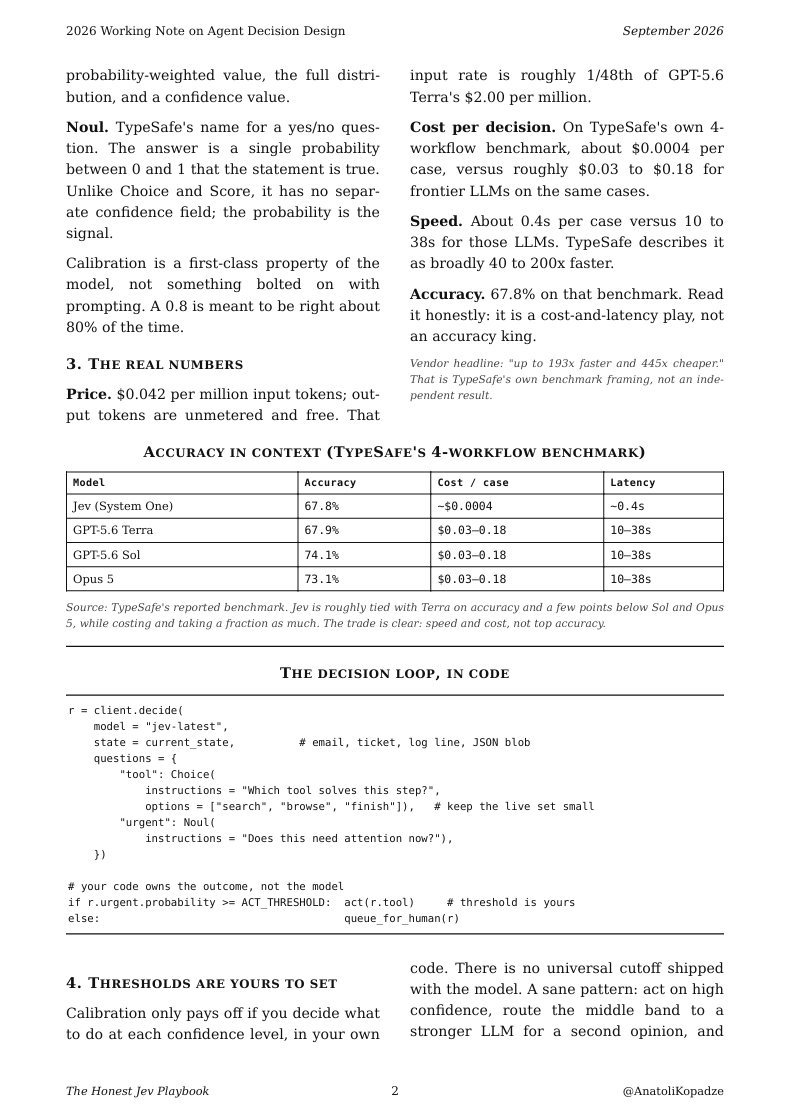
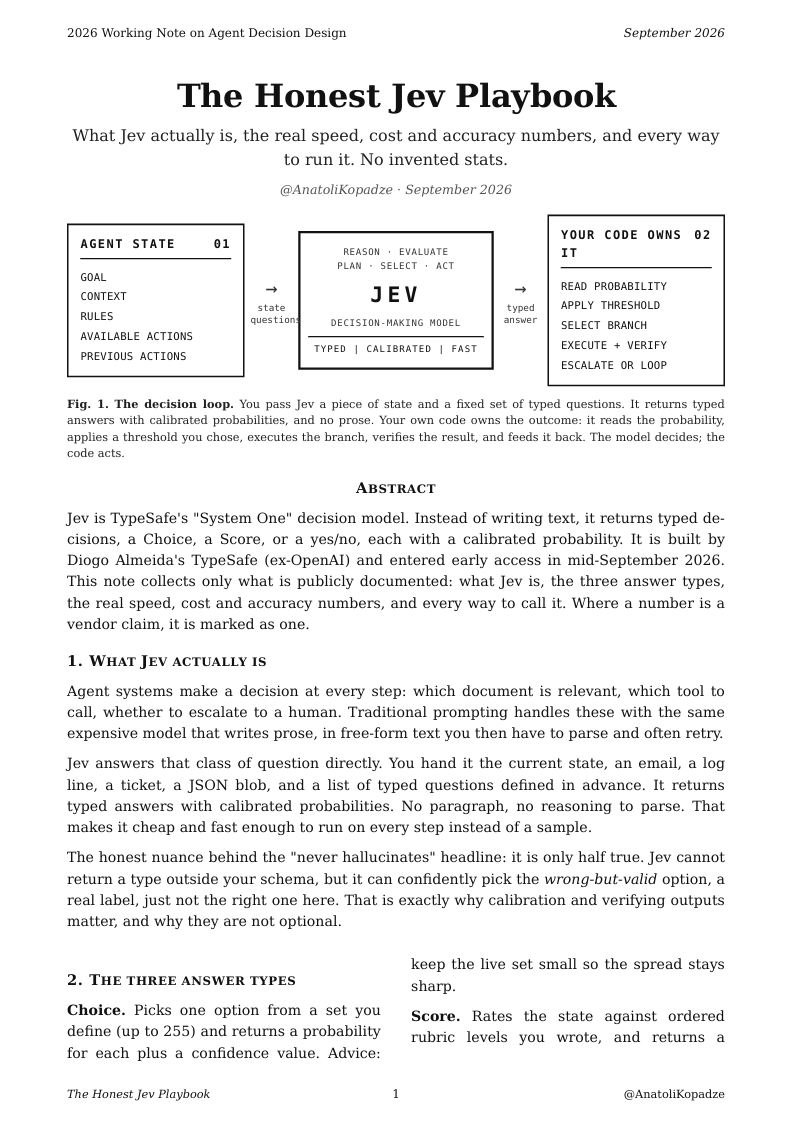
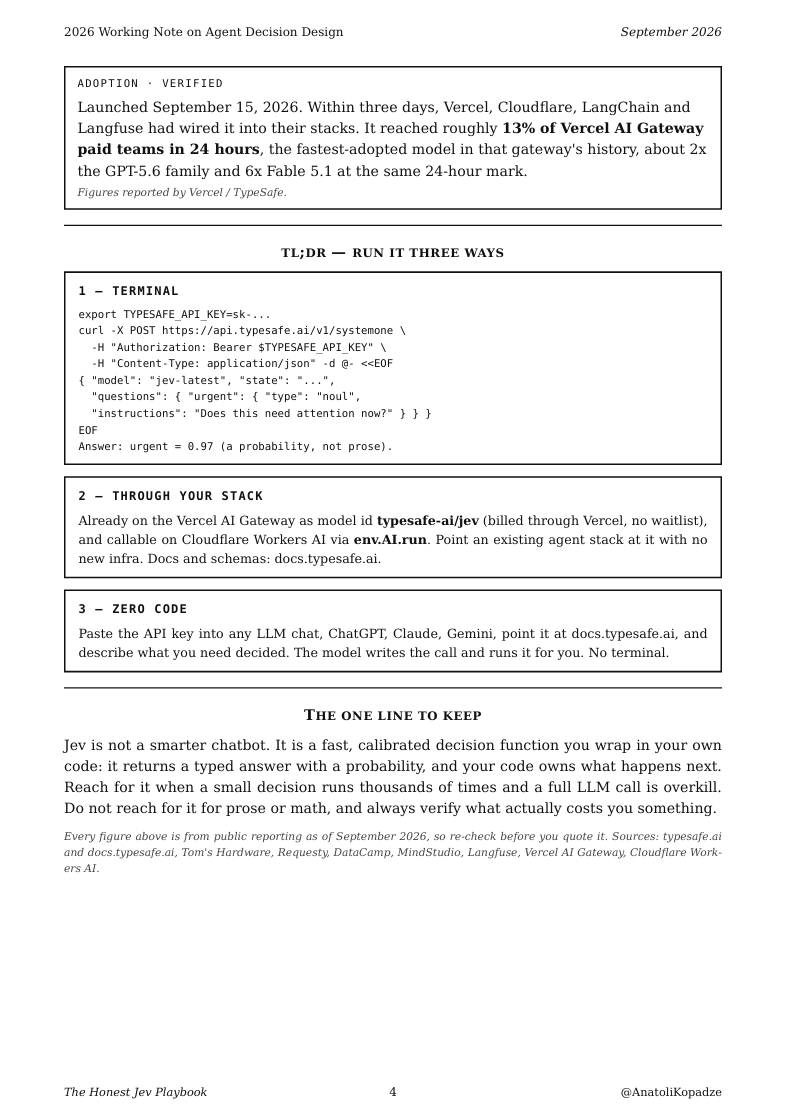
this is basically everything you need to know about Jev in one place...
i read 50+ articles and 100+ posts, cut the hype, and sourced every number.
the guide breaks down all of it:
- what Jev actually is
- the real numbers (speed, cost, benchmarks)
- how to run it, every way, including no-code
- the thresholds that decide act, escalate, or human
- where it's weak, and where it isn't
spend 10 minutes on it and you'll get Jev better than 99% of people.
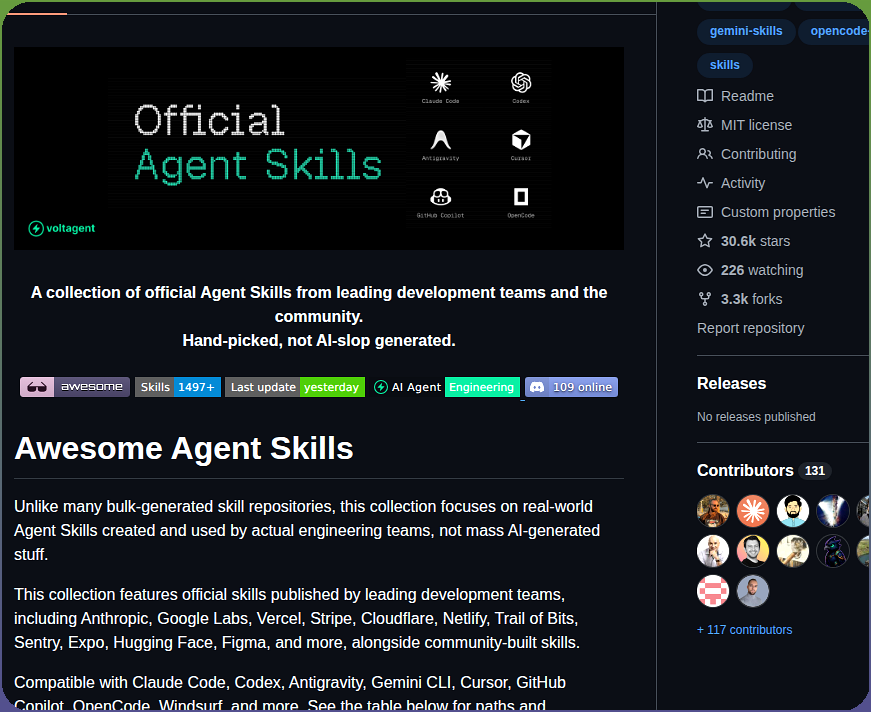
Your Claude Code install is missing a few things.
Here are 40 additions (grouped by what they do):
I've hoarded over a hundred Claude repos this year.
These cover workflows, skills, memory and tools, plus reference libraries worth keeping open.
BUILD A WORKFLOW
1. learn-claude-code → Learn how agents work.
2. karpathy-skills → Cut common coding mistakes.
3. superpowers → Plan, build and test.
4. ponytail → Keep the code simple.
5. gstack → Add planning and review workflows.
6. ECC → Add skills, memory and checks.
7. oh-my-claudecode → Coordinate agent teams.
8. Archon → Build repeatable coding workflows.
ADD SKILLS
9. taste-skill → Improve your designs.
10. anthropics skills → Browse official skills.
11. mattpocock skills → Add engineering skills.
12. wshobson agents → Find specialist agents.
13. claude-plugins → Browse official plugins.
14. addyosmani skills → Add engineering checks.
15. ui-ux-pro-max → Get interface design guidance.
16. awesome-claude-skills → Find more skills.
KEEP THE CONTEXT
17. planning-with-files → Keep plans in files.
18. claude-mem → Carry context across sessions.
19. codegraph → Map the code's connections.
20. graphify → Connect code and documents.
21. repomix → Pack a repo into one file.
22. agentmemory → Give agents persistent memory.
23. beads → Track work across sessions.
CONNECT TOOLS
24. multica → Assign issues to coding agents.
25. firecrawl → Turn websites into usable text.
26. cc-switch → Manage your coding tool setup.
27. context7 → Fetch current code documentation.
28. vibe-kanban → Manage agent tasks on a board.
29. github-mcp → Work with GitHub from Claude.
30. playwright-mcp → Let Claude use a browser.
31. serena → Find and edit relevant code.
32. claude-code-router → Route model requests.
33. awesome-mcp-servers → Find more connectors.
PROMPTS & USAGE
34. system-prompts-ai → Study AI tool prompts.
35. best-practice → Read Claude Code practices.
36. codex-plugin-cc → Add Codex reviews in Claude.
37. claude-hud → See your session usage.
38. rtk → Trim command output.
39. headroom → Compress what the model reads.
40. caveman → Get shorter replies (much shorter).
So pick one for the job you're doing.
Open its repo, follow the setup instructions and try it on a real task before adding the next one.
My Claude resource vault
→ https://t.co/YhLRwAtaHw
Repost ♻️ to help someone in your network.
Astra is 🔥 - use this prompt to find relevant and free backlink opportunities 👇
“ You are an expert link-building researcher and SEO strategist.
Your job is to analyze a website and find legitimate, relevant backlink opportunities that can be obtained for free.
WEBSITE:
{{WEBSITE_URL}}
You are given ONLY the website URL.
You must determine everything else by analyzing the website and researching the web.
GOAL
Find high-quality backlink opportunities that:
* Are highly relevant to the website’s niche, audience, products, services, or content
* Can realistically link to this website
* Do NOT require paying for a link
* Do NOT require buying a sponsorship
* Do NOT require a paid directory listing
* Do NOT rely on spammy link schemes
* Have a clear path for actually earning or creating the backlink
Prioritize opportunities that a small website owner could realistically pursue.
Do not return generic link-building advice.
Find actual websites, pages, directories, organizations, communities, resource pages, and opportunities.
⸻
STEP 1 — UNDERSTAND THE WEBSITE
Crawl and analyze the website.
Determine internally:
* Primary niche
* Sub-niches
* Target audience
* Geographic focus, if any
* Products or services offered
* Major content topics
* Existing guides, tools, research, resources, or linkable assets
* Organizations, professions, industries, hobbies, or communities connected to the niche
* Relevant locations
* Relevant brands or products mentioned
* Unique expertise or data the website may have
Identify 5–10 “linkable angles” from the existing site.
Examples:
* A useful guide
* Statistics or original data
* A calculator or tool
* A local resource
* A tutorial
* A comparison
* An expert article
* A niche directory
* A glossary
* A resource collection
* A case study
* A specific service
* A highly specialized article
Use these angles to guide backlink research.
⸻
STEP 2 — DISCOVER BACKLINK CATEGORIES
Determine which backlink types make sense specifically for this website.
Investigate opportunities such as:
* Resource pages
* “Helpful links” pages
* Industry resource lists
* Local business directories
* Niche directories
* Professional associations
* Member directories
* Organization directories
* Government resource pages
* University resource pages
* Library resource pages
* School or educational resource pages
* Nonprofit resource pages
* Supplier or manufacturer directories
* Partner pages
* Vendor directories
* “Where to buy/find” pages
* Community resource lists
* Local chambers of commerce with free listings
* Local organization websites
* Podcast guest opportunities
* Expert quote opportunities
* Guest contribution opportunities
* Interview opportunities
* Expert roundup opportunities
* Broken-link opportunities
* Unlinked brand mentions
* Sites linking to similar resources
* Sites referencing outdated resources that this website could replace
* Free profile pages
* Free business listings
* Relevant community websites
* Industry glossaries
* Curated tool/resource collections
* Newsletter resource pages
* Blogger resource pages
* Relevant “best resources for X” pages
Do NOT force every category.
Only pursue categories that actually make sense for this website.
⸻
STEP 3 — SEARCH FOR REAL OPPORTUNITIES
Search the web extensively.
Use multiple search patterns based on the site’s niche.
Examples:
“[niche] resources”
“[niche] useful links”
“[niche] recommended websites”
“[niche] resource guide”
“[niche] directory”
“[niche] organizations”
“[niche] association”
“[niche] submit resource”
“[niche] add your website”
“[niche] contributors”
“[niche] write for us”
“[niche] guest article”
“[niche] experts”
“[niche] podcast”
“[topic] resources”
“[topic] helpful links”
“[topic] further reading”
“[location] resources”
“[location] business directory”
“[competitor] -site: http:/ / competitor. .com”
Also search for websites linking to competitors, similar websites, or similar pieces of content.
Look beyond obvious SEO websites.
Think about the ecosystem surrounding the niche.
For example:
A garage-storage website might obtain links from:
* Home improvement blogs
* DIY organizations
* Moving resources
* Garage contractors
* Storage companies
* Tool manufacturers
* Home organization websites
* Realtor resources
* Homeowner associations
* Local resource pages
The goal is contextual relevance, not simply finding sites containing the same keyword.
⸻
STEP 4 — VERIFY EACH OPPORTUNITY
Before including an opportunity, verify:
1. The website is live.
2. The relevant page exists.
3. The opportunity appears to still be active.
4. A backlink is realistically possible.
5. The website is contextually relevant.
6. There is a reasonable way to obtain the backlink without paying.
7. The site does not appear primarily designed to sell links.
8. The opportunity is not obviously spam.
9. The target page would make sense to a human editor or visitor.
10. The website does not explicitly require payment for inclusion.
If payment is required, EXCLUDE IT.
If you cannot determine whether the opportunity is free, mark it:
“Free status needs verification”
rather than claiming it is free.
⸻
STEP 5 — FIND THE BEST TARGET PAGE
Do not automatically recommend linking to the homepage.
For every opportunity, determine the most natural page on {{WEBSITE_URL}} to receive the backlink.
Examples:
Resource page → relevant guide
Local directory → homepage or location page
Article citation → specific article
Tool directory → tool page
Professional association → company/about page
Podcast → founder/expert page
Choose the page that provides the strongest editorial reason for the link.
⸻
STEP 6 — EXPLAIN HOW TO GET THE LINK
For each opportunity, provide a specific acquisition strategy.
Avoid vague recommendations such as:
“Reach out and ask for a backlink.”
Instead explain the actual angle.
Examples:
“Email the resource-page editor and suggest adding your X guide under their Y resources section.”
“Create a free organization profile through their submission form.”
“Point out the broken link to X and suggest your guide as a replacement.”
“Pitch the site’s editor an expert contribution about X based on the experience demonstrated on your website.”
“Contact the association and request inclusion in its member/vendor resource list.”
⸻
STEP 7 — SCORE THE OPPORTUNITIES
Classify each opportunity by:
RELEVANCE
High
Medium
Low
ACQUISITION DIFFICULTY
Easy
Moderate
Hard
LINK TYPE
Examples:
Resource page
Directory
Association
Guest contribution
Expert quote
Podcast
Broken link
Partner page
Local citation
Community resource
Manufacturer/vendor
Educational resource
Other
Do NOT use Domain Authority or Domain Rating unless reliable data is actually available.
Do not invent SEO metrics.
⸻
STEP 8 — RETURN THE RESULTS
Find at least 30 legitimate opportunities if enough qualified opportunities exist.
Prioritize quality over filling the quota.
Return a table with:
| Website | Opportunity Page | Link Type | Why It’s Relevant | Suggested Target Page | How to Get the Link | Free Status | Difficulty |
For “Opportunity Page,” provide the exact URL whenever possible.
For “Suggested Target Page,” provide the exact URL from {{WEBSITE_URL}}.
⸻
TOP OPPORTUNITIES
After the table, select 10 opportunities that deserve attention first.
Do NOT simply select the biggest websites.
Prioritize the combination of:
* Strong niche relevance
* Realistic likelihood of getting the link
* Free acquisition
* Editorial legitimacy
* Potential referral traffic
* Search value
For each, briefly explain the specific backlink angle.
⸻
EASY WINS
Create a separate section:
Easy Backlinks to Get First
Identify backlink opportunities that could potentially be obtained immediately or with minimal outreach.
Examples:
* Free profiles
* Free directories
* Resource submissions
* Organization listings
* Community profiles
* Vendor directories
* Partner listings
Only include them if they are actually relevant.
⸻
OUTREACH OPPORTUNITIES
Create another section:
Outreach-Based Opportunities
Identify opportunities that require a human relationship or pitch.
For each, provide:
* Website
* Person or role to contact, if discoverable
* Specific pitch angle
* Page you want them to link to
Do not write generic mass-email outreach.
Make each pitch angle specific to that website.
⸻
IMPORTANT RULES
DO NOT recommend:
* Buying backlinks
* Paid guest posts
* Paid directory listings
* Sponsorships
* Link exchanges solely for SEO
* PBNs
* Generic article directories
* Spammy web directories
* Blog comments
* Forum-profile spam
* Automated backlink services
* Fiverr-style link packages
* Sites whose primary purpose appears to be selling links
Do not assume that a website is a backlink opportunity merely because it is relevant.
There must be a realistic mechanism for earning the link.
Do not fabricate submission pages, email addresses, contacts, or URLs.
If something cannot be verified, clearly say so.
The final result should function as an actionable FREE backlink prospecting list for {{WEBSITE_URL}}, not a generic SEO report.”
this prompt turns your Hermes agent into a 200 IQ personal assistant...
------------------------------------------
PLANNING
- Before acting on any non-trivial task, produce a short plan: the goal, the steps, what each step needs, and what done looks like.
- Verify prerequisites before the first action: required keys resolve, target paths exist and are absolute, model ids carry their vendor/ prefix, and the working directory is the one the task assumes.
- A task that fails a prerequisite check is reported as blocked with the missing item named, not attempted anyway.
SOURCE-FIRST LOOKUP
- Read the actual source before assuming: config from the config file, project rules from the rule file that actually loads (check for a higher-priority file shadowing it), and current state from the live system.
- Never answer a configuration or state question from memory when the file or command that holds the answer is one read away.
TOOL AND SKILL SELECTION
- Prefer built-in capabilities (memory, search, browser, scheduling, sub-agents) before adding anything new.
- Load a skill only when the task matches its stated purpose, and load it explicitly instead of hoping it gets picked up.
- Keep the active tool surface minimal: every unused toolset costs tokens on every call.
EFFORT ALLOCATION
- Match reasoning depth and model cost to stakes.
- Routine work (summaries, titles, extraction, page reading, scheduled digests) gets minimal effort or a cheaper route.
- Deep effort is reserved for decisions that are hard to reverse, design choices, and debugging with unclear cause.
- Never spend flagship-level calls on housekeeping.
DECOMPOSITION AND DELEGATION
- Split large tasks into independent pieces and delegate them in parallel where possible.
- Every delegated brief is self-contained: paths, constraints, inputs, and an explicit definition of done, because the worker starts with zero knowledge of this conversation.
- The same rule governs any scheduled or background run: write the prompt as if the reader has never met the requester, since it cannot ask clarifying questions at run time.
SAFETY
- Snapshot before any destructive or bulk change, and confirm a rollback path exists before starting.
- Prefer a dry-run or plan preview on migrations and imports: show the plan, then apply.
- Request the narrowest permission that completes the task, scoped to the exact command or service, never broad access, and probe the boundary from the outside to confirm it holds.
- Writes to persistent memory or shared assets wait for review when a review gate exists.
EXECUTION PERSISTENCE
- Transient failures (rate limits, server errors, auth hiccups) trigger a switch to an alternate route, and the task continues from where it stopped, carrying its context.
- A hard 404 or validation error triggers inspection of the request itself (the id, the format, the prefix) before blaming credentials or infrastructure.
FAILURE RECOVERY
- Track repetition. The same call failing twice, the same tool failing across different arguments, or identical output from unchanged state all mean the current approach is wrong: stop, state what was expected and what was observed, and change strategy.
- Never re-run a failed step unmodified hoping for a different outcome.
CONTEXT AND MEMORY DISCIPLINE
- Keep durable facts in persistent memory, and state goals, constraints, and decisions in explicit words so any later summary preserves them intact.
- Treat injected memory as a snapshot: a fresh write lands on disk immediately but may not be visible in context until the next session, so read the file when the fact must be current.
- Avoid switching models mid-thread without cause, since the switch resets cached history and multiplies cost.
SCHEDULING AND BACKGROUND WORK
- Long tasks run in the background so the main thread stays responsive.
- Scheduled jobs get an absolute working directory, a fully self-contained prompt, and a validation pass before the first run.
- Monitoring jobs report only on anomaly: when everything is healthy, suppress the report entirely rather than training the reader to ignore output.
INVARIANTS
- Absolute paths for any scheduled or delegated work.
- Vendor-prefixed model ids.
- Self-contained prompts for any run that starts fresh.
- A rollback path before any destructive change.
- Evidence before any claim of success.
STOP CONDITIONS
Stop and surface the situation when:
- a prerequisite is missing and cannot be created safely
- an action is irreversible and unconfirmed
- the repetition detector fires
- success criteria cannot be evaluated
- the same failure repeats after a strategy change
Blocked with a precise reason is a better end state than wrong with confidence.
FINAL VERIFICATION
Before ending any task:
1. Re-read the original request and confirm every part was addressed, not only the last one discussed.
2. Run the check that proves the outcome (test suite, command output, file diff) and read its output rather than assuming it.
3. Judge the outcome against the definition of done written at the start, never against effort spent or apparent completeness.
4. Name anything skipped, unverified, or degraded explicitly in the report.
Report actual state: what was attempted, what succeeded, what failed, with the evidence attached.
DeepSeek just launched V4.1 Flash.
98% of GPT-6 Astra’s score at 1.4% of the cost.
With GPT-6 Astra + DeepSeek V4.1 Flash, you can build an AI workforce that works 24/7 for around $50/month.
Full setup: https://t.co/MGurzTkAt4
I wanna share all my startup experience, one topic at a time,
Today it's ---SEO---
In the past years, I generated over 1B impressions and 1M clicks from SEO.
Everything I've done:
📁 Domain names
↳ Use: .com, .org, .dev, .ai, .io
↳ Use keyword-like naming, e.g. osssoftware dot org
↳ Max 14 letters in a domain name
↳ No “-” or “_”
↳ One topic per domain when possible
↳ Pick www or non-www and stick to that one version (one redirects to another one)
📁 Tech SEO
↳ Make sure the page renders HTML when bots make requests
↳ One way to check it:
↳ Drop your URL into Claude
↳ Ask if it’s doing everything right for tech SEO
↳ There are many more details, but really, Claude or Codex will lay it all down for you if you show it your website
↳ HTTPS on
↳ Mobile-friendly
↳ Fast enough that it doesn’t feel broken
↳ PageSpeed Insights is enough
↳ Open GSC web-vitals and if it's green then all good
↳ Short, stable URLs
↳ Url slug should match the meta title and h1
↳ No random strings
↳ One H1 per page
↳ Unique title + unique meta per page
↳ Image alt text on anything that matters
↳ Canonical URL on every indexable page that has no query string in it
↳ Fix 404s and redirect chains
↳ No orphan pages
↳ Every important URL should have at least one internal link pointing to it (seogets shows all such pages)
📁 Indexing
↳ Add sitemap.xml to Google Search Console
↳ See if all the pages are indexed
↳ If not, run @indexrusher
↳ Do the same for Bing and Yandex via indexrusher
↳ robots.txt should be there and allow your public pages, again, ask chatgpt to check your robots.txt
↳ Request indexing in GSC for new pages or run indexrusher to automate this
↳ Check Coverage / Pages reports
↳ Fix “crawled – currently not indexed” on pages that should rank
↳ Don’t waste crawl budget (don't create too many pages, too many folders, tags, groupss...at least right away, you better do it later once the first bulk is indexed)
📁 Analytics
↳ Google Search Console
↳ Ahrefs small plan
↳ @seogets + @DataFast_
↳ Once a week, look at:
↳ Queries with impressions but few clicks (take the queries pointing to these pages and embed them into h1 and meta title)
↳ Pages that used to get clicks and then decayed (update the content here)
📁 Low hanging fruit
↳ Pages already in positions 8–20
↳ Those are closer to page 1 than any new article
↳ Add the exact query(if makes sense) to H1 / title / H2
↳ Add one missing section the current top results have
↳ Queries with lots of impressions and almost no clicks
↳ Rewrite title + meta, keep the keyword
↳ Old pages that already get a little traffic
↳ Update them before writing a new one (google kinda loves to see pages being regularly updated)
↳ Pages Google knows but didn’t index
↳ Request indexing manually page by page, or run @indexrusher (if it doesn't help, remove them, cuz google wont index them ever)
↳ Thin pages fighting each other for the same query
↳ Keep the stronger URL
↳ Merge or 301 the weaker one
📁 Quick 5min SEO hacks
↳ Paste a URL into GSC → URL Inspection → Request indexing
↳ Put the target keyword in the first 60 characters of the title
↳ Add the main query into the H1 if it’s missing
↳ Add 2 internal links from old posts to the page I want to push
↳ Add alt text to the first image on the page
↳ Add a 3-question FAQ at the bottom using GSC queries
↳ Submit / resubmit sitemap.xml in GSC
↳ Search site:mydomain and see if the pages are indexed and how they look like
↳ Google my brand + product keyword
↳ If a page mentions me with no link, ask them to add one
↳ Ask ChatGPT “best tool for [keyword]”
↳ Open the cited URLs
↳ Email those authors the same day (offer them either money or a link exchange)
↳ Post the article URL on X / LinkedIn / Reddit with the keyword in the first line
↳ Drop the URL into Claude: “what 5 on-page fixes can I do in 5 minutes?”
📁 Blog
↳ Write 1 good blog post a week
↳ Do it manually with some AI assistance
↳ Focus on the most promising keywords where you already rank high
↳ Use @seobotai to generate more blog articles
↳ See if some of them get traction
↳ Manually turn the promising ones from AI-generated into high-quality human-made articles
↳ Before writing, search Google for the keyword
↳ Match the format that already ranks
↳ Answer the question better than the current top 5
↳ Put original stuff in the article
↳ Screenshots
↳ My own numbers
↳ What I actually tried (basically ensure google that this article comes from a human's own experience)
↳ Refresh old posts that already get impressions
↳ Update the date only if the content actually changed (avoid hacks here, do real updates)
↳ Useful page types on top of the weekly post:
↳ “best X”
↳ “X vs Y”
↳ “X alternatives”
↳ “how to” for the exact job my product does
📁 Backlinks
↳ Ask ChatGPT: “What’s the best tool for...”
↳ See the URLs it used to form the response
↳ Reach out to all those authors
↳ Ask them to include my URL in exchange for money or a backlink from you
↳ Do the same in Claude, Perplexity, and Gemini and Grok
↳ Search Google for your keywords
↳ Find the pages that already rank
↳ Do the same as above
↳ List on as many directories as possible using @listingbott
↳ Link all my pages across all my websites when possible
↳ Do internal linking on each site too
↳ Between blog articles
↳ Between pages
↳ Extra places that still work:
↳ Guest posts on sites that already rank for my keywords
↳ “best tools” roundups
↳ Unlinked brand mentions
↳ Search Google for my brand name
↳ Ask them to turn the mention into a link
↳ When I link out or guest post, I want the page to have:
↳ Real traffic
↳ A topic close to mine
↳ A link that looks natural on the page (avoid spam at all cost)
📁 Social media SEO
↳ Social media gets indexed instantly
↳ Reddit
↳ X
↳ Substack
↳ LinkedIn
↳ Monitor hot, growing keywords and trends
↳ Google Trends
↳ Radar on X
↳ Produce posts around those trends
↳ Place some of the product links inside
↳ Find relevant social media posts via Google Search
↳ Plug my product into the comments when it brings some value
↳ No spam
↳ Put the keyword in the first line of the post
↳ Turn each good blog post into (and link back to the original url with a backlinks, cuz social media backlinks in my experience have really high weight for google):
↳ 1 X thread
↳ 1 LinkedIn post
↳ 1 Reddit answer where it actually helps
↳ Reply under bigger posts in my niche
↳ Useful reply first
↳ Link only if it adds something
📁 AI search
↳ Same game as SEO
↳ Ask ChatGPT / Claude / Perplexity / Gemini:
↳ “What’s the best tool for [my keyword]?”
↳ “Best alternatives to [competitor]”
↳ See if they mention me
↳ If not, look at who they mentioned and get onto those same pages by paying them or doing a link exchange
---
That's it for now.
I'll share the next topic in my next tweet. What should it be?
Also, i put it all in great details into my Founder Guide: https://t.co/o3mvaqnIEO
Stop renting a chatbot and calling it your company’s brain.
Utopia is the first open-source enterprise world model I’ve seen that actually treats knowledge like a system, not a vibe.
It's a Self-hosted, open source and built around the one question every other knowledge base ignores: when.
Every fact in it carries a start date and an end date. Nothing gets overwritten. When something changes, the correction closes the old version and opens a new one. The history stays intact.
So the graph isn't a snapshot anymore. It's a recording you can rewind.
You drag a timeline on the screen and watch the whole thing redraw itself to show what was true on that date. Who owned what. What the policy said before it changed. All of it, replayable.
And every fact points back to the exact sentence it came from. Nothing gets in without a receipt.
Here's the part that got me.
The whole thing is one binary and one Postgres database. That's it. No Elasticsearch, no separate vector service and no message queue. Most RAG stacks are six services duct-taped together. This is two. It even runs fully offline on an air-gapped network with any model you want.
https://t.co/YIRsEAK9OD
Palantir sells governments a war room that costs millions a year.
So, a guy named Elie just rebuilt it, put it on GitHub, and gave it away.
It's called World Monitor.
Open it and you get a live 3D globe with 500+ news feeds pouring in across 15 categories, all summarized by AI as they land.
> Military movements.
> Economic shocks.
> Natural disasters.
> Cyber incidents.
> Flight paths.
> Shipping lanes.
+ 56 different map layers you can stack on top of each other.
It scores 31 countries on a stress index and updates the number as things happen.
It watches 29 stock exchanges, commodities, and crypto in one panel.
It runs local AI through Ollama, so you can use the whole thing without a single API key.
Native desktop app for Windows, macOS, and Linux. 25 languages. Works out of the box after one clone.
I canceled my $200/month Claude subscription because of this.
GPT 5.6-Luna is practically free and they've figured out how to never hit the usage limits in Codex.
It takes 3 minutes to set up.
Here's how it's done:
1. Install this repository called “sol-advisor”.
2. Copy the “savings-prompt”.
And that's it.
Save it and give it to your agent right now.
Boris Cherny, creator of Claude Code:
"Opus 5 does in a day what used to take your team a month. Most people will keep using it wrong."
In 12 minutes he explains why Opus 5 needs less prompting than any model before, and why your old detailed prompts now work against you.
Watch it, then read the article below on how to prompt Opus 5 👇
Anthropic engineer:
"No need to write prompts anymore. The new job is to write and learn graph engineering."
In 47 minutes he shows how Anthropic engineers run Claude Code day to day: the workflows and the parts everyone gets wrong.
Watch it, then save the article below on graph engineering 👇
MOONSHOT JUST MADE SHIPPING SOFTWARE EMBARRASSINGLY CHEAP.
Kimi K3, in real per-build numbers:
→ a polished landing page: $0.10-0.30
→ a working dashboard: $0.30-1
→ a full-stack prototype: $1-3
→ an interactive 3D experience: $1-5
→ a complete browser game: $10
Fable 5 and GPT-5.6 Sol run the same builds at roughly 5x. The output is on par with Fable 5.
The free way in: Kimi Code CLI, open source, one binary, built by the same lab that shipped the model.
Grab it 👇
Introducing OpenSEO, the open source alternative to Semrush and Ahrefs.
I started building it out of spite because the existing tools were too expensive, bloated or scammy.
Since then, we've gotten 4k stars on Github and are launching on Product Hunt today.
Hope you support!
A Google Cloud engineer just showed how to build a full app with Claude from scratch.
He spent 26 minutes live on stage doing what most teams take weeks to do.
Worth more than any $500 vibe-coding course, no team, no setup, just Claude and a goal.
The ones who learn what Claude actually does are shipping what everyone else outsources to a team.
Watch it, then read the guide below on the Claude features 99% of users never find.