1/ We are sharing additional details regarding our investigation into unauthorized access to GitHub's internal repositories.
Yesterday we detected and contained a compromise of an employee device involving a poisoned VS Code extension. We removed the malicious extension version, isolated the endpoint, and began incident response immediately.
From small beginnings to shared blankets and lasting memories 💛
#FriendsLikeMe is an ode to where it all started, the Homecoming Picnic, where connection was always the main thing 🥹
Be part of the story and get your tickets from https://t.co/PnDIz7iGvP 🎟
With Apple Pay, your real card number never really leaves your device. When you add your card, the bank creates a special replacement number called a Device Account Number (DAN). That DAN is stored securely inside the phone’s Secure Enclave chip, not on Apple’s servers. When you pay, your phone sends this DAN plus a one-time cryptographic code to the merchant. The merchant never sees your real card, and Apple doesn’t process the transaction itself. It’s basically: phone → bank → done. Everything sensitive stays on the device.
With Google Pay, the idea is similar but the path is different. Instead of storing everything only on the device chip, Google often uses cloud tokenization. Your card info is linked to Google’s servers, which generate payment tokens during transactions. When you tap to pay, a token is fetched/created and sent to the merchant, then validated by the bank. So it’s more like: phone → Google server → bank. Still secure, but it relies more on the cloud.
So both systems hide your real card number. Apple leans more toward hardware-based security (on-device chip), while Google leans more toward server/cloud-based token management.
In simple terms:
Apple Pay locks your card inside your phone.
Google Pay locks your card behind Google’s servers.
Either way, the shop never gets your real card details; which is why mobile payments are often safer than swiping your physical card.
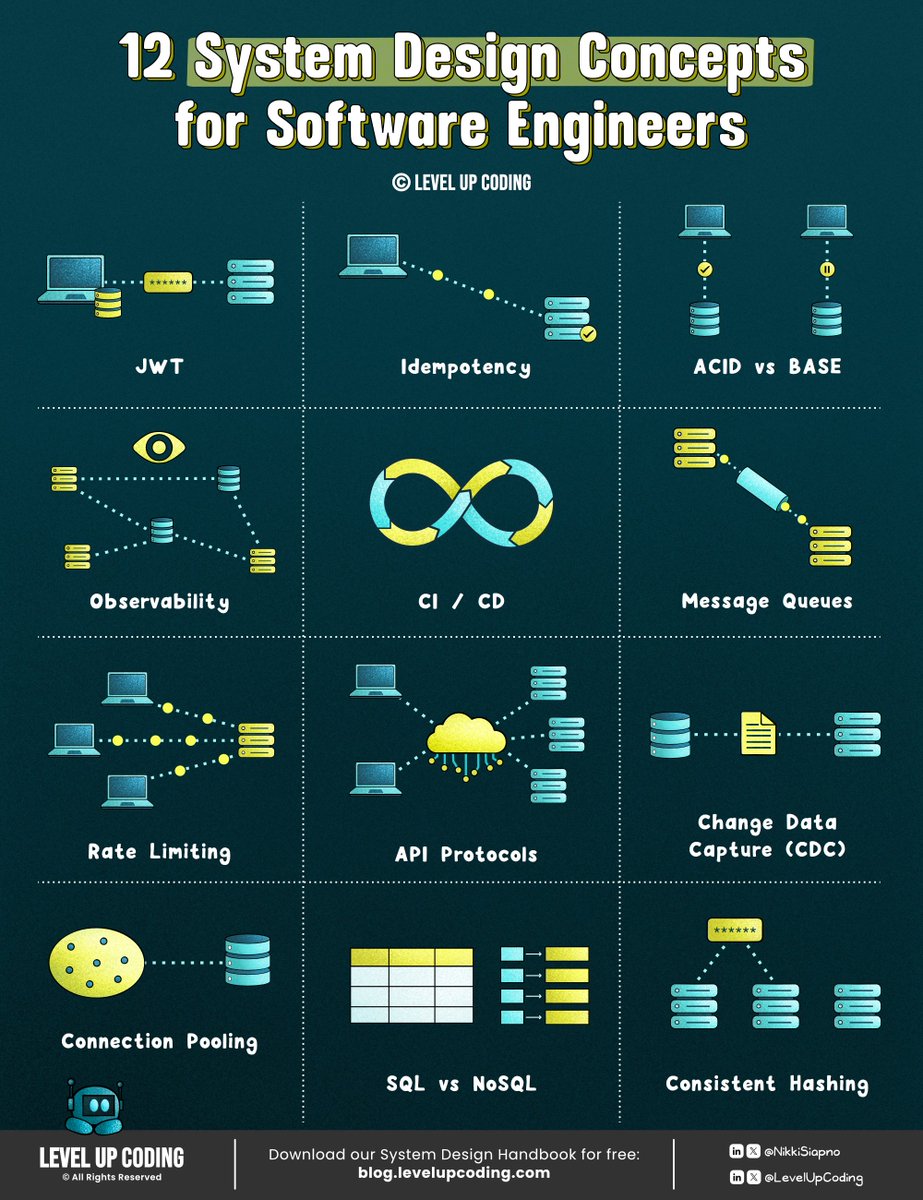
If you’re serious about system design this year,
learn these 12 concepts:
1. How JWT Works
↳ https://t.co/Kuv7DAj6B9
2. Idempotency in API Design
↳ https://t.co/2sItwlz1oe
3. ACID vs BASE
↳ https://t.co/a7nOyylUxk
4. How Observability Turns Alerts Into Insight
↳ https://t.co/VjfECfyB9d
5. Rate Limiting Explained
↳ https://t.co/wr0UAh4sJm
6. Message Queues Explained
↳ https://t.co/7Tz5sevNA8
7. Change Data Capture (CDC)
↳ https://t.co/tgwwoTitCA
8. Connection Pooling
↳ https://t.co/39SsEo4kk3
9. How Consistent Hashing Works
↳ https://t.co/8d8o74EsaS
10. SQL vs NoSQL
↳ https://t.co/oDTRpsnQUn
11. Health Checks vs Heartbeats
↳ https://t.co/r5SalP6CCh
12. API Protocols
↳ https://t.co/2CEu4Wnhsv
What other concepts should be on this list?
--
👋 PS: Want my 𝗦𝘆𝘀𝘁𝗲𝗺 𝗗𝗲𝘀𝗶𝗴𝗻 𝗛𝗮𝗻𝗱𝗯𝗼𝗼𝗸 𝗳𝗼𝗿 𝗳𝗿𝗲𝗲?
Want my 𝗔𝗿𝗰𝗵𝗶𝘁𝗲𝗰𝘁𝘂𝗿𝗲 𝗣𝗮𝘁𝘁𝗲𝗿𝗻𝘀 𝗣𝗹𝗮𝘆𝗯𝗼𝗼𝗸 𝗳𝗼𝗿 𝗳𝗿𝗲𝗲?
Join my newsletter with 26,501+ software engineers: https://t.co/OQtXb4zMoe
--
🔖 Save for later.
♻️ Repost to help others learn system design.
➕ Follow Nikki Siapno + turn on notifications.
Last quarter I rolled out Microsoft Copilot to 4,000 employees.
$30 per seat per month.
$1.4 million annually.
I called it "digital transformation."
The board loved that phrase.
They approved it in eleven minutes.
No one asked what it would actually do.
Including me.
I told everyone it would "10x productivity."
That's not a real number.
But it sounds like one.
HR asked how we'd measure the 10x.
I said we'd "leverage analytics dashboards."
They stopped asking.
Three months later I checked the usage reports.
47 people had opened it.
12 had used it more than once.
One of them was me.
I used it to summarize an email I could have read in 30 seconds.
It took 45 seconds.
Plus the time it took to fix the hallucinations.
But I called it a "pilot success."
Success means the pilot didn't visibly fail.
The CFO asked about ROI.
I showed him a graph.
The graph went up and to the right.
It measured "AI enablement."
I made that metric up.
He nodded approvingly.
We're "AI-enabled" now.
I don't know what that means.
But it's in our investor deck.
A senior developer asked why we didn't use Claude or ChatGPT.
I said we needed "enterprise-grade security."
He asked what that meant.
I said "compliance."
He asked which compliance.
I said "all of them."
He looked skeptical.
I scheduled him for a "career development conversation."
He stopped asking questions.
Microsoft sent a case study team.
They wanted to feature us as a success story.
I told them we "saved 40,000 hours."
I calculated that number by multiplying employees by a number I made up.
They didn't verify it.
They never do.
Now we're on Microsoft's website.
"Global enterprise achieves 40,000 hours of productivity gains with Copilot."
The CEO shared it on LinkedIn.
He got 3,000 likes.
He's never used Copilot.
None of the executives have.
We have an exemption.
"Strategic focus requires minimal digital distraction."
I wrote that policy.
The licenses renew next month.
I'm requesting an expansion.
5,000 more seats.
We haven't used the first 4,000.
But this time we'll "drive adoption."
Adoption means mandatory training.
Training means a 45-minute webinar no one watches.
But completion will be tracked.
Completion is a metric.
Metrics go in dashboards.
Dashboards go in board presentations.
Board presentations get me promoted.
I'll be SVP by Q3.
I still don't know what Copilot does.
But I know what it's for.
It's for showing we're "investing in AI."
Investment means spending.
Spending means commitment.
Commitment means we're serious about the future.
The future is whatever I say it is.
As long as the graph goes up and to the right.