Anthropic released a FULL GUIDE for prompting Fable 5.
Most people completely missed it (it's buried in API docs).
It teaches you how to save money, decrease hallucinations, get better responses & more.
I translated the entire handbook for the average Claude user
Boost your coding focus! Prioritize 'atomic habits' like dedicating specific times for writing code, debugging, and testing to maximize your development productivity #developerproductivity#codingtips#moneyprinterv2
@PTCLOfficial Could you please confirm the specific time slots or duration during which internet services may be degraded? This will help us proactively inform our clients about potential reduced availability during those hours.
What a country !! Took a loan from the IMF, then stopped a potential World War, also attacked Afghanistan, talked ceasefire with China, then became a Global Peacemaker, also stood with Iran, then condemned attack on KSA, then negotiated with Trump while the nation watched PSL.
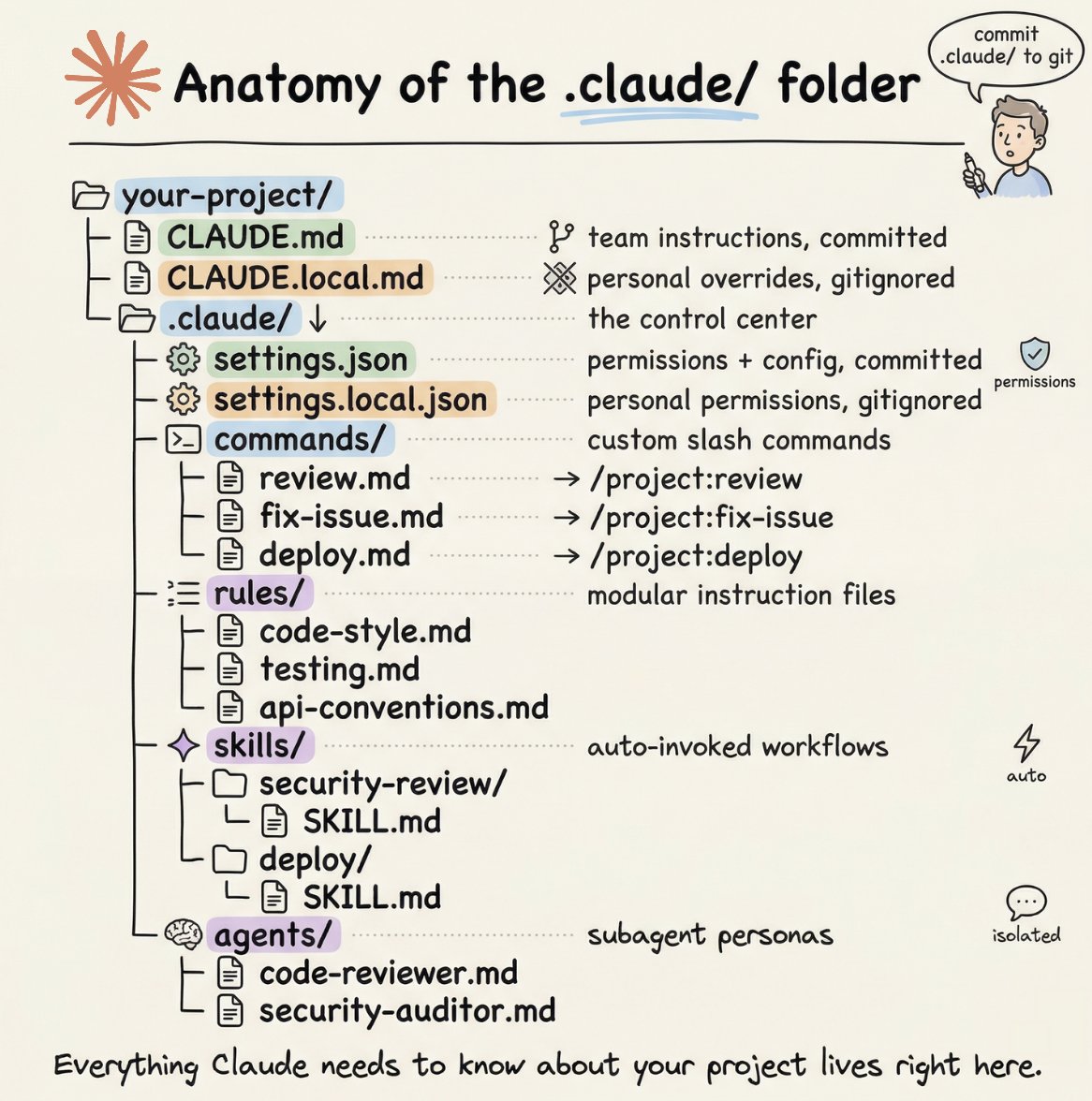
How to setup your Claude code project?
TL;DR
Most developers skip the setup and just start prompting. That's the mistake.
A proper Claude Code project lives inside a .𝗰𝗹𝗮𝘂𝗱𝗲/ folder. Start with 𝗖𝗟𝗔𝗨𝗗𝗘.𝗺𝗱 as Claude's instruction manual. Split it into a 𝗿𝘂𝗹𝗲𝘀/ folder as it grows. Add 𝗰𝗼𝗺𝗺𝗮𝗻𝗱𝘀/ for repeatable workflows, 𝘀𝗸𝗶𝗹𝗹𝘀/ for context-triggered automation, and 𝗮𝗴𝗲𝗻𝘁𝘀/ for isolated subagents. Lock down permissions in 𝘀𝗲𝘁𝘁𝗶𝗻𝗴𝘀.𝗷𝘀𝗼𝗻.
There are two .𝗰𝗹𝗮𝘂𝗱𝗲/ folders: one committed with your repo, one global at ~/.𝗰𝗹𝗮𝘂𝗱𝗲/ for personal preferences and auto-memory across projects.
The .𝗰𝗹𝗮𝘂𝗱𝗲/ folder is infrastructure. Treat it like one.
The article below is a complete guide to 𝗖𝗟𝗔𝗨𝗗𝗘.𝗺𝗱, custom commands, skills, agents, and permissions, and how to set them up properly.
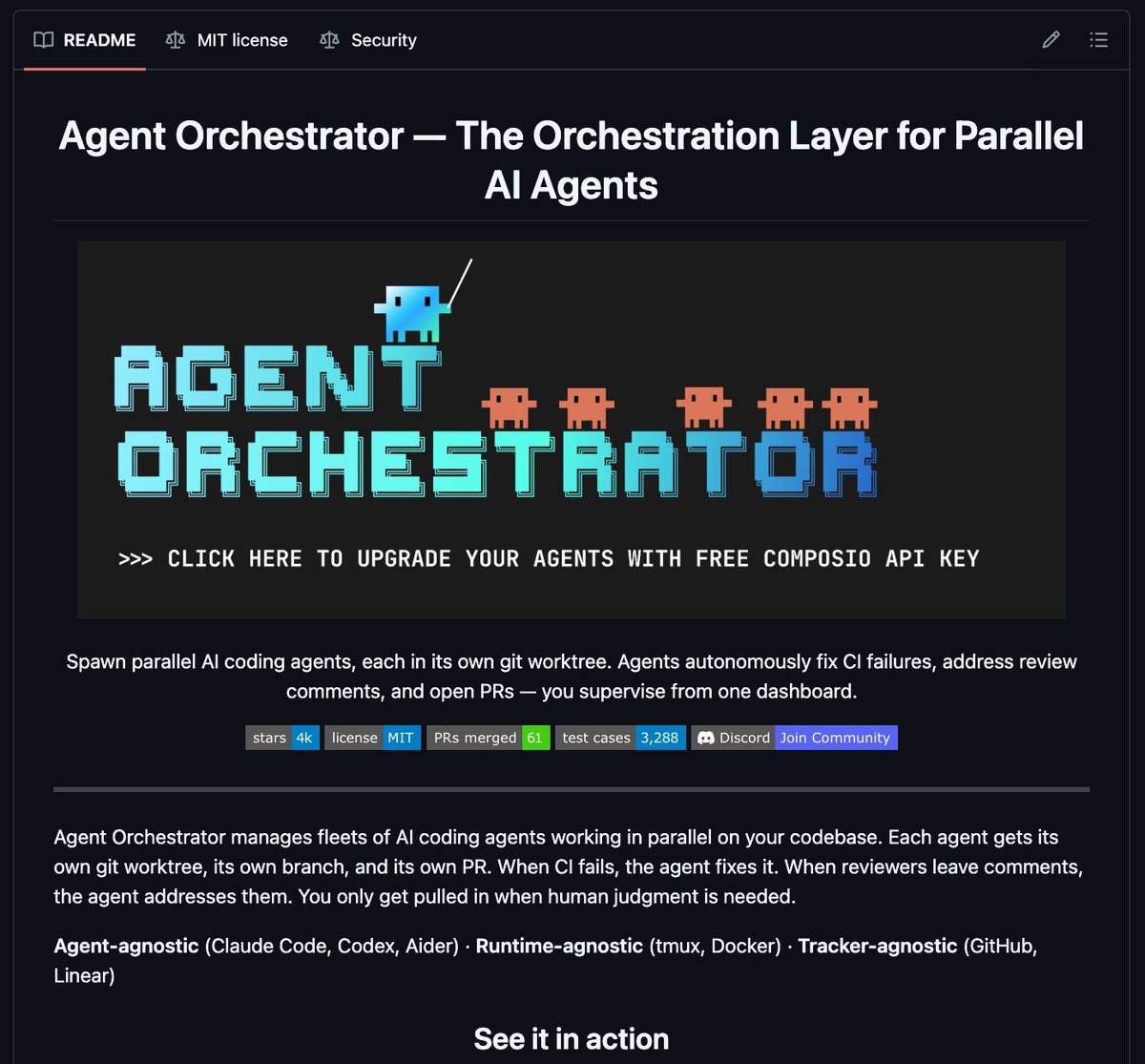
🚨 BREAKING: Composio just open sourced a tool that lets you run 30 AI coding agents in parallel on your codebase.
It's called Agent Orchestrator and it's sitting at 4.1k stars for a reason.
One command spawns an agent. It gets its own git worktree, its own branch, its own PR. CI fails? Agent fixes it. Reviewer leaves comments? Agent addresses them.
Here's what it actually handles:
→ Spawns parallel Claude Code, Codex, or Aider agents
→ Isolated git worktrees so agents never step on each other
→ Auto-fixes CI failures by sending logs back to the agent
→ Auto-addresses code review comments without you touching anything
→ Real-time dashboard at localhost :3000 to supervise everything
→ Notifies you only when human judgment is actually needed
One command:
ao spawn my-project 123
That's it.
Without this, you're manually creating branches, babysitting agents, reading CI logs, forwarding review comments, and tracking which PRs are ready.
With this, you spawn and walk away.
This is the missing coordination layer every team running AI agents in production needs.
100% Open Source. MIT License. Built by Composio.
(Link in comments)
RAG, AI Agents, MCP, and A2A aren’t competitors.
They’re different layers of the same AI system.
Once you see this mental model, modern AI architecture becomes much clearer 👇
1️⃣ RAG = Better answers
RAG is about retrieval + grounded generation.
Flow:
User question → retrieve relevant data → add context → LLM generates answer with sources.
Use RAG when you need:
• answers from company docs
• reduced hallucinations
• citations and traceability
RAG solves the knowledge problem.
Once the model has enough context to answer, its job is done.
2️⃣ AI Agents = Do the work
Agents move beyond answering.
They plan, act, and iterate.
Typical loop:
Plan → Observe → Act → Reflect → Repeat
Use agents when tasks require:
• multi-step decisions
• tool usage
• executing workflows in real systems
• verifying outcomes
Agents solve the execution problem.
3️⃣ MCP = Standard tool access
MCP (Model Context Protocol) is the plumbing layer.
It standardizes how LLMs connect to tools and resources.
Think:
“One universal interface for AI → tools.”
Use MCP when you need:
• consistent access to APIs and services
• structured connections to SQL, CRM, files, etc.
• fewer custom integrations
MCP solves the tool connectivity problem.
4️⃣ A2A = Agents working together
A2A (Agent-to-Agent) enables multi-agent systems.
It handles:
• agent discovery
• delegation and routing
• permissions and handoffs
• events and status updates
Use A2A when you have:
• multiple specialized agents
• distributed AI systems
• cross-team or partner automation
A2A solves the coordination problem.
The real takeaway:
Modern AI systems often look like this:
RAG → grounding knowledge
Agents → executing tasks
MCP → connecting tools
A2A → coordinating agents
Different problems.
Different layers.
One architecture.
The real AI shift isn’t better prompts.
It’s better systems.
#AI #RAG #AIAgents #LLM #AIArchitecture #GenAI
Most people treat CLAUDE.md like a prompt file.
That’s the mistake.
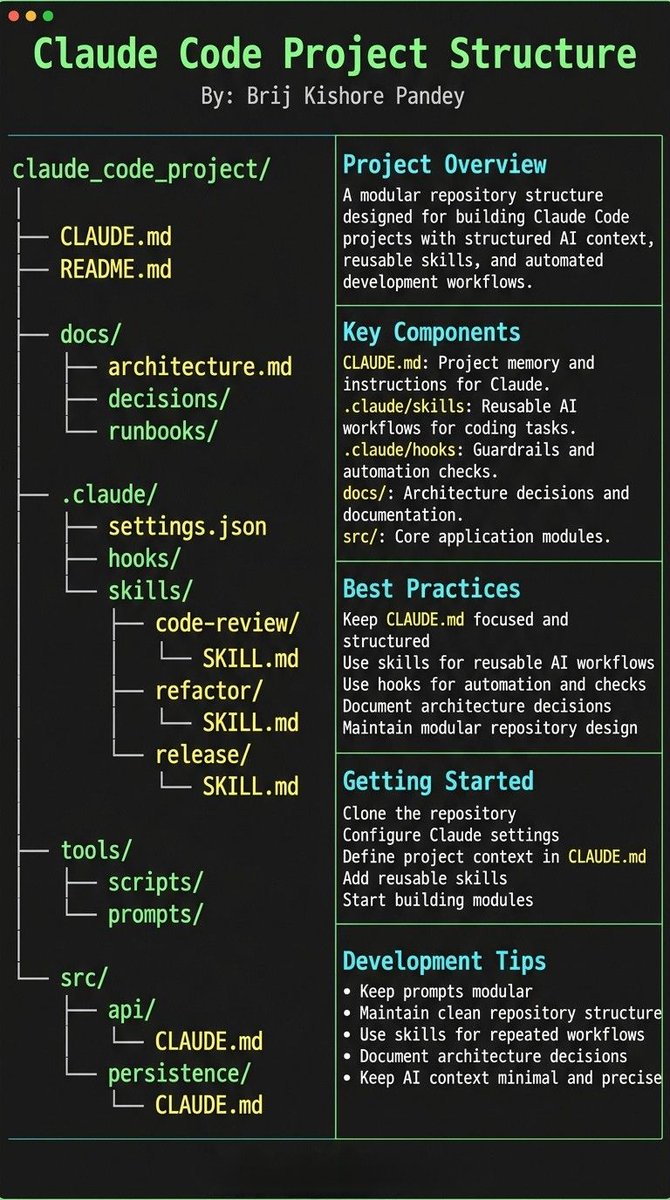
If you want Claude Code to feel like a senior engineer living inside your repo, your project needs structure.
Claude needs 4 things at all times:
• the why → what the system does
• the map → where things live
• the rules → what’s allowed / not allowed
• the workflows → how work gets done
I call this:
The Anatomy of a Claude Code Project 👇
━━━━━━━━━━━━━━━
1️⃣ CLAUDE.md = Repo Memory (keep it short)
This is the north star file.
Not a knowledge dump. Just:
• Purpose (WHY)
• Repo map (WHAT)
• Rules + commands (HOW)
If it gets too long, the model starts missing important context.
━━━━━━━━━━━━━━━
2️⃣ .claude/skills/ = Reusable Expert Modes
Stop rewriting instructions.
Turn common workflows into skills:
• code review checklist
• refactor playbook
• release procedure
• debugging flow
Result:
Consistency across sessions and teammates.
━━━━━━━━━━━━━━━
3️⃣ .claude/hooks/ = Guardrails
Models forget.
Hooks don’t.
Use them for things that must be deterministic:
• run formatter after edits
• run tests on core changes
• block unsafe directories (auth, billing, migrations)
━━━━━━━━━━━━━━━
4️⃣ docs/ = Progressive Context
Don’t bloat prompts.
Claude just needs to know where truth lives:
• architecture overview
• ADRs (engineering decisions)
• operational runbooks
━━━━━━━━━━━━━━━
5️⃣ Local CLAUDE.md for risky modules
Put small files near sharp edges:
src/auth/CLAUDE.md
src/persistence/CLAUDE.md
infra/CLAUDE.md
Now Claude sees the gotchas exactly when it works there.
━━━━━━━━━━━━━━━
Prompting is temporary.
Structure is permanent.
When your repo is organized this way, Claude stops behaving like a chatbot…
…and starts acting like a project-native engineer.
Holy shit.
The guy who BUILT Claude Code just shared his actual workflow.
Boris Cherny runs 10-15 Claude sessions in parallel every single day.
While you're prompting one AI, he has 5 in his terminal + 5-10 on the web all shipping code simultaneously.
And the real weapon?
His https://t.co/qXSoAWzaeH file.
Every time Claude makes a mistake, the team adds a rule so it NEVER happens again.
Boris literally said: "After every correction, end with: Update your https://t.co/qXSoAWzaeH so you don't make that mistake again."
Claude writes rules for itself.
The longer you use it, the smarter it gets on YOUR codebase.
His other insane detail: he hasn't written a single line of SQL in 6+ months.
Claude just pulls BigQuery data directly via CLI.
Claude Code now accounts for 4% of ALL public GitHub commits.
Engineers who haven't set this up yet are already behind.
This https://t.co/qXSoAWzaeH template is the difference between using AI as a chatbot vs using it as a fleet of senior engineers.
Drop it in any project. Free.
Claude 4 Sonnet is dangerously good.
But 99% of people are sleeping on what it can actually do.
I’ve used it to build apps, generate content, automate deep research, and more.
Here are 10 ways to use Claude 4 Sonnet that feel like cheating:
I've seen some close matches in this tournament, but the first semi-final was one-sided. 😞 Hoping the second semi-final will be a closer contest.
By the way, congratulations to South Africa for reaching their first-ever final!
#T20WorldCup2024#SAvAFG#INDvsENG#T20WC2024