Most students say they don't have resources.
Meanwhile, some of the best learning materials on the internet are completely free:
Computer Science Fundamentals
https://t.co/TixUJ1isY3
Data Structures & Algorithms
https://t.co/EGyon2SBWu
System Design
https://t.co/3z6U7AK9Rc
Web Development
https://t.co/w0fxW0A5gW
Frontend Development
https://t.co/y9RSRdhyBt
Backend Development
https://t.co/y9RSRdhyBt
DevOps
https://t.co/y9RSRdhyBt
Cloud Computing
https://t.co/y9RSRdhyBt
Data Engineering
https://t.co/g0OljYCkD6
Machine Learning & AI
https://t.co/HiJQXjkxoC
MLOps
https://t.co/jij6IbQE4P
Cybersecurity
https://t.co/HMxTjR3Wti
Linux
https://t.co/B1uEY4w3Nl
Free Programming Books
https://t.co/syyEvqZPd5
A student with an internet connection can learn almost every in-demand tech skill for free.
Information isn't scarce.
Consistency is.
Incolmotos Yamaha - @yamahacolombia cumple 50 años desde que Don Francisco Sierra saliera con megáfono y carteles a promocionar las motos japonesas por toda Colombia.
Una empresa antioqueña incónica para el país. Hay que honrar su legado.
You don't need Google to use Android.
My favorite FOSS Android stack:
• Vanadium → Hardened browser
• SimpleX → Private messaging
• KeePassDX → Password manager
• Aegis → 2FA authenticator
• Rethink DNS → Firewall + DNS control
• Organic Maps → Offline navigation
• NewPipe → YouTube client
• Syncthing → File synchronization
• HeliBoard → Open-source keyboard
• Obtainium → App updates
• Material Files → File manager
• Joplin → Notes
• Fossify Gallery → Photo gallery
The result?
• No Google Play Services
• No Google account required
• No ads
• No trackers
• No subscriptions
• No vendor bloat
Just a private, lightweight, open-source Android experience.
Most people have never experienced Android like this.
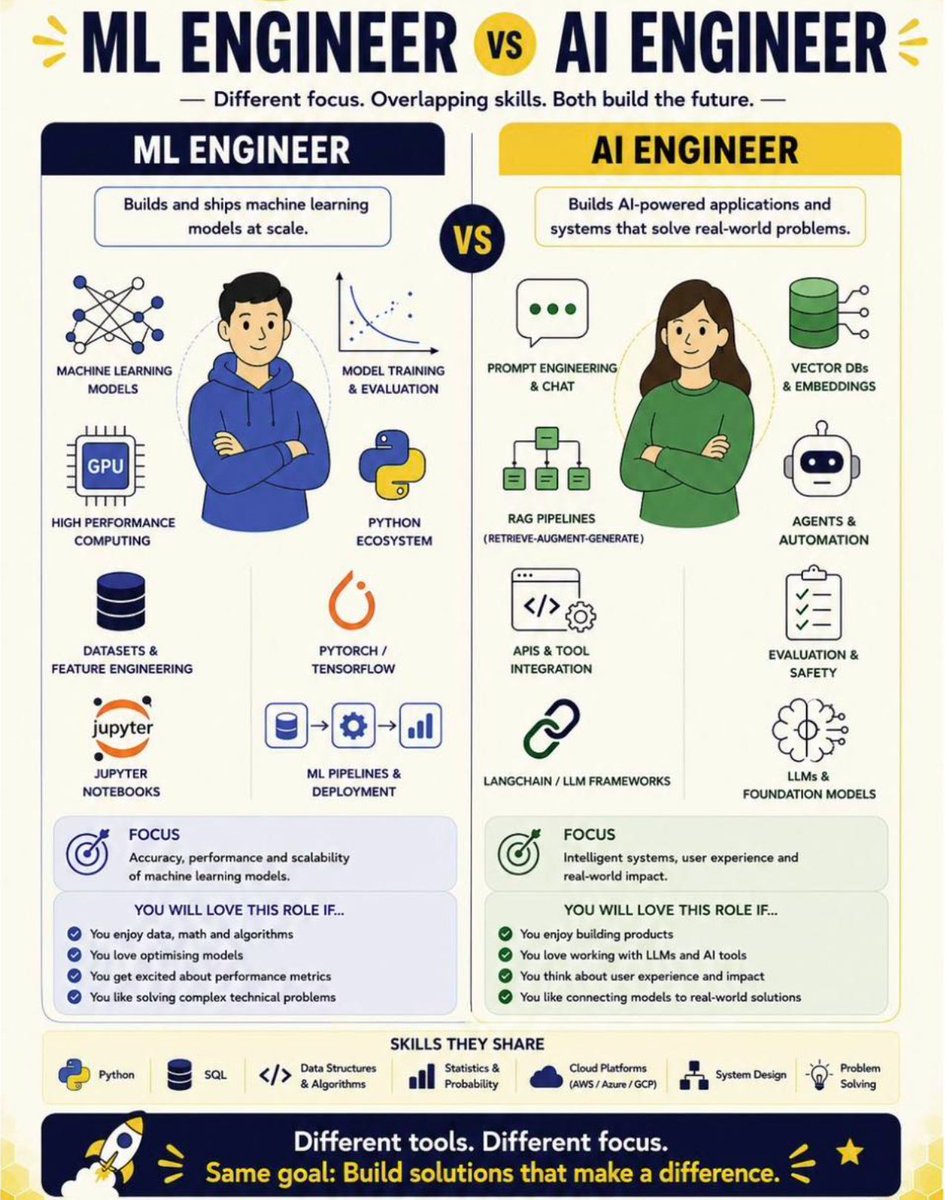
Two of the most confused job titles in tech right now.
ML Engineer. AI Engineer.
People use them interchangeably in job posts, interviews and LinkedIn bios. They are not the same role.
Here is the clearest breakdown I have seen.
An ML Engineer builds and ships machine learning models at scale. The focus is accuracy, performance and scalability. If you love data, math, algorithms and optimising models this is your role.
An AI Engineer builds AI-powered applications and systems that solve real world problems. The focus is intelligent systems, user experience and real world impact. If you love building products, working with LLMs and connecting models to real solutions this is your role.
The skills overlap significantly. Python, SQL, cloud platforms, statistics. Both roles need these.
But the day to day work, the mindset and the problems you solve are fundamentally different.
Save this. Share it with anyone who is trying to figure out which path to take.
♻️ Repost to help someone who is confused about which role to apply for.
#DataScience #MachineLearning #AI #MLEngineer #AIEngineer #DataScientist #LearnAI
Spot the @McLarenF1 race winners! 🧡
McLaren gathered previous race winners for the team here in Monaco as part of their 1000th Grand Prix celebrations! 🤩
#F1#MonacoGP
Top 20 Python one-liners
𝗗𝗔𝗧𝗔 𝗤𝗨𝗔𝗟𝗜𝗧𝗬
df.duplicated() — find duplicate rows
df.isna().sum() — count missing values per column
df.describe() — get a full statistics summary instantly
𝗖𝗟𝗘𝗔𝗡𝗜𝗡𝗚
df.drop_duplicates(keep='last') — remove duplicates, keep the latest
df.fillna() — handle missing values
df.replace({dict}) — replace multiple values at once
df.str.contains() — filter text columns without regex headaches
df.clip() — cap outliers without removing them from your dataset
𝗔𝗡𝗔𝗟𝗬𝗦𝗜𝗦
df.value_counts(normalize=True) — calculate percentages instantly
pd.crosstab() — create a pivot summary in one line
df.groupby().nlargest() — get the top N results per group
𝗧𝗥𝗔𝗡𝗦𝗙𝗢𝗥𝗠𝗔𝗧𝗜𝗢𝗡
pd.cut() — create bins from continuous numbers
df.merge() — join two dataframes
df.pivot_table() — create flexible pivots
df.assign() — add new columns without overwriting your original dataframe
df.explode() — unnest list columns into individual rows
df.pipe() — chain multiple operations cleanly in sequence
𝗦𝗘𝗟𝗘𝗖𝗧𝗜𝗢𝗡 & 𝗦𝗢𝗥𝗧𝗜𝗡𝗚
df.query() — filter with readable syntax instead of brackets
df.nlargest(n, 'col') — get the top N rows by column value
df.sort_values() — sort by one or multiple columns
#python
LibreOffice might be the greatest revenge fork in open source history.
In 2010, Oracle bought Sun Microsystems and inherited OpenOffice, the free office suite millions of people depended on every day.
Oracle had a well-known reputation for acquiring software and squeezing it dry, and the developer community was not going to let that happen to a tool they had built their workflows around.
They created the Document Foundation, forked the entire codebase, and launched LibreOffice. Same software. Zero Oracle.
Oracle told contributors to resign from the OpenOffice council. Nobody listened.
The community kept building, as if Oracle did not exist. Every update, every bug fix, every feature shipped without asking anyone for permission.
By 2011, Oracle gave up and handed OpenOffice to the Apache Foundation like a kid returning a toy they broke.
LibreOffice kept shipping. Today, it runs on millions of computers, and entire governments across Germany, Italy, and France have officially ditched Microsoft Office for it.
OpenOffice still exists under Apache. It just hasn't had a major release in years.
Microsoft charges you $99 a year for Office.
Google charges you $12 a month for Workspace.
LibreOffice charges you nothing.
The most interesting part of this story is that Oracle technically owned the code.
What they couldn't own was the community.
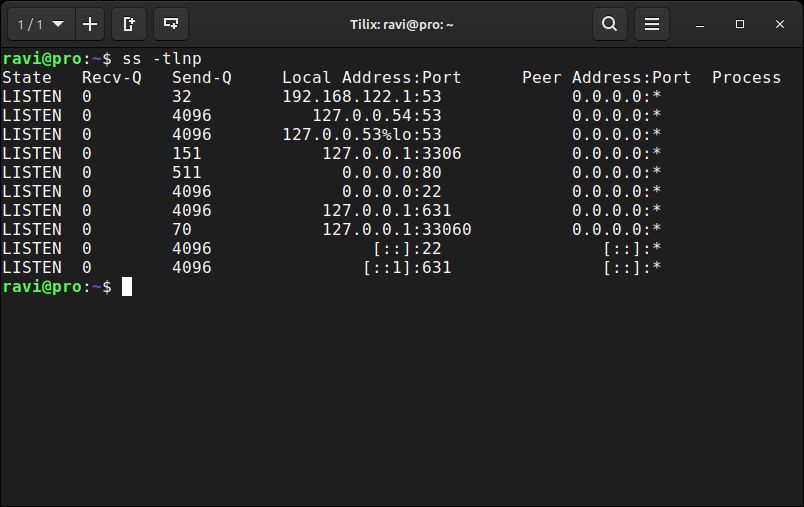
Quick Linux Tip #3
Need to see which ports are open and which process owns each one?
Use:
$ ss -tlnp
It lists all TCP listening ports with the process name and PID attached.
Faster than netstat, built into every modern Linux system, and no package to install.
Run this before opening a firewall port, and you'll know instantly if the service is actually bound and listening or just supposed to be.
Follow @tecmint for more #Linux tips