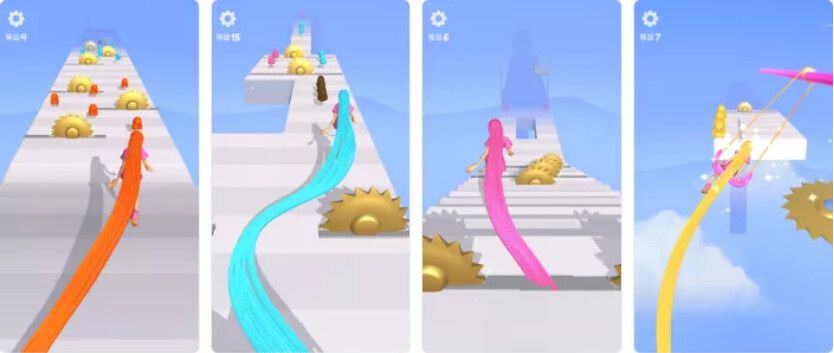
Hypercasual front-facing parkour games are all the rage right now and developers are getting their hands on them. Our #TutorialThursday shares how to fix jittering and floating issues for when you take yours to the next level and add hills and valleys.
https://t.co/3TZvppJSH3
We end our video series with our final #TutorialThursday video, cleaning up all the little items needed to make our game perfect for the gamers. Thanks for following us with this beginner course and get ready for something advanced next week.
➡️ https://t.co/b6GYGpm9UA
We're still working on the final video of our series, but to help those of you already ahead of the game, we have a fun and simple tutorial discussing how to zoom in and out and move around a map with your mouse or fingers. #TutorialThursday
Watch: https://t.co/OgiTuVDVHb
Cocos Creator is amazing by allowing anyone or company to build tools that you can add to the engine. We give these 3rd party tool developers three different options on how: custom, monetizing and integrated. Learn the differences in our tutorial.
➡️ https://t.co/rK63nXBQ3t
Opinion: what's the best timing to release your game?
(There’s a contrarian, over-simplistic answer on this, and then a more nuanced answer. You get both.)
https://t.co/EL8NIdamLA
We're past halfway in our #TutorialThursday video series on Cocos Creator 3.x. We hope you are enjoying. If you have any suggestions for our next video series, share a comment below.
Link: https://t.co/1Z3N6iiVI2
We continue helping you build your first game with our #TutorialThursday video. This time we look at making a main menu and game over screen, as well as moving from different states.
Watch: https://t.co/ukPa6B8THv
The playlist continues as we share part six of the Cocos Creator for Beginners tutorial series. This week is all about animating your character! #TutorialThursday https://t.co/n4PM0Md1WS
Our team has built an incredible tutorial for you in the style of Zelda and Ghibli animation. Learn how to render some awesome animation for your world including swaying grass. Thanks to @artstoff and @Adobe Maximo for their assets as well.
Try out at
https://t.co/KBh610zlpY
We finally are starting our Cocos Creator 3.0 beginner's guide. We start with episode 3 (since episodes one and two of the previous series are still relevant) and will be building a brand new type of game. Come follow this series! https://t.co/D9teDYAbEX
Did you know that you could be saving lots of memory with just one technique? A Cocos developer shows how texture compression saved him tons of memory in our #TutorialThursday blog post.
⬇️⬇️⬇️
https://t.co/LHLwWRQ09f