💡 Power Query Tip 💡
- Right click on an applied step
- Click "Properties"
- Add comment in "Description" textbox
This creates an info icon on the applied step. Hovering over the icon will show the comment. Your future self will thank you.
#PowerQuery#PowerBI#Excel
Next time you're using your favorite software, take a deep tour through the menus for a minute or two.
I can almost guarantee you'll find something new it can do.
Even Notepad could surprise you (press F5 to type the date/time).
💡If a YouTube video has chapters, you can use the following keyboard shortcuts to skip or move back through them on desktop:
CTRL+➡ (Skip to next chapter)
CTRL+⬅ (Replay/Skip to previous chapters)
#TechTip#YouTube#Productivity
Quick Excel Tip 📊
Hold CTRL and use the mouse scroll wheel to zoom in/out. Zoom all the way out to 25% and you can see the sheet's named ranges highlighted.
#Excel#QuickTip
TIL in OneNote you can make a page a subpage of another page, but only if you have sort set to "None" for that tab. Took me long enough to figure that one out. 😜
#OneNote#Productivity#Organization
TIL there is a button at the bottom-right of the PowerBI Desktop Model View, "Fit to Screen", that fits all the tables to the view so you don't have to scroll around to view all the tables.
#PowerBI
Excel Quick Tip: If you find yourself using something on the ribbon often, right click on it and choose "Add to Quick Access Toolbar".
#Excel#ExcelTip#MicrosoftExcel
Google Sheets Tip:
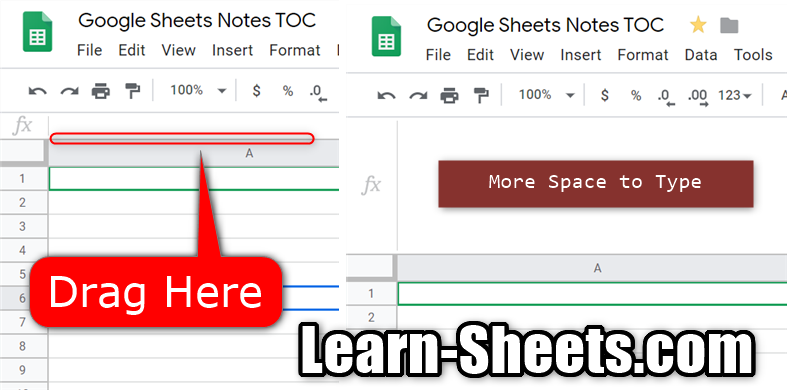
Open up more room to type/edit in the formula bar by dragging the bottom of the formula bar downward.
Or you can hide the formula bar by unchecking "Formula Bar" in the View menu.
#GoogleSheets 😀
Google Sheets Tip:
Track the price of Bitcoin with Google Sheets. Enter the following into a cell:
=GOOGLEFINANCE("CURRENCY:BTCUSD")
Now sprinkle on some formatting.
#GoogleSheets#Bitcoin#BTC
Google Sheets Tip:
Share a web render of a spreadsheet.
Replace "edit" in the URL with "preview" to show a read-only version of the spreadsheet without the overhead of the editor. Be sure the recipient has rights to view the spreadsheet.
#GoogleSheets
Google Sheets Tip:
You can zoom Sheets using the browser shortcuts (CTRL +/-). This will zoom all the open Sheets browser tabs and the menu bar.
-OR-
Use the zoom entry in the 'View' menu to change the zoom of only the current spreadsheet and not the menu bar.
#GoogleSheets
Google Sheets Tip:
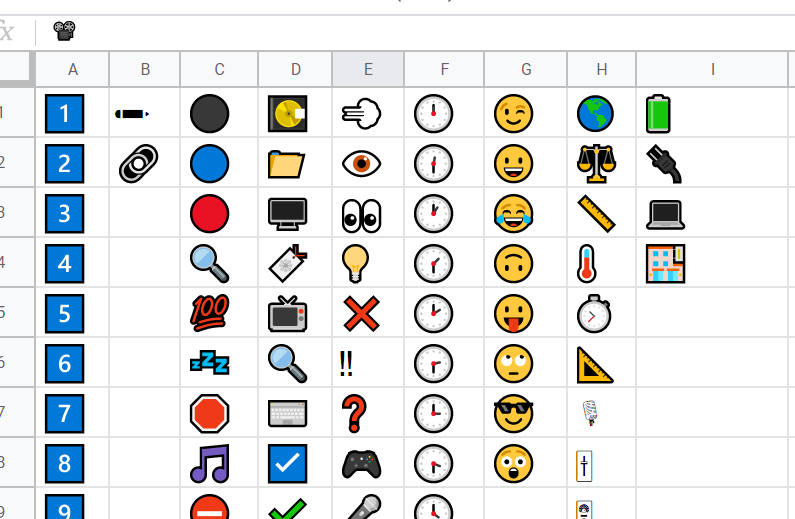
Paste your favorite emojis into a Google Sheets document and copy from there whenever you need one.
Find an emoji here: https://t.co/JPrJ5o35PX
#GoogleSheets
And have an 💯 Monday! You got this!
Google Sheets Tip:
If you are using Windows 10 and want to insert an emoji or two into your Google Sheets spreadsheet, use the keyboard shortcut [WIN + .] to activate the emoji picker.
Even use them in file names to make them pop in Drive.
#GoogleSheets#Windows10#GoogleDrive
👍 Google Sheets Tip:
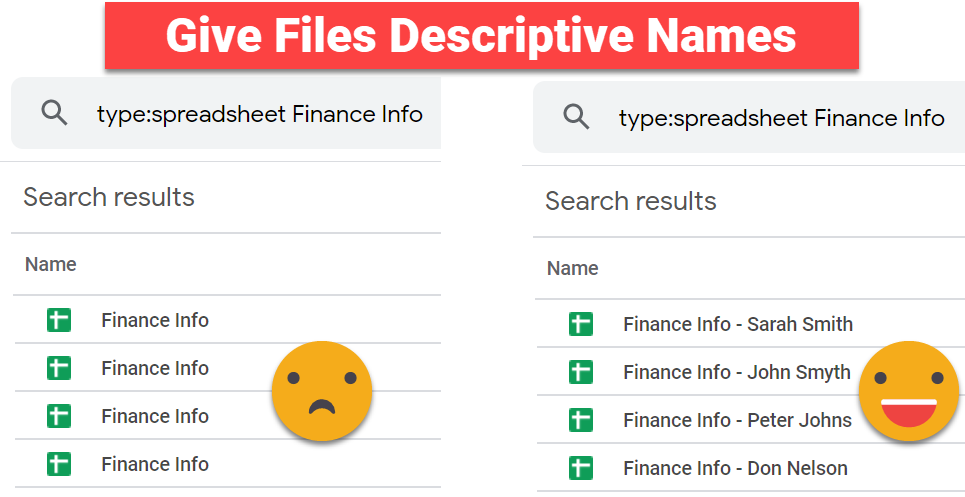
Give your spreadsheets descriptive names so your next Google Drive search result doesn’t include 12 spreadsheets with the name ‘Finance Info’. Your future self will thank you!
#GoogleSheets#SheetsTip 🍻



![TheSheetsGuy's tweet photo. Google Sheets Tip:
If you are using Windows 10 and want to insert an emoji or two into your Google Sheets spreadsheet, use the keyboard shortcut [WIN + .] to activate the emoji picker.
Even use them in file names to make them pop in Drive.
#GoogleSheets #Windows10 #GoogleDrive https://t.co/TfLC6ZayEu](https://pbs.twimg.com/media/EL7h-ibWkAIqQBS.png)