We are the Microsoft Visual Studio Debugger team. You can reach us through: Tweets, comments on our blogs, VS Developer Community and at [email protected]
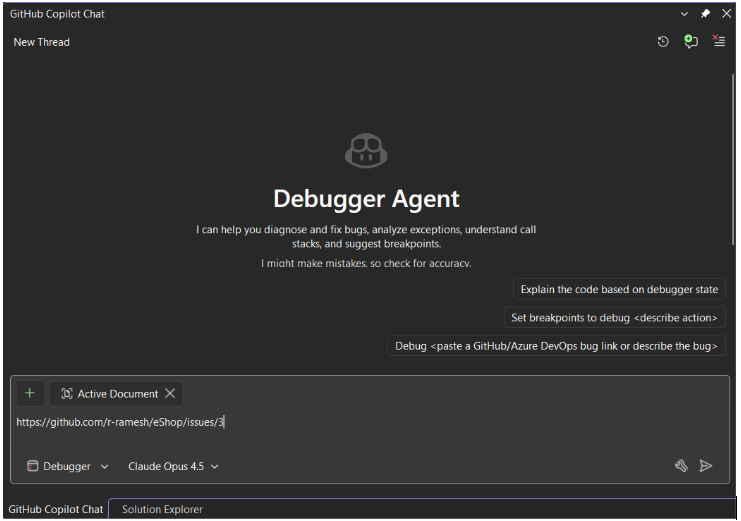
Think the Debugger Agent is just for explaining exceptions? Think again. 👀
It can reproduce bugs, find root causes, suggest & validate fixes, analyze call stacks, debug failing tests, and more all with natural language.
Try these ready-to-use prompts: https://t.co/w1AQCYFUKr
Debugging isn’t just about fixing code; it’s about reducing uncertainty. We’re taking a massive leap toward solving that problem by introducing a new, upgraded, guided workflow within our existing Debugger Agent in Visual Studio.
Mark Downie lays it out for us... https://t.co/yhLj9KxtZp
〰️ Next up at #MSBuild for Visual Studio Devs 〰️
GitHub Copilot in Visual Studio: Agents That Debug, Profile, and Test
Tune into the livestream ➡️https://t.co/hzvhaV21H5
Next week at #MSBuild ⚡
Copilot in Visual Studio: Agents that Debug, Profile & Test
These aren’t just code‑gen bots — they find bugs from runtime behavior, surface perf issues, and build tests to block regressions.
A must‑see for C#, .NET & C++ devs.
👉 https://t.co/N1e1b4GDQg
@wstaelens Sorry you're running into this. Could you please file a feedback ticket with details about the memory usage and your setup? That’ll help us investigate what’s going on and figure out the root cause.
We’d really appreciate it.
In today's Visual Studio Toolbox highlight, Marco shows us how Visual Studio has a new, upgraded, guided workflow within the existing Debugger Agent to help you fix issues.
Check it out: https://t.co/IfnOPl1hjP
Check out the latest Visual Studio Toolbox episode
Watch as @mpeyrotc from the Debugger team explains the Debugger Agent.
Learn how to use the guided workflow to navigate from bug report to verified fix with total precision in runtime.
#VisualStudio2026
https://t.co/jNb3r0Gz9I
@archiecoder Love this 🙌
Getting the agent to reason through the bug with you instead of jumping to conclusions was a big focus for us.
Thanks for trying it out and sharing 🙏
Stop Guessing, Start Fixing!
Meet the new Debugger Agent workflow in Visual Studio. ...not just a chatbot, but a real-time partner that reasons together with you.
https://t.co/MhxBhW3M2D
Working with Copilot for debugging and profiling is now much easier with dedicated agents.
Just select the Debugger or Profiler Agent to get all the context-aware help you need to diagnose and optimize your application instantly.
🤖✨ Visual Studio just got a whole squad of agents — and they’re not your average “chatbot.”
🕵️♀️ Debugger Agent → reads your call stacks + diagnostics like a pro
⚡ Profiler Agent → hunts bottlenecks using real VS profiling data
🧪 Test Agent → generates tests that match YOUR project’s patterns
🛠️ Modernize Agent → upgrades .NET/C++ projects with awareness of your graph
And the best part?
🧩 You can build your own custom agents — wired into your repos, docs, APIs, design systems, and more.
Teams are already crafting:
• PR reviewers tied to their style guides
• Design‑system enforcers linked to Figma
• Planning agents that gather requirements before you write a line of code
Dive into how it all works + how to start building your own 👇
https://t.co/A7KCcwLbQU
Got a slow LINQ query?
Now you can catch it and fix it while debugging.
Perf Tips + Profiler Agent in Visual Studio surface real runtime data as you step, and GitHub Copilot helps you optimize instantly. Currently supported in C# .NET.
#VS2026 Insiders
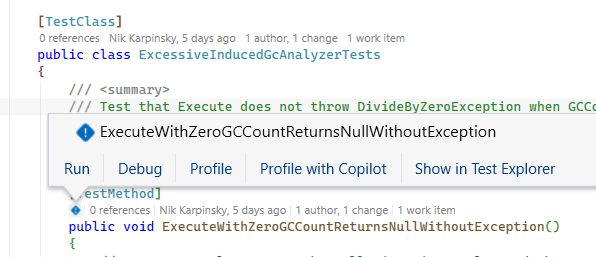
A super easy way for me to optimize performance of my .NET application using my existing unit tests, the built-in profiler, and Copilot to tie it all together into a single click of a button.
Coming to Visual Studio 2026 very soon...
@madskristensen@wstaelens Unfortunately, the Text Visualizer doesn't currently support strings with embedded null characters (\0) in the middle it essentially stops rendering at the first one.
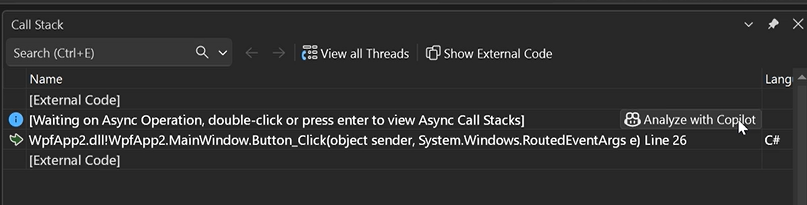
Ever stared at a call stack thinking “okay… but why?”
Analyze Call Stack with Copilot is coming soon bringing instant clarity to sync & async debugging.