THE CEO OF OBSIDIAN JUST OPEN-SOURCED THE CLAUDE CODE SKILLS HE WAS USING PRIVATELY IN HIS OWN VAULT. 40,000 STARS IN A FEW WEEKS
5 skills. 1 MIT license. 0 pitches
kepano - the founder who wrote the "File over app" essay - dropped a set of Agent Skills that teach Claude Code to read and write Obsidian files the way a human expert would. Markdown that respects wikilinks. Bases queries Claude actually writes correctly
JSON Canvas edits that don't corrupt the file. A defuddle skill that strips ads and boilerplate off any URL and drops a clean note into your vault. He built them for himself, tested them in his own workflow, then pushed the folder to GitHub
every skill is one SKILL.md file. Drop the repo into .claude/skills/ and Claude Code picks them up automatically. No plugin store. No account. No cloud. Same idea that made Obsidian: your notes are files on your disk, the app is disposable, and the AI just learned to speak the format
the essay was called "File over app". The workflow is now file over agent
MIT-licensed. Shipped in his own name
no vendor lock. no subscription. no cloud memory. no walled garden. no pitch to raise a round
you're reading this on a device that could clone the repo, drop it into your vault, and have Claude Code editing your notes correctly before your next standup
YOU CAN BUILD AN AI SECOND BRAIN IN 15 MINUTES.
No coding experience. No $1000 course.
Here is the entire setup.
Step 1: Download Claude Desktop.
Step 2: Download Obsidian.
Step 3: Create a new vault and start dropping .MD files into it.
Step 4: Tell Claude Code to connect to your vault using Karpathy's prompt: https://t.co/5LkhJDGQLO
That is it.
Your entire knowledge base becomes searchable, connectable, and queryable by the most powerful AI model on earth.
Every note you have ever written.
Every idea you have ever captured.
Every resource you have ever saved.
Claude reads all of it, finds connections you missed, and surfaces insights from your own thinking that you FORGOT you had.
Most people use Claude as a search engine.
The people building second brains use it as an INTELLIGENCE LAYER on top of everything they know.
That gap is the gap between asking Google a question and having a research partner who has read everything you have ever written.
Bookmark this.
Build it tonight. Follow @cyrilXBT
48 HOURS AFTER KARPATHY POSTED HIS LLM WIKI IDEA, A 26-YEAR-OLD BIRMINGHAM GRAD SHIPPED THE ONE COMMAND THAT MAKES IT WORK. IT NOW HAS 76,000 GITHUB STARS
1 command. 71.5x fewer tokens per query. 0 vector databases
points graphify at any folder - codebase, docs, PDFs, screenshots, video. Tree-sitter parses the code, Claude reads the prose, the whole thing lands as a knowledge graph in graphify-out/
one flag - --obsidian - writes the entire graph as a fully-linked Obsidian vault: one markdown note per concept, every relationship a wikilink, every node linked back to its source. Drop the vault into Claude Code as a skill. Claude queries the graph instead of grepping through raw files, forever
Safi Shamsi finished his MSc at Birmingham with Distinction in 2025. His thesis was a knowledge-graph RAG system for academic search. He shipped Graphify 48 hours after Karpathy's post, iterates every week, and has already been forked by Rootly AI Labs for incident data. Hacker News, Analytics Vidhya, Towards AI - all organic.76,000 stars. Three months old
no neo4j server. no vector db. no embedding pipeline. no cloud. no monthly fee
you're reading this on a device that could clone the repo, run one command, and have a Claude-native knowledge graph of your entire codebase in Obsidian before your next standup
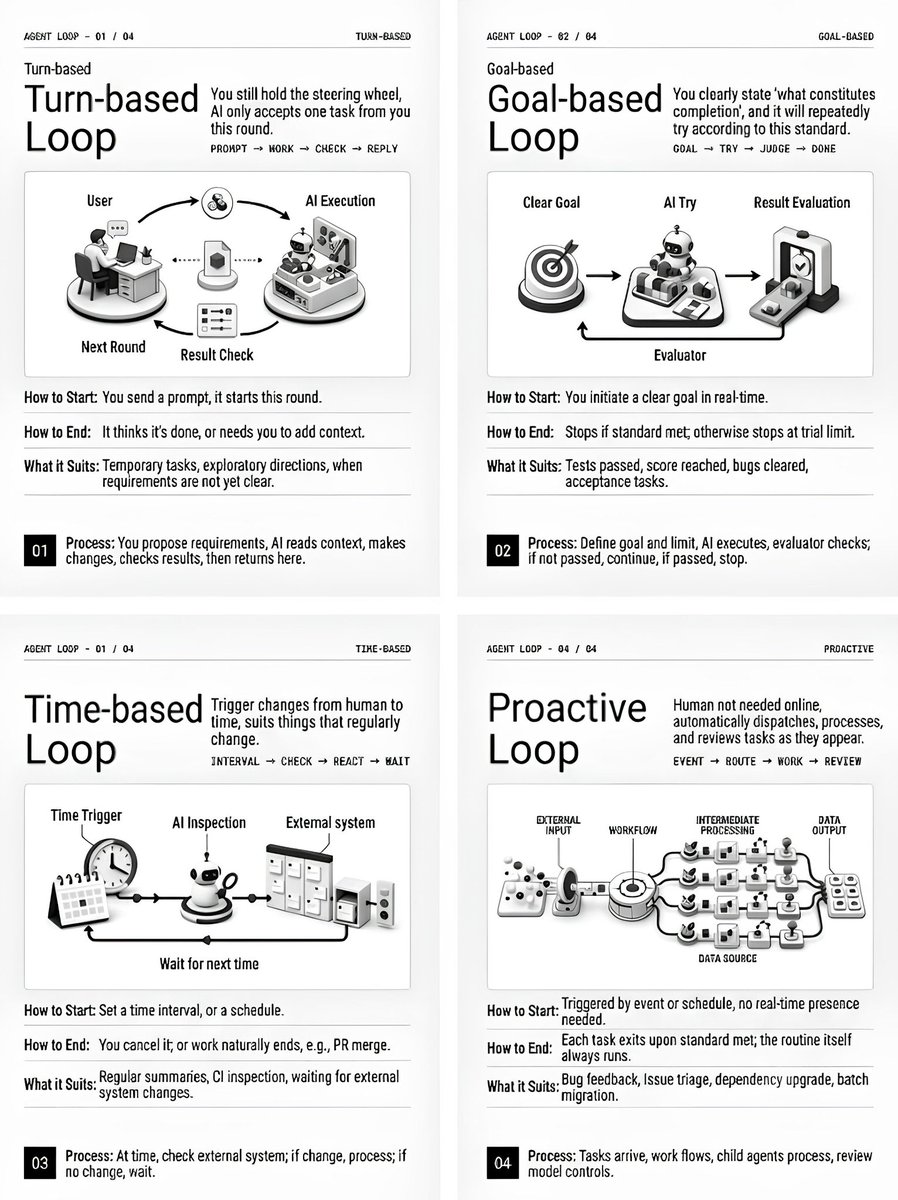
Claude Code just dropped "Getting Started with Loops"
This is their first official document about Loop Engineering.
Spoiler: prompt engineering didn't survive.
Here's the full guide in one post:
1. Turn-based
Every prompt you send already runs as a loop: Claude gathers context, takes action, checks its own work, and repeats until it decides the task is done or realizes it needs your input.
2. Goal-based
You define what "done" looks like with /goal, and Claude keeps iterating toward it. Every time it tries to stop, a separate evaluator model checks your condition - if it's not met, Claude gets sent back to work until the goal is reached or the turn limit hits.
3. Time-based
This is the /loop command: нou set an interval and a prompt fires on schedule. For example, every 5 minutes Claude checks your PR, addresses review comments, and fixes failing CI.
4. Proactive
Here you set up an event once, and the loop triggers itself whenever that event happens - with zero human input.
Anthropic also shared optimization advice - and this part matters most:
- Loop quality depends on system quality.
- Tokens are the real cost
None of this is magic. It's the same familiar parts - /goal, /loop, Skills, Hooks - composed into systems that run without you.
I built exactly that kind of system in my article:
Loop that wakes up at 6 AM, finds work on its own, reviews itself, and leaves ready PRs for you. Step by step, from SKILL(.)md to cron trigger:
Andrew Ng just dropped a 3-hour course on how to become an AI Engineer in 2026:
• 00:00 - How to build agentic AI systems
• 04:25 - Future of AI engineering
• 23:38 - AI Prompting full course
• 2:52:17 - Creating an app with AI in 30 minutes
This 3-hour watch could replace 10 AI engineering courses on the internet.
Watch it today, then read how to run a self-improving system in the article below.
Anthropic just released 5 workshops on building self-improving agentic systems from scratch:
00:00 - Ship your first Claude agent
36:44 - Self-improving agents (tools,skills)
1:21:25 - Build memory for Claude agents
1:49:47 - Set up a proactive agent
2:11:31 - Make your agent autonomous
These 3-hours of Claude workshops will replace 20 paid agentic courses.
Watch today, then read article below on how to build a self-improving agentic system with Fable 5.
SOMEONE WIRED 2,000 OF THEIR NOTES INTO A 3D BRAIN CLAUDE CAN READ - AND IT RUNS ON THE SAME TRICK I USE 23 TIMES
most people send Claude 100+ messages a week re-explaining who they are - and it forgets 100% of it the second the tab closes
this is the opposite. 1 file. written 1 time. read by Claude before every single task, forever
it's called SKILL.md. each one teaches Claude exactly 1 job - your voice, your research, your planning - and it never asks twice
the 3D brain in the video is just 1 skill maxed out: a memory pulled from 2,000 of your own notes, not a billion pages of internet sludge
i run 23 of them. same model everyone else opens - mine just shows up already knowing the work, 10x sharper
30 minutes for the first one. 5 minutes each after. 23 files, and the model turns into a different one
a prompt helps for 1 message. a skill pays you back every session, for life
the article below is the full folder - all 23, start to finish
How to set up Claude so it never forgets you:
Prompts → Projects → Skills (explained in 3 mins)
Prompts = telling a stranger your job every morning.
Projects = giving a new hire a binder on day one.
Skills = training an employee once. For forever.
Step 1: Start with a Prompt (but don't stay there)
✦ Open Claude. Type your task. Get an answer.
✦ It works. But tomorrow? Claude forgot everything.
✦ You re-explain. Again. Every. Single. Chat.
✦ That's Level 1. Most people never leave it.
Step 2: Move to a Project
✦ Go to Claude .ai → Create a Project.
✦ Upload your voice file. Upload your instructions.
✦ Now every chat inside that Project knows you.
✦ Your context, style, and tone stick.
But you still have to open the right Project.
You still have to say "read my file first."
Step 3: Graduate to Skills
✦ Open Claude Cowork.
✦ Select Opus 4.7 + Extended Thinking.
✦ Prompt: "Use the skill-creator to help me build a skill for [your most repeated task]."
Claude interviews you. Answer extensively.
"I write reports" is useless.
"I write weekly reports that start with the headline metric, 3 sections max, next steps as bullets" is a Skill.
The specificity is the skill.
Step 4: Install and test
✦ Save the Skill folder.
✦ Go to Settings → Capabilities → Skills → Upload.
✦ Open a new chat. Type your task normally.
✦ The Skill fires on its own. No slash command.
✦ Claude just knows.
I just wrote my full Claude Skills breakdown. It covers setup, the skill-creator walkthrough, and the 7 hacks I found buried in Anthropic's docs.
Read it here: https://t.co/6cHYYfjpP2
To download all of my Claude infographics:
Step 1. Go to https://t.co/psB7XxAv8w.
Step 2. Subscribe for free. Don't pay anything.
Step 3. Open my welcome email (most skip this).
Step 4. Hit the automatic reply button inside.
Step 5. Download my infographics from my Notion.
♻️ Repost this to help someone on your team stop re-explaining themselves to Claude every morning.
What are Claude Skills?
𝗖𝗟𝗔𝗨𝗗𝗘.𝗺𝗱 was never meant to hold entire workflows.
But that's exactly where they end up. General rules, coding conventions, 20-step security review processes, deployment checklists. All in one file that loads into every single session, eating context even when Claude is just renaming a variable.
𝗦𝗸𝗶𝗹𝗹𝘀 fix this by turning workflows into self-contained packages that Claude loads only when the task demands it.
Here's the idea.
A skill is a folder inside .𝗰𝗹𝗮𝘂𝗱𝗲/𝘀𝗸𝗶𝗹𝗹𝘀/. Each folder contains a 𝗦𝗞𝗜𝗟𝗟.𝗺𝗱 file with two things: a 𝗱𝗲𝘀𝗰𝗿𝗶𝗽𝘁𝗶𝗼𝗻 that tells Claude when to activate it, and the workflow instructions that tell Claude what to do.
The description is the trigger. Claude reads all available skill descriptions, watches the conversation, and when your request matches, it pulls in that skill automatically. You don't paste the steps. You don't type a command. Claude recognizes the intent and invokes the right skill on its own. You can also trigger any skill explicitly with a slash command like /𝘀𝗲𝗰𝘂𝗿𝗶𝘁𝘆-𝗿𝗲𝘃𝗶𝗲𝘄 when you want manual control.
I recorded a deep dive on skills when they were first released, and everything in it is even more relevant today. The video below walks through exactly how this works.
But auto-invocation is just the surface. The real power is what skills can carry with them.
Skills are full packages, not just instruction files. A 𝗦𝗞𝗜𝗟𝗟.𝗺𝗱 can reference supporting files that live right next to it using the @ symbol. A detailed security standards document. A release notes template. A compliance checklist. Whatever the workflow needs, the skill bundles it together.
Inside 𝗦𝗞𝗜𝗟𝗟.𝗺𝗱, YAML frontmatter defines the name, description, and which tools the skill is allowed to use. The 𝗮𝗹𝗹𝗼𝘄𝗲𝗱-𝘁𝗼𝗼𝗹𝘀 field is worth paying attention to. A security review skill only needs 𝗥𝗲𝗮𝗱, 𝗚𝗿𝗲𝗽, and 𝗚𝗹𝗼𝗯. It has no business writing files. Restricting tool access makes the skill safer and far more predictable.
Skills live at two levels. Project skills go in .𝗰𝗹𝗮𝘂𝗱𝗲/𝘀𝗸𝗶𝗹𝗹𝘀/ and get committed to git so the whole team shares them. Personal skills go in ~/.𝗰𝗹𝗮𝘂𝗱𝗲/𝘀𝗸𝗶𝗹𝗹𝘀/ and follow you across every project.
A 𝗖𝗟𝗔𝗨𝗗𝗘.𝗺𝗱 with a 20-step security process baked in is dead weight in 90% of your sessions. A 𝘀𝗲𝗰𝘂𝗿𝗶𝘁𝘆-𝗿𝗲𝘃𝗶𝗲𝘄 skill that activates only when security is on the table is precision.
𝗖𝗟𝗔𝗨𝗗𝗘.𝗺𝗱 tells Claude what rules to follow. Skills tell Claude what workflows to execute.
The article below is a complete guide to 𝗖𝗟𝗔𝗨𝗗𝗘.𝗺𝗱, hooks, skills, agents, and permissions, and how to set them up properly.
Anthropic engineer:
"You're not supposed to prompt Claude. You're supposed to build a system that prompts itself."
In 45 minutes she breaks down how Anthropic builds agents that remember, learn from their mistakes, and get smarter with every run.
Worth more than any paid course you'll find on building agents.
Watch the session, then read the guide on building loops below.
YOU CAN BUILD AN AI SECOND BRAIN IN 15 MINUTES.
No coding experience. No $1000 course.
Here is the entire setup.
Step 1: Download Claude Desktop.
Step 2: Download Obsidian.
Step 3: Create a new vault and start dropping .MD files into it.
Step 4: Tell Claude Code to connect to your vault using Karpathy's prompt: https://t.co/5LkhJDHoBm
That is it.
Your entire knowledge base becomes searchable, connectable, and queryable by the most powerful AI model on earth.
Every note you have ever written.
Every idea you have ever captured.
Every resource you have ever saved.
Claude reads all of it, finds connections you missed, and surfaces insights from your own thinking that you FORGOT you had.
Most people use Claude as a search engine.
The people building second brains use it as an INTELLIGENCE LAYER on top of everything they know.
That gap is the gap between asking Google a question and having a research partner who has read everything you have ever written.
Bookmark this.
Build it tonight. Follow @cyrilXBT
Jim Simons says Renaissance Technologies' edge traces back to a mathematician who wrote 70 volumes of math with 13 children on his knee
pause at 1:31 - that's the second he names the man
"and you take vertices minus edges plus faces, you'll get two"
"So this is called the Euler characteristic, and it's what's called a topological invariant"
"Pontryagin classes, actually there were Chern classes"
"But if it wasn't for Mr. Euler, who wrote almost 70 volumes of mathematics, had 13 children whom he apparently would dandle up on his knee while he was writing"
Bookmark & Watch It
Jim Simons on how the greatest hedge fund in history was built by people who knew nothing about finance
"we have about 100 PhDs working for the firm"
pause it right at 0:03 - that number is the whole setup
"we hired smart folks who didn't know anything about finance; we looked for someone with a PhD in physics, astronomy, mathematics, or statistics, with a few good papers and five years out"
"my algorithm has always been: you get smart people together, you give them a lot of freedom, create an atmosphere where everyone talks to everyone else"
bookmark & watch it
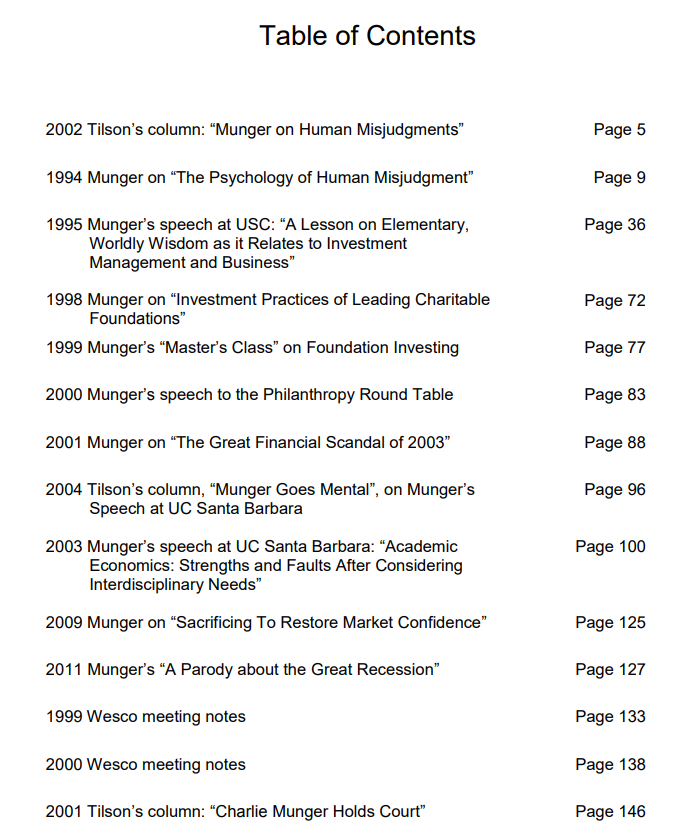
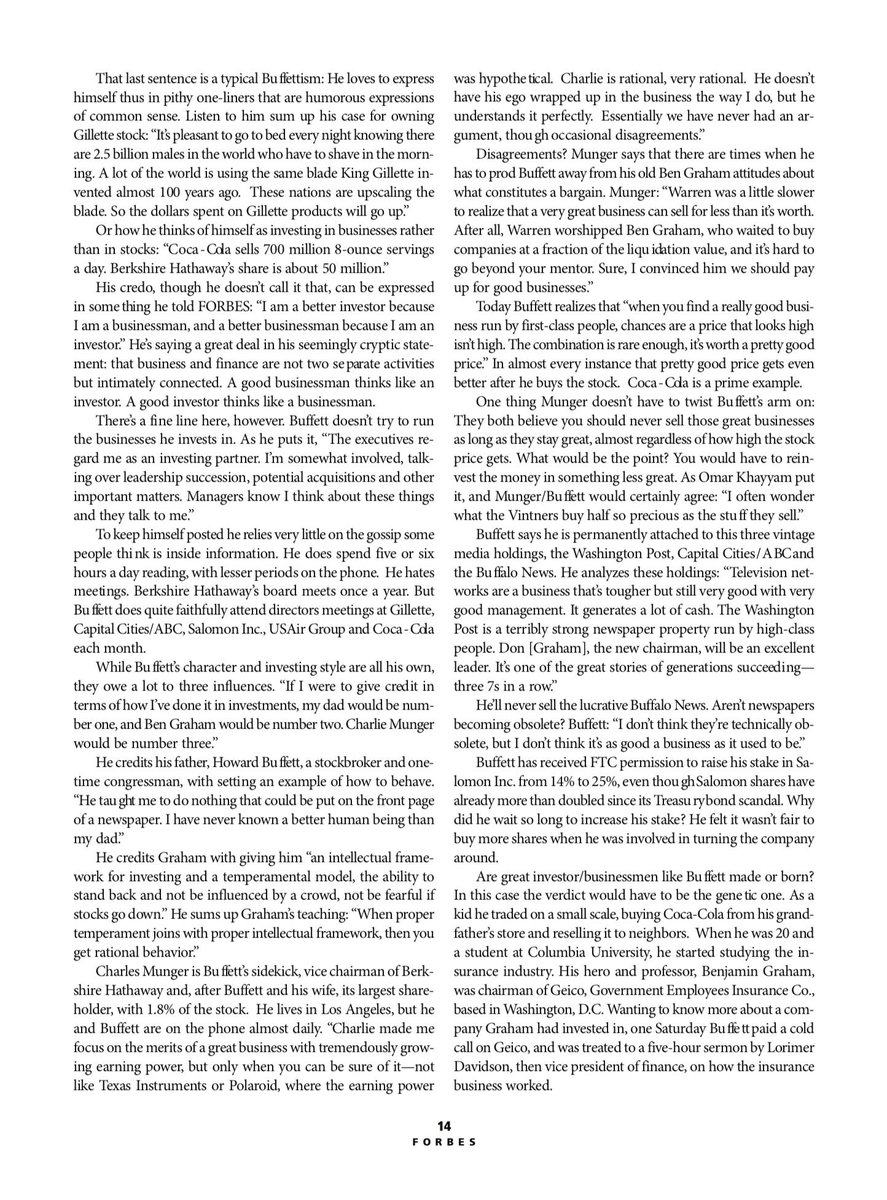
nice compilation -- "The Best of Charlie Munger: 1994-2011 - A collection of speeches, essays, and Wesco annual meeting notes." (349 Pages)
https://t.co/NUQUKNKk7y






![rubenhassid's tweet photo. How to set up Claude so it never forgets you:
Prompts → Projects → Skills (explained in 3 mins)
Prompts = telling a stranger your job every morning.
Projects = giving a new hire a binder on day one.
Skills = training an employee once. For forever.
Step 1: Start with a Prompt (but don't stay there)
✦ Open Claude. Type your task. Get an answer.
✦ It works. But tomorrow? Claude forgot everything.
✦ You re-explain. Again. Every. Single. Chat.
✦ That's Level 1. Most people never leave it.
Step 2: Move to a Project
✦ Go to Claude .ai → Create a Project.
✦ Upload your voice file. Upload your instructions.
✦ Now every chat inside that Project knows you.
✦ Your context, style, and tone stick.
But you still have to open the right Project.
You still have to say "read my file first."
Step 3: Graduate to Skills
✦ Open Claude Cowork.
✦ Select Opus 4.7 + Extended Thinking.
✦ Prompt: "Use the skill-creator to help me build a skill for [your most repeated task]."
Claude interviews you. Answer extensively.
"I write reports" is useless.
"I write weekly reports that start with the headline metric, 3 sections max, next steps as bullets" is a Skill.
The specificity is the skill.
Step 4: Install and test
✦ Save the Skill folder.
✦ Go to Settings → Capabilities → Skills → Upload.
✦ Open a new chat. Type your task normally.
✦ The Skill fires on its own. No slash command.
✦ Claude just knows.
I just wrote my full Claude Skills breakdown. It covers setup, the skill-creator walkthrough, and the 7 hacks I found buried in Anthropic's docs.
Read it here: https://t.co/6cHYYfjpP2
To download all of my Claude infographics:
Step 1. Go to https://t.co/psB7XxAv8w.
Step 2. Subscribe for free. Don't pay anything.
Step 3. Open my welcome email (most skip this).
Step 4. Hit the automatic reply button inside.
Step 5. Download my infographics from my Notion.
♻️ Repost this to help someone on your team stop re-explaining themselves to Claude every morning.](https://pbs.twimg.com/media/HGQUfwtbAAE75yi.jpg)