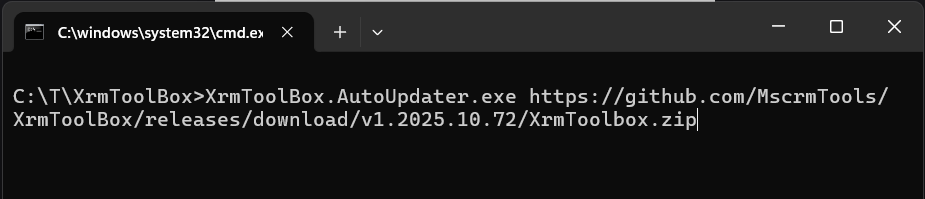
I forgot :
- Copy XrmToolBox.AutoUpdater.exe to another folder
- Add extra parameters:
- path to your XrmToolBox.exe application
- custom path for configuration (if any)
So c:\tmp\XrmToolBox.AutoUpdater.exe <url> <path to XrmToolBox.exe> <path for custom storage if any>
Having issues after connection controls update => XrmToolBox.AutoUpdater.exe https://t.co/V5oWKqD9X7
(don't forget to start from your XrmToolBox folder)
Sorry about this issue. Next version of XrmToolBox will add safeguards to avoid the same situation.
@amarnath_3011 Yes but under a content folder which seems not interpreted by the zip package . Plugins folder should be under a lib/net48 folder I guess
@amarnath_3011 When searching for package parts, https://t.co/wpNthkiuNO.Packaging.ZipPackage does not find the Plugins folder. Don’t know why exactly but you could try to read the Nuget package in a C# console to test this. Maybe it’s due to content folder. I’m using lib folder for my tools.