Once we have completed our review for security vulnerabilities, we will make the entire codebase of 𝕏 open source, with no exceptions.
Moreover, we will invite third party reviewers to examine the system that is running to confirm that the open source code is what is running.
Trust through total transparency is the only thing that should be believed.
Meet DiffusionGemma!
An experimental open model that explores a fast approach to text generation, released under an Apache 2.0 license.
Moving beyond sequential, token-by-token processes to generate entire blocks of text simultaneously. Here’s what’s new with DiffusionGemma: 👇
Meet Gemma 4 12B!
A unified, encoder-free multimodal model designed to bring high-performance intelligence directly to your laptop, and released under an Apache 2.0 license.
Bridging the gap between edge efficiency and advanced reasoning. Here is what’s new with Gemma 4 12B: 👇
Introducing the world's first AI Chrome Extension Builder.
Turn the manual steps you take on any website into an AI extension that does them for you.
Describe it to Blink. It builds the AI extension.
Download. Launch on Chrome Web Store.
Comment Chrome + RT for a free month.
A Swiss teenager killed the Lightroom subscription.
It's called RapidRAW. A free open-source RAW photo editor that runs on Windows, Mac, and Linux. Non-destructive, GPU-accelerated, and under 20MB.
He was 18 when he started it.
Lightroom vs RapidRAW:
- Price: $143.88 a year → $0
- Account: Adobe login required → No login, ever
- Storage: 20GB cloud, then you pay more → Your files, your disk
- Install size: Adobe Creative Cloud, multi-GB → Under 20MB
- Updates: Forced when Adobe says → When you want
- Works on: Windows and Mac → Windows, Mac, and Linux
No Adobe ID. No cloud upload. No AI trained on your photos.
What it actually does:
→ Non-destructive editing. Your original RAW stays untouched.
→ GPU-accelerated. Sliders move in real time on a cheap laptop.
→ Masks, parametric curves, manual noise reduction with separate luma and color controls.
→ EXIF editing, batch presets, custom keyboard shortcuts.
→ Built in Rust + Tauri + WGPU. That's why it's tiny and fast.
→ Works on touchscreens. Has an Android build.
6,849 stars in 11 months. 275 forks. 20+ contributors.
One honest note: it's still in active development. The author says it isn't yet as polished as Darktable, RawTherapee, or Lightroom. You report bugs, he fixes them, usually within days.
License is AGPL-3.0. Free forever. No "Pro" tier. No upgrade nags.
Timon Käch built RapidRAW from Switzerland as a personal challenge to learn Rust, React, and WGPU shaders. He's a full-stack developer and photographer. No VC. No team. No fundraise.
This is what Lightroom should have been when the subscription started.
(Link in the comments)
Today, we’re open-sourcing the draft specification for DESIGN.md, so it can be used across any tool or platform. We’re also adding new capabilities.
DESIGN.md lets you easily export and import your design rules from project to project. Instead of guessing intent, agents know exactly what a color is for and can even validate their choices against WCAG accessibility rules.
Watch David East break down this shared visual language in action👇. New capabilities and links in 🧵
Introducing Claude Design by Anthropic Labs: make prototypes, slides, and one-pagers by talking to Claude.
Powered by Claude Opus 4.7, our most capable vision model. Available in research preview on the Pro, Max, Team, and Enterprise plans, rolling out throughout the day.
Gemma 4 can run on phones without an internet connection! 🤯
It can perform local agentic tasks, such as logging and analyzing trends. When connected, it can also make API calls.
Want to try it yourself? Get the Google AI Edge App on iOS or Android. (🔊 Sound on for the demo!)
LLM Knowledge Bases
Something I'm finding very useful recently: using LLMs to build personal knowledge bases for various topics of research interest. In this way, a large fraction of my recent token throughput is going less into manipulating code, and more into manipulating knowledge (stored as markdown and images). The latest LLMs are quite good at it. So:
Data ingest:
I index source documents (articles, papers, repos, datasets, images, etc.) into a raw/ directory, then I use an LLM to incrementally "compile" a wiki, which is just a collection of .md files in a directory structure. The wiki includes summaries of all the data in raw/, backlinks, and then it categorizes data into concepts, writes articles for them, and links them all. To convert web articles into .md files I like to use the Obsidian Web Clipper extension, and then I also use a hotkey to download all the related images to local so that my LLM can easily reference them.
IDE:
I use Obsidian as the IDE "frontend" where I can view the raw data, the the compiled wiki, and the derived visualizations. Important to note that the LLM writes and maintains all of the data of the wiki, I rarely touch it directly. I've played with a few Obsidian plugins to render and view data in other ways (e.g. Marp for slides).
Q&A:
Where things get interesting is that once your wiki is big enough (e.g. mine on some recent research is ~100 articles and ~400K words), you can ask your LLM agent all kinds of complex questions against the wiki, and it will go off, research the answers, etc. I thought I had to reach for fancy RAG, but the LLM has been pretty good about auto-maintaining index files and brief summaries of all the documents and it reads all the important related data fairly easily at this ~small scale.
Output:
Instead of getting answers in text/terminal, I like to have it render markdown files for me, or slide shows (Marp format), or matplotlib images, all of which I then view again in Obsidian. You can imagine many other visual output formats depending on the query. Often, I end up "filing" the outputs back into the wiki to enhance it for further queries. So my own explorations and queries always "add up" in the knowledge base.
Linting:
I've run some LLM "health checks" over the wiki to e.g. find inconsistent data, impute missing data (with web searchers), find interesting connections for new article candidates, etc., to incrementally clean up the wiki and enhance its overall data integrity. The LLMs are quite good at suggesting further questions to ask and look into.
Extra tools:
I find myself developing additional tools to process the data, e.g. I vibe coded a small and naive search engine over the wiki, which I both use directly (in a web ui), but more often I want to hand it off to an LLM via CLI as a tool for larger queries.
Further explorations:
As the repo grows, the natural desire is to also think about synthetic data generation + finetuning to have your LLM "know" the data in its weights instead of just context windows.
TLDR: raw data from a given number of sources is collected, then compiled by an LLM into a .md wiki, then operated on by various CLIs by the LLM to do Q&A and to incrementally enhance the wiki, and all of it viewable in Obsidian. You rarely ever write or edit the wiki manually, it's the domain of the LLM. I think there is room here for an incredible new product instead of a hacky collection of scripts.
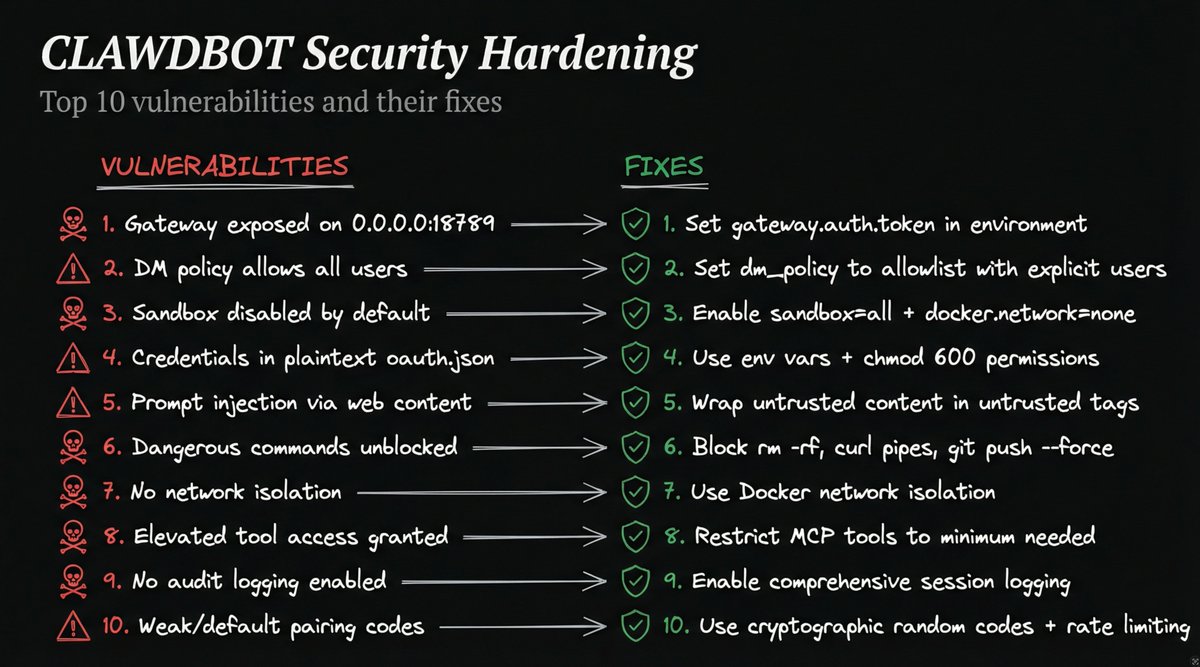
As a Security / 98% AI YOLO Maximalist with Guardrails guy, I'm asking you to please listen to this.
Here are some of the top security issues with https://t.co/yCq4RmE7lB that you all should be avoiding.
Don't avoid the project. It's great. But please be safe with it!