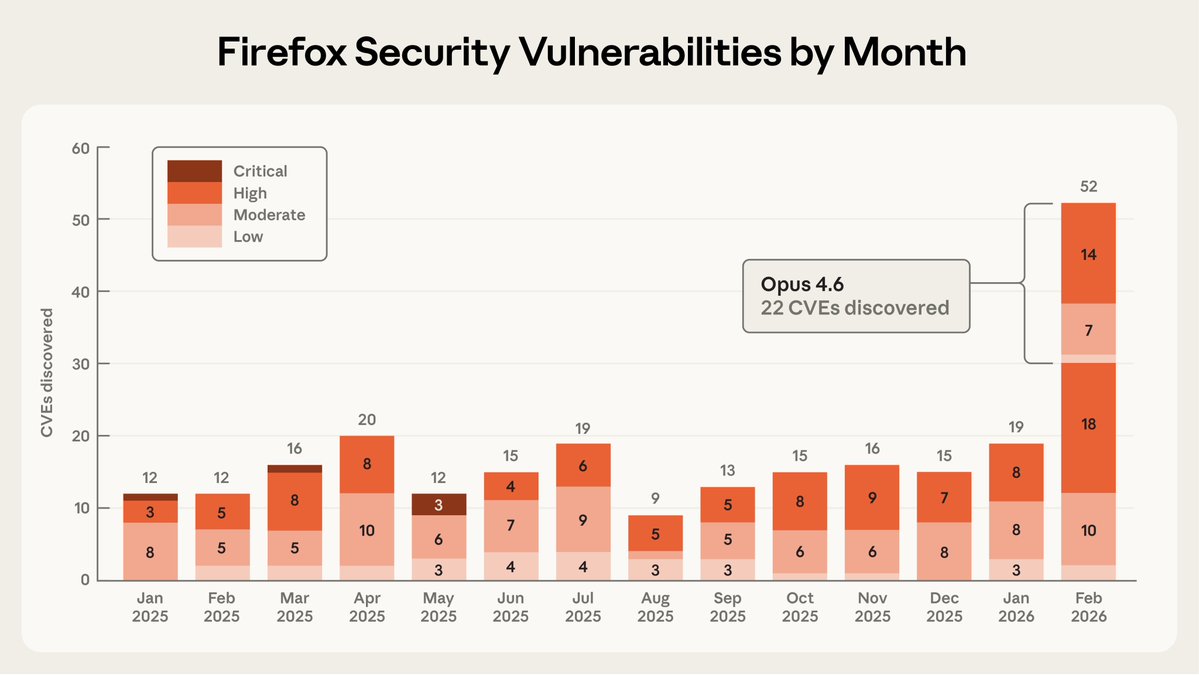
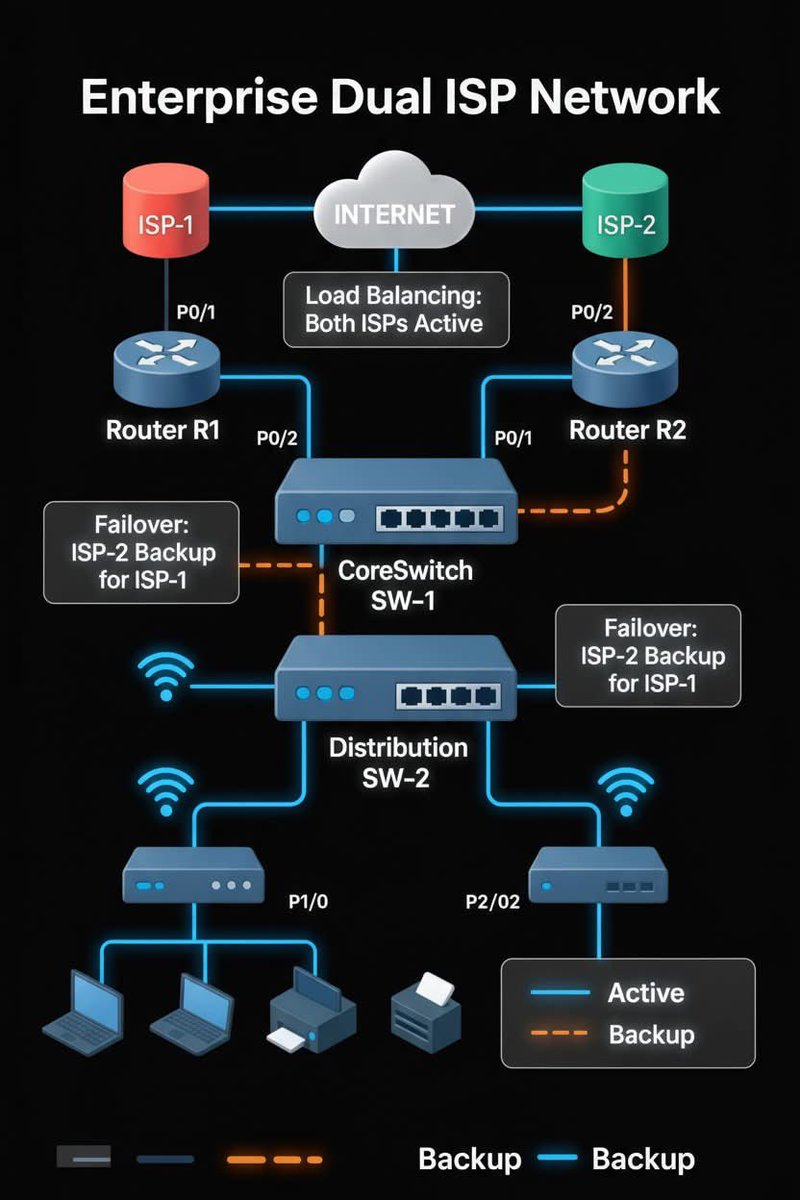
We partnered with Mozilla to test Claude's ability to find security vulnerabilities in Firefox.
Opus 4.6 found 22 vulnerabilities in just two weeks. Of these, 14 were high-severity, representing a fifth of all high-severity bugs Mozilla remediated in 2025.
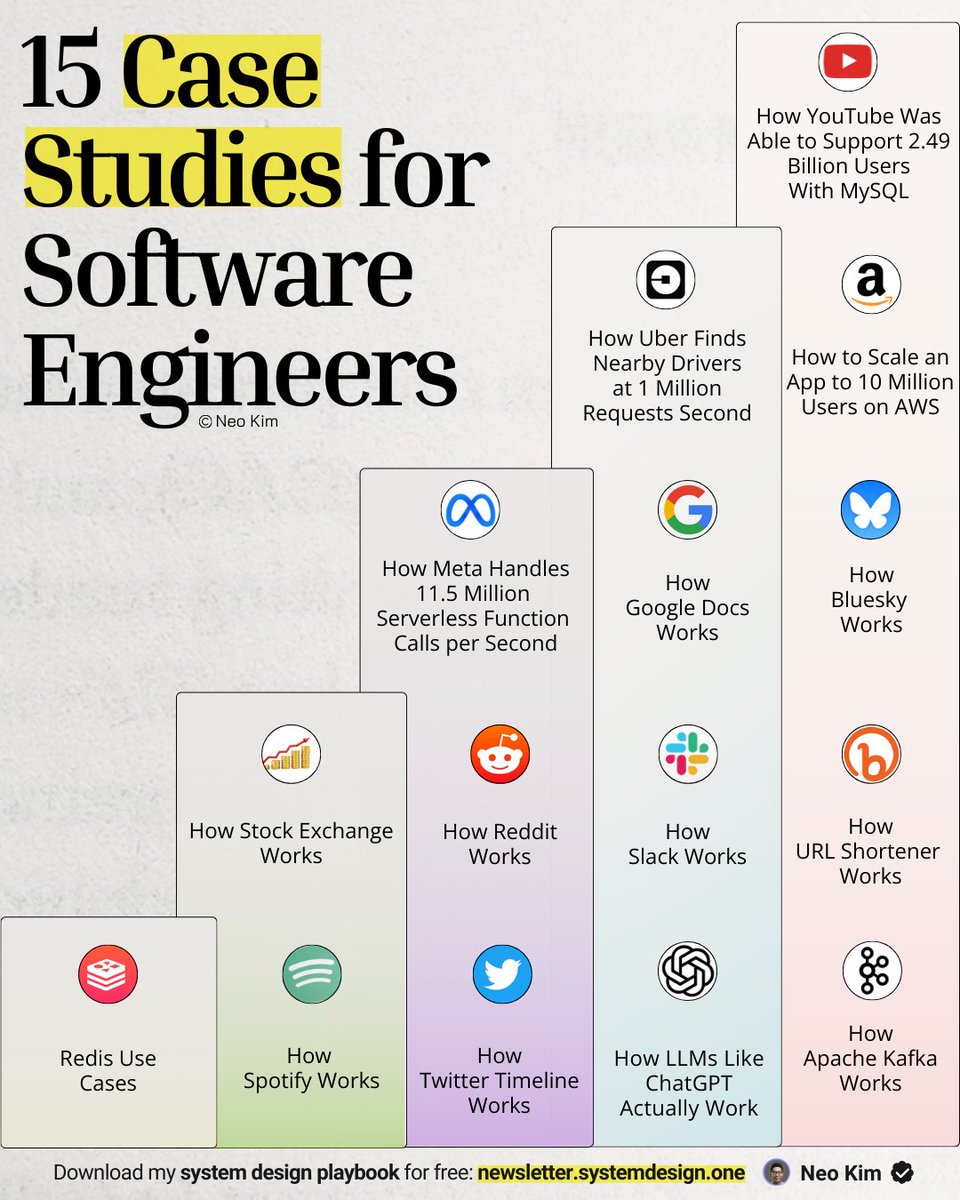
randomly found this repo of 500+ AI Agent industry projects and use cases. you can practice with notebooks and learn their code and architectures. example topics:
→ deep research agent
→ customer service and support
→ content creation and marketing
→ automated trading and finance bot
→ market analysis
it's practical and real world. pick one and test your skills without paying for any courses:
repo: https://t.co/mqQPsiJLqN
How to build a RAG app on AWS!
The visual below shows the exact flow of how a simple RAG system works inside AWS, using services you already know.
At its core, RAG is a two-stage pattern:
- Ingestion (prepare knowledge)
- Querying (use knowledge)
Below is how each stage works in practice.
> Ingestion: Turning raw data into searchable knowledge
- Your documents live in S3 or any internal data source.
- Whenever something new is added, a Lambda ingestion function kicks in.
- It cleans, processes, and chunks the file into smaller units that the model can understand.
- Each chunk is embedded using Bedrock Titan Embeddings.
- The embeddings are stored in a vector database like OpenSearch Serverless, DynamoDB, or Aurora.
- This becomes your searchable knowledge store.
This stage can run continuously in the background, keeping your knowledge fresh.
That said, you need to be strategic about how you reindex your data.
For instance, if you are fetching data from a document and only one character was updated in it, you don’t want to reprocess the entire document every time.
So smart diffing, incremental updates, and metadata checks become important to avoid unnecessary cost and keep ingestion efficient.
> Querying: Retrieving and generating answers:
- A user asks a question through the app.
- The request flows through API Gateway into a Lambda query function.
- The question is embedded with Bedrock Titan Embeddings.
- That embedding is matched against your vector database to fetch the most relevant chunks.
- Those chunks are passed to a Bedrock LLM (Claude or OpenAI) to craft the final answer.
- The response travels back to the user through the same API path.
This pattern ensures the LLM is grounded in your actual data, not model guesses.
This setup is the most basic form of RAG on AWS, but the pattern stays the same even as your system grows.
You can add better chunking, smarter retrieval, caching layers, orchestration, streaming responses, eval pipelines, or multi-source ingestion, and the architecture still holds.
I have shared a visual that depicts 8 RAG architectures in the replies!
Also, the visual in this tweet on building a RAG app on AWS is inspired by ByteByteGo's post on a similar topic. I added more context to it for explainability.
Many DevOps Engineers don’t fully understand how DevOps and GitOps CI/CD pipelines differ.
In a DevOps CI/CD pipeline, everything runs in one flow from code commit, tests, build, image creation, to direct deployment into the Kubernetes cluster.
It is fast and centralized but tightly couples deployment with the CI process, leaving little room for separation or control.
In GitOps pipeline, CI handles tests and builds, but deployment happens through Git commits. A controller syncs changes from the repo to the cluster.
Here, I’ve made this to help you better understand.
57K+ read my DevOps and Cloud newsletter: https://t.co/WBucLdwLhJ
What do we cover:
DevOps, Cloud, Kubernetes, IaC, GitOps, MLOps
🔁 Consider a Repost if this is helpful
Production Microservices Stack
1. API Gateway
Single entry point for all client requests. Handles routing, filtering, and load balancing.
2. Service Registry
Directory of all available services. Gateway uses this for service discovery. Examples: Consul, Eureka, Zookeeper.
3. Service Layer
Individual microservices handling specific business functions.
4. Authorization Server
Secures microservices and manages access control.
5. Data Storage
Application databases.
6. Distributed Caching
Improves performance through caching layers.
7. Async Communication
Message queues enable asynchronous service communication.
8. Metrics Visualization
Services publish metrics to Prometheus, visualized through Grafana dashboards.
9. Log Aggregation
Centralized logging using ELK stack.
--
We just launched the all-in-one tech interview prep platform, covering coding, system design, OOD, and machine learning.
Launch sale: 50% off. Check it out: https://t.co/UOVWx00SOE
A web service is a standarized way for software apps to communicate with each other over a network.
And in this tutorial, Kumar teaches you how they work and why they're important.
You'll learn about two main types of web services - SOAP and REST - and when to use each one in your projects.
https://t.co/m6DRR7eghl
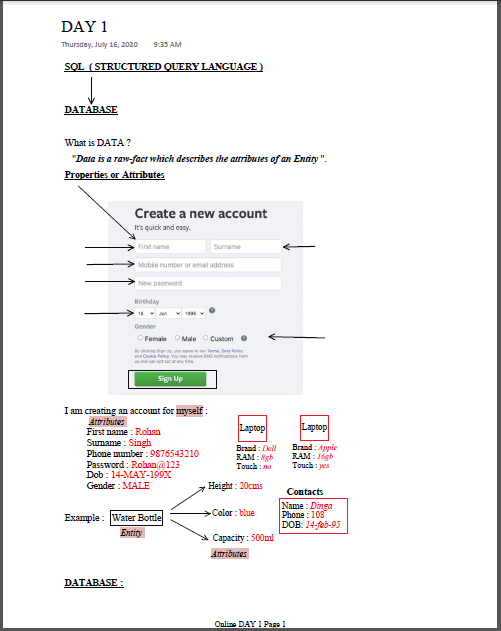
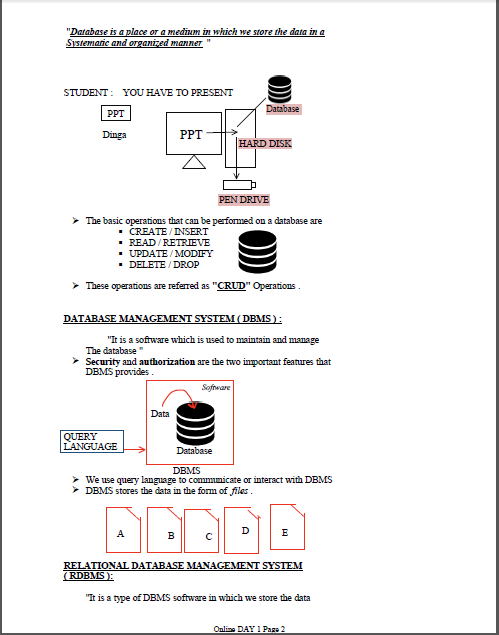
𝗠𝗮𝘀𝘁𝗲𝗿 𝗦𝗤𝗟 𝗳𝗿𝗼𝗺 𝗦𝗰𝗿𝗮𝘁𝗰𝗵 𝗶𝗻 𝟮𝟬𝟮𝟱!
SQL is the foundation of every data-driven career — from 𝗗𝗮𝘁𝗮 𝗔𝗻𝗮𝗹𝘆𝘀𝗶𝘀 to 𝗕𝗮𝗰𝗸𝗲𝗻𝗱 𝗗𝗲𝘃𝗲𝗹𝗼𝗽𝗺𝗲𝗻𝘁 and 𝗔𝗜 𝗘𝗻𝗴𝗶𝗻𝗲𝗲𝗿𝗶𝗻𝗴.
I’m sharing my Day-wise SQL Notes for FREE📘
What’s inside 👇
✅ Day 1–22: Complete SQL concepts explained step-by-step
✅ CRUD Operations, Constraints, Joins, Subqueries & Functions
✅ Real examples + Assignments for practice
✅ Perfect for beginners & interview prep
Want your copy? Follow these 3 simple steps 👇
1️⃣ Follow me (so I can DM you)
2️⃣ Like & Repost this post
3️⃣ Comment “SQL” below
#SQL #Database #Learning #DataScience #Programming #BackendDevelopment #FreeResources #Coding #LearnSQL
Why do RAG systems feel like they hit a ceiling?
I've been diving into @helloiamleonie's latest article on agent memory, and it provided so much clarity into the current evolution of RAG systems.
The progression from RAG → Agentic RAG → Agent Memory isn't about adding features. It's about changing 𝗵𝗼𝘄 𝗶𝗻𝗳𝗼𝗿𝗺𝗮𝘁𝗶𝗼𝗻 𝗳𝗹𝗼𝘄𝘀.
𝗥𝗔𝗚: 𝗥𝗲𝗮𝗱-𝗢𝗻𝗹𝘆, 𝗢𝗻𝗲-𝗦𝗵𝗼𝘁
Traditional RAG is like a library where you can only check out books. You retrieve context, generate a response, done. The knowledge base is static - updated offline, queried online. Simple, but inflexible.
𝗔𝗴𝗲𝗻𝘁𝗶𝗰 𝗥𝗔𝗚: 𝗦𝗺𝗮𝗿𝘁 𝗥𝗲𝗮𝗱-𝗢𝗻𝗹𝘆
Agentic RAG adds intelligence to retrieval. The agent decides:
• Do I even need external information?
• Which knowledge source should I query?
• Is this retrieved context actually relevant?
Still read-only, but way more sophisticated about 𝘸𝘩𝘢𝘵 it reads.
𝗔𝗴𝗲𝗻𝘁 𝗠𝗲𝗺𝗼𝗿𝘆: 𝗥𝗲𝗮𝗱-𝗪𝗿𝗶𝘁𝗲 𝗢𝗽𝗲𝗿𝗮𝘁𝗶𝗼𝗻𝘀
Agent memory introduces write operations during inference. The agent can now:
• Store new information from conversations
• Update existing knowledge
• Create memories from important events
• Build personalized context over time
Your AI assistant doesn't just retrieve your preferences - it 𝗹𝗲𝗮𝗿𝗻𝘀 them through interaction. It's not just searching a static knowledge base - it's actively building one.
Leonie breaks this down with code examples showing how WriteTool extends the SearchTool paradigm. The agent gets tools for storing, updating, even consolidating memories.
But (and this is important) - she's also super clear this is a simplified mental model. Real agent memory systems need sophisticated memory management: deciding what to remember, what to forget, how to handle memory corruption. It's messier than it looks 😅
The article also touches on different memory types - procedural ("use emojis"), episodic ("user mentioned trip on Oct 30"), semantic ("Eiffel Tower is 330m tall") - potentially stored in separate collections.
I love this framing because it shows how each evolution solved specific limitations. RAG was too rigid. Agentic RAG made retrieval smarter. Agent memory made the whole system adaptive.
Full article here: https://t.co/m5NDlm566c
If I had to build auth,
here's what I'd consider:
Building auth properly means you need to:
1) Integrate with OAuth providers
2) Build signup, password reset, CAPTCHA flows
3) Support SAML, SSO, account recovery
4) Implement rate-limiting and 2FA
5) Detect fraud and secure sessions
6) Handle edge cases when switching auth methods
7) Build internal tools for customer support
8) Ensure CSRF protection and secure cookie handling
9) Support passkeys and biometric login (WebAuthn)
10) And more ...
It's a lot. Especially to be enterprise-ready.
That's why auth and identity providers are so popular. And they're the route I'd take.
WorkOS is one of the most popular choices among SaaS teams.
It offers a free tier up to 1 million users, and implementation is super simple with AuthKit.
Try it out: https://t.co/VIrHtkKrhG
Thanks to @WorkOS for making auth simple and fast, and partnering on this post.
What else should make the auth JTBD list?
--
🔖 Save for later • ♻️ Repost to help others
🙋🏻♀️ Follow Nikki Siapno • Turn on notifications 🔔
Virtualization vs Containerization
Virtualization creates multiple virtual machines (VMs) on a single physical server. Each VM runs its own complete operating system and uses a hypervisor to manage hardware resources.
Containerization packages applications with their dependencies into lightweight, portable containers that share the host operating system kernel.
Here are the four deployment patterns:
1. Bare Metal
Applications run directly on the physical server's operating system. No virtualization layer exists between the application and hardware. This provides maximum performance and lowest latency, but offers limited isolation and harder resource management.
2. Virtual Machines
A hypervisor creates multiple VMs on one physical server. Each VM includes a complete guest operating system, consuming significant memory and CPU overhead. VMs provide strong isolation between workloads but require more resources and longer startup times.
3. Containers
A container runtime (like Docker) runs containers that share the host OS kernel. Containers include only the application and its dependencies, not a full operating system. This makes them lightweight, fast to start, and resource-efficient compared to VMs.
4. Containers on VMs
Containers run inside virtual machines, combining both technologies. The VM provides hardware-level isolation while containers enable efficient application packaging. This hybrid approach is popular in cloud environments where you need both security isolation and operational efficiency.
--
We just launched the all-in-one tech interview prep platform, covering coding, system design, OOD, and machine learning.
Launch sale: 50% off. Check it out: https://t.co/UOVWx00SOE
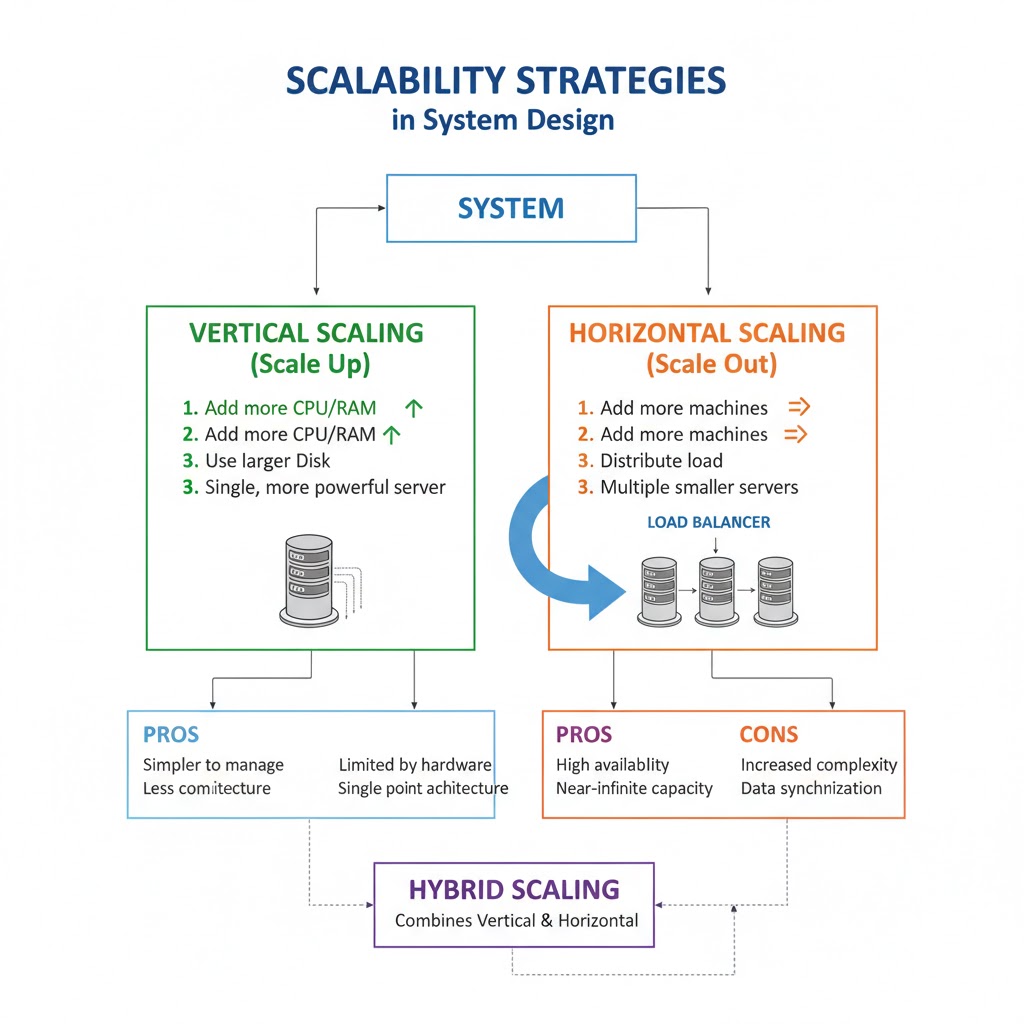
SCALABILITY STRATEGIES IN SYSTEM DESIGN
→ Scalability is the system’s ability to handle increased load without compromising performance or reliability.
→ It ensures that as users, data, or requests grow, the system continues to operate efficiently.
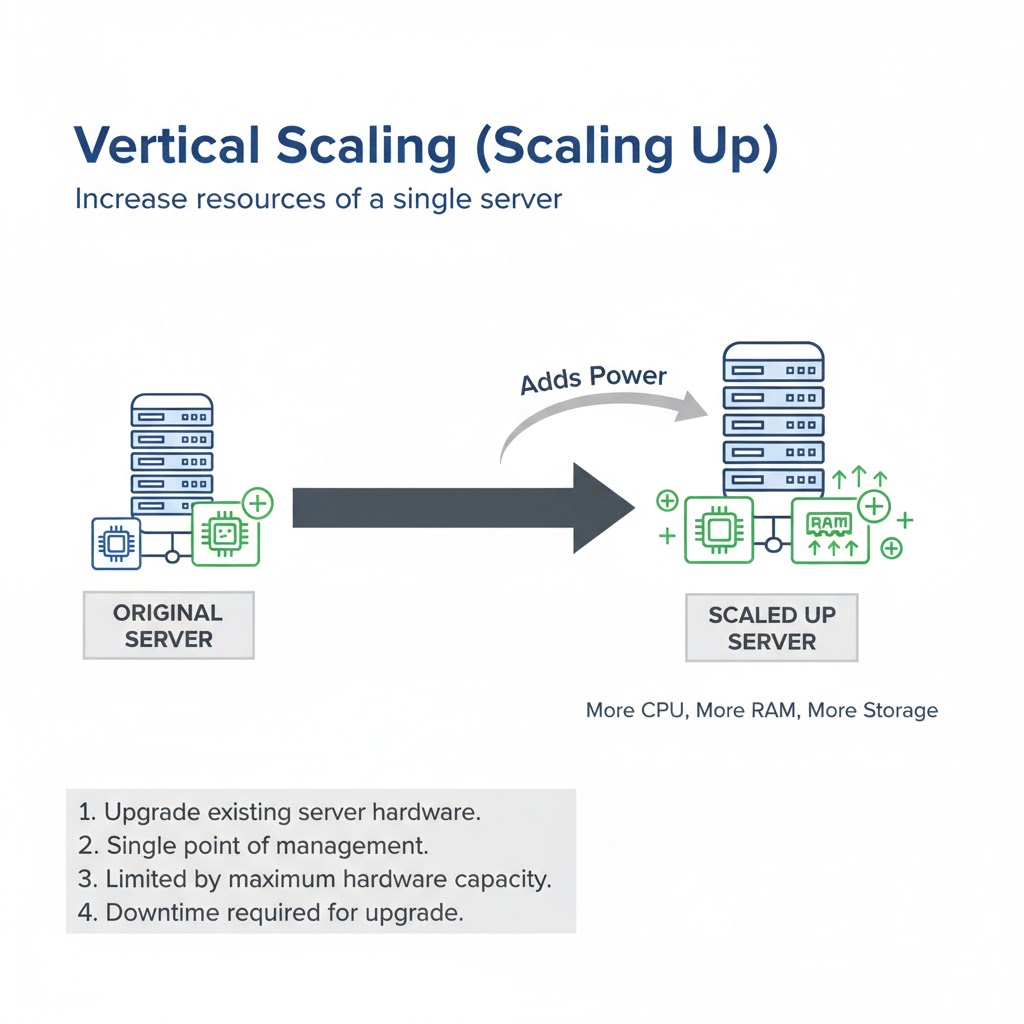
→ 1. VERTICAL SCALING (SCALE UP)
→ Increase resources of a single server (CPU, RAM, Storage)
→ Simple to implement — no code changes required
→ Limited by the maximum capacity of hardware
→ Used for small to medium systems before distributed scaling
Example: Upgrading a database server from 8GB RAM to 64GB RAM
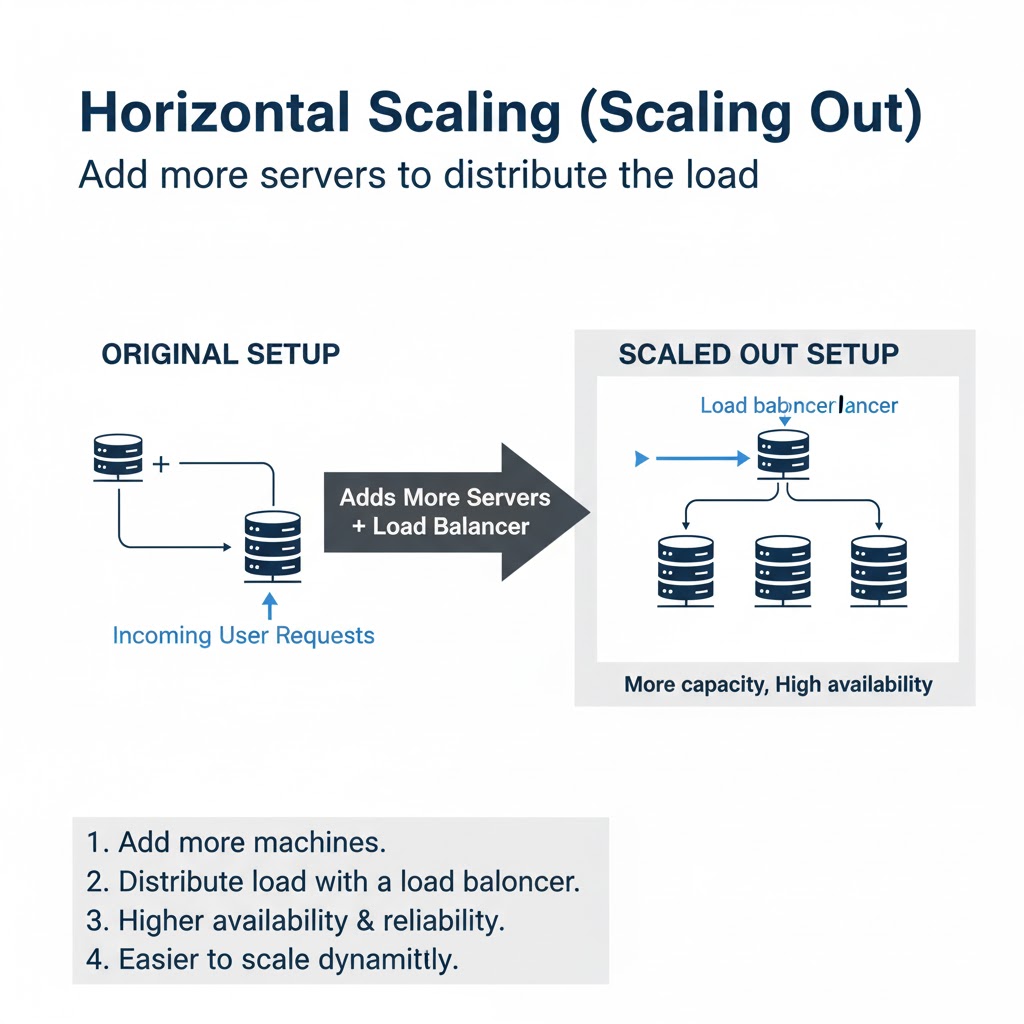
→ 2. HORIZONTAL SCALING (SCALE OUT)
→ Add more servers or nodes to handle increasing traffic
→ Enables load distribution and redundancy
→ Common in cloud-based and distributed architectures
→ Managed via load balancers and service discovery systems
Example: Adding more instances of web or database servers behind a load balancer
→ 3. DATABASE SCALING
→ Read Replicas:
→ Multiple read-only copies of a database improve read performance
→ Write Master:
→ A single master node handles all writes to maintain consistency
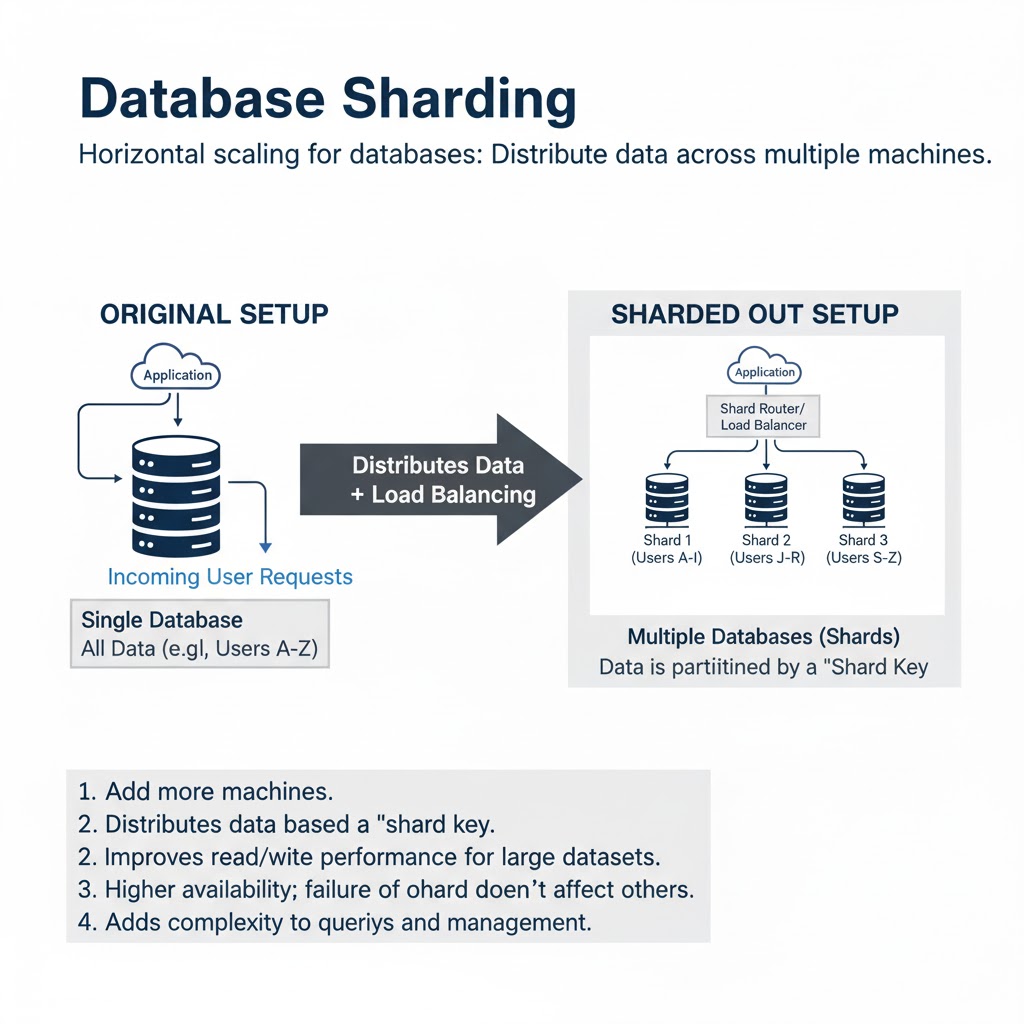
→ Sharding:
→ Data divided across multiple databases (shards) based on user ID or region
→ Partitioning:
→ Divides large tables logically or physically to enhance query speed
→ 4. CACHING STRATEGIES
→ Store frequently accessed data in memory to reduce database load
→ Types of Caches:
→ Application-level Cache (in-memory, e.g., Node.js or Java cache)
→ Distributed Cache (e.g., Redis, Memcached)
→ CDN Cache (e.g., Cloudflare, Akamai) for static content
→ Reduces latency and enhances response time
→ 5. LOAD BALANCING
→ Distributes incoming traffic across multiple servers
→ Prevents overload and improves fault tolerance
→ Can use algorithms like Round Robin, Least Connections, or IP Hash
→ Common tools: Nginx, HAProxy, AWS ELB, Google Cloud Load Balancer
→ 6. ASYNCHRONOUS PROCESSING
→ Offload heavy or time-consuming tasks to background workers
→ Implemented using message queues (e.g., Kafka, RabbitMQ, SQS)
→ Improves request response time and overall scalability
→ 7. AUTO-SCALING
→ Automatically adjusts resources based on demand
→ Implemented through cloud services like AWS Auto Scaling or Kubernetes Horizontal Pod Autoscaler
→ Ensures cost efficiency and performance balance
→ 8. CONTENT DELIVERY NETWORK (CDN)
→ Delivers static assets (images, CSS, JS) from geographically distributed edge servers
→ Reduces latency and server load
→ Enhances global scalability for web applications
→ 9. DATA PARTITIONING & DISTRIBUTION
→ Split large datasets across nodes or regions
→ Reduces contention and enhances query performance
→ Used in distributed databases (Cassandra, MongoDB, DynamoDB)
→ 10. EVENT-DRIVEN & MICROSERVICES SCALING
→ Microservices independently scale based on their specific load
→ Event-driven systems scale automatically with demand
→ Enables fine-grained resource allocation and failure isolation
→ Tip
→ Vertical Scaling → quick but limited
→ Horizontal Scaling → distributed and flexible
→ Caching + Load Balancing → boosts efficiency
→ Auto-Scaling + Asynchronous Processing → dynamic resource management
→ Sharding + Replication → ensures data scalability
Grab the full System Design Handbook:
https://t.co/aE1KNO717x