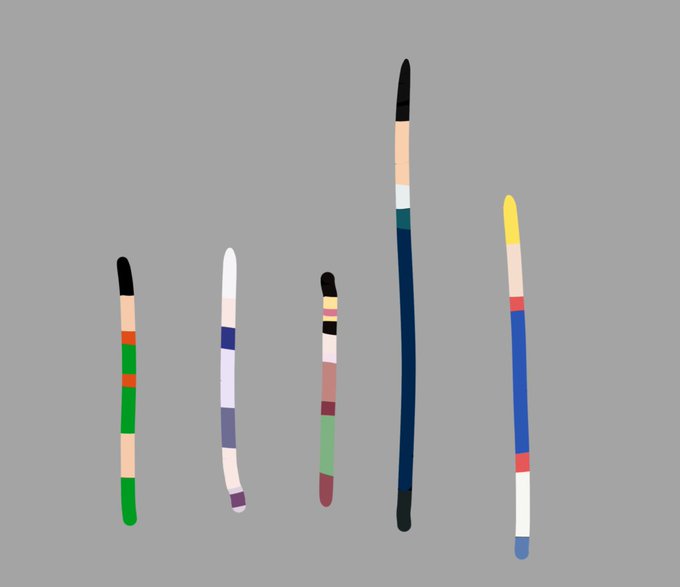
Buying a gaming mouse without measuring your hand size is a fast track to wrist fatigue and ruined muscle memory.
We mapped out the official 2026 hand-size chart to help you find your perfect hardware fit. Full guide via the link in our bio.
#GamingMouse#RAWM
🚨 PC GAMERS 🚨 The hidden Windows MPO tweak is secretly causing stutters input lag and bad 1% lows in 2026
Most gamers never touch registry stuff and this quietly ruins smoothness
1 Win+R → regedit
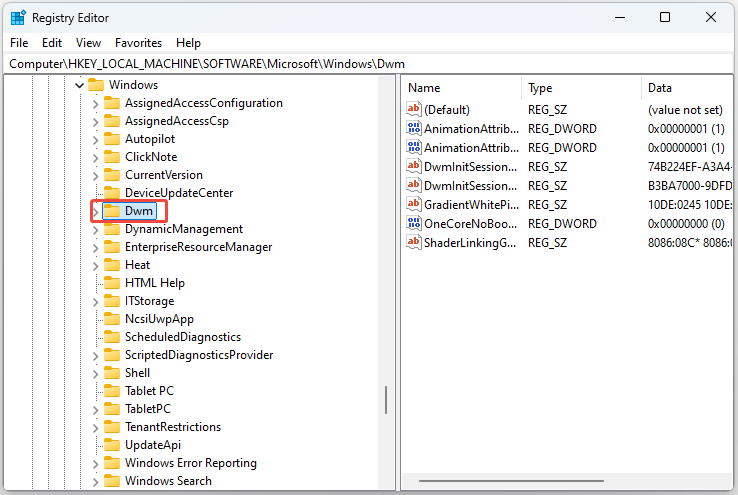
2 Go to HKEY_LOCAL_MACHINE\SOFTWARE\Microsoft\Windows\Dwm
3 Right click → New → DWORD (32-bit) Value
4 Name it OverlayTestMode → value 5
5 Restart PC
Smoother gameplay zero micro-stutters 🔥
Fixed it on my setup — what game did you test? Drop before/after numbers below 👇
your GPU is probably running capped right now and you've never known about it
there's a setting called Resizable BAR (NVIDIA) / Smart Access Memory (AMD) that lets your CPU access your full GPU memory at once instead of in tiny 256MB chunks — and most people have never turned it on
free FPS. no downloads. takes 5 minutes. here's the full guide:
CHECK IF IT'S ALREADY ON
🟢 NVIDIA — right-click desktop → NVIDIA Control Panel → System Information (bottom left) → look for "Resizable BAR" → if it says Yes you're good
🔴 AMD — open Radeon Software → Home dashboard → bottom left → "Smart Access Memory" → if it says Enabled you're good
if it's off or missing, keep reading
HOW TO TURN IT ON — BIOS
restart your PC → press DEL or F2 as it boots to enter BIOS
→ find "Above 4G Decoding" → enable this FIRST
→ find "Resizable BAR" (NVIDIA) or "Smart Access Memory" (AMD) → enable
→ make sure CSM / Legacy Mode is OFF
→ Save & Exit → reboot
if Windows won't boot after doing this, your drive is formatted as MBR instead of GPT — search "convert MBR to GPT Windows" it's fixable in 10 mins with no data loss
VERIFY IT ACTUALLY WORKED
🟢 NVIDIA — back in Windows, NVIDIA Control Panel → System Information → Resizable BAR = Yes ✅
🔴 AMD — Radeon Software → Home → Smart Access Memory = Enabled ✅
still showing disabled after BIOS changes? update your motherboard BIOS firmware + GPU drivers to latest. that fixes it 95% of the time.
DOES YOUR GAME BENEFIT? real breakdown:
✅ Fortnite — yes, open world asset streaming hits different with this on
✅ Warzone — yes, massive maps mean constant VRAM transfers, this smooths it out
✅ Apex Legends — yes, meaningful FPS gains reported across multiple setups
✅ Black Ops 6 — yes, CPU-heavy engine responds well
✅ Battlefield series — one of the strongest use cases, big maps + destruction engine = big gains
✅ Valorant — marginal but no reason to leave it off
⚠️ Rainbow Six Siege — test it yourself, some benchmarks show a slight performance drop on this specific title. turn it off if your frames get worse.
WHO THIS IS FOR
✅ RTX 30 or 40 series GPU
✅ RX 6000 or 7000 series GPU
✅ Intel 10th gen+ or Ryzen 3000+ CPU
✅ Motherboard with a BIOS update from 2021 or newer
❌ GTX 10 or 16 series — not supported
❌ RX 500 series or older — not supported
❌ Laptop users — check your laptop manufacturer's support page, it depends on your specific model
❌ nothing breaks from checking — if your hardware doesn't support it, the option simply won't appear
this is the one setting that's been sitting in your BIOS doing nothing while you spent money on thermal paste and RGB fans
costs $0. takes 5 minutes. works tonight.
RT if your friends are still playing on a capped GPU 🔁
#PCGaming #FPSBoost #ResizableBAR #SmartAccessMemory #Fortnite #Warzone #ApexLegends #BlackOps6 #Battlefield #NvidiaRTX #AMDRadeon #GamingPC #PCOptimization #BIOS #ReBAR #GameReady #GPUPerformance #FPS #RadiantOpti
🚨 THE FREE WINDOWS SETTING COMPETITIVE PLAYERS KEEP SLEEPING ON LOWER INPUT LATENCY IN WARZONE, MARVEL RIVALS, VALORANT, APEX + MORE
Built into Windows 10 and 11. Takes 30 seconds. Required if you use NVIDIA DLSS Frame Generation on RTX 40/50 series.
**Enable Hardware Accelerated GPU Scheduling (HAGS)**
What it does:
→ Moves GPU scheduling off your CPU entirely
→ Reduces average input lag by 1–3ms on supported hardware
→ Improves frame time consistency in CPU heavy moments
→ Required for DLSS Frame Generation on RTX 40/50 series
How to turn it on:
Settings → System → Display → Graphics → Default graphics settings → Toggle HAGS ON → Restart
✅ Enable if you play: Warzone, Marvel Rivals, Valorant, Apex Legends, Black Ops 7, Fortnite + more test and keep if it helps
⚠️ CS2 players: competitive benchmarks show better frametimes with HAGS OFF keep it off
⚠️ 8GB VRAM or less: can cause stuttering at 1440p/4K test carefully
⚠️ OBS streamers with hardware encoding: may cause issues OBS officially flags this
Requires: NVIDIA RTX 20 series+, AMD RX 5000 series+, or Intel Arc. GTX cards not supported.
Drop your GPU + game below 👇 Did it change anything for you?
🚨 Stop letting Windows 11 "park" your background threads mid match. 🚨
If your PC feels snappy at first, but you notice random micro stutters or a "heavy" mouse feel 45 minutes into a session, it isn't your hardware it's the Windows OS Scheduler.
By default, Windows uses EcoQoS (Power Throttling) to shove background processes into a low power state. This is great for office work, but it’s a disaster for competitive gaming. It throttles critical dependencies like Anti Cheat (Ricochet/Vanguard), high polling controller drivers (Flydigi/DS4), and system timers.
When those background threads get "throttled," your 1% lows tank and your system latency spikes. You don't lose average FPS; you lose consistency.
✅ THE "DO IT" LIST (Desktops Only):
High End CPUs: Ryzen 7800X3D/9800X3D or Intel i7/i9 (12th–15th Gen). Essential for Intel "Hybrid" chips to keep game critical tasks off the efficiency cores.
High End GPUs: RTX 4080/4090 or RX 7900 XTX. When your GPU is this fast, you feel every micro delay the CPU makes.
Competitive Edge: If you’re pushing 1000Hz+ polling on your peripherals, you need this to prevent input buffering.
❌ THE "SKIP IT" LIST:
Laptops: Disabling this will trigger thermal throttling and nuke your battery life. Not worth it.
Budget Rigs: If you’re GPU bound (100% GPU usage), this won’t change your gameplay feel.
🛠 THE FIX (Registry Override):
Win + R → regedit → Run as Admin.
Go to: HKEY_LOCAL_MACHINE\SYSTEM\CurrentControlSet\Control\Power
Right click Power → New → Key → Name it PowerThrottling
Inside it, Right click → New → DWORD (32 bit) → Name it PowerThrottlingOff
Set value to 1.
Restart your PC.
This isn't a "hidden secret" it’s a standard OS level policy override used to stabilize frametimes. It makes the FPS you already have feel like butter. 📈🔥
🚨 This Windows tweak has been copy pasted across every gaming optimization guide for years and it has never actually worked
Everybody tells you to set SystemResponsiveness to 0 in the registry for maximum gaming performance. Thousands of guides. Millions of views. One problem.
Microsoft's own documentation says this:
"Values below 10 and above 100 are clamped to 20"
When you set it to 0 Windows reads it, ignores it, and runs at the default value of 20 anyway. You changed nothing. You restarted your PC for nothing. The tweak does not do what anyone claims it does.
Blur Busters confirmed this in February 2026: "Setting this to 0 clamps it to the default value of 20 with the possibility of introducing issues"
━━━━━━━━━━━━━━━━
✅ WHAT ACTUALLY WORKS:
The lowest value Windows will genuinely accept is 10. Setting it to 10 reduces background CPU reservation from 20% to 10%. That is a real change. Small but it actually does something.
→ Win + R → regedit → Run as Admin → HKEY_LOCAL_MACHINE\SOFTWARE\Microsoft\Windows NT\CurrentVersion\Multimedia\SystemProfile → Find SystemResponsiveness → Set to 10 in Decimal → Restart
━━━━━━━━━━━━━━━━
This is why I verify everything against primary sources before posting it. Most optimization content out there is just copy paste with zero research behind it.
More placebo tweaks getting exposed this week 👇
#PCGaming #WindowsTweaks #GamingOptimization #Win11 #Win10 #Warzone #Valorant #CS2 #PCMR
🚨 Windows is secretly hurting your mouse feel in 2026
Even on high-end PCs, background tasks can make your aim feel heavy and movements laggy in Warzone, BlackOps7, Valorant, and CS2.
This 45-second registry tweak gives your game more foreground priority for snappier responsiveness.
✅ Best for:
Competitive players who run Discord + Chrome in the background
❌ Skip if:
You're a heavy multitasker or on an unstable/low-end system
🛠️ THE FIX:
1. Win + R → type `regedit` → Run as Administrator
2. Go to: `HKEY_LOCAL_MACHINE\SYSTEM\CurrentControlSet\Control\PriorityControl`
3. Double-click **Win32PrioritySeparation**
4. Set to **Hexadecimal** → Change value to **26** → OK
5. Restart your PC
⚠️ Create a System Restore Point first (search “Create a restore point”).
Some players use **2A** instead for a more aggressive effect.
Won’t add FPS, but a lot of competitive players report it feels noticeably smoother and more responsive.
Test it and drop your before/after results below 👇
#PCGaming #FPSBoost #WindowsTweaks #RegistryTweak #Win11
"니가 게임하는데에 쓴 노력을 공부에 썼으면 서울대를 갔겠다"
엄마
저는 오버워치를 1500시간을 했고요
오버워치 레벨은 무려 2122레벨인데요
그런데도 여전히 플레티넘이에요
사실 어제 솔큐경쟁돌리다가 4판져서 골드됐어요
티어 분포도 적용하면 6등급일거예요
엄마
6등급으로는 서울대 못 가요
💡 Windows is secretly logging EVERY app you’ve ever run… even after you uninstall it.
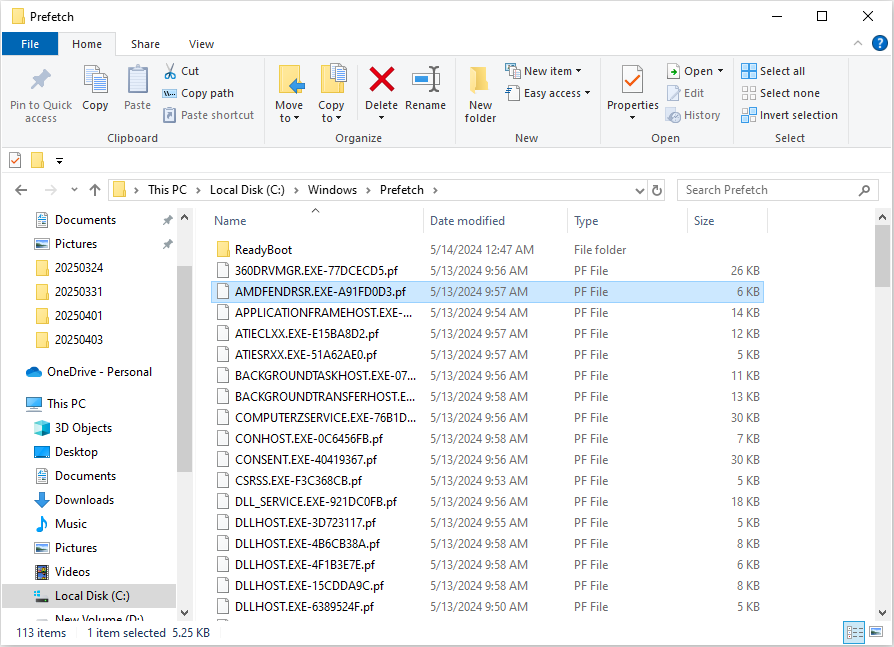
These hidden “ghost records” are called Prefetch files (.pf) and they live in:
C:\Windows\Prefetch
Each file quietly saves:
• Exact date & time you launched the program
• Full path of the .exe
• How many times you’ve run it
Forensic teams use them to prove you opened CCleaner, malware tools, or anything else — even if the drive was “cleaned.” 😱
Privacy move: Clear this folder regularly if you don’t want a permanent activity log.
Who else is wiping their Prefetch files today? Drop a 🔥 if this one surprised you!
#WindowsTips #PCTweaks