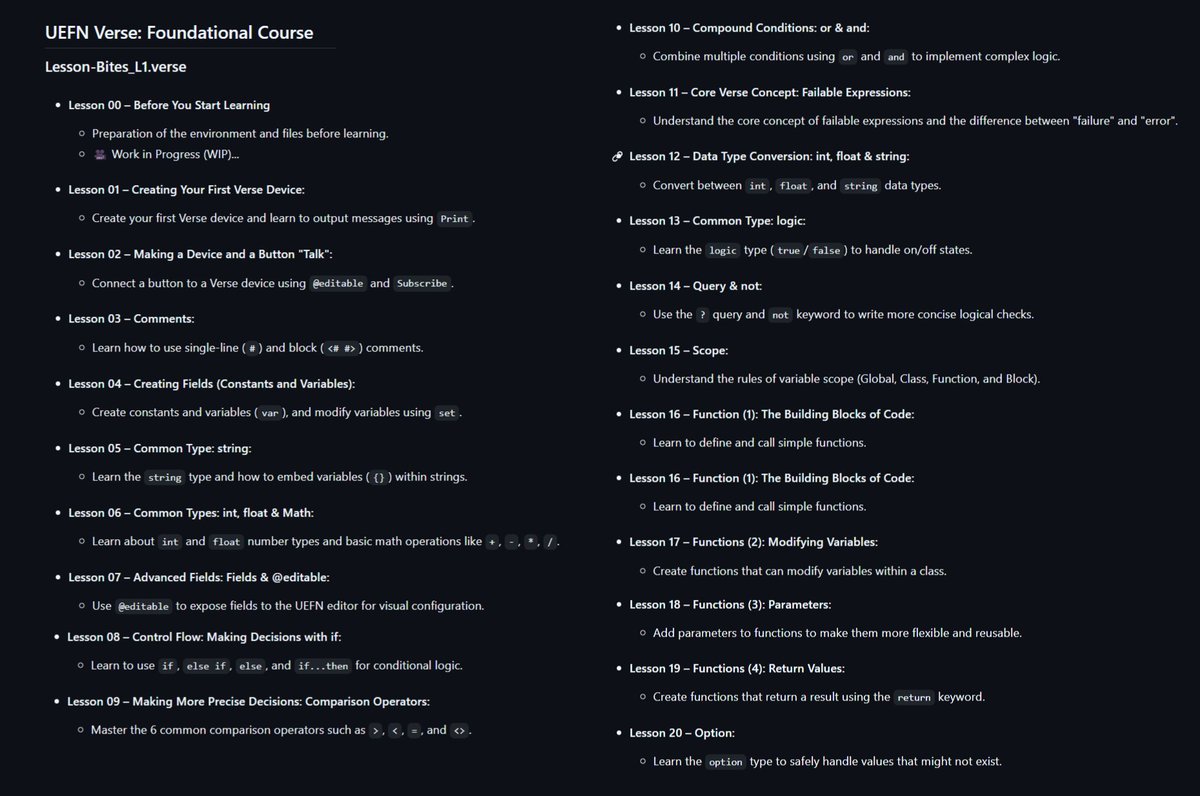
🎉 It's here! The entire UEFN Verse Lesson-Bites Foundational Course is now LIVE!
🍕All 40 text-based lessons are officially released. (Video lessons will be coming in the future).
This free course is designed for creators with zero coding experience.
Dive in, start learning, and help improve the course with your feedback!
🍔What's next? Templates for Persistent Data and a Player Manager will be released soon. Collaborations within the Verse open-source community are welcome!
🔗 GitHub Course: https://t.co/d5mj4iCL0Q
💬 Discord Learning Community: https://t.co/FgAOmLmsP1
#VerseTutorial #Verse #UEFN #FortniteCreative
UEFN Verse SG: Introduction to Scene Graph
This is the first in a series of articles related to the Scene Graph system in UEFN.
https://t.co/Q0TEYLVbMI
#uefn#verse
A 1-billion-parameter motion model trained on NVIDIA CUDA, requiring 8GB of VRAM for real-time operation. It converts webcam or video footage into real-time XYZ skeletal point data and rotation values, enabling rapid creation of 3D animation data.
Scene Graph is native to Verse, so learning Scene Graph is learning Verse. The difference is that it's easier to get started with Scene Graph if you first learn to build creative_devices using Verse.
The official AI Assistant is terrible, full of misinformation. Using Gemini Pro or Grok is relatively better.
#UEFN Scene Graph trick:
You can check if an Entity belongs to a `fort_character` by looping through its components and casting them to `fort_character`
A Review: UEFN Developer Assistant vs. My Custom Gemini "Verse Expert" Gem
Lately, while learning SceneGraph, I've been heavily relying on AI to help explain the new architecture, functions, and application methods. After extensive use, here's my personal conclusion: My custom "Verse Expert" Gem, built with Gemini, is far more effective at solving my problems.
My Experience with UEFN Developer Assistant:
When asking the official assistant for information, I encountered significant inaccuracies. Its answers were often inconsistent, self-contradictory, and—shockingly—it even fed me information related to Unity at one point. A major issue is that it's incredibly lazy. If you provide a short code sample, it will frequently ignore the context you've given unless you explicitly state "please refer to the provided code" in your prompt. This strongly reminded me of my past experiences with ChatGPT.
🍕My AI Journey (ChatGPT to Gemini)
- I was a long-time paid ChatGPT user and relied on several excellent Verse GPTs for coding assistance. However, my experience with post-GPT-5 models got progressively worse, and I eventually canceled my subscription and switched to Gemini.
- Honestly, I didn't think much of Gemini in its early days. It simply couldn't meet my personal needs for precision and functionality. But over time, and after repeated real-world testing, it has evolved to a point where many of its features now meet and even surpass my previous needs and user experience.
~Of course, this is just my personal experience.~
How I Made My "Verse Expert" Gem :
It was surprisingly simple.
I just uploaded the three official Verse API documents and the .verse source files from my own 40-lesson course. Then, I had Gemini itself design a persona for the Gem, and it was done. If you have Gemini Pro, I highly recommend giving it a try, or please share your own superior configurations!
🍔Final Thoughts & My Workflow :
- AI is Ultimately an Assistant: Regardless of the platform, the most common mistakes AI makes are very basic syntax errors, like using () instead of [] in an if statement, or forgetting to use a failable expression where one is needed. For any beginner who has completed my 40-lesson Verse course, these minor errors are not a real issue. The key is to focus not on these small mistakes, but on the code structure, logic, and application methods the AI provides, and whether they fit your needs.
- UEFN Developer Assistant: I will continue to use it, but primarily as a tool for explaining basic official features and information. It might be better suited for this than my Gem, as it's said to have been specially trained on official data. But again, AI is just an assistant.
- My Gemini "Verse Expert" Gem: This is now my primary development assistant. Its main advantages are its long-context input and its superior contextual memory and understanding. But to be honest, I mostly use it to write the small methods I'm too lazy to do myself, like the logic for mathematical calculations, haha.
#UEFN #Verse #Gemini #Gem
Today's attempt to use SceneGraph with animated Skeletal Meshes... ended in failure!
A few weeks ago, I first tried adding an animated Skeletal Mesh to SceneGraph and discovered it wasn't supported. My decision back then was to simply set SceneGraph aside for the time being.
However, the other day, a new idea struck me: what if I could Spawn the Skeletal Mesh asset from within the SceneGraph? So, for the past couple of days, I paused my course creation and project work to do a serious deep dive into SceneGraph.
Here's what I found:
The Result: You absolutely cannot use the SpawnProp function to spawn any creative_prop asset within a SceneGraph environment.
The Reason:
SceneGraph and Creative Devices are two fundamentally different architectures. This means their methods and limitations are very different. SpawnProp is a function of the Creative Device framework and is simply incompatible with the SceneGraph environment.
The Silver Lining:
Although I didn't achieve my main goal, the exploration was still incredibly valuable. My new project will definitely be using SceneGraph for some of its features, and the biggest benefit is the massive amount of time it saves.For example, my old approach would have required me to place 260 individual buttons in the scene, then duplicate and link them to numerous Creative Devices. Now, with a single SceneGraph entity, I can completely bypass all that tedious work of placing buttons and wiring up devices.
🍕To put it another way, a traditional Creative Device is like a "Device HUB." You connect various devices to this HUB, which allows you to build complex logic inside it. SceneGraph, on the other hand, lets you encapsulate components like buttons directly within an entity.
The current limitation, however, is that Button seems to be the only interactive component available. This means many applications will still require a hybrid approach, combining SceneGraph with Creative Devices.
🍔This is just what I've learned so far. I'll be sure to share more updates as I dive deeper in the future.
#UEFN #Verse #SceneGraph #gamedev #indiedev
Do you often `Sleep` in your `OnBegin` functions because you are waiting for something to initialize? ⌛️
That's not always ideal... 👎
Lazy Initialization can help! 🦸♂️
Learn how in just 4 minutes! #UEFN#Verse https://t.co/f7tcb1uJkd
@giovafncreative Wow! The effect is amazing!
Thanks to @giovafncreative, this method is very simple~
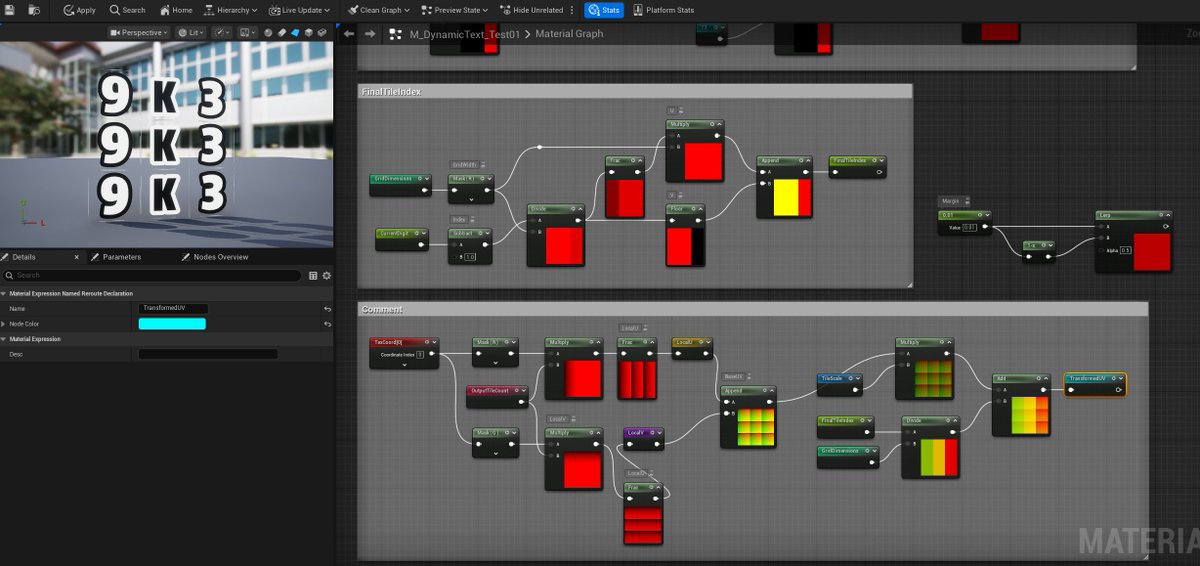
Friends who are encountering white border issues while making dynamic texture atlases can give this a try!
I haven't written any Verse code lately; all my time has been consumed by dealing with Materials.
Learning Materials is so painful for me right now. I bought an asset to speed things up, but it didn't fit my needs, so in the end, I have to learn and create it myself. The one thing that was supposed to accelerate my work is now where I'm completely stuck! Damn it! 🤣
And I still don't know how to properly remove the white border that appears on my combined UVs...
#UEFN #UnrealEngine #indiedev