day 8 of 30 👩💻
Task: recreate this film listing page. The page contains a list of film titles arranged in rows, with a single image fixed in the centre of the screen.
as the user scrolls through the list, the image should automatically update to match the film title currently in view. the image stays fixed in place while the content scrolls.
use whatever works for you. same design, your own approach.
quote with your version when you're done
Note: Focus on the desktop only!
Day 7 of 30👩💻
Task: recreate this gallery page
Interaction: when you click any image on the left, it should replace the big image on the right. the active image should also have a visible border so it’s clear which one is currently selected.
deadline: 18 hours
use whatever works for you. same design, your own approach.
quote with your version when you're done👇
day 6 of 30 👩💻
Task: recreate this photo leadge page. the photos should be draggable... pick up any photo and move it anywhere on the board.
on mobile, figure out the interaction (Thinkkkk)!
deadline: 18 hours
use whatever works for you. same design, your own approach.
quote with your version when you're done 👇
day 6 of 30 👩💻
Task: recreate this photo leadge page. the photos should be draggable... pick up any photo and move it anywhere on the board.
on mobile, figure out the interaction (Thinkkkk)!
deadline: 18 hours
use whatever works for you. same design, your own approach.
quote with your version when you're done 👇
5 days in ✅ https://t.co/xsQurlIrSX
Figuring out how to combine plan hover states with a monthly/yearly toggle without creating conflicting interactions had me rethinking life choices.
5 days in ✅ https://t.co/xsQurlIrSX
Figuring out how to combine plan hover states with a monthly/yearly toggle without creating conflicting interactions had me rethinking life choices.
day 5 of 30👩💻
Task: recreate this pricing page. Today's challenge is focused on interactions.
1. the monthly/yearly toggle should work properly. when users switch between both options, the prices should update
2. on hover, each card should transform with its own colour as seen in image 2
deadline: 18 hours
use whatever works for you. same design, your own approach.
quote with your version when you're done 👇
Weekend well spent.
Caught up on Day 3 and Day 4 of @IwuezeAmarachi@Framer challenge. I'm behind schedule, but every Design is getting done.
No skipping days.
https://t.co/rihX6g1eV0
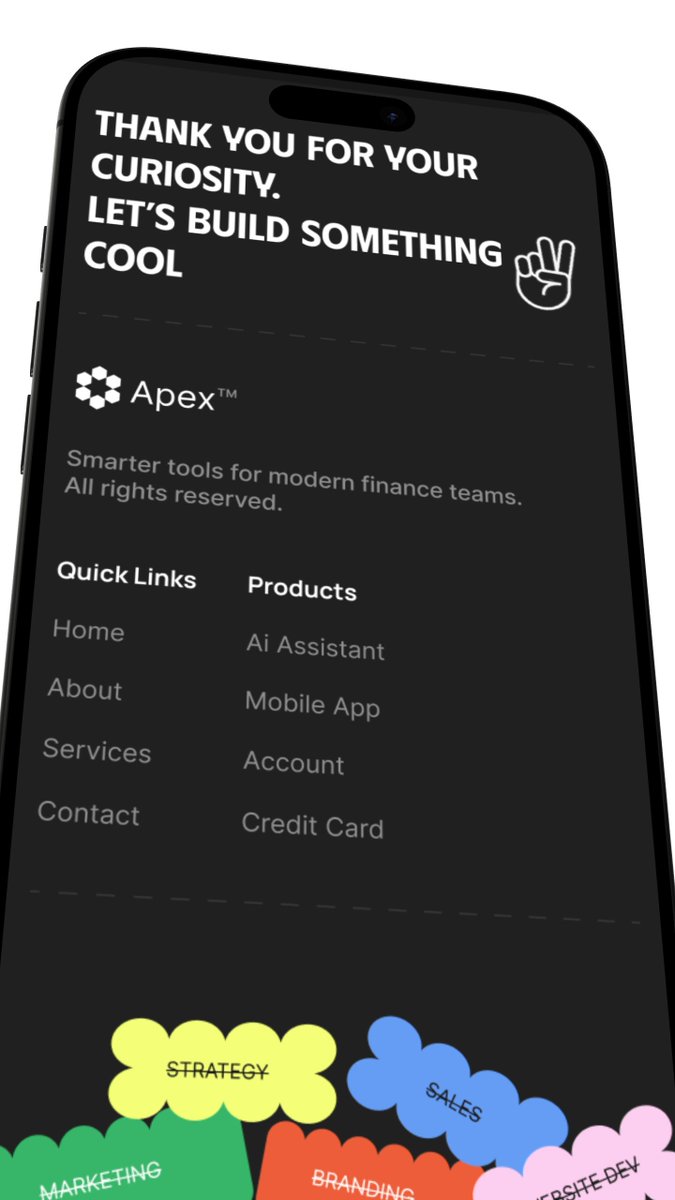
day 4 of 30👩💻
Task: recreate this Apex footer. When the page loads, the blob tags at the bottom should float in one by one with a slight delay instead of appearing all at once.
when you hover on each blob, it should jiggle slightly and the text should change from crossed-out to normal.
deadline: 18 hours
use whatever works for you. same design, your own approach.
quote with your version when you're done 👇
Weekend well spent.
Caught up on Day 3 and Day 4 of @IwuezeAmarachi@Framer challenge. I'm behind schedule, but every Design is getting done.
No skipping days.
https://t.co/rihX6g1eV0
day 3 of 30 👩🏽💻
Task: recreate WEME Hero section page. When the page loads, each card should appear one by one with a slight delay and on hover, the card should slide up and cast a shadow on the cards behind it.
deadline: 18 hours
use whatever works for you. same design, your own approach.
quote with your version when you're done 👇🔥
last week we launched Koji, @brilliantorg 's math and coding tutor.
one of my favorite little design details is a dynamic glow effect that visually indicates when Koji is talking.
to make it happen, we wrote a script to databind the audio waveform of Koji's voice, then built a preview environment that allowed us to fine-tune the effect before handing off to developers.
you can read more about the process below