If you want to get dangerously good at system design, learn these concepts:
1 Scalability
2 Availability
3 Reliability
4 Latency
5 Throughput
6 Database
7 SQL vs NoSQL
8 Load Balancing
9 Caching
10 Cache Invalidation
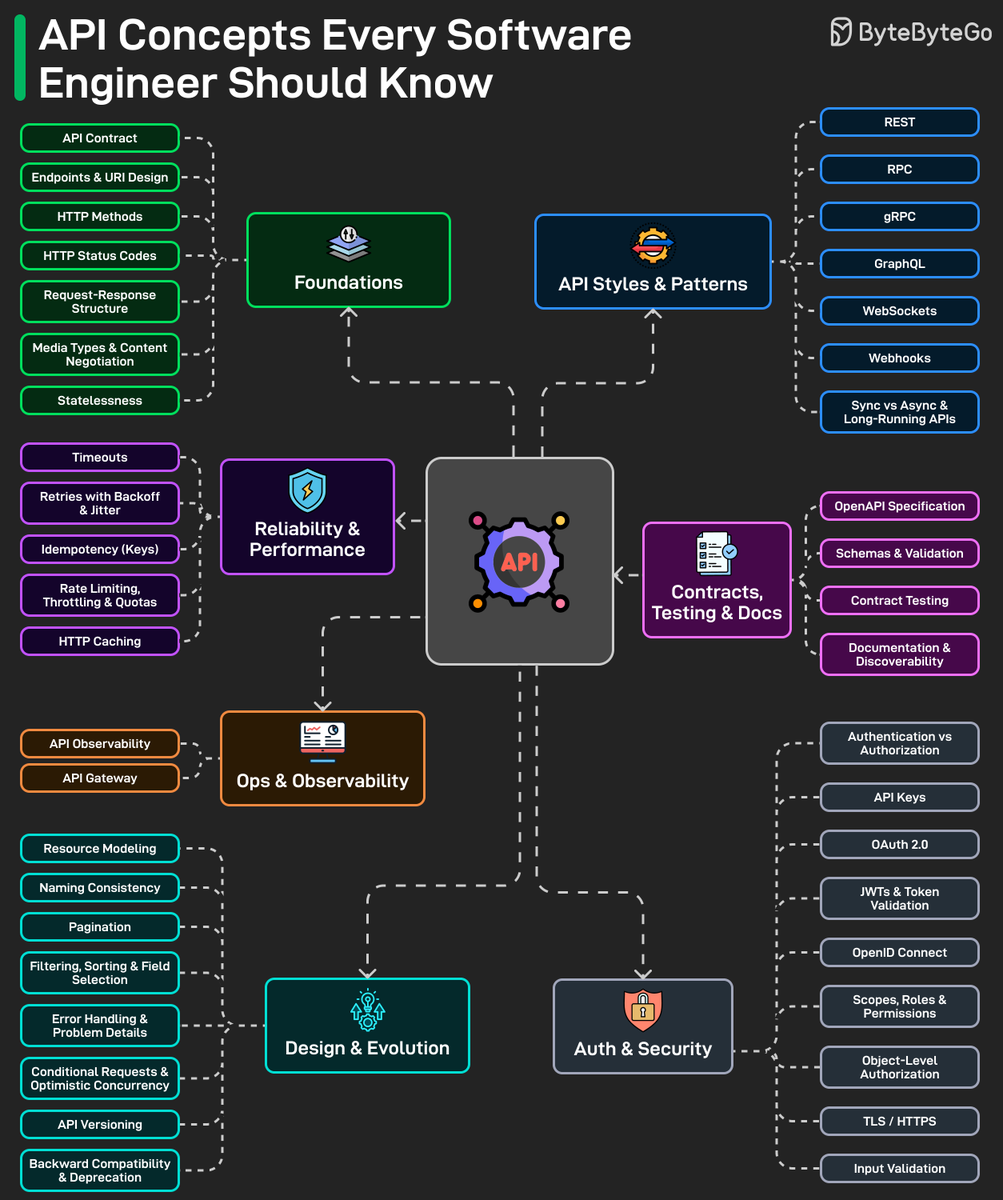
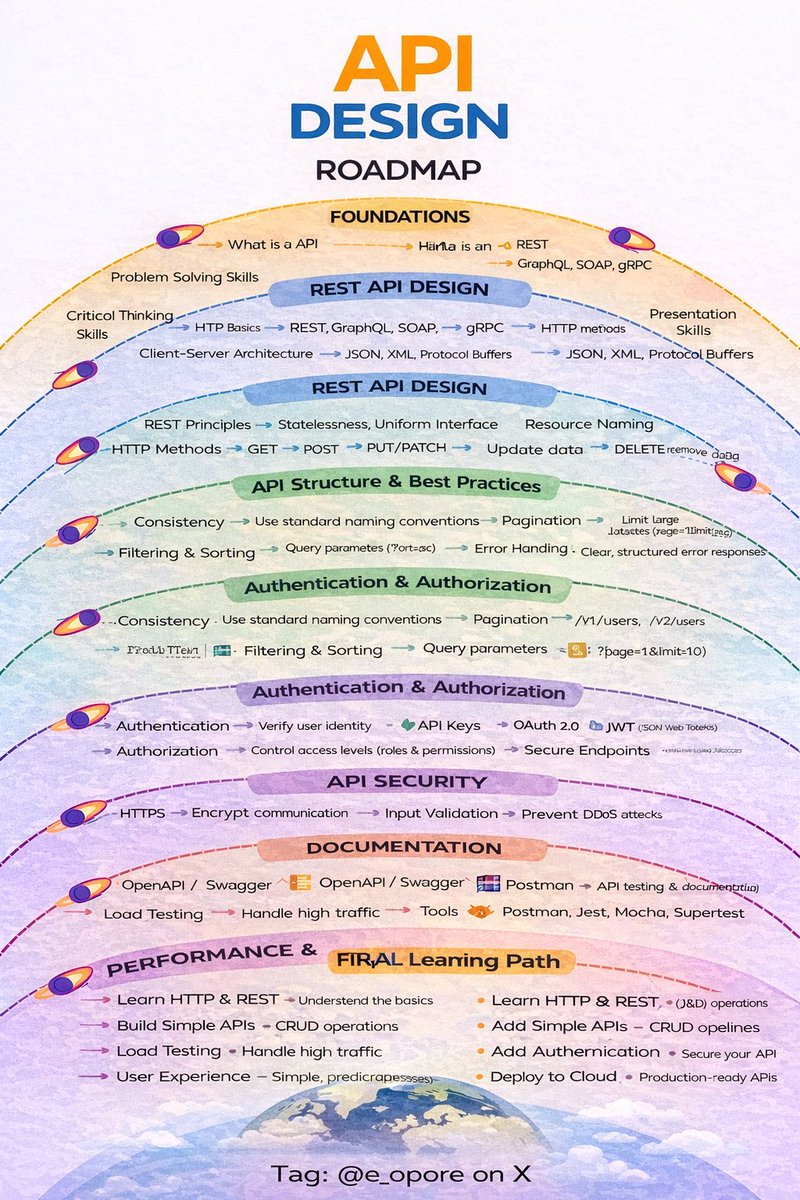
11 API Design
12 REST
13 GraphQL
14 gRPC
15 Authentication
16 Fault Tolerance
17 High Availability
18 CAP Theorem
19 Consistency Models
20 Replication
21 Erasure Coding
22 Consensus
23 Leader Election
24 Secrets Management
25 RBAC
26 Sharding
27 Indexing
28 Denormalization
29 ACID
30 BASE
31 Event-Driven
32 Message Queue
33 Pub/Sub
34 Sync vs Async
35 Idempotency
36 Bulkhead
37 Retry Logic
38 Timeout
39 Service Discovery
40 API Gateway
41 Blue-Green Deployment
42 Canary Release
43 Feature Flags
44 Observability
45 Logging
46 Correlation ID
47 Monitoring
48 Alerting
49 Full-Text Search
50 Time Series
(...and many more!)
What else should make this list?
===
👋 PS - Want a simple breakdown of each concept?
Read right now in my newsletter:
→ Part 1: https://t.co/u7BsUK307i
→ Part 2: https://t.co/CJAwmrUXdI
→ Part 3: https://t.co/DOQpnNOnjc
===
💾 Save & RT to help others get good at system design.
👤 Follow @systemdesignone + turn on notifications.
Anthropic pays engineers $750,000+ a year to understand how LLMs work.
Stanford just put a 2 hour lecture that covers 80% of it for FREE.
Bookmark this. Give it 2 hours today.
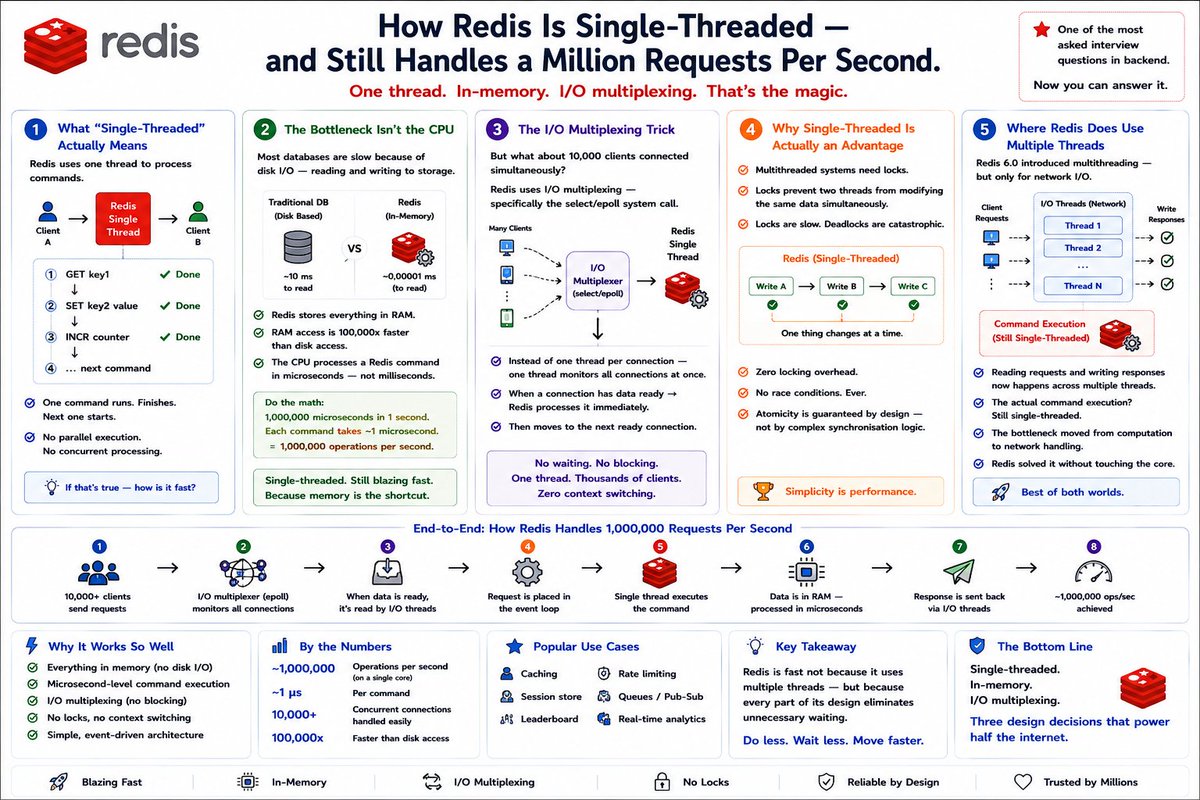
How Redis is single-threaded -
and still handles a million requests per second.
This is one of the most asked interview questions in backend.
Most people know Redis is fast.
Very few can explain why.
If you're just getting started with SYSTEM DESIGN, learn these 16 concepts (not joking):
1 The Computer Science Stack, Simply Explained
→ https://t.co/qfZnlyCSN5
2 Modular Monolith Architecture
→ https://t.co/VVV6v3KGHJ
3 How RPC Works
→ https://t.co/yeIgcmAxQx
4 How JWT Works
→ https://t.co/SZXXrlBsWH
5 Capacity Planning
→ https://t.co/umTNhM2dVY
6 How Bloom Filters Work
→ https://t.co/ntZXq7LxVn
7 How Consistent Hashing Works
→ https://t.co/7d6EipPcKF
8 How Service Discovery Works
→ https://t.co/BcL3tgxx1u
9 API Versioning - A Deep Dive
→ https://t.co/OHAtKSUgVN
10 Concurrency Is Not Parallelism
→ https://t.co/BwRHeuJ5AF
11 How Idempotent API Works
→ https://t.co/afe7ACuSYE
12 Saga Design Pattern
→ https://t.co/2CffTodOHL
13 How Databases Keep Passwords Securely
→ https://t.co/KSfIhpAT2j
14 API Design Best Practices
→ https://t.co/I2ejJ0kbYq
15 How Apache Kafka Works
→ https://t.co/8rOy9KgCMo
16 Distributed Systems 101
→ https://t.co/yi0K5K5RIE
What else should make this list?
===
👋 PS - Want my System Design Playbook (for free)?
Join my newsletter with 200K+ software engineers now:
→ https://t.co/ByOFTtOihX
===
💾 Save now & RT to help others start with system design.
👤 Follow @systemdesignone + turn on notifications.
15 SYSTEM DESIGN PRINCIPLES
1. SCALABILITY
→ Design systems to handle growth in users and traffic
→ Use horizontal scaling (adding more servers)
→ Avoid single-machine limitations
A good system should grow without breaking.
2. AVAILABILITY
→ Ensure your system is always accessible
→ Use redundancy and failover strategies
→ Minimize downtime
High availability = better user trust.
3. RELIABILITY
→ Systems should perform consistently over time
→ Handle failures gracefully
→ Ensure data correctness
Users should depend on your system without surprises.
4. PERFORMANCE
→ Reduce latency and response time
→ Optimize database queries
→ Use caching strategies
Fast systems improve user experience.
5. FAULT TOLERANCE
→ Design systems to continue working even when parts fail
→ Use backups and replication
→ Implement retry mechanisms
Failures are inevitable — plan for them.
6. LOAD BALANCING
→ Distribute traffic across multiple servers
→ Prevent server overload
→ Improve system responsiveness
No single server should carry all the load.
7. CACHING
→ Store frequently accessed data temporarily
→ Reduce database load
→ Improve speed
Examples: Redis, in-memory caching
8. DATABASE DESIGN
→ Choose the right database (SQL vs NoSQL)
→ Normalize or denormalize based on use case
→ Index for faster queries
Data design is the backbone of your system.
9. CONSISTENCY VS AVAILABILITY (CAP THEOREM)
→ You can’t have full consistency, availability, and partition tolerance at once
→ Choose trade-offs based on system needs
Understanding trade-offs is key in distributed systems.
10. MICROSERVICES ARCHITECTURE
→ Break systems into smaller independent services
→ Each service handles a specific responsibility
→ Enables scalability and flexibility
Avoid tightly coupled monoliths when scaling.
11. API DESIGN
→ Use REST or GraphQL
→ Keep APIs consistent and predictable
→ Version your APIs
APIs are the communication bridge between systems.
12. MESSAGE QUEUES
→ Handle asynchronous tasks
→ Improve system resilience
→ Decouple services
Examples: RabbitMQ, Kafka
13. SECURITY
→ Encrypt data (HTTPS, TLS)
→ Implement authentication & authorization
→ Protect against attacks (SQL injection, XSS)
Security must be built from day one.
14. MONITORING & LOGGING
→ Track system performance
→ Log errors and events
→ Use tools like Prometheus, ELK
You can’t fix what you can’t see.
15. DEPLOYMENT & CI/CD
→ Automate builds and deployments
→ Use pipelines for testing and release
→ Ensure smooth updates
Faster delivery with fewer errors.
System design is about making the right trade-offs while building systems that are scalable, reliable, and efficient.
If you want to master system design in depth:
Grab the System Design Handbook:
https://t.co/WIMretRdFc
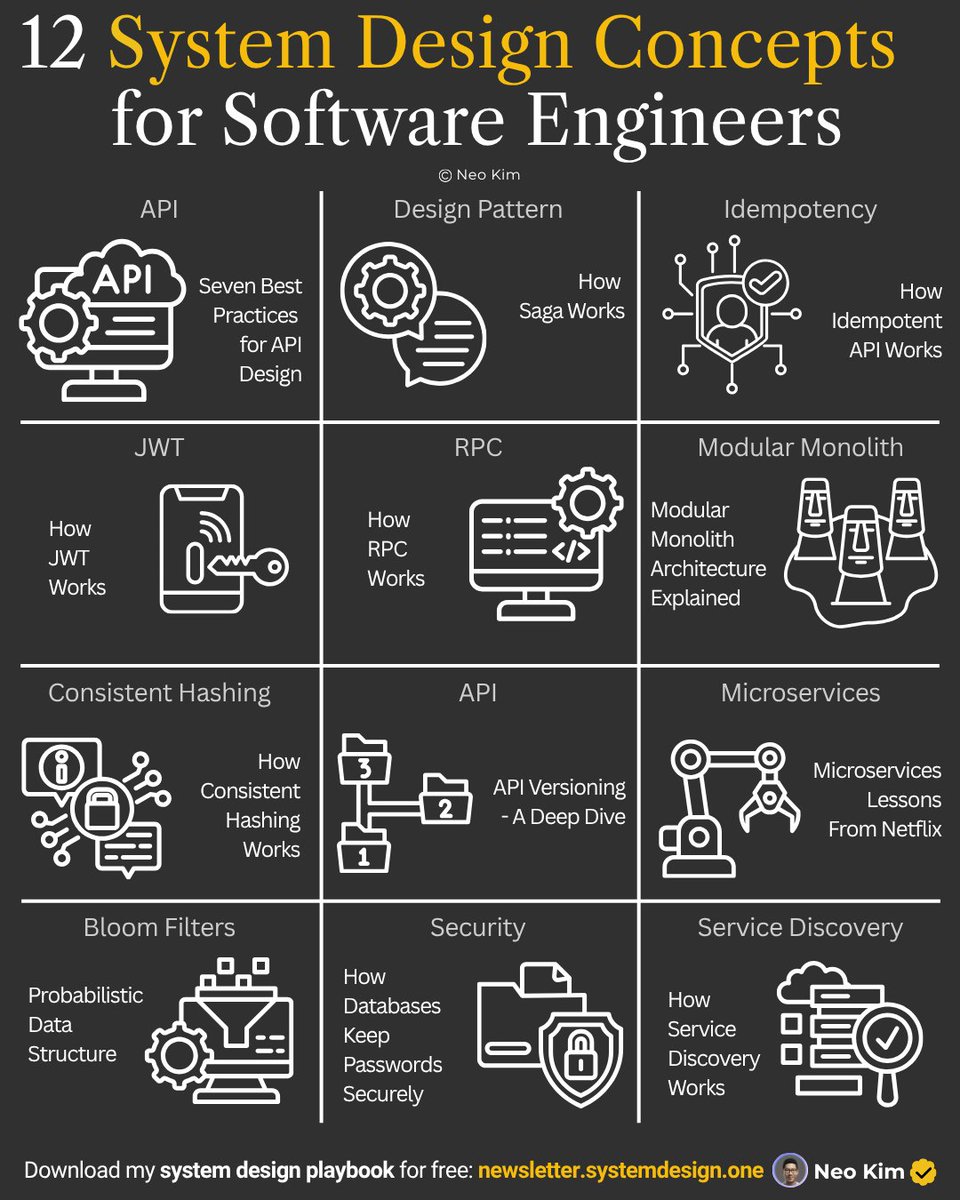
If you want to get started with system design, then learn these 12 concepts:
1 How RPC Works:
↳ https://t.co/yeIgcmAxQx
2 Idempotent API:
↳ https://t.co/afe7ACuSYE
3 Saga Design Pattern:
↳ https://t.co/2CffTodOHL
4 How Bloom Filters Work:
↳ https://t.co/ntZXq7LxVn
5. How Consistent Hashing Works:
↳ https://t.co/7d6EipPcKF
6. Service Discovery:
↳ https://t.co/BcL3tgxx1u
7. Microservices Lessons From Netflix:
↳ https://t.co/XgS7VQoBFv
8. Modular Monolith Architecture Explained:
↳ https://t.co/VVV6v3KGHJ
9. How Databases Keep Passwords Securely:
↳ https://t.co/KSfIhpAT2j
10. Best Practices for API Design:
↳ https://t.co/I2ejJ0kbYq
11. API Versioning - A Deep Dive:
↳ https://t.co/OHAtKSUgVN
12 How JWT Works:
↳ https://t.co/SZXXrlBsWH
What else should make this list?
===
👋 PS - Want my System Design Playbook for FREE?
Join my newsletter with 200K+ software engineers now:
→ https://t.co/ByOFTtOihX
===
💾 Save & RT to help others get started with system design.
👤 Follow @systemdesignone + turn on notifications.
Your system design knowledge, explaining:
- gRPC
- CDNs
- WebSockets
- Rate Limiting
- API Gateways
- Microservices
- Redis Caching
- Load Balancers
- Message Queues
- Database Sharding
- Consistent Hashing
- Eventual Consistency
- Distributed Tracing
- Horizontal Scaling
- Circuit Breakers
- Event Sourcing
- Reverse Proxy
- CAP Theorem
- Service Mesh
- Saga Pattern
- CQRS
- Kafka
Interview decision:
Sorry, we need someone who can explain why they'd use a database.
Knowing the name of a pattern doesn't mean you understand when to use it.
I've seen engineers confidently explain microservices architecture, then suggest splitting a 3-table CRUD app into 15 services.
They knew the pattern.
They didn't know the problem it solves.
Understanding fundamentals means asking better questions, for example:
1. Why would I choose PostgreSQL over MongoDB?
Not "what are the differences" but what specific requirements in my system make one a better fit.
Is it the transaction guarantees?
The query flexibility?
The team's expertise?
2. When should I NOT use Redis caching? Maybe your data changes too frequently.
Maybe cache invalidation becomes more complex than just hitting the database.
Maybe you're solving a performance problem that doesn't exist yet.
3. What's the real cost of event sourcing?
Sure, you get an audit trail and time travel.
But now you're debugging by replaying events, your storage grows unbounded, and your queries need projections.
Is that tradeoff worth it for your use case?
4. Do I actually need Kafka?
Or would a simple queue work fine for my 1000 requests per day?
Are you building for scale you have or scale you imagine?
The best engineers I know can explain why they'd choose a boring SQL database over the latest distributed system.
They understand the problems these patterns solve AND the problems they create.
That's what separates someone who memorized a list from someone who can actually architect systems.
14 must-know Data Structures for coding interviews:
1. Array
2. Queue
3. Deque
4. Matrix
5. Stack
6. Binary Tree
7. Linked List
8. Doubly Linked List
9. HashMap
10. Binary Search Tree (BST)
11. Heap (Priority Queue)
12. Trie
13. Graph
14. Union Find
♻️ Repost to help others in your network
🧵 Day 11/30 — #SystemDesign
Event-Driven Architecture: How modern systems react in real time
Many systems fail when one service depends directly on another. If Payment Service is down, Order Service breaks. If Notification Service slows, user actions feel delayed. Tight coupling creates fragile systems.
That’s why large-scale systems use Event-Driven Architecture (EDA).
Instead of services calling each other directly every time, services publish events when something happens. Other services subscribe and react independently.
Example:
User places order → OrderCreated event published.
Then different services can react:
→ Payment Service charges user → Inventory reserves stock → Email Service sends confirmation → Analytics logs purchase → Recommendation engine updates behavior
One action triggers many workflows asynchronously.
⸻
Core Idea
Producer emits event. Consumers listen and process.
Flow:
Service A → Event Bus / Queue → Multiple Consumers
The producer doesn’t need to know who is listening. This creates loose coupling and better scalability.
⸻
Why Companies Love It
Benefits:
→ Independent services → Easier scaling → Faster feature additions → Better fault isolation → Async processing → Cleaner microservices communication → Real-time workflows
Instead of changing one giant system, teams add new consumers.
⸻
Real-World Examples
→ Uber: Trip booked triggers pricing, driver matching, notifications → Amazon: Order placed triggers payment, shipment, invoice, emails → Netflix: User watches content triggers analytics + recommendations → Stripe: Payment events power webhooks and integrations
Modern products run on events everywhere.
⸻
Common Event Types
→ UserSignedUp → OrderCreated → PaymentSucceeded → MessageSent → RideStarted → InventoryLow → SubscriptionExpired
Good event names describe something that already happened.
⸻
Popular Tools
→ Kafka → RabbitMQ → AWS SNS + SQS → Google Pub/Sub → NATS → Redis Streams
Tool choice depends on throughput, durability, ordering, and complexity needs.
⸻
Challenges Most Ignore
EDA sounds elegant, but introduces real complexity:
→ Duplicate events → Event ordering issues → Debugging across many services → Eventual consistency → Retry storms → Schema evolution problems
Distributed systems always charge rent.
⸻
Golden Rule
Use events when many services must react independently.
Don’t use events just because it sounds advanced.
For a small CRUD app, direct calls may be simpler.
⸻
Key Insight
Monoliths share functions. Service architectures share events.
That shift changes how systems scales.
#30DaysOfSystemDesign #EventDrivenArchitecture #BackendEngineering
System Design Series - Day 8/30
API Gateway Patterns – The Front Door of Your Microservices
API Gateway is the single entry point for all your clients.
Without it:
- Mobile/web clients call 10+ different services directly
- Authentication is duplicated everywhere
- Rate limiting, CORS, logging → repeated in every service
- Services are fully exposed to the internet
With it:
- One clean URL for clients
- Centralized auth, rate limiting, routing, aggregation
- Backend services stay hidden and secure
Here’s everything you need to know about API Gateway patterns.
What is an API Gateway?
Think of it as the hotel front desk
Without a front desk:
- Guests wander around looking for rooms
- No security check
- Housekeeping and room service have no coordination
With a front desk:
- Single check-in point
- Routes guests to correct room
- Handles security, coordination, and requests
API Gateway does exactly that for your microservices.
The Problem It Solves
Before API Gateway:
Mobile app needs user profile + orders:
→ Calls User Service directly
→ Calls Order Service directly
→ Calls Payment Service directly
Problems:
- Client knows internal service URLs
- Multiple network calls (slow on mobile)
- Auth tokens sent to every service
- No centralized rate limiting or logging
- Services exposed to the internet
After API Gateway:
Mobile app calls one URL:
https://api.example. com/profile
Gateway handles everything internally:
- Authenticates once
- Routes and aggregates calls
- Returns combined response
Benefits:
- 1 network call from client
- Services completely hidden (security win)
- Centralized cross-cutting concerns
- Much better client experience
Core Responsibilities:
1. Routing
Maps external URLs to internal services
GET /api/users → User Service
GET /api/orders → Order Service
2. Authentication & Authorization
Validates JWT/OAuth once at the gateway.
Services trust the gateway.
3. Rate Limiting
Prevents abuse (e.g., 100 requests/min per user).
4. Request Aggregation
Combines multiple backend calls into one response for the client.
5. Protocol Translation
Client uses REST → Service uses gRPC (handled at gateway).
Advanced Patterns
- Circuit Breaker → Prevents cascading failures when a service is down
- Request/Response Transformation → Convert old → new API formats
- Caching → Cache frequent responses at the gateway level
- Logging & Monitoring → Centralized observability
When to Use API Gateway
Use it when:
- You have multiple microservices
- External clients (mobile, web, third-party)
- You need centralized auth, rate limiting, or aggregation
Don’t use it when:
- Simple monolith (overkill)
- Only internal service-to-service communication
- Ultra-low latency is critical (extra hop)
Popular Solutions
- Kong (open-source, powerful plugins)
- AWS API Gateway (managed, serverless)
- NGINX + Lua (DIY, lightweight)
- Traefik, Envoy, KrakenD
Summary
API Gateway is not just a proxy.
It is the security layer, traffic manager, and aggregator for your entire backend.
It simplifies client code, hides internal complexity, and centralizes cross-cutting concerns.
Trade-offs:
- Extra network hop (adds latency)
- Becomes a critical component (make it highly available)
Used correctly, it’s one of the most valuable pieces in any microservices architecture.
Tomorrow (Day 9): Inter-Service Communication Patterns
Questions about API Gateway?
Drop them below 👇
#SystemDesign #APIGateway #Microservices #Backend
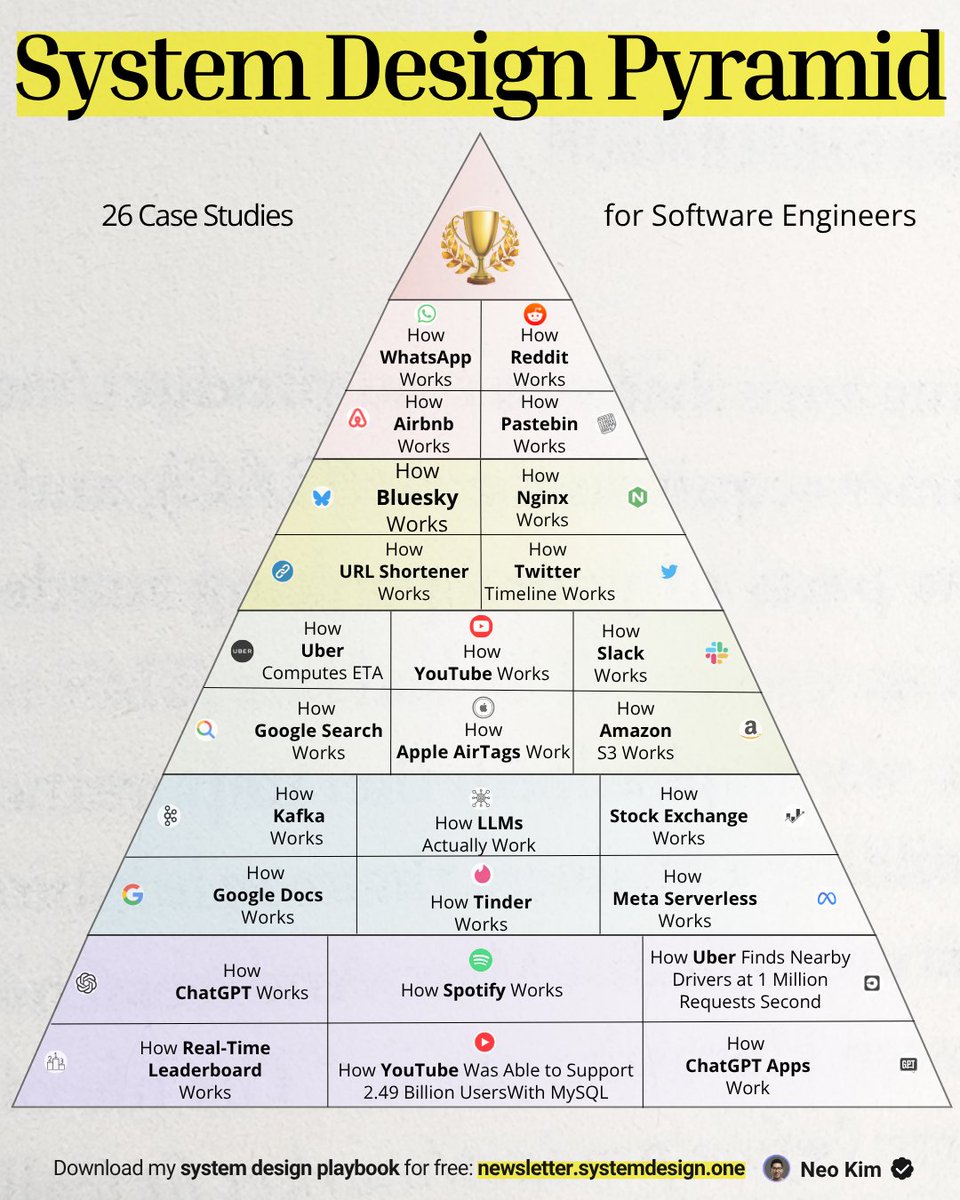
If you're serious about system design (in 2026), learn these 26 case studies:
1 How Stock Exchange Works:
↳ https://t.co/iFNSX9TM9O
2 How YouTube Works:
↳ https://t.co/kHk3g6jz6t
3 How Kafka Works:
↳ https://t.co/8rOy9KgCMo
4 How Google Docs Works:
↳ https://t.co/W57IkAjXpT
5 How URL Shortener Works:
↳ https://t.co/tGndgdhH0V
6 How WhatsApp Works:
↳ https://t.co/VScq8QwHMr
7 How Airbnb Works:
↳ https://t.co/Bi5SAjfv5S
8 How Spotify Works:
↳ https://t.co/BxrH3oHIFS
9 How Slack Works:
↳ https://t.co/eIo29uOQOJ
10 How Reddit Works:
↳ https://t.co/o6Pw2hhj3T
11 How Bluesky Works:
↳ https://t.co/2rLYlRlky0
12 How Tinder Works:
↳ https://t.co/4E1zfgfvlw
13 How Twitter Timeline Works:
↳ https://t.co/pF2RYmPaIG
14 How Uber Finds Nearby Drivers:
↳ https://t.co/kJ2t8dtmch
15 How Pastebin Works:
↳ https://t.co/8NSUNlYM7q
16 How Amazon S3 Works:
↳ https://t.co/iReWAEHwmj
17 How Do Apple AirTags Work:
↳ https://t.co/upWcgsXwKh
18 How LLMs Actually Work:
↳ https://t.co/5lCKxq2g4N
19 How Uber Computes ETA:
↳ https://t.co/hw1hYJqQmj
20 How Real Time Leaderboard Works:
↳ https://t.co/HEChNTOHWb
21 How ChatGPT Apps Work:
↳ https://t.co/BJTYYnAwO1
22 How Nginx Works:
↳ https://t.co/JTeQTJvyrf
23 How ChatGPT Works:
↳ https://t.co/TZYZ3iddYH
24 How Meta Serverless Works:
↳ https://t.co/NSt6jovxu5
25 How YouTube Was Able to Support 2.49 Billion Users With MySQL:
↳ https://t.co/4VDJ5cs6fL
26 How Google Search Works:
↳ https://t.co/jwOaC4bhnv
What else should make this list?
===
👋 PS - Want my System Design Playbook for FREE?
Join my newsletter with 200K+ software engineers now:
→ https://t.co/ByOFTtOihX
===
1 Save & RT to help other software engineers ace system design.
2 Follow @systemdesignone + turn on notifications.