See how you can animate a basic run cycle with helpful tips from Chalermphol Wattanawongtrakool, senior animator at Sony Pictures Imageworks.
More: https://t.co/thv55PpoV5
この泣き方、ちゃんと理由があるんです。
#淡路人形座 が大事にしてる、細かな所作の話。
The way she cries—
yeah, there’s a reason behind it.
This is the kind of detail we care about at Awaji Ningyoza.
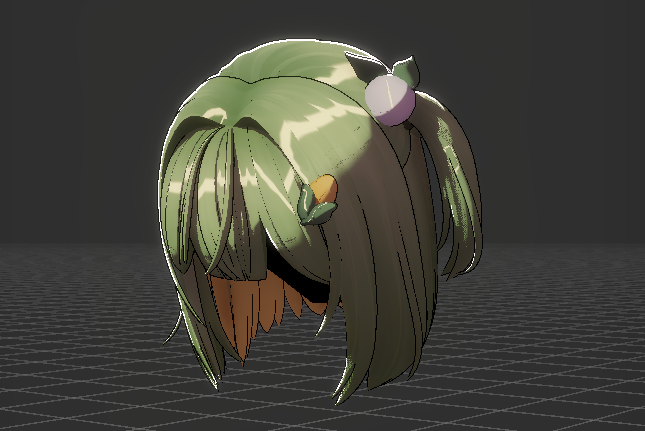
RealToon에 업데이트된 Anisotropic Highlight를 테스트해봤다. 이방성 하이라이트에 노이즈 텍스쳐와 Intensity를 곱한 만큼 오프셋을 주는 것 같이 구현해 주셨다. 이 노이즈 텍스쳐를 그리는 노하우가 좀 더 있어야 될 것 같다. 하이라이트가 머릿결대로 애니메이션 같은 예쁜 지그재그 파형을 가지려면 회색을 중간점으로 잡고 UV의 머리결을 따라 음과 양을 묘사해야 할 듯. 그리고 하이라이트 자체를 여러 번 그려서 각각 위치를 옮기거나 겹칠 수 있게 블렌딩해서 색조를 다양하게 하거나, 프레넬을 곱해서 면이 돌아가는 쪽은 색을 옅게 할 수 있는 옵션도 있으면 좋을 것 같은데... UV 채널도 더 쓸 수 있게 해주면 노이즈 텍스쳐 그리기도 쉬울 테고. 주파 대역를 나눠 랜덤 파형으로 묘사하는 다른 공개된 로직들을 쉽�� ��아볼 수 있었어서 파형을 손으로 그려야 하는 게 기대했던 거랑 조금 다르긴 하지만... 아예 이방성 묘사를 못하던 때보단 훨씬 좋다!
Here are some more details and the January pose for the monthly Pose Cycle animation challenge i'm doing. If you decide to get involved feel free to share yours with me and i'll post them all together at the end of the month!
https://t.co/dmKWIye2EP