I gave my AI agent a robot arm.
This is Hermes running on my desktop, controlling Robot Arm over my local network.
How it worked:
1. Hermes scanned my LAN and found the robot
2. It checked the robot socket server
3. It connected with robot arm
4. Before moving anything, it read:
- joint angles
- current coordinates
- robot error state
5. Error state was 0, so it sent safe low-speed commands:
- joint 1 waved “hi”
- gripper opened wide
- joint 3 danced while the gripper opened/closed 10 times
No joystick.
No hardcoded demo routine.
No custom robotics UI.
Just me typing:
“make it dance” and the agent turning that into real robot motion.
This is the part of AI agents I’m most excited about:
not chatbots that answer questions, but software that can safely touch the physical world.
If you wonder how i made a robot arm follow my natural language using hermes agent. 🤔
This was not “plug in robot, press button.” The setup looked more like:
1. Human work on the robot itself 🤖
→ I had to get into the robot-arm Pi environment, deal with the robot-side CLI, update/install what was missing, and get the controller ready to accept commands.
2. Server config on the robot 🪛
→ The Pi version of myCobot works better as a networked robot than as a USB serial device. So the robot needed its socket server running on the Pi, connected to the arm internally over: /dev/ttyAMA0 baud 1000000
🪄 That server exposes the robot over the network on port 9000.
3. Client config on the desktop 🖥️
→ On my Mac, Hermes needed the Python control stack ready:
1. pymycobot
2. MyCobot280Socket
3. robot IP
4. port 9000
The desktop talks to the robot server.
The robot server talks to the arm.
4. Debugging the wrong assumptions 🐛
→ At first, the obvious question was: “Why doesn’t my Mac see the robot as USB serial?”
Turns out that was the wrong path for this model.
The better path was:
Mac → LAN → myCobot Pi socket server → robot serial bus
5. Safety checks before movement 🦺
→ Before moving anything, Hermes read:
- joint angles
- coordinates
- gripper state
- error state
Only after error state came back 0 did it send motion commands.
6. The actual prompt 💬
->Then I typed:
“open close the gripper 10 times while moving the third motor so that it is like dancing”
Hermes turned that into:
- small joint 3 movements around the current pose
- low speed commands
- gripper open/close cycles
- final status readback
So yes, the video looks like “AI makes robot dance.”
But the real story is:
→human configures the robot side
→agent discovers the network path
→agent checks safety state
→agent turns language into physical action
That stack is what makes this exciting.
Not chatbot → answer.
Human + agent → working robot.
I gave my AI agent a robot arm.
This is Hermes running on my desktop, controlling Robot Arm over my local network.
How it worked:
1. Hermes scanned my LAN and found the robot
2. It checked the robot socket server
3. It connected with robot arm
4. Before moving anything, it read:
- joint angles
- current coordinates
- robot error state
5. Error state was 0, so it sent safe low-speed commands:
- joint 1 waved “hi”
- gripper opened wide
- joint 3 danced while the gripper opened/closed 10 times
No joystick.
No hardcoded demo routine.
No custom robotics UI.
Just me typing:
“make it dance” and the agent turning that into real robot motion.
This is the part of AI agents I’m most excited about:
not chatbots that answer questions, but software that can safely touch the physical world.
If I were building an agent for my inbox from scratch, I wouldn’t try to make it do everything.
I’d start with four jobs:
• Sort what actually needs my attention
• Draft the replies that need to go out
• Track the conversations I’m waiting on
• Give me one clean daily briefing
That’s the foundation.
Get those four right, and your inbox starts becoming a decision queue instead of something you have to keep checking all day.
This is the Hermes setup guide I wish I had on day one.🔥
Most guides show you what to install. @HermesWatcher explains what to decide, what can wait, and when to add more.
That matters when your setup starts filling up with skills, agents, plugins, and cron jobs—and you’re no longer sure which ones are helping.😎
My favorite part: he turns the full guide into a practical order. Get one working setup first. Use it for real work. Then add the next layer when you have a reason.
Read it if you’re starting Hermes or if your current setup needs a cleanup.
Which part did you add too early?✋
I gave my AI agent a robot arm.
This is Hermes running on my desktop, controlling Robot Arm over my local network.
How it worked:
1. Hermes scanned my LAN and found the robot
2. It checked the robot socket server
3. It connected with robot arm
4. Before moving anything, it read:
- joint angles
- current coordinates
- robot error state
5. Error state was 0, so it sent safe low-speed commands:
- joint 1 waved “hi”
- gripper opened wide
- joint 3 danced while the gripper opened/closed 10 times
No joystick.
No hardcoded demo routine.
No custom robotics UI.
Just me typing:
“make it dance” and the agent turning that into real robot motion.
This is the part of AI agents I’m most excited about:
not chatbots that answer questions, but software that can safely touch the physical world.
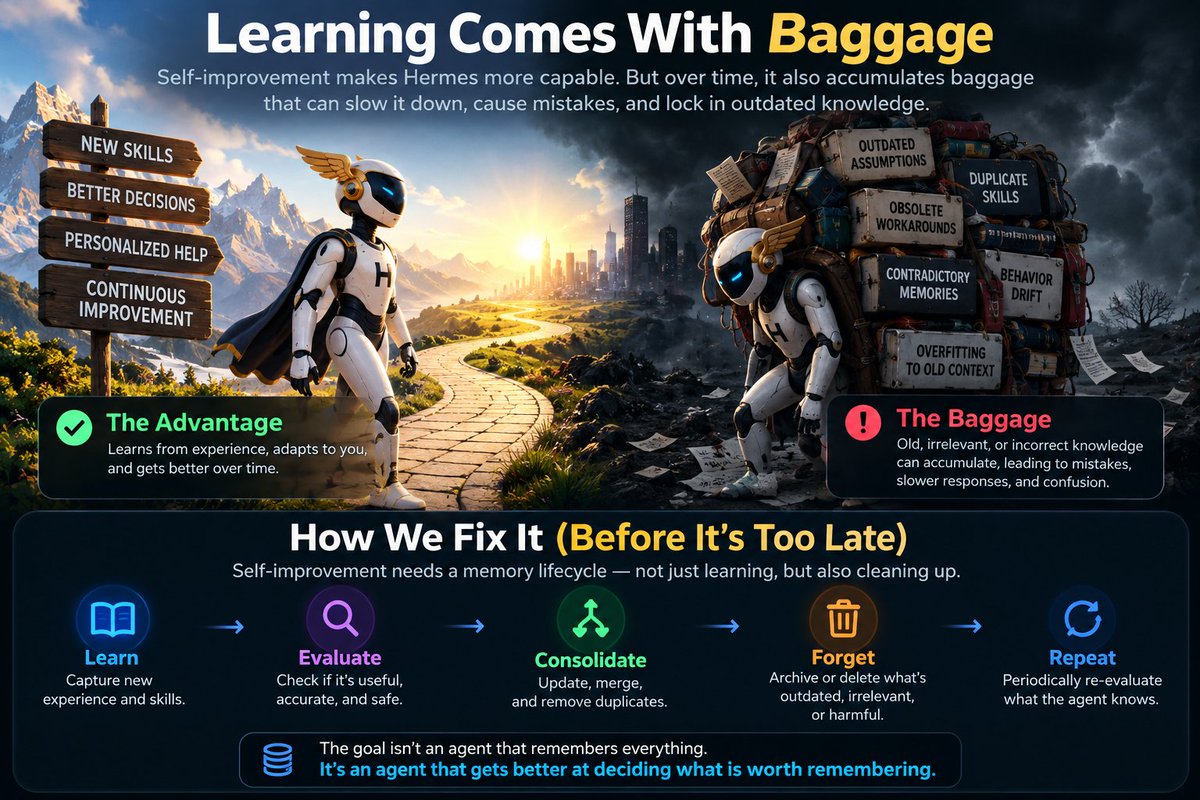
Hermes getting better from experience is exciting.
But there’s another side to self-improving agents we should think about early:
Learning comes with baggage.
An agent that runs for years won't just accumulate good lessons. It can accumulate:
→ outdated assumptions
→ duplicate skills
→ obsolete workarounds
→ contradictory memories
→ behaviors optimized for yesterday's environment
Not retrieving something isn't the same as forgetting it.
Eventually, self-improvement needs a second loop:
Learn → Evaluate → Consolidate → Forget
Imagine giving an agent a memory garbage collector:
• track how often knowledge is useful
• detect when a newer skill supersedes an older one
• merge duplicate lessons
• decay low-value memories
• archive before deleting
• periodically re-evaluate what it "knows"
The goal shouldn't be an agent that remembers everything.
It should be an agent that gets better at deciding what is worth remembering.
Otherwise today's self-improving agent could become tomorrow's self-accumulating agent.
Maybe forgetting is just as important to AGI as learning.
@agentmail@agentmail definitely, but should be away from how humans use it. Email sent by agents or between agents should have more guardrail and anonymous emails should not be allowed.
I gave my AI agent a robot arm.
This is Hermes running on my desktop, controlling Robot Arm over my local network.
How it worked:
1. Hermes scanned my LAN and found the robot
2. It checked the robot socket server
3. It connected with robot arm
4. Before moving anything, it read:
- joint angles
- current coordinates
- robot error state
5. Error state was 0, so it sent safe low-speed commands:
- joint 1 waved “hi”
- gripper opened wide
- joint 3 danced while the gripper opened/closed 10 times
No joystick.
No hardcoded demo routine.
No custom robotics UI.
Just me typing:
“make it dance” and the agent turning that into real robot motion.
This is the part of AI agents I’m most excited about:
not chatbots that answer questions, but software that can safely touch the physical world.
Ten people build the same Hermes agent ten different ways.🚀🪽
I got tired of seeing the same questions, so I built an archive of working examples.
What you get:
- 100+ tested workflows with full code
- Real prompts that actually work
- Filter by use case: automation, webhooks, multi-agent
- Setup guides and common failure points
All open source. All credited.
One dev automated GitHub releases with cron. Another built a Telegram assistant that routes to 3 specialized agents.
Browse what the community is actually running:
https://t.co/oNnTFRaxxl
Want to contribute your setup?
https://t.co/rkGGBX8YUk
Independent project, not affiliated with Nous Research.
5 moments when Hermes /btw comes in handy:🫡
🫡You're coding - but need to ask what a function does without changing the task.
😤Hermes is researching - but you want a quick clarification without steering it away.
🥱You're debugging - but need to check one unrelated config.
🧐A long task is running - but you suddenly need one small answer.
😆You want to ask something without adding another instruction to the main workflow.
Instead of interrupting the job:👇
/btw <your question>
Ask on the side. Keep the main task on track.🚀
Hermes says “done.” What did it actually do? 🤔
Run /status to get a quick recap of the session: recent turns, tools used, and files touched.
Then apply the verification contract in my original post. A recap tells you where to look—it doesn’t prove the work passed.
What’s the first thing you check before trusting an agent’s “done”? 👇
Your Hermes verifier may know too much.😉
If the worker and verifier share the same:
→ assumptions
→ memory
→ context
→ conclusions
then two agents agreeing isn't really verification.
Try this instead:
Worker → solves with full context
Verifier → receives only requirements + evidence + output
Then ask:
“Can you independently prove this result passes?”
Sometimes the best verifier isn't the smartest agent.
It's the one least contaminated by the original reasoning.
You installed Hermes. Is it doing a job yet? 🪽
It’s easy to spend the first week adding skills and learning commands—while still doing the same work yourself.
Give Hermes one job to start:
→ Scout: Find 3 useful updates and link the sources
→ Organizer: Turn your notes into a morning plan
→ Verifier: Check a draft and flag unsupported claims
Run it for a week. See where it helps, then improve the instructions.
Which job would you give Hermes first: Scout, Organizer, or Verifier? 👇
A Perfect Morning Briefing by an Agent 🪽🚀
This would be my favorite kind of Hermes Agent Morning Briefing automation. 🌟
Waking up with the prep already done.
Calendar,email and personal newspaper waiting for you. 🪽
I gave my AI agent a robot arm.
This is Hermes running on my desktop, controlling Robot Arm over my local network.
How it worked:
1. Hermes scanned my LAN and found the robot
2. It checked the robot socket server
3. It connected with robot arm
4. Before moving anything, it read:
- joint angles
- current coordinates
- robot error state
5. Error state was 0, so it sent safe low-speed commands:
- joint 1 waved “hi”
- gripper opened wide
- joint 3 danced while the gripper opened/closed 10 times
No joystick.
No hardcoded demo routine.
No custom robotics UI.
Just me typing:
“make it dance” and the agent turning that into real robot motion.
This is the part of AI agents I’m most excited about:
not chatbots that answer questions, but software that can safely touch the physical world.
I gave my AI agent a robot arm.
This is Hermes running on my desktop, controlling Robot Arm over my local network.
How it worked:
1. Hermes scanned my LAN and found the robot
2. It checked the robot socket server
3. It connected with robot arm
4. Before moving anything, it read:
- joint angles
- current coordinates
- robot error state
5. Error state was 0, so it sent safe low-speed commands:
- joint 1 waved “hi”
- gripper opened wide
- joint 3 danced while the gripper opened/closed 10 times
No joystick.
No hardcoded demo routine.
No custom robotics UI.
Just me typing:
“make it dance” and the agent turning that into real robot motion.
This is the part of AI agents I’m most excited about:
not chatbots that answer questions, but software that can safely touch the physical world.
I gave my AI agent a robot arm.
This is Hermes running on my desktop, controlling Robot Arm over my local network.
How it worked:
1. Hermes scanned my LAN and found the robot
2. It checked the robot socket server
3. It connected with robot arm
4. Before moving anything, it read:
- joint angles
- current coordinates
- robot error state
5. Error state was 0, so it sent safe low-speed commands:
- joint 1 waved “hi”
- gripper opened wide
- joint 3 danced while the gripper opened/closed 10 times
No joystick.
No hardcoded demo routine.
No custom robotics UI.
Just me typing:
“make it dance” and the agent turning that into real robot motion.
This is the part of AI agents I’m most excited about:
not chatbots that answer questions, but software that can safely touch the physical world.