When you open your #passport at the airport and realize the importance of #ICAO#standard of Machine Readable Travel documents #MRTD or #smart cards that a loving child with good intentions doesn’t know 😊
International standards are there for a reason!
How does ChatGPT work?
Since OpenAI hasn't provided all the details, some parts of the diagram may be inaccurate.
1. Training. To train a ChatGPT model, there are two stages:
- Pre-training: In this stage, we train a GPT model (decoder-only transformer) on a large chunk of internet data. The objective is to train a model that can predict future words given a sentence in a way that is grammatically correct and semantically meaningful similar to the internet data. After the pre-training stage, the model can complete given sentences, but it is not capable of responding to questions.
- Fine-tuning: This stage is a 3-step process that turns the pre-trained model into a question-answering ChatGPT model:
1). Collect training data (questions and answers), and fine-tune the pre-trained model on this data. The model takes a question as input and learns to generate an answer similar to the training data.
2). Collect more data (question, several answers) and train a reward model to rank these answers from most relevant to least relevant.
3). Use reinforcement learning (PPO optimization) to fine-tune the model so the model's answers are more accurate.
2. Answer a prompt
🔹Step 1: The user enters the full question, “Explain how a classification algorithm works”.
🔹Step 2: The question is sent to a content moderation component. This component ensures that the question does not violate safety guidelines and filters inappropriate questions.
🔹Steps 3-4: If the input passes content moderation, it is sent to the chatGPT model. If the input doesn’t pass content moderation, it goes straight to template response generation.
🔹Step 5-6: Once the model generates the response, it is sent to a content moderation component again. This ensures the generated response is safe, harmless, unbiased, etc.
🔹Step 7: If the input passes content moderation, it is shown to the user. If the input doesn’t pass content moderation, it goes to template response generation and shows a template answer to the user.
Subscribe to our weekly newsletter to get a Free System Design PDF (158 pages): https://t.co/FIzCeaWsZV
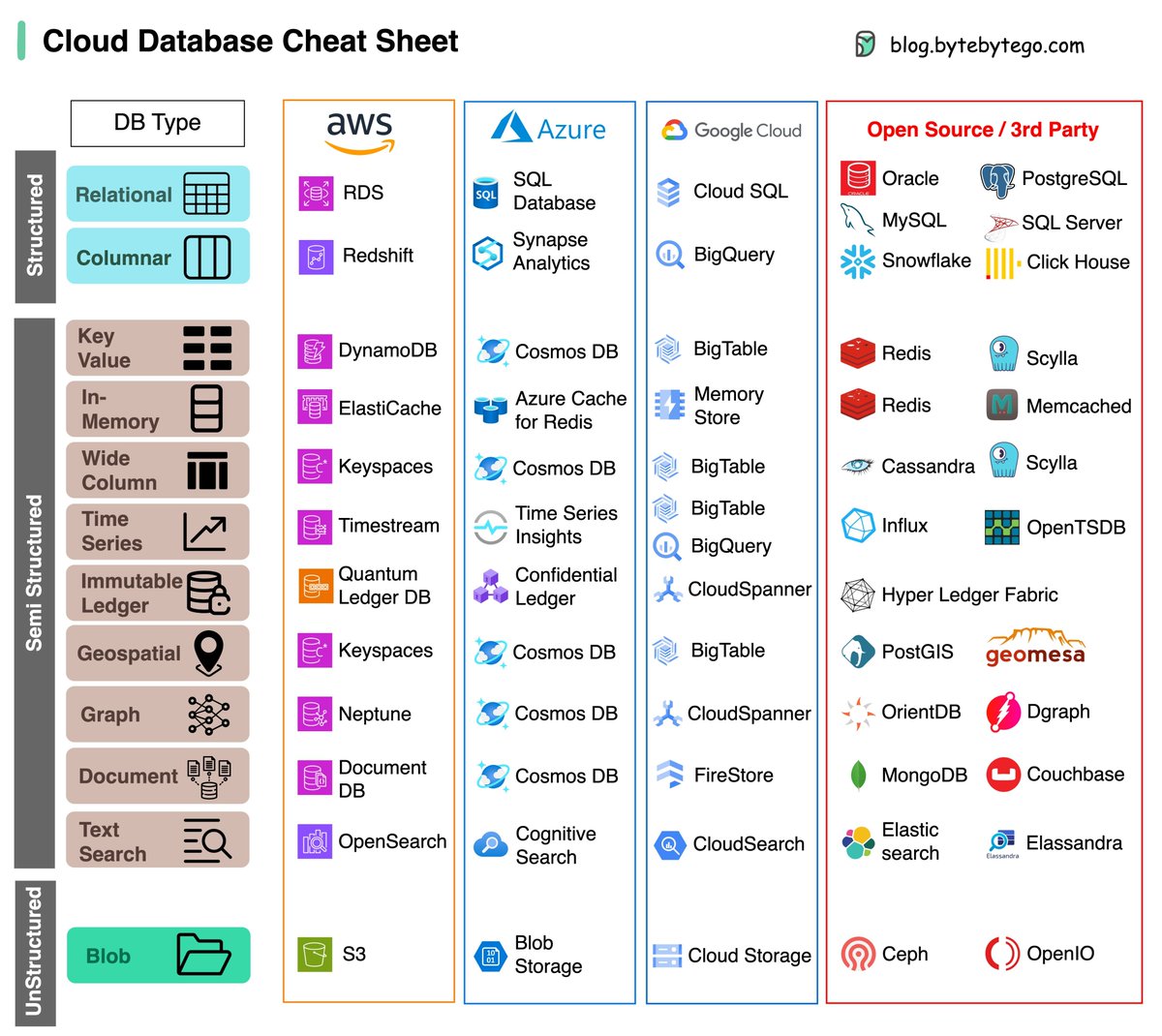
A cheat sheet of various databases in cloud services, along with their corresponding open-source/3rd-party options.
Choosing the right database for your project is a complex task. The multitude of database options, each suited to distinct use cases, can quickly lead to decision fatigue.
We hope this cheat sheet provides the high level direction to pinpoint the right service that aligns with your project's needs and avoid potential pitfalls.
Note: Google has limited documentation for their database use cases. Even though we did our best to look at what was available and arrived at the best option, some of the entries may be not accurate.
Over to you: Which database have you used in the past, and for what use cases?
–
Subscribe to our weekly newsletter to get a Free System Design PDF (158 pages): https://t.co/uc5M7CdXXC
Here’s description of 9 types of API testing:
➡️ 1. Unit Testing: Involves testing individual components or functions of an API in isolation to ensure they function correctly and produce the expected output.
➡️ 2. Functional Testing: Focuses on testing the overall functionality of the API, verifying that it performs as intended and produces accurate results.
➡️ 3. Integration Testing: Tests interactions between different components or services within an API to ensure they work together seamlessly and communicate effectively.
➡️ 4. Load Testing: Evaluates the API's performance under heavy load by simulating a large number of concurrent requests to identify potential bottlenecks and optimize resource usage.
➡️ 5. Security Testing: Aims to identify vulnerabilities in the API by testing for potential security risks, such as unauthorized access, data leakage, or injection attacks.
➡️ 6. Stress Testing: Pushes the API beyond its limits by applying extreme conditions, such as high traffic or limited resources, to determine how well it can handle such scenarios.
➡️ 7. Negative Testing: Involves deliberately sending invalid or incorrect inputs to the API to verify that it responds appropriately with error messages or other expected behaviors.
➡️ 8. Boundary Testing: Focuses on testing the limits of the API's inputs, such as minimum and maximum values, to ensure it handles these boundaries correctly.
➡️ 9. Usability Testing: Evaluates the user-friendliness of the API by assessing how easily developers can understand its documentation, endpoints, and responses, ultimately enhancing the developer experience.
🚨 Join Waiting List for New 10+ Hour Linux Course - https://t.co/EolNQecppN
#apitest #API #APItesting #apitesting #software
How is data sent over the network? Why do we need so many layers in the OSI model?
The diagram below shows how data is encapsulated and de-encapsulated when transmitting over the network.
🔹 Step 1: When Device A sends data to Device B over the network via the HTTP protocol, it is first added an HTTP header at the application layer.
🔹 Step 2: Then a TCP or a UDP header is added to the data. It is encapsulated into TCP segments at the transport layer. The header contains the source port, destination port, and sequence number.
🔹 Step 3: The segments are then encapsulated with an IP header at the network layer. The IP header contains the source/destination IP addresses.
🔹 Step 4: The IP datagram is added a MAC header at the data link layer, with source/destination MAC addresses.
🔹 Step 5: The encapsulated frames are sent to the physical layer and sent over the network in binary bits.
🔹 Steps 6-10: When Device B receives the bits from the network, it performs the de-encapsulation process, which is a reverse processing of the encapsulation process. The headers are removed layer by layer, and eventually, Device B can read the data.
We need layers in the network model because each layer focuses on its own responsibilities. Each layer can rely on the headers for processing instructions and does not need to know the meaning of the data from the last layer.
Over to you: Do you know which layer is responsible for resending lost data?
–
Subscribe to our weekly newsletter to get a Free System Design PDF (158 pages): https://t.co/RibM5u7UxP
What is SSO (Single Sign-On)?
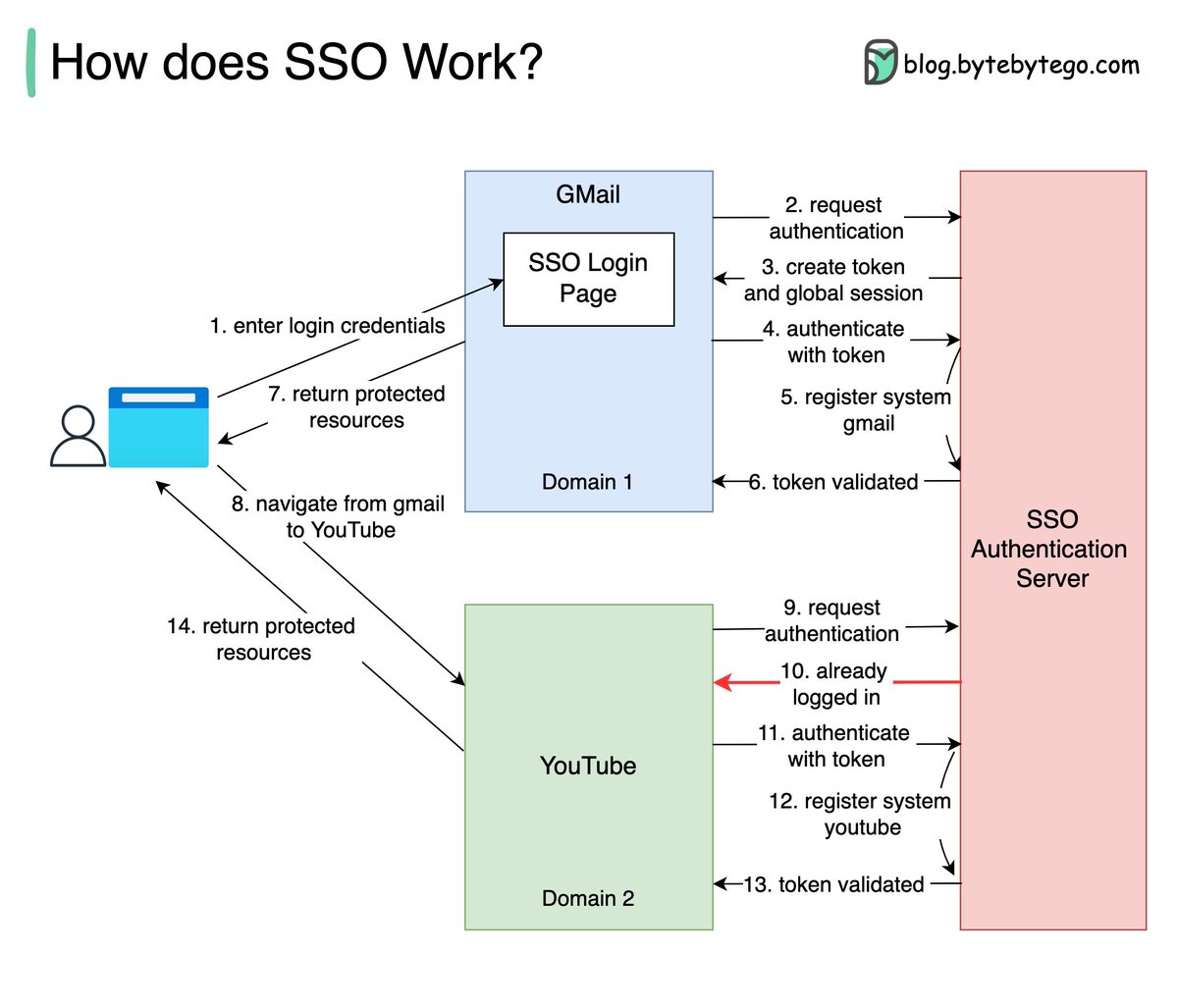
Basically, Single Sign-On (SSO) is an authentication scheme. It allows a user to log in to different systems using a single ID.
The diagram below illustrates how SSO works.
Step 1: A user visits Gmail, or any email service. Gmail finds the user is not logged in and so redirects them to the SSO authentication server, which also finds the user is not logged in. As a result, the user is redirected to the SSO login page, where they enter their login credentials.
Steps 2-3: The SSO authentication server validates the credentials, creates the global session for the user, and creates a token.
Steps 4-7: Gmail validates the token in the SSO authentication server. The authentication server registers the Gmail system, and returns “valid.” Gmail returns the protected resource to the user.
Step 8: From Gmail, the user navigates to another Google-owned website, for example, YouTube.
Steps 9-10: YouTube finds the user is not logged in, and then requests authentication. The SSO authentication server finds the user is already logged in and returns the token.
Step 11-14: YouTube validates the token in the SSO authentication server. The authentication server registers the YouTube system, and returns “valid.” YouTube returns the protected resource to the user.
The process is complete and the user gets back access to their account.
Over to you:
Question 1: have you implemented SSO in your projects? What is the most difficult part?
Question 2: what’s your favorite sign-in method and why?
–
Subscribe to our weekly newsletter to get a Free System Design PDF (158 pages): https://t.co/RibM5u7UxP
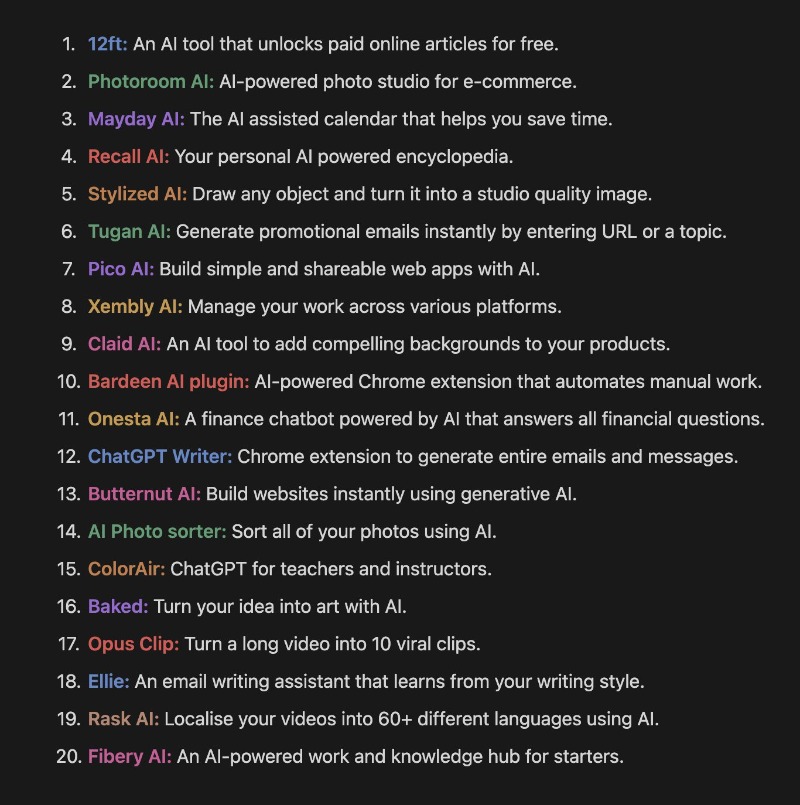
Using the right AI tools is like having your own personal army of robots.
20 AI tools to supercharge your productivity:
If you want tools and insights about AI, follow along for more.