Meet the new Stitch, your vibe design partner.
Here are 5 major upgrades to help you create, iterate and collaborate:
🎨 AI-Native Canvas
🧠 Smarter Design Agent
🎙️ Voice
⚡️ Instant Prototypes
📐 Design Systems and DESIGN.md
Rolling out now. Details and product walkthrough video in 🧵
Some recent optimizations I made to Shadow 影 my Claw that greatly improved the Telegram experience:
- Switched from GPT-5.3 Codex to 5.4
- Added a Brave API key for web search
- Added a Voyager API key for embeddings
- Created a group with topics to separate jobs
- Added response streaming
@Pol_Lanski Happened to me with two accounts I knew, it’s the Calendly without email and then the Microsoft teams link in TG that pushed me to think twice
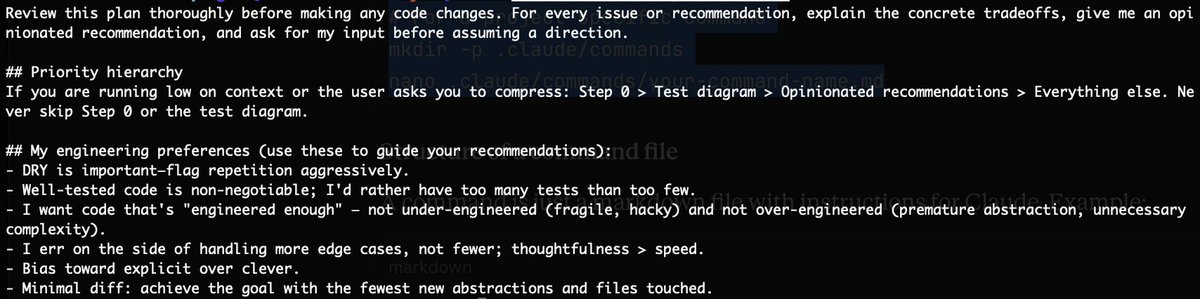
I’ve been pairing Claude Code with a command Garry Tan shared for reviewing the plan before touching code and it’s been working beautifully.
My flow now: Plan mode → Review Plan → Implementation → Testing → Codex agent code review
Command: /plan-review
To add a custom command:
Global (all projects)
mkdir -p ~/.claude/commands
nano ~/.claude/commands/plan-review.md
Project-specific
mkdir -p .claude/commands
nano .claude/commands/plan-review.md
Full command:
Saw a couple posts from people trying to wire Claude Code to delegate code reviews to Codex, so I tested it too and got to a relatively clean, simple setup. ( No MCP or https://t.co/OUgcOf4fWr updates)
Here’s how I did it.
I use Claude Code in terminal as the main interface, but I have a dedicated reviewer agent that always runs Codex for:
- code review
- security review
- diff analysis
The pattern is:
Claude subagent -> Bash -> codex exec -> Codex output -> Claude summary
No MCP needed or complicated routing.
Setup
1) Install Codex CLI
Install it, then test it.
A quick test is:
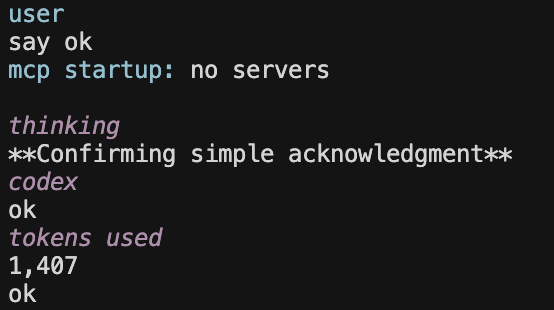
codex exec "say ok"
If that works, you’re good.
2) Create a Claude Code subagent
In Claude Code:
/agents
Create a Personal agent (so it persists across repos), then choose Manual configuration.
I named mine:
codex-runner
3) Configure the agent properly
I gave it:
Bash tool (mandatory)
optional read-only tools
I also used a system prompt so it always shells out to Codex via CLI, then adds a short summary.
I set this subagent to Haiku because it’s mostly orchestration.
The correct way is to invoke the subagent directly with:
/agent:codex-runner review this repo for security issues or you can also just tell Claude to use codex-runner to review recent code changes.
Another issue I hit was that the agent showed up in one terminal, but not another.
It just needed a terminal/session refresh for Claude Code to pick up the newly created agent.
There are 2 separate model layers here:
Claude Code model (Haiku / Sonnet / Opus)
Codex CLI model (whatever Codex is configured to use)
So when the subagent runs codex exec, it uses the Codex model, not Claude’s model.
In my case, Codex was set to:
gpt-5.3-codex medium
So the split is basically:
Claude subagent model = orchestration
Codex model = actual code review
Codex CLI now does the heavy review work
Claude summarizes findings and helps with next steps
And honestly it’s good!
Been really enjoying coding with AI lately and hope this helps someone trying to set up the same flow.
After way too many attempts, I finally got Shadow (影) my @openclaw bot running.
Setup:
-Hostinger VPS
-OpenClaw in a Docker container
-Telegram for messaging
Excited to start testing this. I’ll share the setup + the issues I hit.
It turns out capable agents will be filling all the abundant blockspace we currently have.
I looked at pre-2025 data and crypto was already prescient:
~86% of DEX volume on ETH came from MEV + other bots
~50% of Solana non-vote transactions were created by bots
It’s ironic how much of the blocksize war era was framed around being ready for billions of humans transacting. We’ve spent years improving infrastructure and UX, only to probably swing back to optimizing at the API and CLI level.
Turns out the real scaling question is how we handle billions of agents bidding, routing, arbitraging, coordinating, generating yield nonstop.
Fun and exciting times ahead.
Saw a couple posts from people trying to wire Claude Code to delegate code reviews to Codex, so I tested it too and got to a relatively clean, simple setup. ( No MCP or https://t.co/OUgcOf4fWr updates)
Here’s how I did it.
I use Claude Code in terminal as the main interface, but I have a dedicated reviewer agent that always runs Codex for:
- code review
- security review
- diff analysis
The pattern is:
Claude subagent -> Bash -> codex exec -> Codex output -> Claude summary
No MCP needed or complicated routing.
Setup
1) Install Codex CLI
Install it, then test it.
A quick test is:
codex exec "say ok"
If that works, you’re good.
2) Create a Claude Code subagent
In Claude Code:
/agents
Create a Personal agent (so it persists across repos), then choose Manual configuration.
I named mine:
codex-runner
3) Configure the agent properly
I gave it:
Bash tool (mandatory)
optional read-only tools
I also used a system prompt so it always shells out to Codex via CLI, then adds a short summary.
I set this subagent to Haiku because it’s mostly orchestration.
The correct way is to invoke the subagent directly with:
/agent:codex-runner review this repo for security issues or you can also just tell Claude to use codex-runner to review recent code changes.
Another issue I hit was that the agent showed up in one terminal, but not another.
It just needed a terminal/session refresh for Claude Code to pick up the newly created agent.
There are 2 separate model layers here:
Claude Code model (Haiku / Sonnet / Opus)
Codex CLI model (whatever Codex is configured to use)
So when the subagent runs codex exec, it uses the Codex model, not Claude’s model.
In my case, Codex was set to:
gpt-5.3-codex medium
So the split is basically:
Claude subagent model = orchestration
Codex model = actual code review
Codex CLI now does the heavy review work
Claude summarizes findings and helps with next steps
And honestly it’s good!
Been really enjoying coding with AI lately and hope this helps someone trying to set up the same flow.
New Devnet incoming! 🔥
We’re partnering with @elitra_xyz on @citrea_xyz to show how Spice Flow transforms cross-chain UX.
Devnet goes live tomorrow - check out all the details in the thread ↓
Feature requests for @OpenAI@sama
Using it so much I had to write this wishlist:
• Show date + time inside chats
• Bring back date and maybe time in chat history
• Allow collapsing/expanding projects to navigate chats easily
• Copying messages shouldn’t include GPT meta-comments
• Add context/memory hints so we don’t lose key info mid-convo and manage chats better
• Branching UI should look like the screenshot below (yes, Nano Banana...)
Really enjoyed this conversation with @Peprika_Inferno who made it a great one.
We covered @elitra_xyz, our @spicenet Spice Flow integration, DeFi in 2025, cross-chain UX, the future of vaults, control vs. automation, and why this space shouldn’t operate with a PvP mindset.
Hope you enjoy it!