How to Use NotebookLM in 2026
NotebookLM can help you turn your documents into an AI-powered research and learning workspace.
Key Features
1. Add Sources — Import PDFs, Google Docs, audio transcripts, and webpages.
2. Source-Based Chat — Ask questions based on your uploaded sources with references.
3. Structured Study Guides — Generate summaries, timelines, reports, and briefs.
4. Visual Topic Mapping — Organize relationships between topics visually.
5. Audio Overviews — Convert notebook content into AI-generated audio discussions.
6. Video Summaries — Create short visual summaries from notebook content.
7. Deep Research — Explore additional credible sources related to your topic.
8. Structured Data Tables — Extract information into organized, sortable tables.
9. Collaborative Notebooka — Share notebooks with teams or clients.
10. Smart Prompts — Summarize, compare sources, identify decisions, generate briefs, and create scripts.
Useful Prompts
Summarize:
Create a 500-word thematic summary of these sources with citations.
Compare:
“Show the key points across these documents and note where they conflict.”
Identify Decisions:
“Pull the main decisions from these notes and attach each one to its source.”
Generate a Brief:
“Organize this material into Background → Core Points → Recommendations.”
Create a Script:
“Write a two-host script where Host A explains and Host B tests weak claims.”
Best approach: Upload quality sources → ask precise questions → verify the citations → turn the insights into action.
🔖 Save this for later & follow
AdarshChetan on LinkedIn & X for more! ❤️
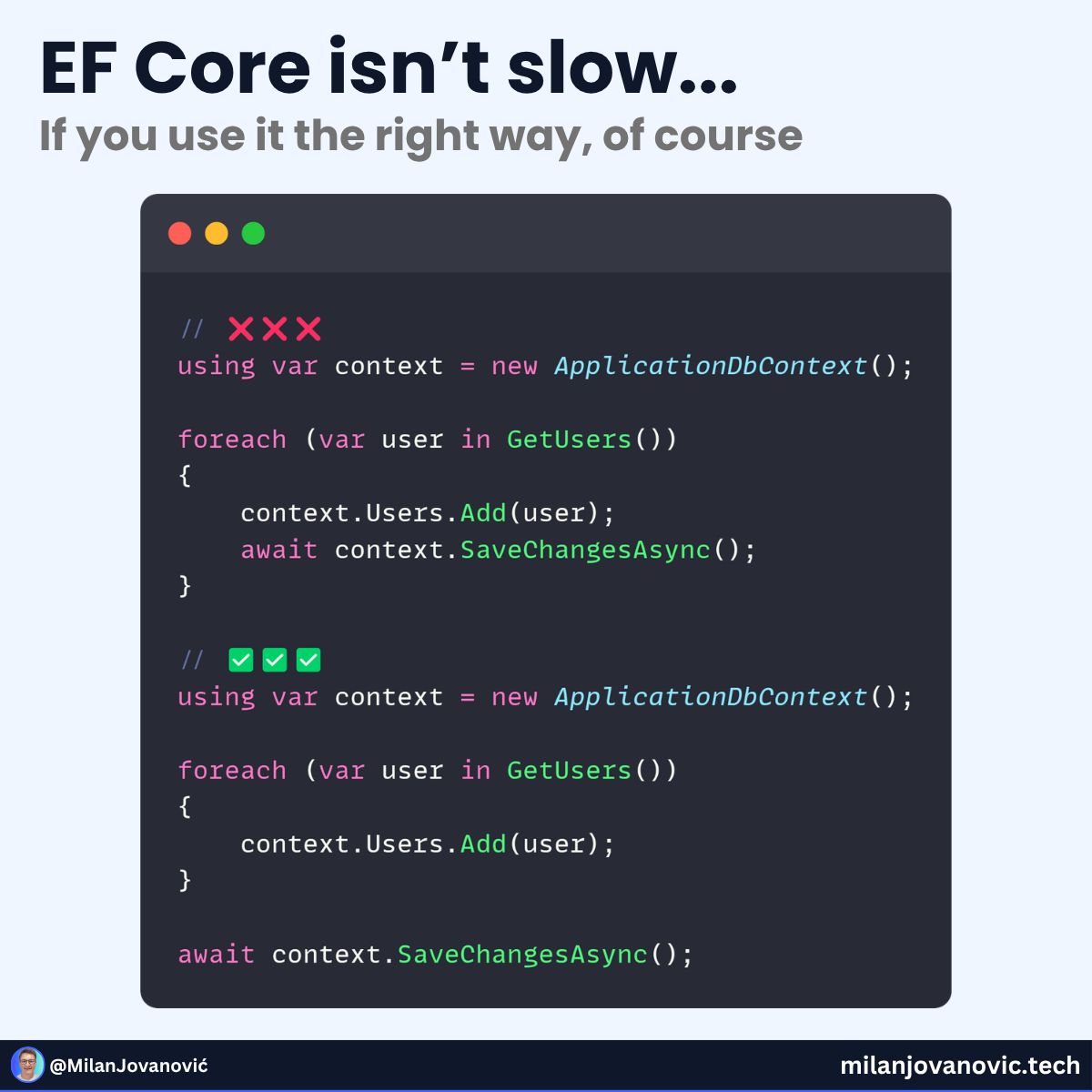
Can you find what's wrong with this code snippet?
Example 2 is 43x faster at inserting 10,000 records into a database.
What causes such a huge performance difference?
The code between the two examples looks similar.
But if you understand how EF works under the hood, the answer should be obvious.
Every call to SaveChanges means a round-trip to the database.
In the first example, inserting each record means one call to the database.
And this quickly adds up...
Here's the right way to solve this: https://t.co/0yfwyfbcBj
Unnecessary DB queries are one of the biggest performance killers.
Don't let this mistake happe in your code.
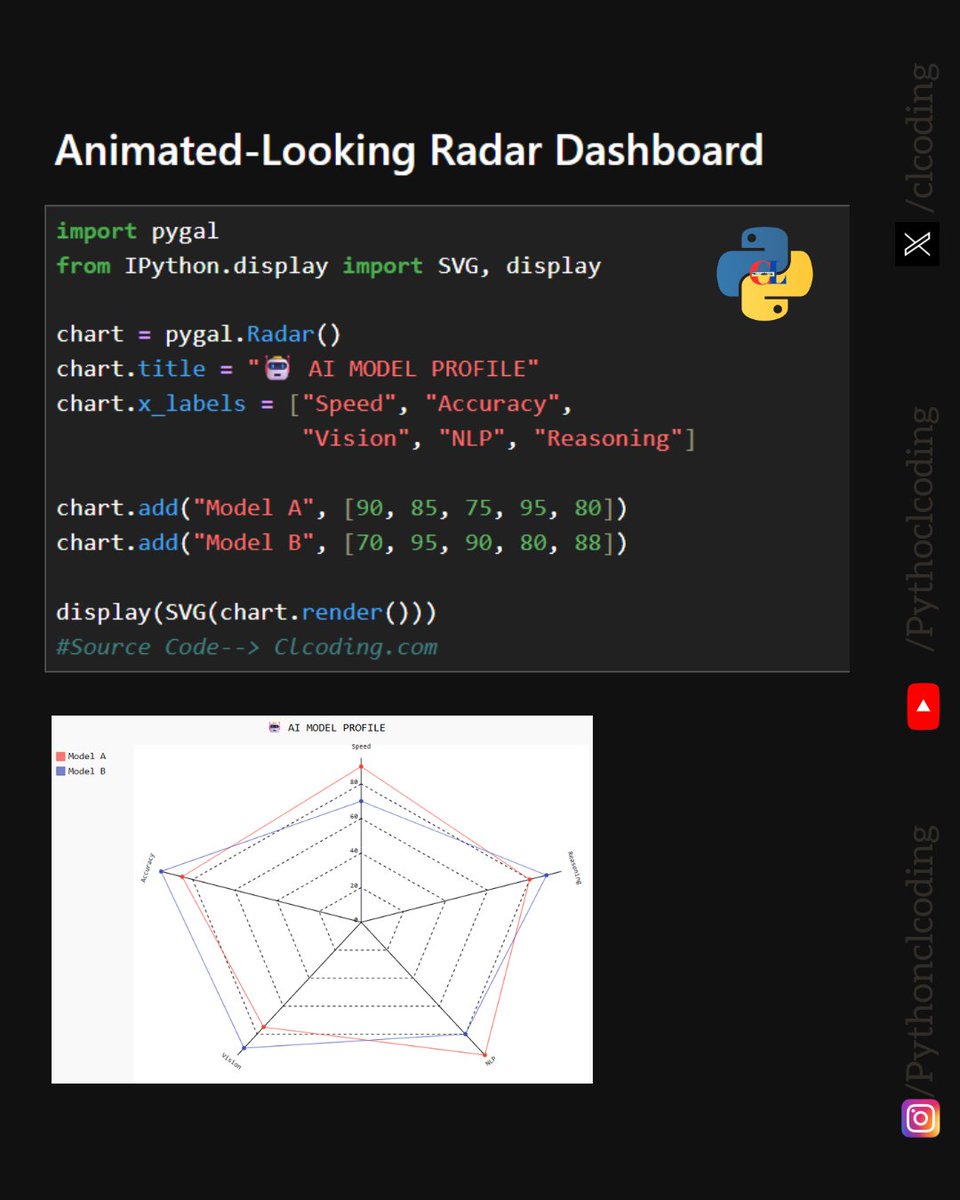
Create a Radar Dashboard with Python!
Want to turn simple data into a visually engaging dashboard? This example uses Pygal to create a radar chart comparing AI models across multiple dimensions:
Speed
Accuracy
Vision
NLP
Reasoning
https://t.co/0VQMkRlwTZ
The chart makes it easy to see where each model performs strongly and where there are differences between them.
The best part? You can generate the visualization directly in Jupyter Notebook using SVG rendering.
Python + Pygal = Interactive-looking data visualizations with just a few lines of code!
Try customizing the categories and values with your own dataset.
🔗 Source: https://t.co/LK7RqiltGC
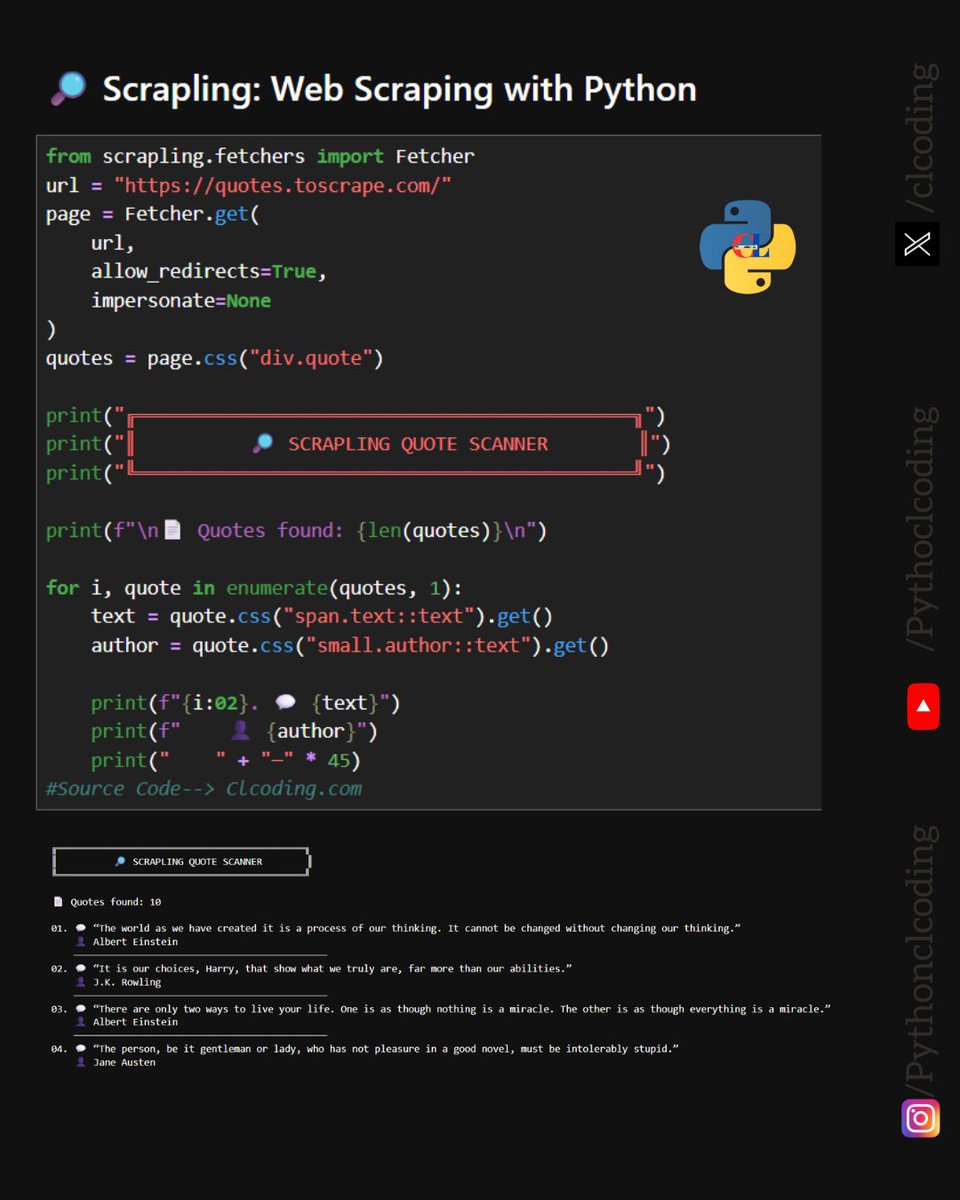
Web Scraping with Python just got interesting!
Meet Scrapling — a Python library designed to make web scraping faster and more flexible.
In this example, we use Fetcher to:
Fetch a webpage
Select elements using CSS selectors
Extract quotes and authors
Count the results
Display the scraped data in a clean format
The workflow is simple:
Fetch → Parse → Select → Extract → Process
https://t.co/aoRhQchVpE
If you're learning Python, web scraping, automation, or data collection, Scrapling is a library worth exploring.
One of the most useful skills in Python is learning how to turn unstructured web pages into structured data.
Expectation:
Plan → Code → Analyze → Visualize → Build something amazing
https://t.co/28nNc0YncJ
Reality:
FileNotFoundError
“But it worked yesterday…”
Every Python developer has been here.
You spend hours planning the perfect project, only to discover that the file is missing, the path changed, or one tiny dependency decided to ruin your day.
Debug. Coffee. Repeat.
What’s the most ridiculous Python error you’ve faced?
Did you know Python supports multiple inheritance?
In Python, a class can inherit from more than one parent class.
Key concept: Python uses Method Resolution Order (MRO) to determine which method should be called when multiple parent classes contain methods with the same name.
https://t.co/S8VKitFFX5
A powerful OOP concept to understand when building reusable and modular Python applications.
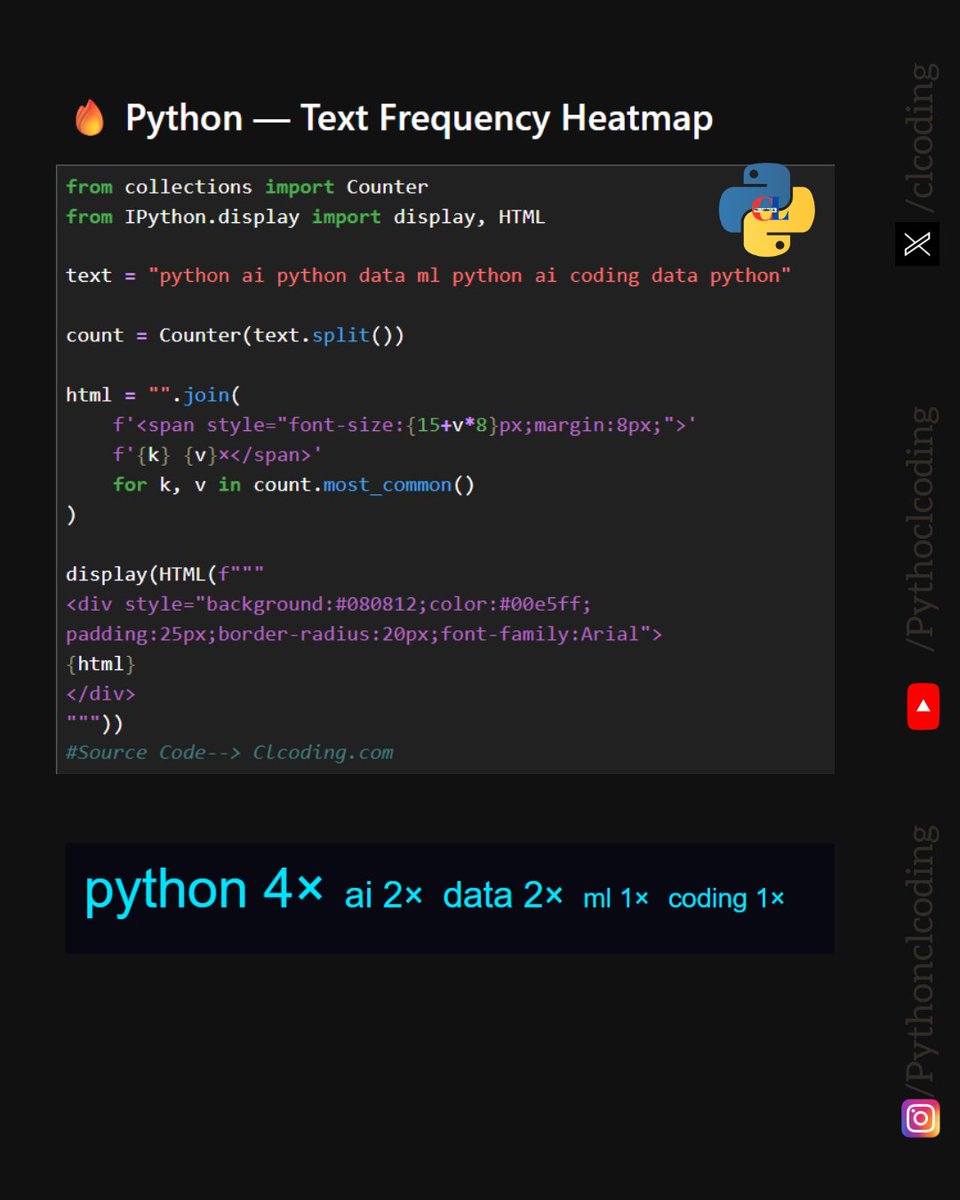
Python Text Frequency Heatmap
Want to see which words appear most often in a text? Python makes it surprisingly simple!
https://t.co/9SsZCpvA5w
Using Counter from the collections module, you can:
🔹 Count word frequencies
🔹 Sort words by occurrence
🔹 Dynamically change font size based on frequency
🔹 Create an interactive visual directly in Jupyter Notebook
🔹 Display the result using IPython.display and HTML
In this example:
python → 4×
ai → 2×
data → 2×
ml → 1×
coding → 1×
A small piece of Python code can turn raw text into an easy-to-read visual representation.
Try changing the text variable and see how the visualization changes!
Python Coding Challenge — Day 1259
Can you predict the output without running the code?
A small Python snippet can hide a tricky concept!
Try it yourself first, then check the explanation:
https://t.co/taIIYKc3td
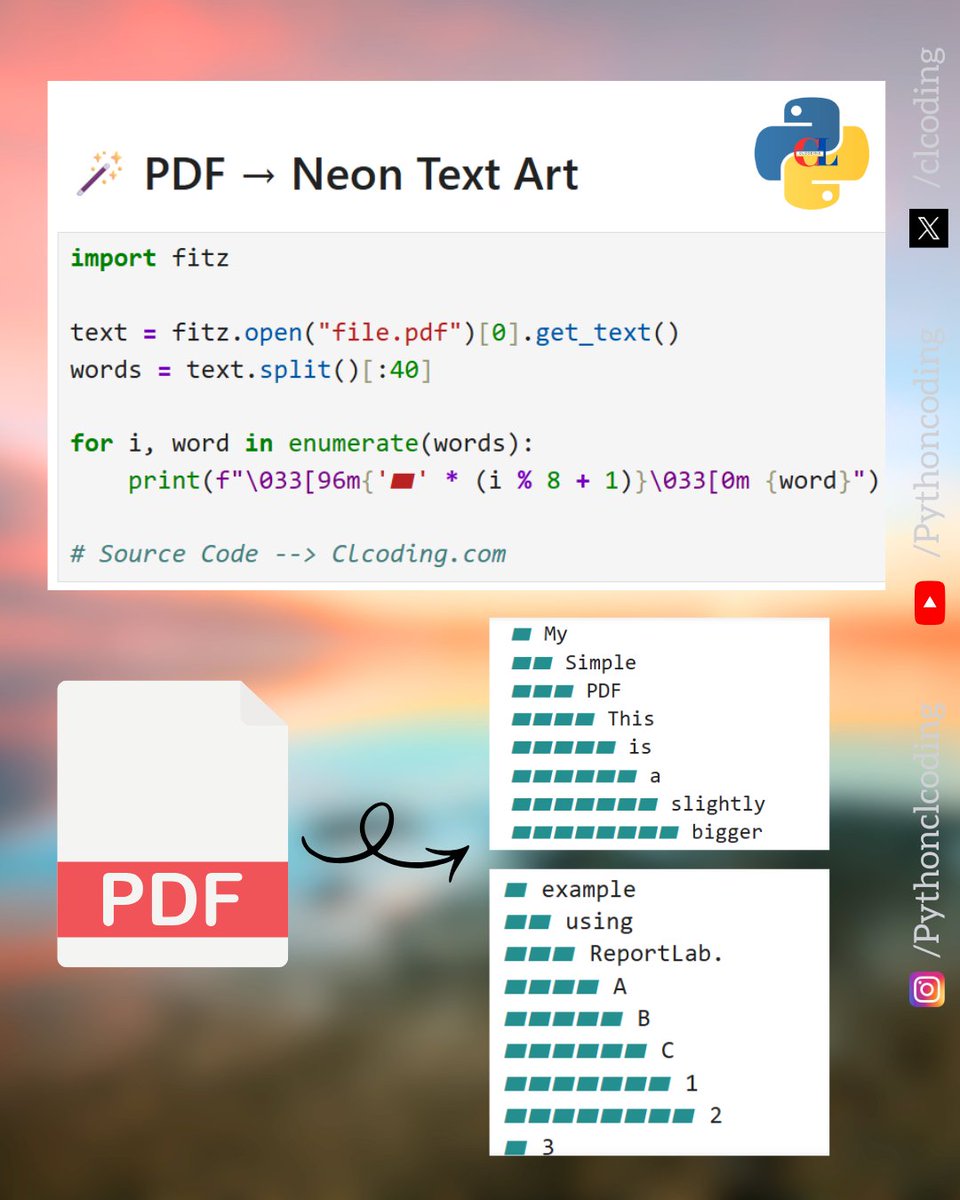
Turn a PDF into Neon-Style Text Art with Python!
What if you could extract text from a PDF and turn it into a simple visual pattern directly in your terminal?
https://t.co/K7E9F2Al0y
This Python example uses PyMuPDF (fitz) to:
Extract text from a PDF
Select the first 40 words
Loop through each word with enumerate()
Use ANSI escape codes to create a growing block pattern
Display the result as terminal-style text art
A small script, but a fun example of combining PDF processing + Python loops + terminal formatting.
Python can turn ordinary text into surprisingly creative visuals.
Save it. Try it with your own PDF.