Anthropic engineer:
"You're not supposed to prompt Claude. You're supposed to build a system that prompts itself."
this is one of the best workflows I've seen in a long time
in this video he breaks down exactly how most people are using Claude:
- the 14% you lose to CLAUDE.md before typing a word
- the plugins that 95% of users have never installed
- the caching setup that keeps it at 95% hit rate and almost free
- why starting every chat from zero is the slowest way to use Claude
if you've been using Claude for more than a month and never left the chat window, you've been using one project when you could be running a team of them
instead of another show tonight, watch this
make sure to bookmark it before it gets lost in your feed
full guide in the article below
Claude Code creator:
"I don't prompt Claude anymore. I have loops that figure out what to do. My job is to create loops."
in 30 minutes Boris breaks down his daily Claude Code setup, step by step
the person who built the tool doesn't use it the way most people think
no prompts, no chat box, just loops running on their own
I broke down 17 Claude features most people have never found
full guide in the post below
Someone just turned Claude Code into a full academic publishing house.
It's called Academic Research Skills.
Research team, paper writer, peer reviewers, and an editor all running as AI agents on your machine.
The pipeline goes: Research → Write → Integrity Check → 5-person Review → Revise → Re-Review → Final Check → Publish-ready PDF.
Here's what's inside:
→ 13-agent deep research team with Socratic guidance and PRISMA systematic reviews
→ 12-agent paper writer that outputs LaTeX in APA 7, IEEE, or Chicago
→ Multi-perspective peer review: Editor-in-Chief + 3 reviewers + a Devil's Advocate that attacks your core thesis
→ A 10-stage orchestrator with mandatory integrity checkpoints you cannot skip
Here's the wildest part:
The integrity agent verifies 100% of references, data, and claims before review. In the showcase run, it caught 15 fabricated references and 3 statistical errors before a human ever saw the draft.
Every review is scored on a 0-100 rubric. Above 80 gets accepted. Below 50 gets rejected. Just like a real journal.
Free on GitHub. CC-BY-NC 4.0 License.
Demis Hassabis just gave away 40 minutes that will quietly change how the next 5 years play out.
40 minutes from a Nobel laureate, CEO of Google DeepMind, the man building AGI.
The 1000x engineer, what to build before AGI, what comes after.
Most founders will hear this when it's already too late.
The article below is the cheat sheet that puts you ahead of them today.
The person who built Claude Code just showed exactly how to use it.
This single session is worth more than any $1000 course.
30 minutes. Free. Straight from Boris Cherny himself.
Bookmark this before you forget.
20 Powerful NotebookLM Prompts.
To Learn Faster, Think Smarter & Research Like a Pro.👇
1. Smart Summary
Turn lengthy documents into clear insights.
👉 “Summarize this material into the 10 most important ideas, arguments, and actionable takeaways in simple language.”
2. Explain Like I’m New
Make difficult topics easy to grasp.
👉 “Explain this topic for a complete beginner using simple examples, analogies, and step-by-step explanations.”
3. Advanced Breakdown
Go beyond surface-level understanding.
👉 “Break this content into core ideas, hidden assumptions, expert insights, and details most people overlook.”
4. Source Comparison
Find patterns and contradictions.
👉 “Compare these sources and highlight where they agree, disagree, and what unique value each one adds.”
5. Instant Study Notes
Create organized notes in seconds.
👉 “Convert this content into structured study notes with headings, bullets, definitions, and examples.”
6. Flashcard Creator
Learn through active recall.
👉 “Generate 25 useful flashcards from this material with clear questions and concise answers.”
7. Interactive Quiz
Test your understanding.
👉 “Create a quiz that progresses from beginner to advanced based only on this source. Grade my answers afterward.”
8. Memory Techniques
Retain information faster.
👉 “Create mnemonics, memory hooks, and analogies to help me remember the key concepts.”
9. Timeline Generator
See the bigger picture clearly.
👉 “Extract all major events, milestones, and developments from these sources and organize them into a timeline.”
10. Evidence & Quotes
Pull out the strongest insights.
👉 “Find the most impactful quotes, statistics, and supporting evidence from these materials.”
11. Identify Research Gaps
Discover what’s missing.
👉 “Point out weak arguments, missing evidence, unanswered questions, and research gaps in these sources.”
12. Debate Viewpoints
Strengthen critical thinking.
👉 “Present the strongest arguments both for and against the main idea as if two experts are debating.”
13. Build a Framework
Turn knowledge into systems.
👉 “Transform the ideas from these sources into a practical framework, checklist, or repeatable process.”
14. Repurpose Into Content
Turn research into content assets.
👉 “Use this material to create a LinkedIn post, article outline, tweet thread, and newsletter concept.”
15. Expert Q&A Mode
Learn directly from the material.
👉 “Act like an expert on these uploaded sources. Answer my questions only using the provided information.”
16. Executive Summary
Get strategic insights quickly.
👉 “Create a concise 5-minute executive briefing with key insights, implications, and action points.”
17. Learning Roadmap
Turn information into a curriculum.
👉 “Convert this notebook into a 7-day learning plan with lessons, exercises, and checkpoints.”
18. Idea Expansion
Unlock creative applications.
👉 “Generate 20 original ideas, opportunities, or innovations inspired by these materials.”
19. Teach It Simply
Prepare to explain it to others.
👉 “Rewrite the key concepts into a simple teaching script I can explain in under 5 minutes.”
20. Execution Plan
Move from learning to action.
👉 “Create a practical action plan with priorities, next steps, and deadlines based on these sources.”
❤️ Save for later
🔁 Share with your network
🔖 Bookmark this thread
Follow @SaurabhDub28465 for more AI, Tech productivity & research workflows.
the fastest growing GitHub repos in finance + AI this week:
1. TradingAgents (+~2,000 ★)
multi-agent LLM trading framework built for financial research and execution. combines analyst agents, sentiment models, portfolio reasoning, and real trading firm dynamics into a single stack.
https://t.co/IvYOYlN59H
2. MoneyPrinterTurbo (+11,147 ★)
one-click short video generator powered by AI LLMs. widely used in AI-driven content monetization pipelines. biggest star spike of the week across all finance-adjacent AI repos.
https://t.co/5p10rF8Qut
3. OpenBB (+~1,500 ★)
open-source financial data platform for analysts, quants, and AI agents. covers stocks, derivatives, crypto, fixed income, and macro. actively developed with a push today.
https://t.co/M1t4gtXiWu
4. nofx (+~800 ★)
AI-native trading terminal for US stocks, commodities, forex, and crypto. real-time market data with built-in intelligent analysis and agent-ready architecture.
https://t.co/gqZFT00tYs
5. Vibe-Trading (+728 ★)
personal AI trading agent with multi-agent architecture, MCP support, backtesting, and algorithmic trading across asset classes. built by HKUDS research lab.
https://t.co/15UUXF0Zuf
6. QuantDinger (+726 ★)
AI quantitative trading platform for crypto, stocks, and forex. includes live trading, backtesting, market analytics, and integrations with Binance, Alpaca, MT5, and Coinbase.
https://t.co/x8GHftf5XX
7. FinRobot (+~300 ★)
open-source AI agent platform for financial analysis using LLMs. covers robo-advisory, report analysis, and market research. maintained by AI4Finance Foundation.
https://t.co/UgO9rdE8V7
8. ValueCell (+~250 ★)
community-driven multi-agent platform for financial applications. covers investment research, stock and crypto monitoring, and agentic finance workflows.
https://t.co/68WHsXgt4n
9. TradingAgents-AShare (+~150 ★)
Chinese A-share multi-agent investment research system built on TradingAgents architecture. 15 AI agents simulate institutional collaboration with real-time debate. supports Claude Code and Docker.
https://t.co/MXTzPt6oUY
10. sec-edgar-mcp (+~100 ★)
MCP server that gives AI agents direct access to SEC EDGAR filings. lets LLMs read and analyze 10-Ks, 10-Qs, and other public financial disclosures from US-listed companies.
https://t.co/3XP2t89jxH
bookmark this and start today.
Two economists just published a mathematical proof that AI will destroy the economy.
Not might. Not could. Will — if nothing changes.
The paper is called "The AI Layoff Trap." Published March 2, 2026. Wharton School, University of Pennsylvania. Boston University. Peer reviewed. Mathematically modeled.
The conclusion is one sentence.
"At the limit, firms automate their way to boundless productivity and zero demand."
An economy that produces everything. And sells it to nobody.
Here is how you get there.
A company fires 500 workers and replaces them with AI. A competitor fires 700 to keep up. Another fires 1,000. Every company is behaving rationally. Every company is following the incentives correctly. And every company is building a trap for itself.
Because the workers who were fired were also customers.
When they lose their jobs faster than the economy can absorb them, they stop spending. Consumer demand falls. Companies respond by cutting costs — which means automating more workers — which means less spending — which means more falling demand — which means more automation.
The loop has no natural exit.
The researchers tested every proposed solution. Universal basic income. Capital income taxes. Worker equity participation. Upskilling programs. Corporate coordination agreements.
Every single one failed in the model.
The only intervention that worked: a Pigouvian automation tax — a per-task levy charged every time a company replaces a human with AI, forcing them to price in the demand they are destroying before they pull the trigger.
No government has implemented this. No major economy is seriously discussing it.
Meanwhile the numbers are already tracking the curve. 100,000 tech workers laid off in 2025. 92,000 more in the first months of 2026. Jack Dorsey fired half of Block's workforce and said publicly: "Within the next year, the majority of companies will reach the same conclusion."
Nobody is doing anything wrong. Companies are following their incentives perfectly. That is exactly the problem.
Rational behavior. At scale. Simultaneously. With no mechanism to stop it.
Two economists built the math. The math leads to one place.
Source: Falk & Tsoukalas · Wharton School + Boston University ·
Obsidian is usually placed in the same category as Notion, Apple Notes, Roam, or any other app where people collect thoughts.
That comparison is useful at the interface level, but it hides the more important design choice.
Obsidian’s central object is not a workspace hosted inside the product. It is a folder of Markdown files on your own machine. The app sits on top of that folder and gives you ways to inspect, connect, search, visualize, and extend those files.
That is a very different architecture from the productivity tools most people are used to.
In many modern tools, the database is the source of truth and the interface is the only practical way to reach it. In Obsidian, the file remains the source of truth. A note can be read outside the app. A vault can be backed up like any other folder. Links are written into the text. Metadata can live inside the file. The useful thing is not that Obsidian has a graph view or a plugin marketplace. The useful thing is that it keeps the durable layer simple enough to survive the interface.
This also explains why Obsidian becomes more interesting in the AI era.
LLMs work best when the material they operate on is explicit, inspectable, and easy to transform.
A folder of Markdown notes is a much better substrate for that than an opaque productivity database. A model can summarize notes, extract metadata, suggest links, generate index pages, or turn raw research into a more coherent local wiki. But the human still needs to audit the result, because a knowledge base that looks organized can still be wrong.
The point is not to automate thinking. The point is to make the maintenance of knowledge less fragile.
This is the most important AI article you'll read all year.
I've been deep in the AI space for 2+ years, and if I had to rebuild wealth from zero, this is exactly what I'd do.
Three distinct paths to making money with AI - all executable by anyone.
Don't scroll past this one:
Anthropic engineer:
"You're not supposed to watch Claude Code work. You're supposed to wake up and review what it shipped."
In 22 minutes she builds the entire workflow live on camera.
Most people close their terminal and everything stops.
This setup keeps shipping while you sleep.
Watch the video, then save the exact setup below👇
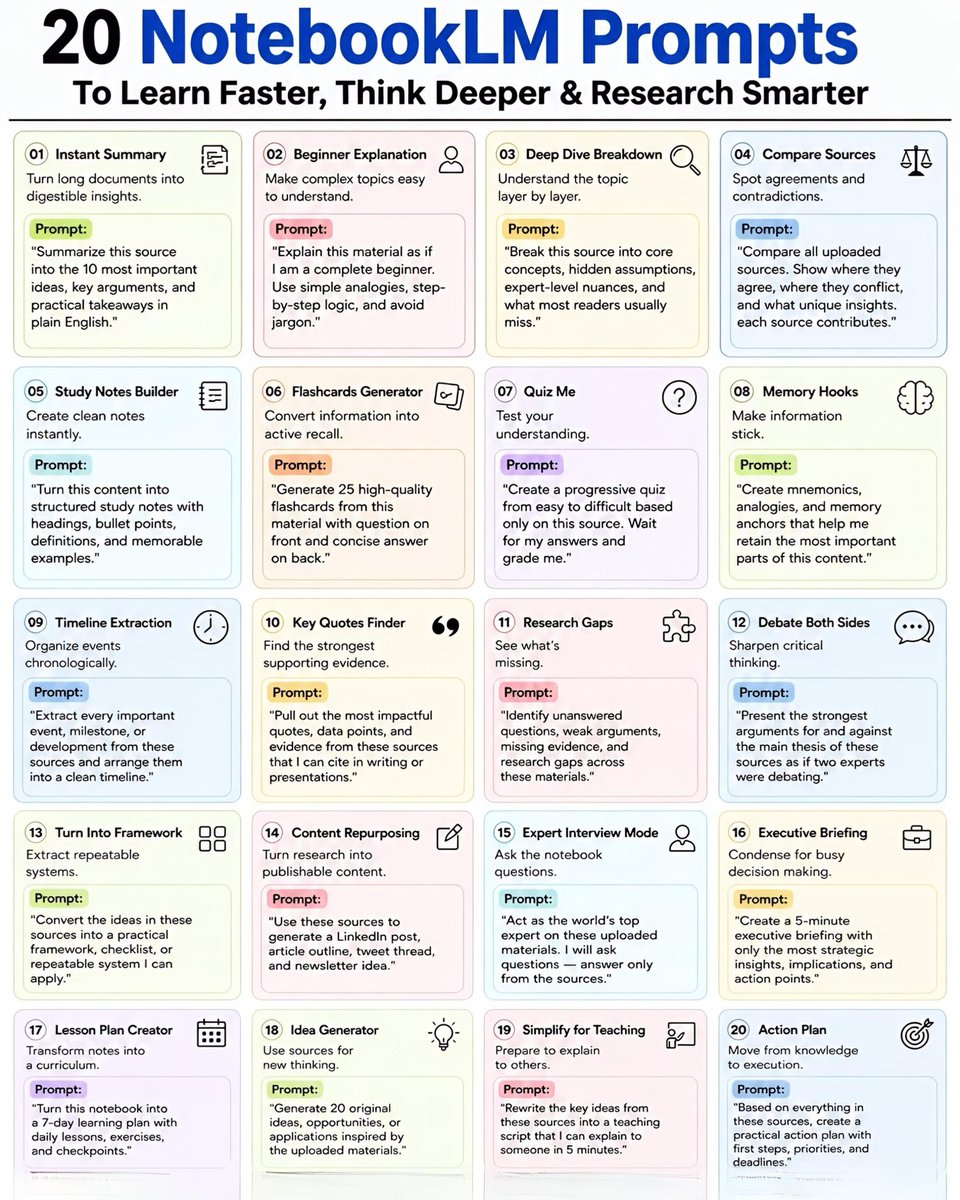
20 NotebookLM Prompts
To Learn Faster, Think Deeper & Research Smarter
01. Instant Summary
Turn long documents into digestible insights.
👉 Prompt:
“Summarize this source into the 10 most important ideas, key arguments, and practical takeaways in plain English.”
02. Beginner Explanation
Make complex topics easy to understand.
👉 Prompt:
“Explain this material as if I am a complete beginner. Use simple analogies, step-by-step logic, and avoid jargon.”
03. Deep Dive Breakdown
Understand the topic layer by layer.
👉 Prompt:
“Break this source into core concepts, hidden assumptions, expert-level nuances, and what most readers usually miss.”
04. Compare Sources
Spot agreements and contradictions.
👉 Prompt:
“Compare all uploaded sources. Show where they agree, where they conflict, and what unique insights each source contributes.”
05. Study Notes Builder
Create clean notes instantly.
👉 Prompt:
“Turn this content into structured study notes with headings, bullet points, definitions, and memorable examples.”
06. Flashcards Generator
Convert information into active recall.
👉 Prompt:
“Generate 25 high-quality flashcards from this material with question on front and concise answer on back.”
07. Quiz Me
Test your understanding.
👉 Prompt:
“Create a progressive quiz from easy to difficult based only on this source. Wait for my answers and grade me.”
08. Memory Hooks
Make information stick.
👉 Prompt:
“Create mnemonics, analogies, and memory anchors that help me retain the most important parts of this content.”
09. Timeline Extraction
Organize events chronologically.
👉 Prompt:
“Extract every important event, milestone, or development from these sources and arrange them into a clean timeline.”
10. Key Quotes Finder
Find the strongest supporting evidence.
👉 Prompt:
“Pull out the most impactful quotes, data points, and evidence from these sources that I can cite in writing or presentations.”
11. Research Gaps
See what’s missing.
👉 Prompt:
“Identify unanswered questions, weak arguments, missing evidence, and research gaps across these materials.”
12. Debate Both Sides
Sharpen critical thinking.
👉 Prompt:
“Present the strongest arguments for and against the main thesis of these sources as if two experts were debating.”
13. Turn Into Framework
Extract repeatable systems.
👉 Prompt:
“Convert the ideas in these sources into a practical framework, checklist, or repeatable system I can apply.”
14. Content Repurposing
Turn research into publishable content.
👉 Prompt:
“Use these sources to generate a LinkedIn post, article outline, tweet thread, and newsletter idea.”
15. Expert Interview Mode
Ask the notebook questions.
👉 Prompt:
“Act as the world’s top expert on these uploaded materials. I will ask questions answer only from the sources.”
16. Executive Briefing
Condense for busy decision making.
👉 Prompt:
“Create a 5-minute executive briefing with only the most strategic insights, implications, and action points.”
17. Lesson Plan Creator
Transform notes into a curriculum.
👉 Prompt:
“Turn this notebook into a 7-day learning plan with daily lessons, exercises, and checkpoints.”
18. Idea Generator
Use sources for new thinking.
👉 Prompt:
“Generate 20 original ideas, opportunities, or applications inspired by the uploaded materials.”
19. Simplify for Teaching
Prepare to explain to others.
👉 Prompt:
“Rewrite the key ideas from these sources into a teaching script that I can explain to someone in 5 minutes.”
20. Action Plan
Move from knowledge to execution.
👉 Prompt:
“Based on everything in these sources, create a practical action plan with first steps, priorities, and deadlines.”
❤️ Like
🔁 Retweet
🔖 Bookmark
Follow @Tech_by_Shweta for more such posts
Eric Schmidt (ex-Google CEO): “if you really want to make money, it’s actually easy. found an agentic AI company.”
If I had only 30 days to do that , I'd begin here and save this:
Agent Architecture
https://t.co/Xyy3e9AjAQ
Claude Code 101:
https://t.co/tZbHeRDWkj
Claude Code in Action:
https://t.co/RDYEVbydhW
Prompt engineering (official):
https://t.co/aYQzAWmObh
Interactive prompt tutorial (hands-on):
https://t.co/5k9My0hYgY
CLAUDE.md & how to give Claude memory:
https://t.co/gtmOGKAvDe
Skills, teach Claude reusable workflows:
https://t.co/DJFqh3E6OB
MCP, time connect Claude to Slack, GitHub, Drive:
https://t.co/XbRdmmcYmP
Routines (automate tasks 24/7):
https://t.co/LGbhOeWWdJ
Claude Code Ultimate Guide (community):
https://t.co/56DAmEuqH8
Awesome Claude Code (skills, hooks, plugins):
https://t.co/jUIBuxvV5K
All 13 Anthropic Academy courses (free certs):
https://t.co/rHn0gDmtGH
Claude Code full docs:
https://t.co/KYHnapDdHG
All of this is for free at $0/month
Then read this guide by this builder
INSTEAD OF WATCHING AN HOUR OF NETFLIX.
This 60-minute MIT lecture will teach you more about building companies than every startup book you've read combined.
Bookmark it and give it an hour, no matter what.
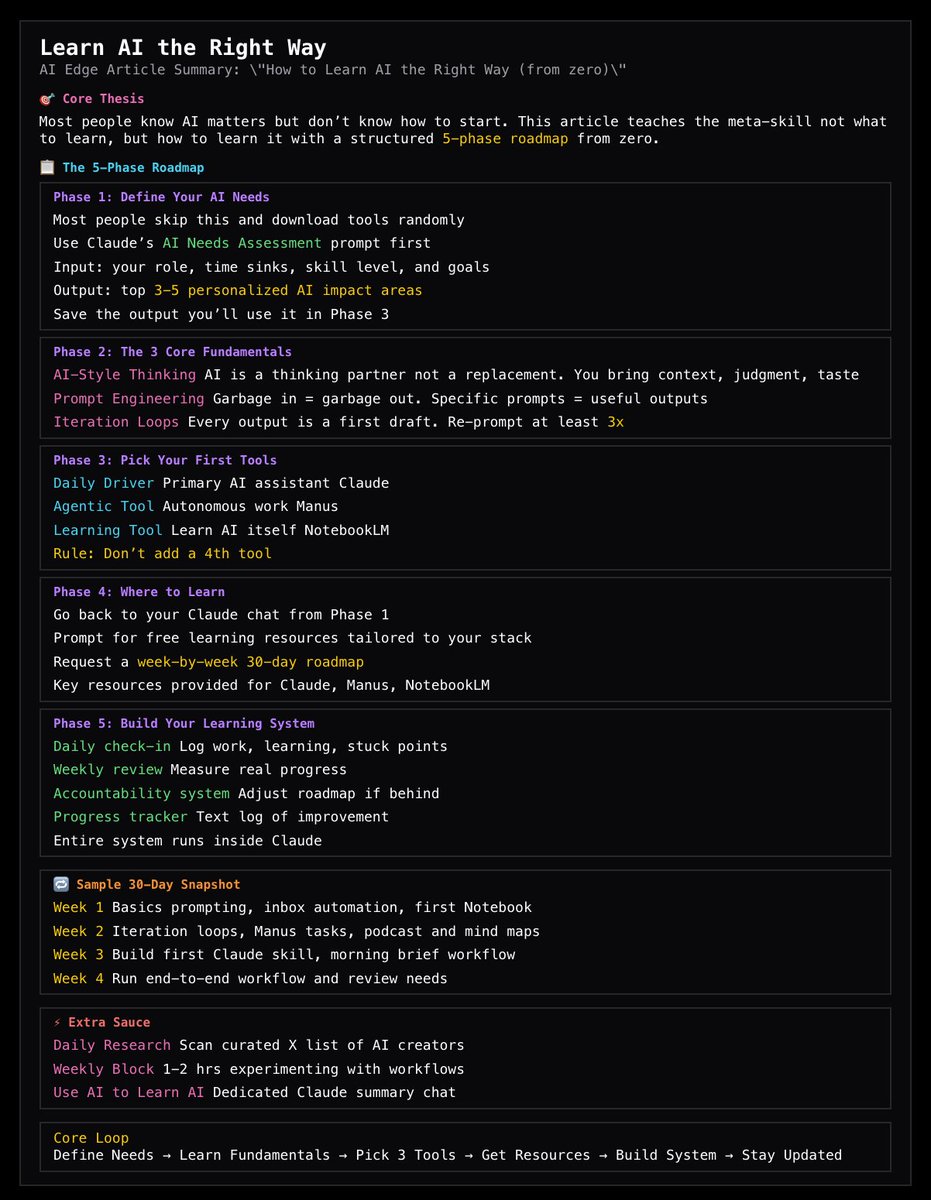
I've taught dozens of people AI from scratch using this exact roadmap.
Zero technical experience required - works every single time.
How to learn AI the right way:


![shushant_l's tweet photo. 99% of Claude users have no idea these shortcuts exist.
They're hiding in plain sight.
Here are 40 Claude prompt shortcuts that can save hours every week.
📂 Claude Prompt Shortcuts
┃
┣ 📂 Explain & Understand
┃ ┣ 📂 /ELI5
┃ ┣ 📂 /TLDR
┃ ┣ 📂 /DEFINE
┃ ┣ 📂 /EXAMPLE OF
┃ ┣ 📂 /SIMPLIFY
┃ ┣ 📂 /HISTORY OF
┃ ┗ 📂 /CONTEXT FOR
┃
┣ 📂 Think & Decide
┃ ┣ 📂 /PROS AND CONS
┃ ┣ 📂 /COMPARE
┃ ┣ 📂 /RISKS OF
┃ ┣ 📂 /DEVIL'S ADVOCATE
┃ ┗ 📂 /DECISION MATRIX
┃
┣ 📂 Writing
┃ ┣ 📂 /REWRITE
┃ ┣ 📂 /SHORTER
┃ ┣ 📂 /CLEARER
┃ ┣ 📂 /MORE FORMAL
┃ ┗ 📂 /PROOFREAD
┃
┣ 📂 Email & Work
┃ ┣ 📂 /EMAIL FROM
┃ ┣ 📂 /SUBJECT LINE FOR
┃ ┣ 📂 /POLITE DECLINE
┃ ┣ 📂 /MEETING AGENDA FOR
┃ ┣ 📂 /ACTION ITEMS FROM
┃ ┗ 📂 /COVER LETTER FOR
┃
┣ 📂 Creative
┃ ┣ 📂 /STORY ABOUT
┃ ┣ 📂 /TWEET ABOUT
┃ ┣ 📂 /LINKEDIN POST ABOUT
┃ ┣ 📂 /HEADLINE FOR
┃ ┣ 📂 /SLOGAN FOR
┃ ┗ 📂 /CAPTION FOR
┃
┣ 📂 Learning
┃ ┣ 📂 /QUIZ ME ON
┃ ┣ 📂 /FLASHCARDS FOR
┃ ┣ 📂 /STUDY PLAN FOR
┃ ┣ 📂 /BEGINNER GUIDE TO
┃ ┣ 📂 /LEARN [topic]
┃ ┗ 📂 /CHEAT SHEET FOR
┃
┣ 📂 Productivity
┃ ┣ 📂 /STEP-BY-STEP
┃ ┣ 📂 /CHECKLIST FOR
┃ ┣ 📂 /SUMMARIZE
┃ ┗ 📂 /SCHEDULE FOR
┃
┣ 📂 Mind & Growth
┃ ┣ 📂 /JOURNAL PROMPT FOR
┃ ┗ 📂 /HABIT PLAN FOR
┃
┣ 📂 Content Creation
┃ ┣ 📂 Social Media Posts
┃ ┣ 📂 Newsletter Writing
┃ ┣ 📂 Blog Articles
┃ ┣ 📂 Content Repurposing
┃ ┗ 📂 Audience Growth
┃
┣ 📂 Marketing
┃ ┣ 📂 Ad Copy
┃ ┣ 📂 Landing Pages
┃ ┣ 📂 Marketing Angles
┃ ┣ 📂 Customer Research
┃ ┗ 📂 Funnel Optimization
┃
┣ 📂 Business
┃ ┣ 📂 Market Analysis
┃ ┣ 📂 Business Plans
┃ ┣ 📂 Revenue Ideas
┃ ┣ 📂 Process Documentation
┃ ┗ 📂 Strategic Decisions
┃
┣ 📂 AI Productivity
┃ ┣ 📂 Prompt Engineering
┃ ┣ 📂 Workflow Automation
┃ ┣ 📂 AI Research
┃ ┣ 📂 Knowledge Management
┃ ┗ 📂 AI Agents
┃
┣ 📂 Career
┃ ┣ 📂 Resume Improvement
┃ ┣ 📂 Interview Preparation
┃ ┣ 📂 Salary Negotiation
┃ ┣ 📂 Skill Development
┃ ┗ 📂 Job Search
┃
┣ 📂 Personal Life
┃ ┣ 📂 Travel Planning
┃ ┣ 📂 Fitness Planning
┃ ┣ 📂 Meal Planning
┃ ┣ 📂 Financial Planning
┃ ┗ 📂 Goal Setting
┃
┗ 📂 Mastery
┣ 📂 Faster Learning
┣ 📂 Better Decisions
┣ 📂 Clear Communication
┣ 📂 Higher Productivity
┗ 📂 Personal Growth](https://pbs.twimg.com/media/HJotgRvb0AA4KSx.jpg)