SHOCKING: Claude has a secret mode called "Research Accelerator."
It turns a 60-page paper into a literature review, a counterargument, and 10 research questions in under 5 minutes.
Here are the 13 prompts grad students are quietly using to finish in half the time:
Instead of watching Netflix tonight, watch this 2-hour Stanford lecture.
It will teach you more about how LLMs like ChatGPT and Claude are actually built than most people learn in years working in AI.
Stanford released it for free.
Save this.
Most people use Claude like this:
“Help me write this.”
“Give me ideas.”
“Fix this for me.”
That’s exactly why they never get elite-level outputs.
Instead, treat Claude like an operating system for your brain.
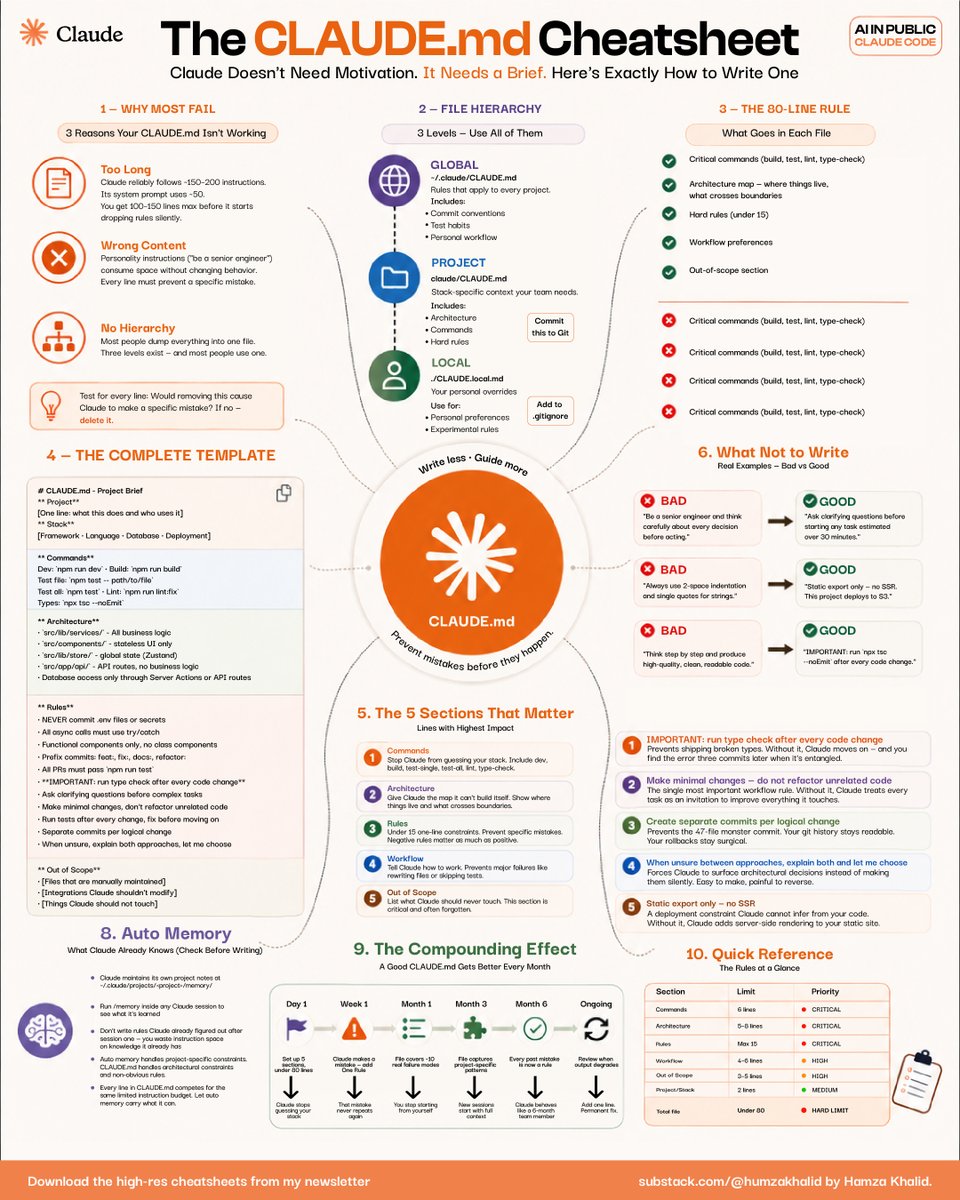
This CLAUDE. MD framework completely changed how people structure context, rules, workflows, and decision-making with AI.
Here’s the exact cheatsheet + protocol you can steal today: 👇
☑ 1. Stop dumping random prompts into Claude
Most people fail for 3 reasons:
��� Their instructions are too long
→ Their prompts contain vague fluff
→ They have zero hierarchy
Claude follows systems better than motivation.
The moment you create structure:
• Better outputs
• Fewer mistakes
• Faster execution
• Consistent quality
↳ Claude does not need motivation. It needs a brief.
☑ 2. Use the 3-level CLAUDE. md hierarchy
The cheatsheet breaks it into 3 layers:
→ GLOBAL
Rules that apply to every project
→ PROJECT
Context specific to the current build
→ LOCAL
Personal preferences and experimental rules
This is unfairly powerful because Claude stops “guessing” what you want.
Instead:
• It understands architecture
• Knows your workflow
• Respects constraints
• Avoids repeating mistakes
↳ Most people use only one layer and wonder why the outputs feel inconsistent.
☑ 3. Follow the 80-line rule
One of the biggest insights in this cheatsheet:
Your CLAUDE. MD should stay under ~80 lines.
Why?
Because overloaded context silently degrades performance.
Include only:
• Critical commands
• Architecture map
• Hard rules
• Workflow preferences
• Out-of-scope tasks
Remove:
• Generic motivation
• Personality fluff
• Redundant instructions
↳ If removing a line changes nothing, delete it.
☑ 4. These 5 sections matter most
The highest-impact CLAUDE. MD files contain:
1. Commands
2. Architecture
3. Rules
4. Workflow
5. Out of Scope
That’s it.
Not 400 lines of “act like a senior engineer.”
The brutal truth:
Claude performs better with constraints than with inspiration.
☑ 5. The “good vs bad” examples are the goldmine
BAD:
“Think carefully before acting.”
GOOD:
“Run type-check after every code change.”
BAD:
“Write high-quality code.”
GOOD:
“Use static export only. No SSR.”
The difference?
Specificity.
Claude executes operational instructions better than abstract advice.
↳ Treat Claude like a teammate with perfect memory but zero intuition.
☑ 6. This is where the compounding starts
A good CLAUDE. MD improves every single month.
Each mistake becomes:
• A new rule
• A better workflow
• A cleaner constraint
• A stronger operating system
Eventually, Claude stops feeling like a chatbot.
It starts feeling like infrastructure.
That’s why CLAUDE. MD is one of the most underutilized AI leverage systems right now.
For more AI productivity breakdowns like this: 👇
→ https://t.co/XZmlWQ3gEs
→ Subscribe to my free newsletter (don’t pay anything)
→ Get more free and daily cheatsheets
What’s the biggest mistake you’ve been making with Claude?
♻️ Repost this to help your network stop wasting hours fighting bad AI outputs.
How to actually set up Claude in 7 minutes:
(and never re-do it after this setup)
1. Pick the right model.
☑ Open the Claude desktop app
☑ Set Opus 4.7 for complex tasks
☑ Turn ON Extended Thinking
2. Create your 'Cowork' folder.
☑ 3 subfolders: About me, Outputs & Templates
☑ ABOUT ME holds your 3 context files
☑ Claude reads them for every single task
3. Write your Global Instructions.
☑ Settings → Cowork → Edit Global Instructions
☑ A persistent prompt before every task
☑ Tells Claude what to read, and when
4. Connect your daily tools.
☑ Gmail, Gamma, Drive, Granola
☑ All your tools in one place
☑ No more copy-paste between 12 tabs
5. Install Wispr .ai (it's free).
☑ Turns your voice → text
☑ Pick a hold-key (mine = Shift)
☑ Typing at 60 wpm is the bottleneck
6. Open your Cowork folder in Obsidian.
☑ Install Obsidian (free)
☑ Open Cowork as a vault
☑ Edit context files without leaving flow state
7. Save your top 3 workflows as Skills.
☑ Click any chat → "Turn into a Skill"
☑ /linkedin, /brief, /report = instant
☑ Reuse what already works
8. Build one Project per recurring deliverable.
☑ One Project = one type of output
☑ Files + instructions live inside
☑ Never re-explain the same task twice
9. Restart the chat at message 20.
☑ Long chats burn 30x more tokens
☑ Ask Claude to summarize → paste in new chat
☑ Fresh start = better results, lower bill
Full guide + prompts at https://t.co/psB7XxAv8w
(save this - small habits = big leverage over time)
CLAUDE .md is the most important file in Claude.
This is exactly how Boris Cherny sets his up:
- CLAUDE .md is one text file.
- It sits in your project folder.
- Claude reads it before every reply.
Without one, Claude has no idea who you are.
Boris's version is the infographic below.
Save it as your starting template.
3 steps to install yours:
1. Create the CLAUDE .md file.
2. Paste in Boris's rules from below.
3. Tell Claude to update it as you work.
It builds itself from there.
This is 1 of 6 features you need in Claude Code.
The other 5 are in this week's newsletter.
You also get Boris's CLAUDE.md to copy-paste.
Free to read
https://t.co/GXvwuzHk5l
Repost ♻️ to help someone in your network.
P.S. Have you set up a CLAUDE .md yet?
Ali Abdaal just dropped his Claude Code workflow.
And I think this is the most beginner-friendly breakdown anyone has published.
Most Claude Code tutorials are made by engineers for engineers.
Terminal commands.
API keys.
Technical jargon that loses you in the first 60 seconds.
Ali starts from zero.
Don't upgrade to the $100 Claude plan (yet).
These 21 hacks make the $20/month plan enough:
1. You upload PDFs raw. One page = 3,000 tokens.
Fix: Paste the text into a Google doc. Download as .md format. Under 200 tokens.
2. You build files inside Cowork too early.
Fix: Plan in Chat first. Move to Cowork only when you know exactly what you want.
3. You write 500-word prompts that reload.
Fix: Write 29 words instead: "I want to [task] to [goal]. Ask me questions using AskUserQuestion."
4. You say "redo the whole thing" to fix section 3.
Fix: "Only redo section 3. Keep everything else. No commentary. Just the output."
5. You send 3 separate messages for 3 tasks.
Fix: One message, three tasks. "Summarize this, list the points, suggest a headline."
6. You type "No, I meant," stacking on the history.
Fix: Click 'Edit' on your original message. Fix it. Regenerate.
7. You rewrite prompts from scratch every time.
Fix: Keep a prompt library. Same structure, swap the variable.
8. You use Opus for a simple grammar check.
Fix: Sonnet for quick tasks. Save Opus + Extended Thinking for deep work.
9. Your about-me file is 22,000 words (too long).
Fix: Trim to under 2,000 words. End sessions with "Write a session-notes .md."
Paste my .md file prompt: https://t.co/LyV7fegv4c
10. You never restart & keep stacking long chats.
Fix: When Cowork goes sideways, click "Restart the conversation from here" on an earlier message.
11. You never summarize before things get long.
Fix: Every 15-20 messages → summarize, copy the brief, start a fresh session.
12. You use Projects for recurring files.
Fix: Use Projects. Upload once. Every chat inside references it without re-burning tokens.
13. You dump 50 files into Cowork "just in case."
Fix: Only include what this task needs. Zero folders for quick tasks like email drafts.
14. You keep 3 topics in 1 chat. Claude re-reads all.
Fix: New topic = new chat. Always. Dead context is dead tokens.
15. You leave search & connectors on by default.
Fix: Default everything off. Turn features on per task, not per account.
16. You manually run the same report every week.
Fix: Use /schedule. "Every Monday at 7am, create my weekly briefing."
17. You let Claude Code explore your whole repo.
Fix: Be specific. "Build a bar chart from this CSV. Save as chart .png."
18. You skip Personal Preferences & waste setup.
Fix: Settings → Personal Preferences. Set your tone and style once.
19. You type lazy prompts like "make it better."
Fix: Speak your prompts with wispr .ai. Richer context in one shot.
20. You burn your whole limit in one morning.
Fix: Claude runs on a rolling 5-hour window. Split it.
21. You use Claude for things it can't do.
Fix: Know your tools. Images → Gemini.
Real-time search → Grok.
To download my exact .md files:
1. Go to https://t.co/psB7XxAv8w.
2. Subscribe for free. Open my welcome email.
3. Hit the automatic reply button inside.
4. Go to the Notion link in the second mail.
5. Copy-paste prompts, too.
After 3 years using Claude, I can say it’s the technology that has revolutionized my life.
Here are 18 prompts I use daily that have transformed my day to day; they could do the same for you:
(Save this 🔖)
The person who built Claude Code just showed exactly how to use it.
30 minutes. Free. Straight from Boris Cherny himself.
Bookmark this before you forget.
Most people using Claude daily are missing 40+ features hiding in plain sight.
This single session is worth more than any $1000 course.
INSTEAD OF WATCHING NETFLIX TONIGHT.
Spend 1 hour with this.
Claude AI FULL COURSE that teaches you how to BUILD and AUTOMATE anything.
The people who watch this tonight will wake up tomorrow with a new skill.
Watch it and Bookmark it now.
🚨 Anthropic just showed a 24-minute workshop on how to actually do prompts for Claude.
Taught by the people who built it.
Free. No registration. No paywall.
I've seen $300 courses that don't cover what they teach in the first 8 minutes.
Watch it and bookmark it now.
Anwar Ibrahim tak pernah dalam sejarah Malaysia ada Perdana Menteri komplen “ingat senang ka jadi Perdana Menteri”.
Ada yang jadi PM sampai 22 tahun pun tak pernah sekali pun komplen “ingat senang ka jadi Perdana Menteri”.
24 tahun tunggu gila - gila nak jadi Perdana Menteri, buat macam - macam, berkerusi roda, berguling atas jalan raya,
serba tak kena, PM tu tak betui, PM ni tak reti jaga negara, tapi hang tak sampai 5 tahun dah komplen “Ingat senang ka jadi Perdana Menteri?”
Hang patut jadi Hang Kebun je la.
I've written 500 articles, 23 whitepapers, and 3 ebooks using Claude over 2 years.
These 10 prompts are the ONLY ones I actually use anymore because they handle 90% of professional writing better than any human editor I've worked with and cost me $0.02 per 1000 words: 👇
🚨 BREAKING: Research just got 10x faster.
Claude can now break down dozens of academic papers into structured insights like a Stanford-level researcher.
Use these 9 prompts to skip the overwhelm and get straight to clarity 👇
(Bookmark this)
BREAKING: Claude can now research like a Stanford PhD student.
Here are 9 insane Claude prompts that turn 40+ research papers into structured literature reviews, knowledge maps, and research gaps in minutes (Save this)
We are proud to share that we have broken into the QS Top 10 globally for Petroleum Engineering in the 2026 rankings.
This milestone reflects our dedication to nurturing world-class talent and driving innovation within the energy sector. As we celebrate being among the world’s best, we remain focused on our mission to produce well-rounded graduates and sustainable engineering solutions for a changing world.
Join us in celebrating this monumental achievement!
#UTPinMe #PetroleumEngineering #QSRankings2026 #HigherEducation #MalaysiaExcellence #EnergyTransition
🚨 BREAKING: Claude can now research like an MIT PhD student.
Here are 12 insane Claude prompts that turn 40+ research papers into structured literature reviews, knowledge maps, and research gaps in minutes.
(Save this before it goes viral):










![rubenhassid's tweet photo. Don't upgrade to the $100 Claude plan (yet).
These 21 hacks make the $20/month plan enough:
1. You upload PDFs raw. One page = 3,000 tokens.
Fix: Paste the text into a Google doc. Download as .md format. Under 200 tokens.
2. You build files inside Cowork too early.
Fix: Plan in Chat first. Move to Cowork only when you know exactly what you want.
3. You write 500-word prompts that reload.
Fix: Write 29 words instead: "I want to [task] to [goal]. Ask me questions using AskUserQuestion."
4. You say "redo the whole thing" to fix section 3.
Fix: "Only redo section 3. Keep everything else. No commentary. Just the output."
5. You send 3 separate messages for 3 tasks.
Fix: One message, three tasks. "Summarize this, list the points, suggest a headline."
6. You type "No, I meant," stacking on the history.
Fix: Click 'Edit' on your original message. Fix it. Regenerate.
7. You rewrite prompts from scratch every time.
Fix: Keep a prompt library. Same structure, swap the variable.
8. You use Opus for a simple grammar check.
Fix: Sonnet for quick tasks. Save Opus + Extended Thinking for deep work.
9. Your about-me file is 22,000 words (too long).
Fix: Trim to under 2,000 words. End sessions with "Write a session-notes .md."
Paste my .md file prompt: https://t.co/LyV7fegv4c
10. You never restart & keep stacking long chats.
Fix: When Cowork goes sideways, click "Restart the conversation from here" on an earlier message.
11. You never summarize before things get long.
Fix: Every 15-20 messages → summarize, copy the brief, start a fresh session.
12. You use Projects for recurring files.
Fix: Use Projects. Upload once. Every chat inside references it without re-burning tokens.
13. You dump 50 files into Cowork "just in case."
Fix: Only include what this task needs. Zero folders for quick tasks like email drafts.
14. You keep 3 topics in 1 chat. Claude re-reads all.
Fix: New topic = new chat. Always. Dead context is dead tokens.
15. You leave search & connectors on by default.
Fix: Default everything off. Turn features on per task, not per account.
16. You manually run the same report every week.
Fix: Use /schedule. "Every Monday at 7am, create my weekly briefing."
17. You let Claude Code explore your whole repo.
Fix: Be specific. "Build a bar chart from this CSV. Save as chart .png."
18. You skip Personal Preferences & waste setup.
Fix: Settings → Personal Preferences. Set your tone and style once.
19. You type lazy prompts like "make it better."
Fix: Speak your prompts with wispr .ai. Richer context in one shot.
20. You burn your whole limit in one morning.
Fix: Claude runs on a rolling 5-hour window. Split it.
21. You use Claude for things it can't do.
Fix: Know your tools. Images → Gemini.
Real-time search → Grok.
To download my exact .md files:
1. Go to https://t.co/psB7XxAv8w.
2. Subscribe for free. Open my welcome email.
3. Hit the automatic reply button inside.
4. Go to the Notion link in the second mail.
5. Copy-paste prompts, too.](https://pbs.twimg.com/media/HIDFFMcb0AAMalG.jpg)