The clock code in most .NET apps is a static call your tests can never control.
That one fact causes more flaky time bugs than any library ever will.
DateTimeNow reads the local clock of whatever machine happens to run the code.
Deploy that same service to a server in another region and your timestamps quietly shift. Nothing throws. The data just starts lying.
Then daylight saving flips, and your "run at midnight" job fires twice or skips a day. Nobody wrote a bug. The clock moved and the code had no say in it.
Switching to UtcNow kills the region drift - one timeline for everyone.
DateTimeOffset.UtcNow goes a step further and stores the offset with the value, so you never have to guess which timezone a saved time came from.
But all three are still static calls. In a test you can't say "pretend it's 11:59 PM on the night the clock rolls back." The time is whatever the machine says right now.
That's the gap TimeProvider closes in .NET 8.
You inject it like any other dependency, then call GetUtcNow() instead of the static one.
In production it's the real system clock. In a test you hand it a FakeTimeProvider, set the exact moment you want, and even push time forward to check what happens after a delay.
The rule I follow now: no DateTimeNow near anything that makes a decision. If the logic depends on what time it is, the clock gets injected.
Make the clock a dependency, and time stops being something that happens to your code. It becomes something your tests get to decide.
Microsoft quietly published 99 ready-made .NET skills for AI Agents.
Most .NET developers have no idea they exist 👇
These are not toy examples
They are official and open-sourced.
And they work across Claude Code, Codex, GitHub Copilot, and Cursor.
Quick reminder first.
A skill is a folder of instructions that your AI loads only when a task matches.
You write the recipe once, and it follows your steps every time.
Microsoft ships these in the dotnet/skills repo: 14 plugins, around 95 skills.
A plugin is just a group of related skills.
Here are 5 worth installing today:
𝟭. 𝗱𝗼𝘁𝗻𝗲𝘁-𝗱𝗮𝘁𝗮
The optimizing-ef-core-queries skill finds N+1 problems, fixes tracking modes, and removes common EF Core performance traps.
𝟮. 𝗱𝗼𝘁𝗻𝗲𝘁-𝘁𝗲𝘀𝘁
The largest plugin: 22 skills for running, filtering, and migrating tests between frameworks.
𝟯. 𝗱𝗼𝘁𝗻𝗲𝘁-𝘂𝗽𝗴𝗿𝗮𝗱𝗲
Migrates a project from .NET 8 to 10, and turns on nullable reference types.
𝟰. 𝗱𝗼𝘁𝗻𝗲𝘁-𝗮𝘀𝗽𝗻𝗲𝘁
Creates Web API endpoints and file-upload endpoints in Minimal APIs the right way.
𝟱. 𝗱𝗼𝘁𝗻𝗲𝘁-𝗮𝗶
Builds, debugs, and tests MCP servers with the C# SDK.
Installing them in Claude Code takes 4 steps:
https://t.co/j9AhJjYMUe
But here is the catch.
These skills know .NET.
But they do not know YOUR project.
They cannot tell where you put your entities, or that you don't use repositories, or that your handlers return Result<T>.
That is the gap your own skills fill.
✅ Microsoft's skills → general .NET tasks
✅ Your own skills → your house rules and conventions
Pair them, and Claude (or other AI agent) has both the framework and your style.
In my newest article, I break down the whole system:
→ What a skill is and the building blocks inside one
→ How to write the description so a skill triggers at the right moment
→ How to encode your conventions: rich entities, no repositories, full features
→ Using the Skill Creator to bundle your real code files
→ The complete Microsoft dotnet/skills setup
Read the full guide here:
👉 https://t.co/j9AhJjYMUe
Have you tried any of Microsoft's .NET skills yet, or is this the first you're hearing of them?
——
𝗕𝗲𝘀𝘁 𝘁𝗼𝗼𝗹𝘀 𝗼𝗳 𝘁𝗵𝗲 𝘄𝗲𝗲𝗸:
Redis Iris is a real-time context engine that transforms fragmented data into live, agent-ready context and memory. Try for free today: https://t.co/H5HavL4t5t
exe[.]dev runs persistent VMs for the agent era. SSH and root, plus HTTPS and auth out of the box. Secrets injected at the network edge stay out of the LLM's hands. Run agents, internal tools, side projects, anything: https://t.co/TMnjphLFpS
——
♻️ Repost to help other .NET developers discover these skills
➕ Follow me ( @AntonMartyniuk ) to improve your .NET and Architecture Skills
🚀 New in CODE Magazine: Angular Signals: The End of RxJS Boilerplate?
I’ve been diving deeper into Angular Signals - this article is a preview of what I’m also covering in my upcoming Signals book.
Read here 👉 https://t.co/a64XrmZO7j
#Angular#Signals#RxJS#WebDev
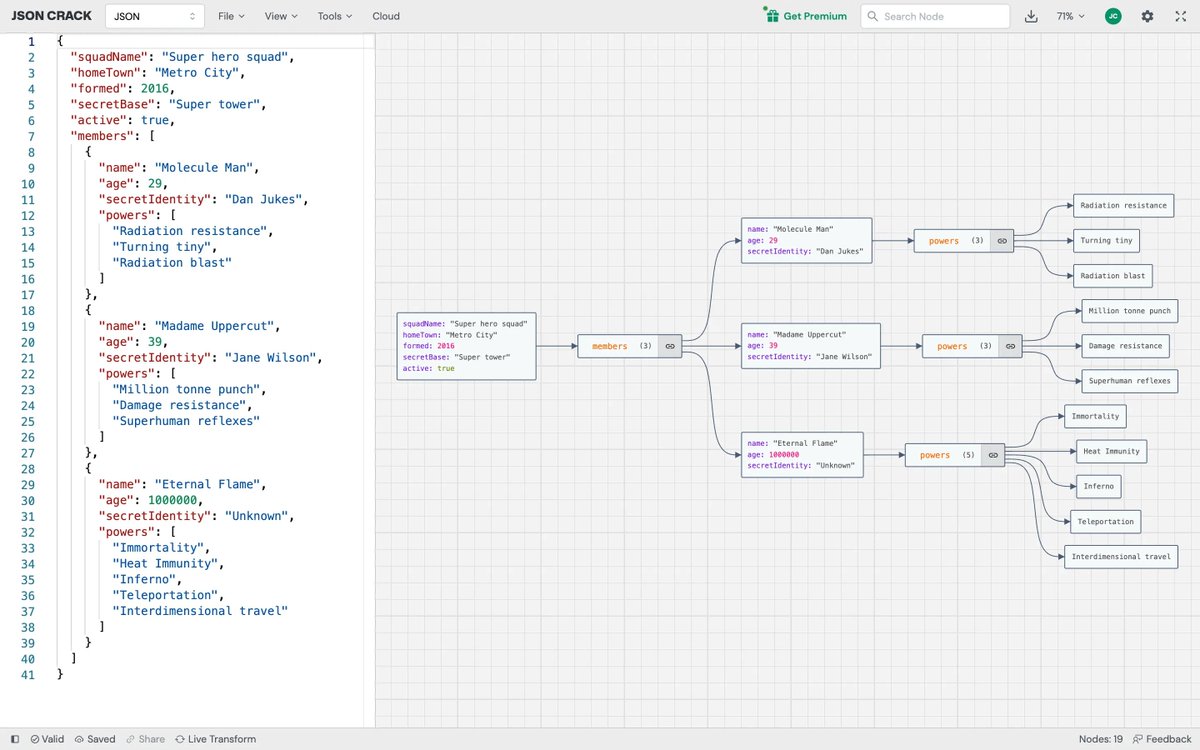
JSON Crack (@jsoncrack): Visualize JSON data from various formats (JSON, YAML, CSV, XML) into interactive graphs.
Easily convert JSON to YAML, XML to JSON, CSV to JSON...
A VSCode extension exists too.
https://t.co/k9N3cluZqC
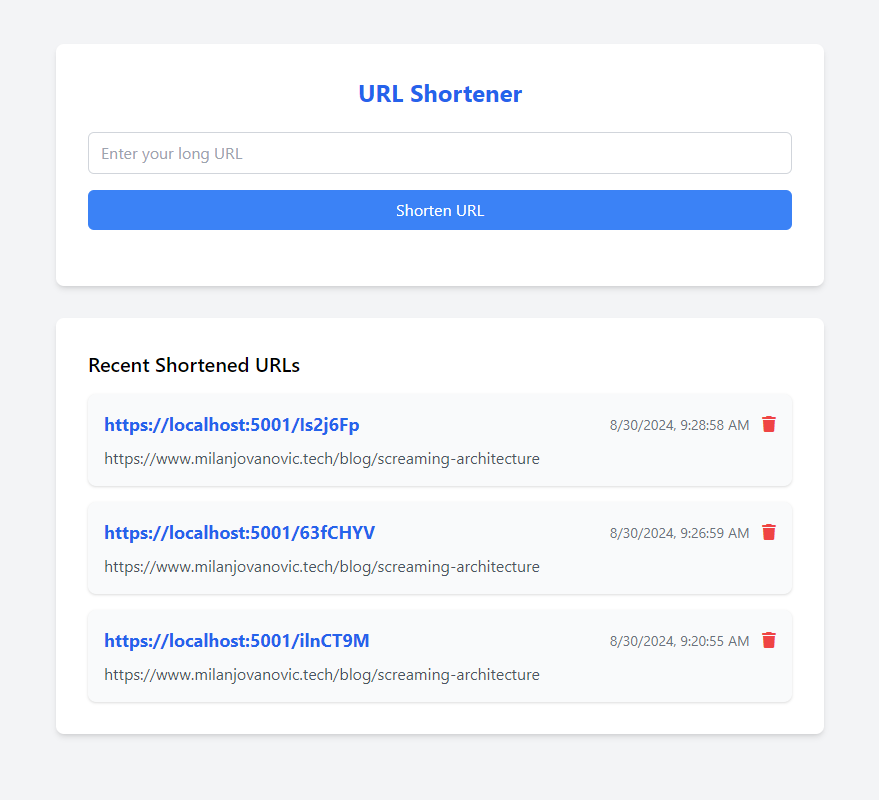
I built this UI with Cursor in ~5 minutes.
I wrote the backend, and Cursor handles the integration like a joke.
I know this is trivial stuff, but do you realize how many opportunities this creates?
And to think we are still early in this game. Wild.
𝗖𝗼𝗻𝗳𝗶𝗴𝘂𝗿𝗶𝗻𝗴 𝘁𝗵𝗲 𝗘𝗙 𝗠𝗶𝗴𝗿𝗮𝘁𝗶𝗼𝗻 𝗛𝗶𝘀𝘁𝗼𝗿𝘆 𝘁𝗮𝗯𝗹𝗲
When setting up the EF DbContext, you can provide a delegate to call the MigrationHistoryTable method.
This lets you customize the migration history schema and even the table name.
Four awesome Visual Studio features
... you might not be aware of!
+ HTTP files
+ Endpoints Explorer
+ Dev Tunnels
+ Paste Json as Classes
Scroll the thread for details ...
#dotnet@VisualStudio
Multiple EF Core DbContexts in a single application?
Here's when it makes sense to do this. 👇
- Working with multiple databases
- Separating concerns
- Modular monolith
- Read replicas
I did this when implementing a modular monolith application. Each module had a dedicated schema in the database and a separate DbContext in the code.
The surprising part?
How EF Core deals with database migrations and different schemas.
Here's a breakdown of how I solved this: https://t.co/iPt3fw9vPi
---
Simplify your development process – download your free Clean Architecture template today: https://t.co/WY1EZdIbsQ





![AntonMartyniuk's tweet photo. Microsoft quietly published 99 ready-made .NET skills for AI Agents.
Most .NET developers have no idea they exist 👇
These are not toy examples
They are official and open-sourced.
And they work across Claude Code, Codex, GitHub Copilot, and Cursor.
Quick reminder first.
A skill is a folder of instructions that your AI loads only when a task matches.
You write the recipe once, and it follows your steps every time.
Microsoft ships these in the dotnet/skills repo: 14 plugins, around 95 skills.
A plugin is just a group of related skills.
Here are 5 worth installing today:
𝟭. 𝗱𝗼𝘁𝗻𝗲𝘁-𝗱𝗮𝘁𝗮
The optimizing-ef-core-queries skill finds N+1 problems, fixes tracking modes, and removes common EF Core performance traps.
𝟮. 𝗱𝗼𝘁𝗻𝗲𝘁-𝘁𝗲𝘀𝘁
The largest plugin: 22 skills for running, filtering, and migrating tests between frameworks.
𝟯. 𝗱𝗼𝘁𝗻𝗲𝘁-𝘂𝗽𝗴𝗿𝗮𝗱𝗲
Migrates a project from .NET 8 to 10, and turns on nullable reference types.
𝟰. 𝗱𝗼𝘁𝗻𝗲𝘁-𝗮𝘀𝗽𝗻𝗲𝘁
Creates Web API endpoints and file-upload endpoints in Minimal APIs the right way.
𝟱. 𝗱𝗼𝘁𝗻𝗲𝘁-𝗮𝗶
Builds, debugs, and tests MCP servers with the C# SDK.
Installing them in Claude Code takes 4 steps:
https://t.co/j9AhJjYMUe
But here is the catch.
These skills know .NET.
But they do not know YOUR project.
They cannot tell where you put your entities, or that you don't use repositories, or that your handlers return Result<T>.
That is the gap your own skills fill.
✅ Microsoft's skills → general .NET tasks
✅ Your own skills → your house rules and conventions
Pair them, and Claude (or other AI agent) has both the framework and your style.
In my newest article, I break down the whole system:
→ What a skill is and the building blocks inside one
→ How to write the description so a skill triggers at the right moment
→ How to encode your conventions: rich entities, no repositories, full features
→ Using the Skill Creator to bundle your real code files
→ The complete Microsoft dotnet/skills setup
Read the full guide here:
👉 https://t.co/j9AhJjYMUe
Have you tried any of Microsoft's .NET skills yet, or is this the first you're hearing of them?
——
𝗕𝗲𝘀𝘁 𝘁𝗼𝗼𝗹𝘀 𝗼𝗳 𝘁𝗵𝗲 𝘄𝗲𝗲𝗸:
Redis Iris is a real-time context engine that transforms fragmented data into live, agent-ready context and memory. Try for free today: https://t.co/H5HavL4t5t
exe[.]dev runs persistent VMs for the agent era. SSH and root, plus HTTPS and auth out of the box. Secrets injected at the network edge stay out of the LLM's hands. Run agents, internal tools, side projects, anything: https://t.co/TMnjphLFpS
——
♻️ Repost to help other .NET developers discover these skills
➕ Follow me ( @AntonMartyniuk ) to improve your .NET and Architecture Skills](https://pbs.twimg.com/media/HMOFAyKWEAEH4hk.jpg)