Visualizing a SQL query
SQL statements are executed by the database system in several steps, including:
- Parsing the SQL statement and checking its validity
- Transforming the SQL into an internal representation, such as relational algebra
- Optimizing the internal representation and creating an execution plan that utilizes index information
- Executing the plan and returning the results
--
Subscribe to our weekly newsletter to get a Free System Design PDF (158 pages): https://t.co/uc5M7CdXXC
𝐖𝐡𝐚𝐭 𝐀𝐫𝐞 𝐭𝐡𝐞 𝐆𝐫𝐞𝐞𝐧𝐞𝐬𝐭 𝐏𝐫𝐨𝐠𝐫𝐚𝐦𝐦𝐢𝐧𝐠 𝐋𝐚𝐧𝐠𝐮𝐚𝐠𝐞𝐬?
The study below runs 10 benchmark problems in 28 languages [1]. It measures the runtime, memory usage, and energy consumption of each language. The abstract of the paper is shown below.
“This paper presents a study of the runtime, memory usage and energy consumption of twenty seven well-known software languages. We monitor the performance of such languages using ten different programming problems, expressed in each of the languages. Our results show interesting findings, such as, slower/faster languages consuming less/more energy, and how memory usage influences energy consumption. We show how to use our results to provide software engineers support to decide which language to use when energy efficiency is a concern”. [2]
𝐌𝐨𝐬𝐭 𝐞𝐧𝐯𝐢𝐫𝐨𝐧𝐦𝐞𝐧𝐭𝐚𝐥𝐥𝐲 𝐟𝐫𝐢𝐞𝐧𝐝𝐥𝐲 𝐥𝐚𝐧𝐠𝐮𝐚𝐠𝐞𝐬: 𝐂, 𝐑𝐮𝐬𝐭, 𝐚𝐧𝐝 𝐂++
𝐋𝐞𝐚𝐬𝐭 𝐞𝐧𝐯𝐢𝐫𝐨𝐧𝐦𝐞𝐧𝐭𝐚𝐥𝐥𝐲-𝐟𝐫𝐢𝐞𝐧𝐝𝐥𝐲 𝐥𝐚𝐧𝐠𝐮𝐚𝐠𝐞𝐬: 𝐑𝐮𝐛𝐲, 𝐏𝐲𝐭𝐡𝐨𝐧, 𝐏𝐞𝐫𝐥
[1] https://t.co/rPD6Sw5mJn
[2] https://t.co/TDM72hEci4
Over to you: What do you think of the accuracy of this analysis?
—
Subscribe to our weekly newsletter to get a Free System Design PDF (158 pages): https://t.co/FIzCeaWsZV
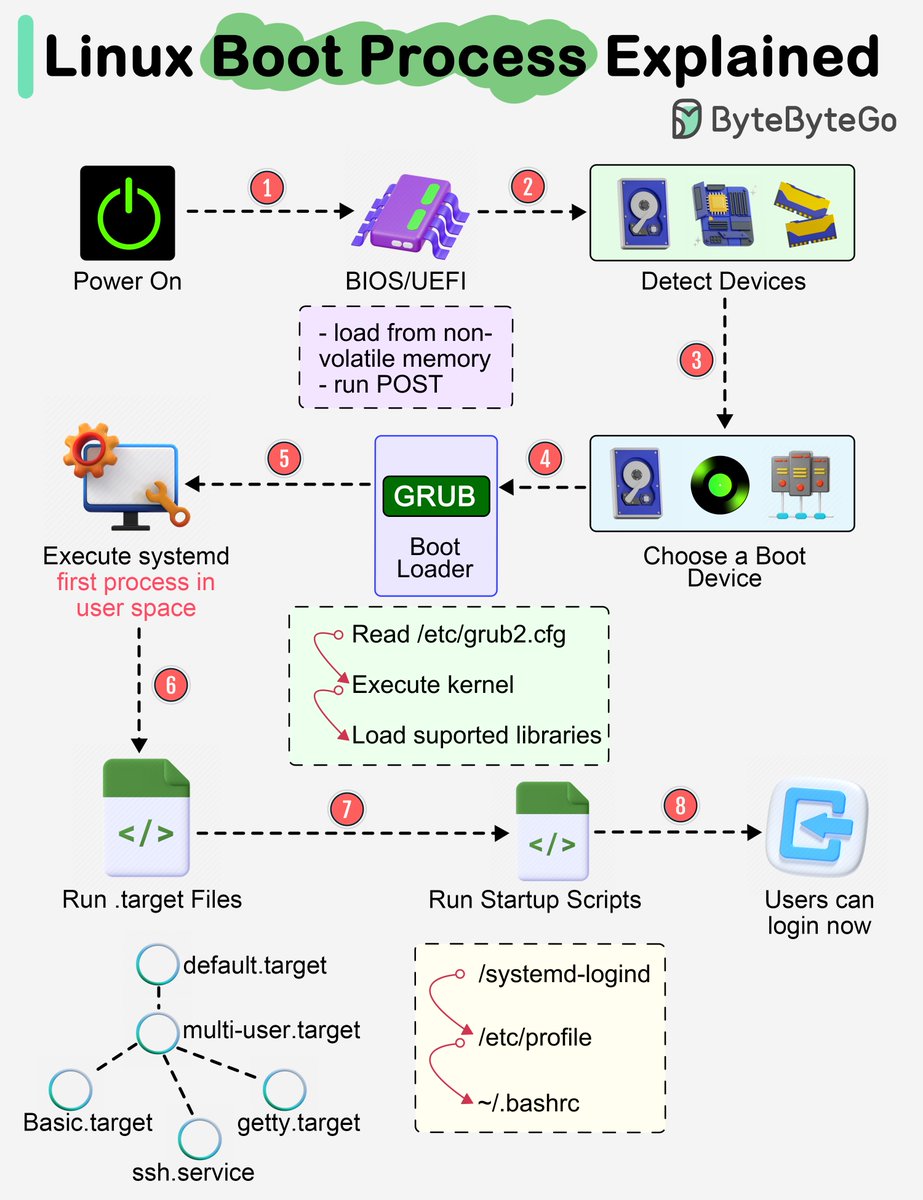
Almost every software engineer has used Linux before, but only a handful know how its Boot Process works :) Let's dive in.
The diagram below shows the steps.
Step 1 - When we turn on the power, BIOS (Basic Input/Output System) or UEFI (Unified Extensible Firmware Interface) firmware is loaded from non-volatile memory, and executes POST (Power On Self Test).
Step 2 - BIOS/UEFI detects the devices connected to the system, including CPU, RAM, and storage.
Step 3 - Choose a booting device to boot the OS from. This can be the hard drive, the network server, or CD ROM.
Step 4 - BIOS/UEFI runs the boot loader (GRUB), which provides a menu to choose the OS or the kernel functions.
Step 5 - After the kernel is ready, we now switch to the user space. The kernel starts up systemd as the first user-space process, which manages the processes and services, probes all remaining hardware, mounts filesystems, and runs a desktop environment.
Step 6 - systemd activates the default. target unit by default when the system boots. Other analysis units are executed as well.
Step 7 - The system runs a set of startup scripts and configure the environment.
Step 8 - The users are presented with a login window. The system is now ready.
–
Subscribe to our weekly newsletter to get a Free System Design PDF (158 pages): https://t.co/uc5M7CdXXC









![bytebytego's tweet photo. 𝐖𝐡𝐚𝐭 𝐀𝐫𝐞 𝐭𝐡𝐞 𝐆𝐫𝐞𝐞𝐧𝐞𝐬𝐭 𝐏𝐫𝐨𝐠𝐫𝐚𝐦𝐦𝐢𝐧𝐠 𝐋𝐚𝐧𝐠𝐮𝐚𝐠𝐞𝐬?
The study below runs 10 benchmark problems in 28 languages [1]. It measures the runtime, memory usage, and energy consumption of each language. The abstract of the paper is shown below.
“This paper presents a study of the runtime, memory usage and energy consumption of twenty seven well-known software languages. We monitor the performance of such languages using ten different programming problems, expressed in each of the languages. Our results show interesting findings, such as, slower/faster languages consuming less/more energy, and how memory usage influences energy consumption. We show how to use our results to provide software engineers support to decide which language to use when energy efficiency is a concern”. [2]
𝐌𝐨𝐬𝐭 𝐞𝐧𝐯𝐢𝐫𝐨𝐧𝐦𝐞𝐧𝐭𝐚𝐥𝐥𝐲 𝐟𝐫𝐢𝐞𝐧𝐝𝐥𝐲 𝐥𝐚𝐧𝐠𝐮𝐚𝐠𝐞𝐬: 𝐂, 𝐑𝐮𝐬𝐭, 𝐚𝐧𝐝 𝐂++
𝐋𝐞𝐚𝐬𝐭 𝐞𝐧𝐯𝐢𝐫𝐨𝐧𝐦𝐞𝐧𝐭𝐚𝐥𝐥𝐲-𝐟𝐫𝐢𝐞𝐧𝐝𝐥𝐲 𝐥𝐚𝐧𝐠𝐮𝐚𝐠𝐞𝐬: 𝐑𝐮𝐛𝐲, 𝐏𝐲𝐭𝐡𝐨𝐧, 𝐏𝐞𝐫𝐥
[1] https://t.co/rPD6Sw5mJn
[2] https://t.co/TDM72hEci4
Over to you: What do you think of the accuracy of this analysis?
—
Subscribe to our weekly newsletter to get a Free System Design PDF (158 pages): https://t.co/FIzCeaWsZV](https://pbs.twimg.com/media/GEwCh6ubYAEWLCT.jpg)