Hey @codewithanthony
Thanks for the great video explanations. I was wondering if you could shed some light on the following.
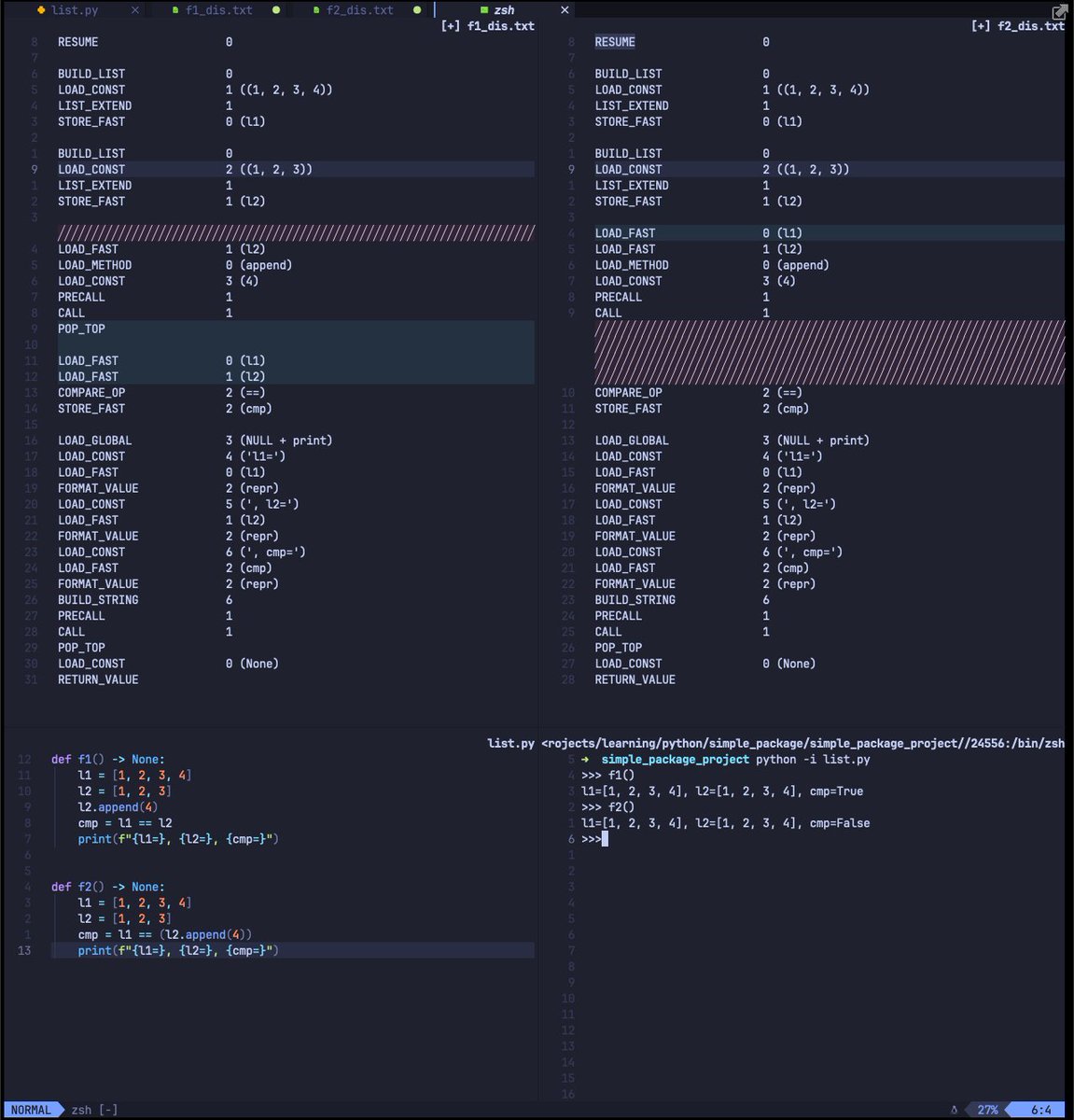
I can't figure out why the comparison in `f2` evaluates to `False`.
Doesn't python evaluate the right hand of the `==` first?
1/ 2
#Python
3 ways to delete in insert mode - build edits you can repeat with dot:
• ctrl-h – Delete previous char
• ctrl-w – Previous word
• ctrl-u – Entire line (except indent)
👉 Read the tip: https://t.co/hd6YmN0157
📨 Subscribe for more: https://t.co/iNUnlLcO9W
Stanford has released Prof. Manning's NLP course for free (!!!) on Youtube if you are interested in diving deeper into NLP.
It starts with the very basic word2vec and expends to:
-> Domain adaptation for supervised sentiment
-> Retrieval augmented in-context learning
-> Advanced behavioral evaluation
-> Analysis methods
-> More NLP methods
Happy A.B.L <Always Be Learning> y'all!
https://t.co/7kGpLzyBdY
Stay in search mode in Vim by using Ctrl-g and Ctrl-t after searching for a pattern, instead of pressing enter. Refine your pattern faster this way.
Read the tip: https://t.co/l0OCliLNB5
Subscribe for free Vim tips: https://t.co/iNUnlLcO9W
Quickly add empty lines above and below with Unimpaired 👉 https://t.co/aVKOXYiTQY
[ + space - Add line above
] + space - Below
According to our stats, this is the most hated VimTrick we've published. 🤷♂️
📨 Subscribe for (better) #vim tips: https://t.co/KMsBv1b5h0
Vim's gn command will go to the next match and select it. On the blog post, we show how to build repeatable operations by combining this with other commands.
👉 Read the tip: https://t.co/81Tv6EeK3C
📨 Subscribe for more: https://t.co/iNUnlLcO9W
Use g; to jump back to your last change in Vim:
• :changes - Show list of changes
• g; - Jump to previous
• g, - Jump to next
👉 Read the tip: https://t.co/lDfhJCVygg
🖥️ Watch the tip: https://t.co/54B1cvfQQ5
📨 Join for weekly Vim tips: https://t.co/iNUnlLcO9W
Sort lines in Vim:
• :sort - sort all lines
• :sort! - sort in reverse
• :sort u - remove dupes and sort
• :sort i - ignore case
• :sort n - sort numerically
👉 Our tutorial has more ways: https://t.co/pdve0sTtqM
📨 Subscribe for weekly Vim tips: https://t.co/iNUnlLcO9W
Jump between methods or functions in Vim with ]m:
• ]m jump to beginning of next method
• ]M end of next
• [m beginning of previous
• [M end of previous
👉 Read the full tip: https://t.co/92S8OCl25F
📨 Subscribe for weekly Vim tips: https://t.co/iNUnlLdlZu
Did you know you can access man pages from Vim?
• leader K - Press with the cursor on any word to open the man page for that command
• :Man command - Open that command's man page
👉 Use cases on the blog: https://t.co/oaOwafszOf
📨 More Vim tips: https://t.co/iNUnlLcO9W
Use to undo all your changes in insert mode, but stay in insert mode.
I like this better than using and u and then reentering insert mode.
Read the tip: https://t.co/6daSWGqc1X
Subscribe for more tips like these: https://t.co/iNUnlLcO9W
Extract lines from a file by visually selecting them and then using :w path/to/file
Then reselect the last visual selection with gv and press d to delete.
👉 Tutorial: https://t.co/qrjKVcsLbd
📨 Subscribe for weekly Vim tips: https://t.co/iNUnlLcO9W
Use & in your replacement patterns to insert the matched text. For example, adding markdown links to URLs:
%s/https.*/[&]()/g
👉 Read the tip: https://t.co/v5UIUbQI19
📨 Subscribe to our newsletter: https://t.co/iNUnlLcO9W
Did you know Vim can read and edit Zip and other archives out of the box? Works with gzip, tar, and even files that use Zip under the hood like xlsx and docx!
👉 Read the post: https://t.co/Skd93K4Ib8
📨 Get our newsletter: https://t.co/iNUnlLcO9W