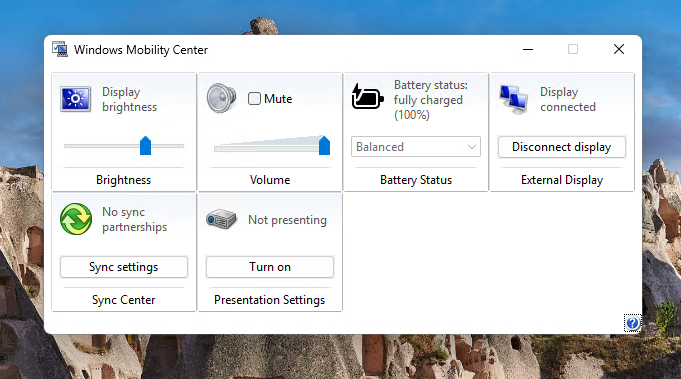
This looks like a great contender for some WinUI glow-up... Seems simple to show/render, (maybe) it's not used too much so it's a bit less risk if things go south.
Or maybe just ditch it and integrate into Control Center. Yeah, that seems like a better idea
Hey @marcusash , I remembered one thing that's missing - flags!
Windows is AFAIK the only OS that doesn't have flags in its emoji pack, and often I see square symbols instead in OS / Edge. Is there anything to share or is it yet another to-do thing now? :)
@Chris123NT It also answers why OneDrive was missing... I get what Rufus wants to do but the option itself is too vague to understand. I don't think it's improvement if stuff gets removed that I have to retrofit back in
@Chris123NT Actually, this is not synced from MSA! This is an option when you make your bootable USB via Rufus with enhanced Windows User Experience toggle:
https://t.co/fTjSeZJRey
Oh, rabbit hole goes deeper lol - I ran into VC++ UWP Desktop Runtime Package download site:
https://t.co/G4JvxyyxQE
But it only downloads readme.txt (despite install instructions stating I'd get appx) and then it says apps comes only as package with Visual Studio?
Heyo @JenMsft I'm trying to make WinGet work on Server 2019 and one step includes installing VCLibs v140 package. URL https://t.co/HLk7w9L1VP points to older version of package (14.0.27810) while WinGet requires 14.0.33519). I don't want to install components from 3rd party sites
@zacbowden@player1129949 I know, anecdotally, that friends and family around me, that aren't nerds but average joes, that were 100% are now much less so, with Neos and Airs more and more involved. Moving from Win to macOS is pricey but moving back to Windows I feel is a much harder task
@zacbowden@player1129949 Both K2 and X2 need to pull their weight quite a bit to get things going for Windows laptops + aggressive pricing which is infeasible at this point to compete with Apple. I wish it was different and I hope things will turn.
@zacbowden@player1129949 Better in what way? If you strech the comparison quite a bit, sure, but for average user Macbook won then, and wins even more now.
And thats coming from someone that loses his mind with macs on daily basis in recent times lol
@bacadd@thebookisclosed@XenoPanther This is what I think in my head - I always rely on approx location of items re: context menus, regardless of its position on screen. Even before the menu even shows up I already move my cursor to that spot. Sidenote: lazy loading additional context menu items is bad idea UX wise
@bacadd@thebookisclosed@XenoPanther Every other element (context menu, jumplists, Start Menu, systray popups etc) have the same treatment regardless of their position, WinX should be the same. I understand the mouse distance rationale, but WinX is used by power users that already are accustomed to kbd shortcuts
Yes, my Task Manager alternative comes with a run dialog, complete with command history, autocompletion and more. No, it does not take 94 ms to appear. Computers can be fast!