“When making gets easier, taste gets harder.” Sent from one of my team members at Adobe Max this week. Need more focus on developing the eye and judgment for taste versus here is yet another “skill” to build a virtual designer.
One of the things I love about design is being able to express an idea in different mediums and at different levels of fidelity. Sometimes a story vignette, like the one @TeaAndDates shared, gets the point across better than a prototype.
And it gives us another way to build a shared understanding of the design intent and the customer problem we're trying to solve.
I'm a big believer that not every product question can be answered by a data dashboard - sometimes we need to figure out whether a feature will not just work and get used, but be impactful.
Our team uses a mix of techniques to evaluate an experience, and one of my favorites is the simplest: picture a real person (rushed, distracted, three tabs deep) and ask honestly whether this would make their day a little easier.
This video shows how we put Actions in Windows Search to that test. Can inline actions in your search box help you knock something out mid-scramble? We think so. You can find, preview, and act right from your taskbar, whether it's ensuring you're about to open the right file, snapping windows, or even sending a text.
We also sweated the details you're not supposed to notice. Animations that used to run independently are now coordinated, so the whole flow reads as one movement.
I'd love to know what you think of the latest Windows Search improvements rolling out to Windows Insiders!
@abhijithmbtech It is a sample intended for a completely different purpose as you note much later in your article. Not related to our ongoing modernization efforts of Windows.
@abhijithmbtech You frame this as the “new WinUI 3 Registry Editor” and “developer sample preview” in your opening line. This isn’t accurate.
“Here's your first look at Microsoft's new WinUI 3 Registry Editor, but it's a developer sample preview, so it may not ship on Windows 11 anytime soon.”
Friday’s Windows tip(s) of the day! A couple from Photos this week.
We shared the rebuilt Photos Editor a few weeks ago. It's built with WinUI 3, with tools organized around what you want to do: Crop, Enhance, Repair, and Stylize. The Editor also launches 25% faster.
If there's something you want to remove from a photo, just circle or brush over it in Repair. The updated AI model does a better job removing it, with faster processing too.
Relight is worth playing with as well. You can change the lighting after you've taken a photo, position up to three lights, change their colors, or try a preset like golden hour for a quick change of mood. We're expanding it beyond Copilot+ PCs to all Windows 11 devices.
Let us know what you think. More here: https://t.co/SRSOIJXpiG
We’re making XBOX on Windows faster and more responsive. Starting today, we’re rolling out updates that make our app up to 60% faster. A meaningful improvement, with plenty more to do.
Great product design is built on fundamentals. We've been working across the full Windows stack, from the kernel to the shell to apps, to make Windows feel faster and more responsive on 8 GB PCs.
A few things worth knowing about today's Windows 11 performance updates:
1. You'll feel the difference in everyday use. Opening Start, launching an app, getting back to a tab. In our lab tests, we're seeing up to 20% better responsiveness and up to 40% faster multitasking on 8 GB PCs.
2. Making better use of the memory you already have. Windows can now keep up to 2 GB more of your active data in memory instead of moving it to slower storage. More of what you're working on stays ready when you need it.
3. The work goes beyond Windows itself. We've been improving how Windows, Edge, and Microsoft 365 apps use memory, helping your PC stay responsive as you move between apps.
These improvements are available today in the latest Windows 11 update, and we're continuing to build on this work.
More details here: https://t.co/K9fEz8vIxD
Today, we’re sharing updates from the team on memory improvements, including work that makes experiences on 8 GB @Windows 11 PCs faster and more responsive.
Windows quality is an ongoing journey. We’ll keep listening, building on what we learn, and sharing our progress 🚀. https://t.co/4CQOSspoaS
@carl_ledbetter and team cooked on this one. Using our human factors expertise, we ran extensive ergonomic testing in our labs and in players' homes, gathering input from players of all backgrounds and play styles. Put our most huggable controller in a bag, purse, or even a pocket and game where you want, when you want.
@tomwarren So glad you like it Tom! We designed the XBOX Nano with players, bringing XBOX controls to a new form that’s light & comfortable for smaller hands & easy to take anywhere. Great work from our Human Factors, Research & Design teams to get it right. More choice & more ways to play!
Friday’s Windows tip of the day!
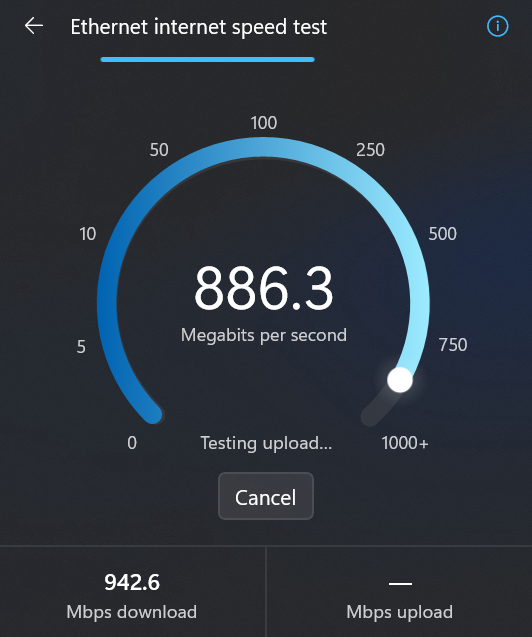
If you're checking your internet speed, why should you have to leave Windows to do it? You can now check it right from Quick Settings.
This came from feedback we heard about wanting a more integrated experience.
And fittingly, the team moved pretty fast on this one.
@pavandavuluri asked @bacadd from our design team to take a look. Within a day, Diego had a working prototype. From there, our connectivity team worked with partners to bring the experience into Windows.
The design and build work was driven by an agentic AI workflow, with a person guiding the process in their spare time.
This is where I see a lot of potential in AI. Using agentic workflows and WinUI 3 to build more integrated Windows experiences. Getting from idea to customer value faster. Without AI slop. That is the way.
In WIP now, read more here: https://t.co/pABMcuaUwu