GREAT NEWS: amanhã, quarta-feira, às 18h00, teremos um episódio ao vivo do Triturando Dados com o @ro_mahl, o bruxo da projeção da apuração.
No YouTube, acesso aberto. Espalhem por aí. Link no comentário.
LLM Knowledge Bases
Something I'm finding very useful recently: using LLMs to build personal knowledge bases for various topics of research interest. In this way, a large fraction of my recent token throughput is going less into manipulating code, and more into manipulating knowledge (stored as markdown and images). The latest LLMs are quite good at it. So:
Data ingest:
I index source documents (articles, papers, repos, datasets, images, etc.) into a raw/ directory, then I use an LLM to incrementally "compile" a wiki, which is just a collection of .md files in a directory structure. The wiki includes summaries of all the data in raw/, backlinks, and then it categorizes data into concepts, writes articles for them, and links them all. To convert web articles into .md files I like to use the Obsidian Web Clipper extension, and then I also use a hotkey to download all the related images to local so that my LLM can easily reference them.
IDE:
I use Obsidian as the IDE "frontend" where I can view the raw data, the the compiled wiki, and the derived visualizations. Important to note that the LLM writes and maintains all of the data of the wiki, I rarely touch it directly. I've played with a few Obsidian plugins to render and view data in other ways (e.g. Marp for slides).
Q&A:
Where things get interesting is that once your wiki is big enough (e.g. mine on some recent research is ~100 articles and ~400K words), you can ask your LLM agent all kinds of complex questions against the wiki, and it will go off, research the answers, etc. I thought I had to reach for fancy RAG, but the LLM has been pretty good about auto-maintaining index files and brief summaries of all the documents and it reads all the important related data fairly easily at this ~small scale.
Output:
Instead of getting answers in text/terminal, I like to have it render markdown files for me, or slide shows (Marp format), or matplotlib images, all of which I then view again in Obsidian. You can imagine many other visual output formats depending on the query. Often, I end up "filing" the outputs back into the wiki to enhance it for further queries. So my own explorations and queries always "add up" in the knowledge base.
Linting:
I've run some LLM "health checks" over the wiki to e.g. find inconsistent data, impute missing data (with web searchers), find interesting connections for new article candidates, etc., to incrementally clean up the wiki and enhance its overall data integrity. The LLMs are quite good at suggesting further questions to ask and look into.
Extra tools:
I find myself developing additional tools to process the data, e.g. I vibe coded a small and naive search engine over the wiki, which I both use directly (in a web ui), but more often I want to hand it off to an LLM via CLI as a tool for larger queries.
Further explorations:
As the repo grows, the natural desire is to also think about synthetic data generation + finetuning to have your LLM "know" the data in its weights instead of just context windows.
TLDR: raw data from a given number of sources is collected, then compiled by an LLM into a .md wiki, then operated on by various CLIs by the LLM to do Q&A and to incrementally enhance the wiki, and all of it viewable in Obsidian. You rarely ever write or edit the wiki manually, it's the domain of the LLM. I think there is room here for an incredible new product instead of a hacky collection of scripts.
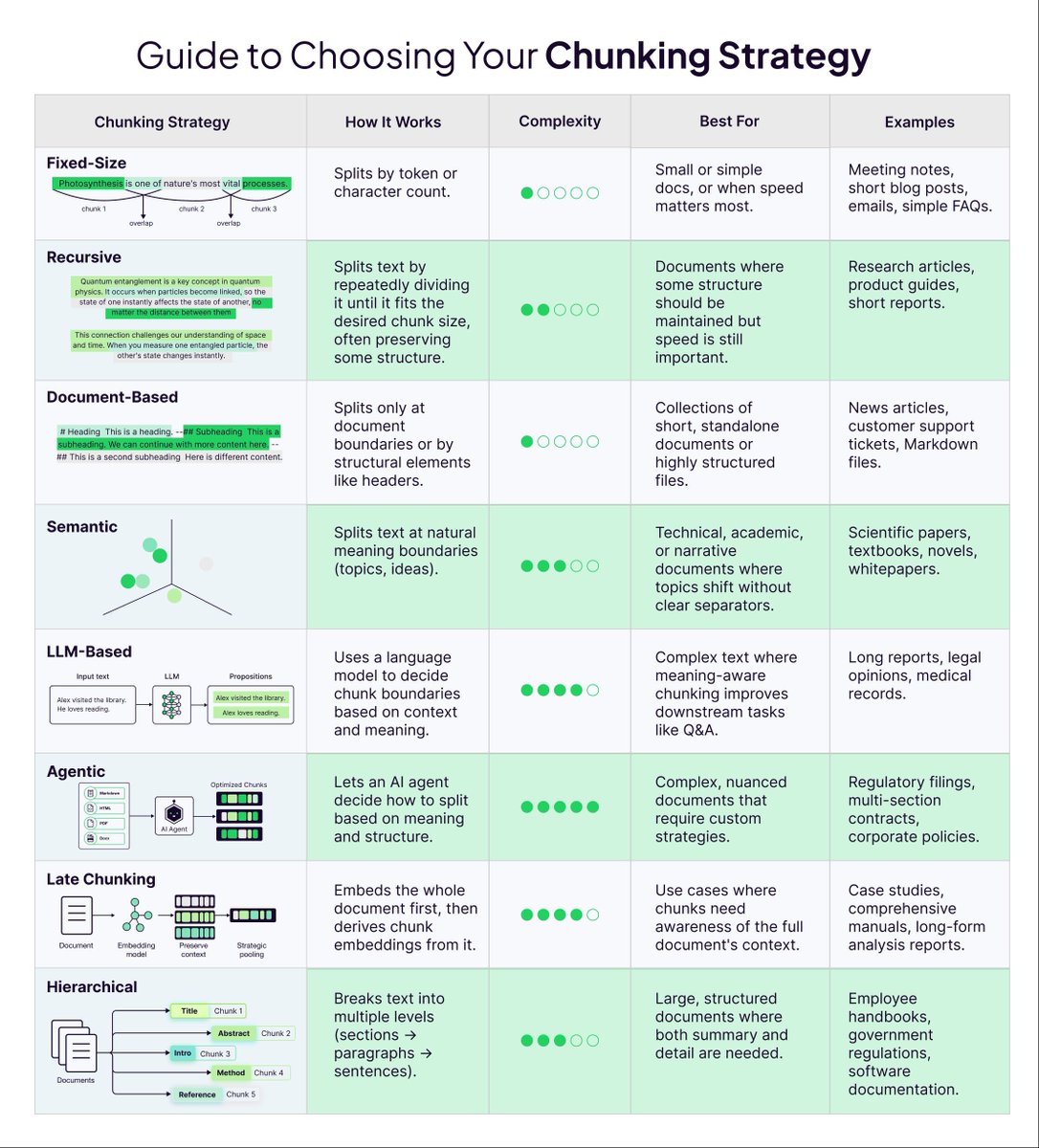
So, which chunking strategy should you actually use?
There's tons of chunking techniques out there, and as always, the "best" strategy depends on your specific use case.
You have to balance two competing priorities:
𝗥𝗲𝘁𝗿𝗶𝗲𝘃𝗮𝗹 𝗣𝗿𝗲𝗰𝗶𝘀𝗶𝗼𝗻: Chunks need to be small and focused on a single idea. This creates distinct embeddings that are easier for vector search to match precisely.
𝗖𝗼𝗻𝘁𝗲𝘅𝘁𝘂𝗮𝗹 𝗥𝗶𝗰𝗵𝗻𝗲𝘀𝘀: Chunks must be large enough to be self-contained and understandable. After retrieval, the LLM needs complete context to generate meaningful responses.
The goal is finding the "chunking sweet spot" - small enough for precise retrieval but complete enough to give the LLM what it needs.
𝗖𝗵𝘂𝗻𝗸𝗶𝗻𝗴 𝗦𝘁𝗿𝗮𝘁𝗲𝗴𝗶𝗲𝘀:
1️⃣ 𝗙𝗶𝘅𝗲𝗱-𝗦𝗶𝘇𝗲 𝗖𝗵𝘂𝗻𝗸𝗶𝗻𝗴: Split by predetermined size (e.g., 512 tokens) with overlap.
Pro: Simple, fast, easy to implement
Con: Can awkwardly cut sentences mid-thought, ignores document structure
2️⃣ 𝗥𝗲𝗰𝘂𝗿𝘀𝗶𝘃𝗲/𝗗𝗼𝗰𝘂𝗺𝗲𝗻𝘁-𝗕𝗮𝘀𝗲𝗱 𝗖𝗵𝘂𝗻𝗸𝗶𝗻𝗴: Splits by natural separators (paragraphs, markdown headers, HTML tags).
Pro: Respects document structure, creates more coherent chunks
Con: Variable chunk sizes can be harder to manage
3️⃣ 𝗦𝗲𝗺𝗮𝗻𝘁𝗶𝗰 𝗖𝗵𝘂𝗻𝗸𝗶𝗻𝗴: Groups semantically related sentences together, creates new chunk when topic shifts.
Pro: Highly coherent, self-contained chunks that preserve meaning
Con: More computationally expensive, requires embedding analysis
4️⃣ 𝗟𝗟𝗠-𝗕𝗮𝘀𝗲𝗱 𝗖𝗵𝘂𝗻𝗸𝗶𝗻𝗴: Uses an LLM to intelligently identify logical boundaries or propositions.
Pro: Meaning-aware, can handle complex documents
Con: High computational cost, slower processing
5️⃣ 𝗔𝗴𝗲𝗻𝘁𝗶𝗰 𝗖𝗵𝘂𝗻𝗸𝗶𝗻𝗴: AI agent analyzes document and selects best chunking strategy (or combination).
Pro: Highly flexible, optimized per document
Con: Very high complexity, significant overhead
6️⃣ 𝗛𝗶𝗲𝗿𝗮𝗿𝗰𝗵𝗶𝗰𝗮𝗹 𝗖𝗵𝘂𝗻𝗸𝗶𝗻𝗴: Creates multiple layers at different detail levels (summaries → sections → paragraphs).
Pro: Enables both broad and detailed queries, good for large documents
Con: More complex to implement and manage
7️⃣ 𝗟𝗮𝘁𝗲 𝗖𝗵𝘂𝗻𝗸𝗶𝗻𝗴: Embeds entire document first, then derives chunk embeddings from context-rich tokens.
Pro: Chunks have full document context awareness
Con: High computational cost, requires long-context embedding models
See this blog for more: https://t.co/l7Sj2IqBkP
AI is difficult to learn, but not anymore!
Introducing "Machine Learning Systems " PDF.
You will get:
• 2620+ pages
• Save 100+ hours on research
And it's 100% FREE!
To get it, just:
• Like and retweet
• Comment " ML "
• DM me in the message for the link
What if you could not only watch a generated video, but explore it too? 🌐
Genie 3 is our groundbreaking world model that creates interactive, playable environments from a single text prompt.
From photorealistic landscapes to fantasy realms, the possibilities are endless. 🧵
Some people today are discouraging others from learning programming on the grounds AI will automate it. This advice will be seen as some of the worst career advice ever given. I disagree with the Turing Award and Nobel prize winner who wrote, “It is far more likely that the programming occupation will become extinct [...] than that it will become all-powerful. More and more, computers will program themselves.” Statements discouraging people from learning to code are harmful!
In the 1960s, when programming moved from punchcards (where a programmer had to laboriously make holes in physical cards to write code character by character) to keyboards with terminals, programming became easier. And that made it a better time than before to begin programming. Yet it was in this era that Nobel laureate Herb Simon wrote the words quoted in the first paragraph. Today’s arguments not to learn to code continue to echo his comment.
As coding becomes easier, more people should code, not fewer!
Over the past few decades, as programming has moved from assembly language to higher-level languages like C, from desktop to cloud, from raw text editors to IDEs to AI assisted coding where sometimes one barely even looks at the generated code (which some coders recently started to call vibe coding), it is getting easier with each step.
I wrote previously that I see tech-savvy people coordinating AI tools to move toward being 10x professionals — individuals who have 10 times the impact of the average person in their field. I am increasingly convinced that the best way for many people to accomplish this is not to be just consumers of AI applications, but to learn enough coding to use AI-assisted coding tools effectively.
One question I’m asked most often is what someone should do who is worried about job displacement by AI. My answer is: Learn about AI and take control of it, because one of the most important skills in the future will be the ability to tell a computer exactly what you want, so it can do that for you. Coding (or getting AI to code for you) is a great way to do that.
When I was working on the course Generative AI for Everyone and needed to generate AI artwork for the background images, I worked with a collaborator who had studied art history and knew the language of art. He prompted Midjourney with terminology based on the historical style, palette, artist inspiration and so on — using the language of art — to get the result he wanted. I didn’t know this language, and my paltry attempts at prompting could not deliver as effective a result.
Similarly, scientists, analysts, marketers, recruiters, and people of a wide range of professions who understand the language of software through their knowledge of coding can tell an LLM or an AI-enabled IDE what they want much more precisely, and get much better results. As these tools are continuing to make coding easier, this is the best time yet to learn to code, to learn the language of software, and learn to make computers do exactly what you want them to do.
[Original text: https://t.co/HdI3Jb9HmF ]
Did you know that over 140,000 participants tuned in for the Kaggle GenAI Intensive with @Google last year? The course is now back, taking place on Mar 31-Apr 4, it offers Google ML expert-led theory sessions, hands-on labs, vibrant community, a capstone challenge w/swag, and remains to be no-cost to all!
More info and registration: https://t.co/YW02YAOJzu
Just finished my first week of the LLM Zoomcamp Course by DataTalks Club! 🚀
Learned about LLMs (Large Language Models) and RAG (Retrieval-Augmented Generation). Created a knowledge base from FAQ and built a smart search system with OpenAI’s GPT-4o LLM.
#llmzoomcamp
Peer reviewing an amazing CNN project for handwritten character recognition, boasting a 98.57% accuracy! It's a blend of alphabets and digits datasets - a real game-changer in image classification. #MachineLearning#DataScience#mlzoomcamp
Kubernetes, kind, docker-compose...
Uma série de novas descobertas na semana passada. O curso #mlzoomcamp realmente nos força a avançar, quando o assunto é publicar e rodar os modelos de #MachineLearning
https://t.co/Vao9m4NL0A
Diving into #MachineLearning with a twist! Just implemented a #TensorFlow Lite model to distinguish between bees and wasps from images. 📸✨ Excited to share that I've deployed this model as a serverless function using #AWSLambda. Seamless and efficient! #mlzoomcamp#week9
#MLZoomCamp! Avaliei projetos de colegas e aprendi muito: desde análise de dados até deploy em nuvem com Docker. Novas habilidades em Python e insights valiosos. Me sinto mais preparado para o mundo de #MachineLearning e #DataScience#AprendizadoContínuo
Ufa, week5 e o que aprendemos?
pipenv, docker e outras ferramentas para produção. Afinal de contas, o modelo de machine learning só terá utilidade se pudermos integrá-lo na resolução de problemas de negócio :)
#week5#mlzoomcamp#machinelearning
I recently took a deep dive into data science, and wow, the insights were mind-blowing!
In my latest @DataTalksClub exercise, I explored concepts like ROC AUC, feature importance, and more: https://t.co/rtU34b5haw
#mlzoomcamp#datatalksclub#machinelearning