Most people treat CLAUDE.md like a prompt file.
That’s the mistake.
If you want Claude Code to feel like a senior engineer living inside your repo, your project needs structure.
Claude needs 4 things at all times:
• the why → what the system does
• the map → where things live
• the rules → what’s allowed / not allowed
• the workflows → how work gets done
I call this:
The Anatomy of a Claude Code Project 👇
━━━━━━━━━━━━━━━
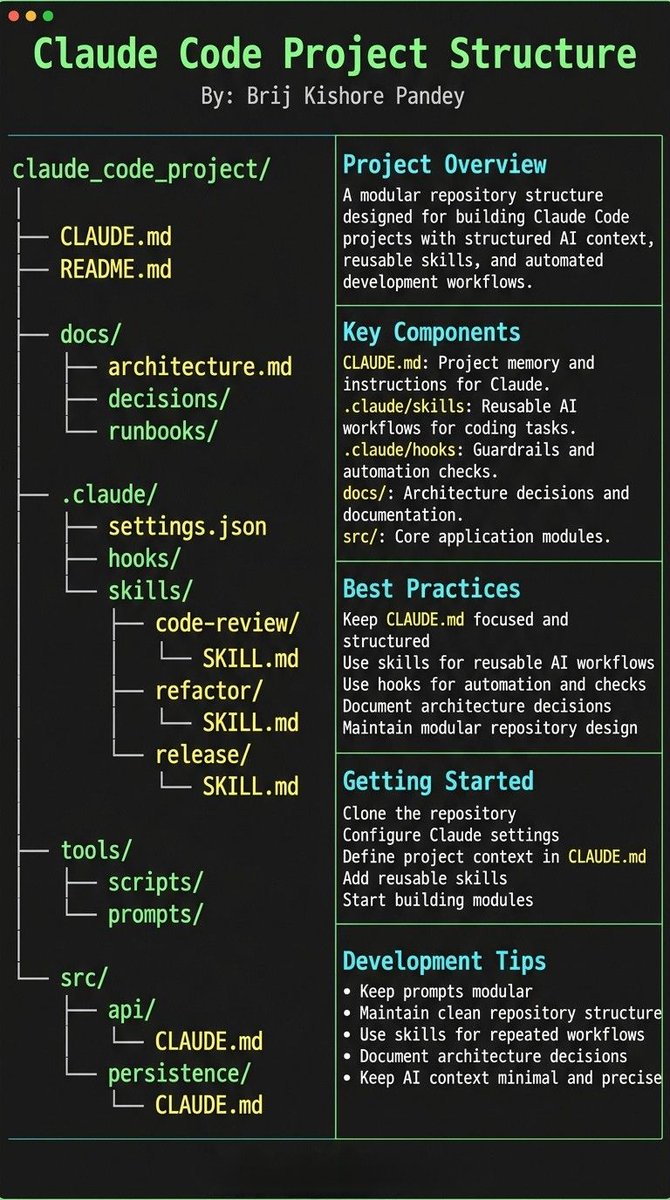
1️⃣ CLAUDE.md = Repo Memory (keep it short)
This is the north star file.
Not a knowledge dump. Just:
• Purpose (WHY)
• Repo map (WHAT)
• Rules + commands (HOW)
If it gets too long, the model starts missing important context.
━━━━━━━━━━━━━━━
2️⃣ .claude/skills/ = Reusable Expert Modes
Stop rewriting instructions.
Turn common workflows into skills:
• code review checklist
• refactor playbook
• release procedure
• debugging flow
Result:
Consistency across sessions and teammates.
━━━━━━━━━━━━━━━
3️⃣ .claude/hooks/ = Guardrails
Models forget.
Hooks don’t.
Use them for things that must be deterministic:
• run formatter after edits
• run tests on core changes
• block unsafe directories (auth, billing, migrations)
━━━━━━━━━━━━━━━
4️⃣ docs/ = Progressive Context
Don’t bloat prompts.
Claude just needs to know where truth lives:
• architecture overview
• ADRs (engineering decisions)
• operational runbooks
━━━━━━━━━━━━━━━
5️⃣ Local CLAUDE.md for risky modules
Put small files near sharp edges:
src/auth/CLAUDE.md
src/persistence/CLAUDE.md
infra/CLAUDE.md
Now Claude sees the gotchas exactly when it works there.
━━━━━━━━━━━━━━━
Prompting is temporary.
Structure is permanent.
When your repo is organized this way, Claude stops behaving like a chatbot…
…and starts acting like a project-native engineer.
I'm Boris and I created Claude Code. I wanted to quickly share a few tips for using Claude Code, sourced directly from the Claude Code team. The way the team uses Claude is different than how I use it. Remember: there is no one right way to use Claude Code -- everyones' setup is different. You should experiment to see what works for you!
You can now connect to Claude in Chrome using the VS Code extension.
Use it to debug frontend apps, collect data or automate your browser.
Install the extension and type @ browser to get started.
Agent swarms in Claude Code 2.1.32 with Opus 4.6 are very very very good. And with tmux auto-opening each agent in it's own interactive mode with graceful shutdown when done it's a breeze to do massive robust changes without the main agent using up much of its context window!🔥
We've added a new command to Claude Code called /insights
When you run it, Claude Code will read your message history from the past month. It'll summarize your projects, how you use Claude Code, and give suggestions on how to improve your workflow.
I'm Boris and I created Claude Code. Lots of people have asked how I use Claude Code, so I wanted to show off my setup a bit.
My setup might be surprisingly vanilla! Claude Code works great out of the box, so I personally don't customize it much. There is no one correct way to use Claude Code: we intentionally build it in a way that you can use it, customize it, and hack it however you like. Each person on the Claude Code team uses it very differently.
So, here goes.
Google just open-sourced LangExtract Python library!
It uses LLMs to extract entities, attributes, and relations—with exact source grounding—from unstructured documents.
Flexible LLM support (Gemini, OpenAI, Ollama)
100% open-source.





![shao__meng's tweet photo. Anthropic 官方发布的 Skills 构建完整指南(33页)
Skill 是什么?为什么重要?
Skill 本质上是一个文件夹,核心是一个 SKILL. md 文件,用 Markdown + YAML frontmatter 编写。它的作用是:把你反复向 Claude 解释的偏好、流程、领域知识打包成一次性的"教学材料",之后每次对话自动生效。
可以把它理解为 Claude 的"标准操作手册"——你不再需要每次都重新 prompt,而是让 Claude 按照预设的工作流自动执行。
Skill 文件夹的标准结构:
your-skill-name/
SKILL. md # 必须,主文件
scripts/ # 可选,可执行脚本
references/ # 可选,参考文档
assets/ # 可选,模板、图标等资源
三层渐进式信息披露
第一层:YAML frontmatter,name + description,始终加载在系统提示词中,用于判断是否激活
第二层:SKILL. md,正文完整指令、步骤、示例,仅当 Claude 判断该 Skill 与当前任务相关时加载
第三层:引用文件,references/ 目录下的文档,仅在需要时按需读取
这意味着:即使你启用了几十个 Skill,Claude 并不会把所有内容都塞进上下文。第一层的 description 就像一个"触发器"——写得好,Skill 才能在正确的时机被激活。
Skill 与 MCP 的关系
指南用了一个非常好的比喻:
> MCP 是专业厨房(工具、食材、设备),Skill 是菜谱(步骤指令)。
MCP(连接层) | Skill(知识层)
连接外部服务 | 如何高效使用这些服务
提供工具调用能力 | 封装最佳实践和工作流
解决"能做什么" | 解决"该怎么做"
没有 Skill 的 MCP,用户拿到了工具却不知道怎么用;有了 Skill,等于给工具配上了说明书和经验沉淀。这对 MCP 服务提供商来说是竞争力的差异化——有 Skill 的集成比纯 MCP 集成更容易上手。
三大使用场景分类
1. 文档与资产创作(Category 1)
不依赖外部工具,纯靠 Claude 内置能力。典型:前端设计、文档生成、PPT/Excel 创建。核心技巧是内嵌风格指南、模板结构和质量检查清单。
2. 工作流自动化(Category 2)
多步骤流程的标准化执行。典型:使用 skill-creator 引导用户一步步创建新 Skill。核心技巧是步骤间的验证门控和迭代改进循环。
3. MCP 增强(Category 3)
为已有 MCP 连接提供工作流指导。典型:Sentry 的代码审查 Skill——自动从 Sentry 拉取错误数据,分析 GitHub PR,给出修复建议。核心技巧是编排多个 MCP 调用序列、嵌入领域专业知识。
YAML Frontmatter 的关键细节
硬性规则:
· 文件名必须精确为 SKILL. md(大小写敏感)
· 文件夹名必须用 kebab-case(如 my-cool-skill),禁止空格、下划线、大写
· 不允许在 Skill 文件夹内放 README. md
· 禁止使用 XML 尖括号 < >(防止系统提示词注入)
· 名称中不能包含 "claude" 或 "anthropic"(保留字)
description 字段的写法决定成败:
好的写法需要同时包含三个要素:做什么 + 何时触发 + 关键能力。
五大实战模式
模式 1:顺序工作流编排
适用于严格按步骤执行的流程(如客户入驻:创建账户 → 设置支付 → 创建订阅 → 发欢迎邮件),强调步骤间的依赖关系和失败回滚。
模式 2:多 MCP 协调
跨多个服务的联合工作流(如设计到开发交接:Figma 导出 → Google Drive 存储 → Linear 建任务 → Slack 通知),关键是阶段间的数据传递和集中式错误处理。
模式 3:迭代精炼
输出质量需要多轮改进的场景(如报告生成:初稿 → 质量检查 → 修正 → 再验证),核心是明确的质量标准和"何时停止迭代"的判断。
模式 4:上下文感知的工具选择
同一目标、根据条件选择不同工具(如文件存储:大文件走云存储、协作文档走 Notion、代码走 GitHub),需要清晰的决策树和备选方案。
模式 5:领域专业智能
嵌入专业知识而非仅仅调用工具(如支付合规:先做制裁名单检查和风险评估,通过后才处理交易),强调合规先于行动、完整的审计追踪。
测试策略
1. 触发测试——Skill 是否在正确时机被激活?
· 直接请求能触发
· 换种说法也能触发
· 无关请求不会误触发
· 调试技巧:直接问 Claude "你什么时候会使用 [skill name] 这个 skill?",它会引用 description 回答
2. 功能测试——执行结果是否正确?
· 输出验证、API 调用成功率、边界情况覆盖
3. 性能对比——有无 Skill 的差异
· 对话轮次从 15 轮降到 2 轮
· 失败 API 调用从 3 次降到 0 次
· Token 消耗减半
一个重要的实践建议:先在单个困难任务上反复迭代,直到成功,再提取经验写入 Skill,而非一开始就追求广覆盖。
分发与 API 使用
· 个人用户:下载 Skill 文件夹 → 压缩 → 上传到 Claude. ai 设置,或放入 Claude Code 的 skills 目录
· 组织级别:管理员可全工作区部署,集中管理和自动更新
· API 使用:通过 /v1/skills 端点管理,在 Messages API 中通过 container.skills 参数引入
Anthropic 将 Agent Skills 定位为开放标准——像 MCP 一样,希望它能跨平台使用,不局限于 Claude 生态。
常见问题排查
· Skill 不触发:description 太模糊或缺少触发短语,增加具体用户会说的话作为触发词
· Skill 过度触发:description 范围太宽,添加负向触发条件、缩小范围
· 指令不被遵循:指令太长/太含糊/关键内容被埋没,精简指令、关键信息放最前面、用脚本做确定性校验
· 上下文过大导致变慢:SKILL. md 过大或同时启用太多 Skill,主文件控制在 5000 词以内,详细文档移到 references/
一个高级技巧特别值得注意:对于关键验证步骤,用脚本(scripts/)替代自然语言指令。代码是确定性的,语言理解不是。
指南下载地址
https://t.co/qWCojDpKA0](https://pbs.twimg.com/media/HAo6M62aoAAEA_-.jpg)




