SSH vs TELNET: What's the Difference?
Imagine logging into a server hundreds of miles away to fix a problem. How your connection is protected matters.
Both SSH and Telnet let you access devices remotely, but they do it very differently.
SSH (Secure Shell) encrypts everything you send, including your username, password, and commands. Even if someone intercepts the traffic, they won't be able to read it. That's why SSH is the standard for managing servers, routers, switches, and other network devices today.
Telnet, on the other hand, sends everything in plain text. Anyone monitoring the network could potentially see your login credentials and everything you type. It was widely used in the past, but it's now considered insecure for production environments.
Here's a quick comparison:
• SSH – Encrypted, secure, uses TCP port 22, supports secure file transfers (SCP/SFTP), and is recommended for modern networks.
• Telnet – Unencrypted, uses TCP port 23, doesn't support secure file transfers, and is mostly limited to legacy systems, labs, or testing.
The takeaway is simple: if a device supports SSH, use it. The small encryption overhead is worth the security it provides. In networking, protecting your remote access is just as important as having remote access in the first place.
🐧 Day 16/30 — #Linux
A Linux server connected to the internet without a firewall is like a house with its doors wide open.
Firewalls help control incoming and outgoing traffic, protecting systems from unauthorized access and malicious activity.
Linux Firewall – Mastering iptables, ufw, and firewalld
Understanding Linux firewalls is essential for system administrators, DevOps engineers, cybersecurity professionals, and cloud engineers.
What is a Firewall?
A firewall filters network traffic based on predefined rules.
It can:
→ Allow trusted connections
→ Block unwanted traffic
→ Restrict access to services
→ Improve server security
→ Protect against attacks
iptables – The Traditional Linux Firewall
iptables is a powerful command-line firewall utility built into the Linux kernel.
Example:
→ sudo iptables -L
Displays current firewall rules.
→ sudo iptables -A INPUT -p tcp --dport 22 -j ACCEPT
Allows incoming SSH connections on port 22.
Benefits:
→ Extremely flexible
→ Highly customizable
→ Widely used on Linux servers
However, complex rule management can become difficult as configurations grow.
ufw – Uncomplicated Firewall
ufw provides a simpler interface for managing firewall rules.
Common on Ubuntu-based systems.
Examples:
→ sudo ufw enable
Enables the firewall.
→ sudo ufw allow 22/tcp
Allows SSH traffic.
→ sudo ufw allow 80/tcp
Allows HTTP traffic.
→ sudo ufw status
Displays active firewall rules.
Benefits:
→ Beginner-friendly
→ Easy rule management
→ Faster configuration than iptables
firewalld – Dynamic Firewall Management
firewalld is commonly used on Red Hat, CentOS, Rocky Linux, and Fedora systems.
It introduces the concept of zones for managing trust levels.
Examples:
→ sudo firewall-cmd --state
Checks firewall status.
→ sudo firewall-cmd --add-service=http --permanent
Allows HTTP traffic permanently.
→ sudo firewall-cmd --reload
Applies configuration changes.
Benefits:
→ Dynamic rule updates
→ Zone-based management
→ Enterprise-focused administration
Common Ports to Know:
→ 22 = SSH
→ 80 = HTTP
→ 443 = HTTPS
→ 3306 = MySQL
→ 5432 = PostgreSQL
Why Firewall Skills Matter:
→ Secure Linux servers
→ Protect cloud infrastructure
→ Control network access
→ Reduce attack surfaces
→ Meet security best practices
Mastering iptables, ufw, and firewalld is a critical step toward building secure and production-ready Linux systems.
🐧 Grab Linux Ebook: https://t.co/DeHjJ1Wubf
#Linux #LinuxTutorial #CyberSecurity #iptables #UFW #firewalld #DevOps #SystemAdministration #CloudComputing #100DaysOfCode
🚨 jBu herkese yarayacak Bilgisayarınızda Google TV'ye en iyi alternatif nedir?
BlissOS
Herhangi bir PC veya Mini PC'yi eksiksiz bir eğlence cihazına dönüştüren, Android tabanlı açık kaynaklı bir sistemdir.
Şunları çalıştırır:
• Android uygulamaları ve oyunları
• Play Store
• Kodi
• Kontrolcüler ve uzaktan kumandalar
• Çok hafif ve hızlı bir arayüz
Eski bir PC veya Mini PC'niz varsa ve onu profesyonel bir Android TV'ye dönüştürmek istiyorsanız, BlissOS şu anda mevcut en iyi seçeneklerden biridir. (Yanıt içinde bağlantı)
🪟Testing the new Taskbar in Windows 11
We took a close look at Microsoft bringing back taskbar positioning and resizing in Windows 11. The feature many people have been waiting for is finally returning, but it works differently than it did on Windows 10.
You can move the taskbar to the top, left, or right again, and you can resize it, but the behavior is not identical. Some layouts feel more limited, and certain classic options are still missing.
It is progress, and it shows Microsoft is listening, but there is still work to do if the goal is to match the flexibility people remember from Windows 10.
Read the full breakdown and see how it works in practice: 🔗
https://t.co/CLDBjvZeAt
Microsoft still can’t decide what Copilot should be on Windows 11.
Microsoft is testing a new Copilot docking experience, and it feels like Microsoft is quietly going back to the original sidebar idea. Copilot still opens as an app by default, but there’s now a new title bar menu with custom snapping options.
You can keep it as a normal app, use picture-in-picture, or dock Copilot to the left or right side of the desktop.
When docked, Windows 11 resizes your workspace around Copilot.
Your apps move aside, File Explorer adjusts, and Copilot stays pinned to the edge instead of floating like a separate window.
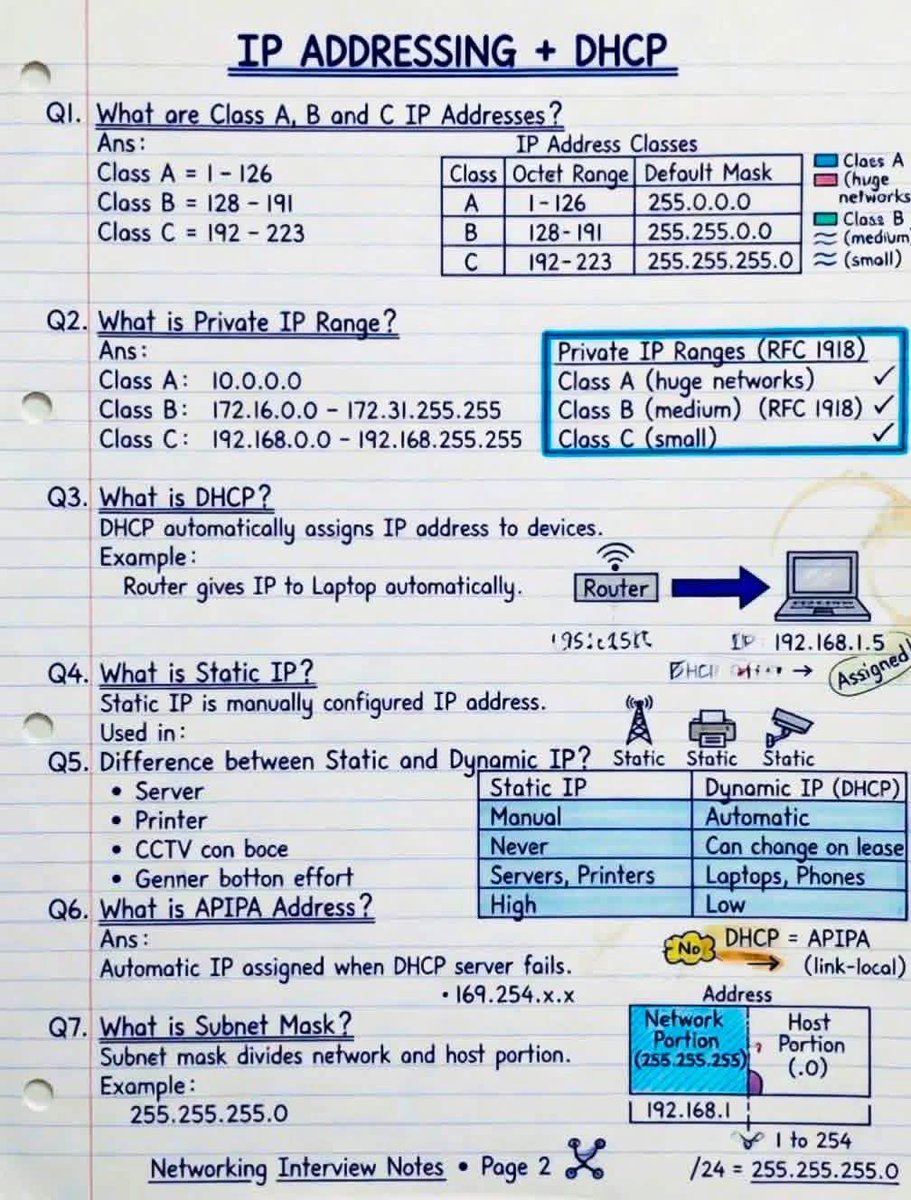
IP Addressing + DHCP Made EASY!
Every Network Engineer MUST understand these basics before moving to advanced networking concepts!
🔹 In this guide you’ll learn:
✅ Class A, B & C IP Addresses
✅ Private IP Ranges (RFC1918)
✅ DHCP vs Static IP
✅ APIPA Address Explained
✅ Subnet Mask Basics
✅ Real-world device examples
🔸 Quick Reminder:
🔹 DHCP = Automatic IP Assignment
🔹 Static IP = Manual & Fixed Address
🔹 APIPA (169.254.x.x) appears when DHCP fails
👉 Interview Question:
Why are servers usually configured with Static IP addresses instead of DHCP?
📚 Perfect for CCNA, CCNP & IT Beginners
💾 Save this for interview preparation
🔁 Share with networking students
#WiFi runs on 2.4 GHz, 5 GHz, and the newer 6 GHz bands. Lower frequencies give you better range, while higher frequencies give you more speed 😎👇
Find pdf ebooks with all my #networking & #cybersecurity related infographics from https://t.co/3t6LHw8TIY
#wireless#techtips
Skills, Subagents, MCP, and Hooks are not four versions of the same thing.
They solve four different problems. Mix them up, and your Claude Code setup starts breaking in ways no one can explain.
Here’s the decision tree I use:
SKILLS → “Load knowledge only when needed”
• Markdown file + helper code
• Loaded per task, not always on
• Best for: specialized knowledge, file formats, repeat workflows
Use when the same knowledge appears often but would bloat context.
SUBAGENTS → “Give a side task its own workspace”
• Separate session with its own memory
• Returns clean output, not the mess
• Best for: deep research, parallel work, messy exploration
Use when the main thread would get cluttered.
MCP → “Connect to external systems”
• Persistent server exposing tools/data
• Handles auth, state, multi-language
• Best for: APIs, databases, SaaS, internal tools
Use when the agent needs to reach something, not just know it.
HOOKS → “Enforce behavior every time”
• Triggered on lifecycle events
• Runs automatically, no exceptions
• Best for: validation, formatting, security, logging
Use when you can’t rely on the model to remember.
Mental model:
• Skills = what the agent knows
• Subagents = where it thinks
• MCP = what it can reach
• Hooks = what it must obey
They don’t compete. They stack.
Common mistakes:
• Building MCP when a Skill was enough
• Overloading main context instead of using Subagents
• Trusting the model instead of enforcing with Hooks
• Treating Skills like docs instead of tools
Hot take:
Most MCP servers should’ve been Skills.
People build connections when they need knowledge—and pay for it with latency, auth issues, and brittle systems.
Where do you draw the line between Skill vs MCP?
Microsoft confirms Windows Update has been downgrading your GPU drivers as many times you tried updating manually.
Right now, Windows Update can treat an OEM-approved driver as the “best-ranked” match for your hardware, even if you manually installed a newer Intel, AMD, or Nvidia driver from the chipmaker’s website.
That is why some of you see Windows replace a fresh 2026 graphics driver with an older version from 2024 or earlier. It is not simply checking the driver version or date. It is following its targeting and ranking system.
The good news is that Microsoft is changing the policy. New display drivers can now use narrower targeting with 2-part HWIDs and CHIDs, so updates are scoped to the specific PCs they are meant for.
It's all part of Microsoft's plans to make the Windows 11 experience less annoying.
12 System design concepts engineers should know:
1. Load balancing algorithms explained
↳ https://t.co/VCLCKOZzni
2. gRPC clearly explained
↳ https://t.co/QwgTXr1N9z
3. How HTTPS actually works
↳ https://t.co/wc3CQOsmPS
4. Database caching strategies
↳ https://t.co/23QdZATj2o
5. System design quality attributes
↳ https://t.co/v9WJoUPevt
6. Health checks vs heartbeats
↳ https://t.co/r5SalP6CCh
7. CI/CD pipelines
↳ https://t.co/SM2YvhioIX
8. API gateway vs load balancer vs reverse proxy
↳ https://t.co/Tg3EhT60tU
9. Microservices clearly explained
↳ https://t.co/1CpY04nNxb
10. How JWT works
↳ https://t.co/Kuv7DAj6B9
11. Idempotency in API design
↳ https://t.co/2sItwlz1oe
12. API protocols made simple
↳ https://t.co/2CEu4Wnhsv
What else should make the list?
What concepts would you like me to cover?
👋 PS: Get our System Design Handbook FREE when you join our newsletter. Join 30,001+ engineers: https://t.co/8uVCeyVa1w
--
📌 Save for later.
♻️ Repost to help other engineers learn system design.
➕ Follow Nikki Siapno + turn on notifications.