Confused by all the different types of AI Agents?
Here’s a simple breakdown of the 5 core types and how they differ! ⬇️
1. Simple Reflex Agents
Work on if-then logic. No memory. Fast, but only suited for basic, predictable environments.
2. Model-Based Reflex Agents
Add memory and a transition model. Can handle sequences and partial observability - ideal for robotics.
3. Goal-Based Agents
Plan actions to reach a goal. Evaluate future states and paths. Used in search, planning, and games.
4. Utility-Based Agents
Go beyond goals, optimize outcomes based on preferences, costs, and satisfaction. Think smarter agents.
5. Learning Agents
Most advanced. Learn from experience and feedback. Adapt strategies, support all learning types, and evolve.
6. Common Building Blocks Across All Agents:
Sensors, effectors, decision logic, performance modules, and interaction with the environment.
This guide can help you understand how autonomous systems make decisions, adapt, and improve from simple bots to super-intelligent agents.
You have been re-explaining yourself to Claude every single day.
You can fix it in just 5 mins. Here is how: (Steal it)
Here is everything you need to know:
☑️ What Is a Claude Skill?
→ A skill is an onboarding doc. You write & Claude follows it every time.
→ It teaches Claude one specific job and auto-loads
↳ Your preferences are written down once and followed forever.
☑️ SKILL. MD Anatomy
→ Name: The slug Claude uses to find and load your skill.
→ Description: The trigger text Claude scans before deciding to load.
→ Instructions: The rules, steps, and format Claude follows every time.
↳ Examples are optional, but they double your skill reliability instantly.
☑️ Your First Skill in 5 Minutes
→ Name: my-first-skill
→ Description: Use when I ask you to write emails
→ Instructions: Short, direct tone. Max 5 sentences per email.
↳ Save it. Type your trigger. Claude loads it automatically.
☑️ Where to Put It
→ Claude. ai users: tap "+" then Skills then Manage Skills to install.
→ Claude Code users: save your SKILL. MD inside the ~claude/skills/
↳ Both work the same. Location depends on where you work.
☑️ When to Use It (The Same Prompt 3 Times Rule)
→ You typed the same instructions across 3 different chats this week.
→ You explain your format and tone before every single writing request.
→ You re-upload the same context file at the start of every session.
↳ If any of these sound familiar, build your first skill today.
☑️ Skill vs Prompt vs MCP
→ Prompt: You type it every time, and Claude forgets it at the end.
→ Skill: Claude autoloads it permanently. You never retype it again.
→ MCP: Connects Claude directly to an external tool or service.
↳ Skills and prompts can both use MCP connections at the same time.
☑️ Free Skill Library (Browse first. Build only if nothing fits.)
→ https://t.co/WsnqtEd2Up. Official Anthropic skills.
→ awesome-claude-skills. 100+ community-built skills
→ Skill Creator Skill. Claude interviews you and builds the whole file.
If you can describe your workflow in plain English, you can build a skill for it. That is literally all it takes.
For more AI systems like this: 👇
→ Go to https://t.co/rnjW2PWRtc
→ Subscribe to my free newsletter (don't pay anything)
→ Get more free and daily cheatsheets
What task are you most tired of re-explaining to Claude every single time? Drop it below.
♻️ Repost to give your network an unfair advantage.
Anthropic just dropped a 31-page prompting guide.
Here's everything you actually need (in 10 rules):
1. You write "review this contract" and pray.
Fix: Name every output. "Review this contract. Flag risks per clause. Rate severity 1-5. Return as a table."
2: You say "summarize this" on a 40-page report.
Fix: 4.8 sizes the answer to the input. Cap it: "5 bullets. Each under 15 words. Start each with an action verb."
3: You write "don't use jargon. don't be salesy."
Fix: Negative instructions don't stick.
Flip them: "Write in plain English a 16-year-old could read aloud."
4: You type "can you help me with the email?"
Fix: Each verb ships something. For example: "Go to Gmail. Find [contact]. Write the send-ready reply. Under 90 words. Tone: confident, casual."
5: You wait for Claude to web search on its own.
Fix: Claude opus 4.8 calls fewer tools than 4.6.
Force it: "Use web search aggressively. Verify every claim with at least 2 sources."
6: You miss the warm tone from old Claude.
Fix: Claude opus 4.8 is direct. Almost zero emojis. Paste 2-3 sentences in the voice you want.
Tell Claude to match the rhythm.
7: You ask for "a landing page" & get bare minimum.
Fix: Drop this one line on every creative task
→ "Go beyond the basics."
It's from Anthropic's own doc.
8: You forget Claude 4.8 doesn't reason by default.
Fix: They call it "Thinking." Effort: High
Add this at the end: "Think before answering (maximum reasoning)." Free upgrade. Every time.
9: You rewrite the same prompt 14 times a week.
Fix: A skill is a command with instructions pre-built.
Write the same prompt twice? Make it a skill.
10: You assume Claude knows what you meant.
Fix: Old Claude 4.6 guessed.
New Claude 4.8 does exactly what you typed.
Spell it out. Output. Order. Length. Tone. Format.
If you don't say it, you don't get it.
To go even further & download my .md files directly:
Step 1. Go to https://t.co/psB7XxAv8w.
Step 2. Subscribe for free. Don't pay anything.
Step 3. Open my welcome email (most skip this).
Step 4. Hit the automatic reply button inside.
Step 5. Download my .md files from my Notion.
Bonus. Enjoy my best copy-paste prompts, too.
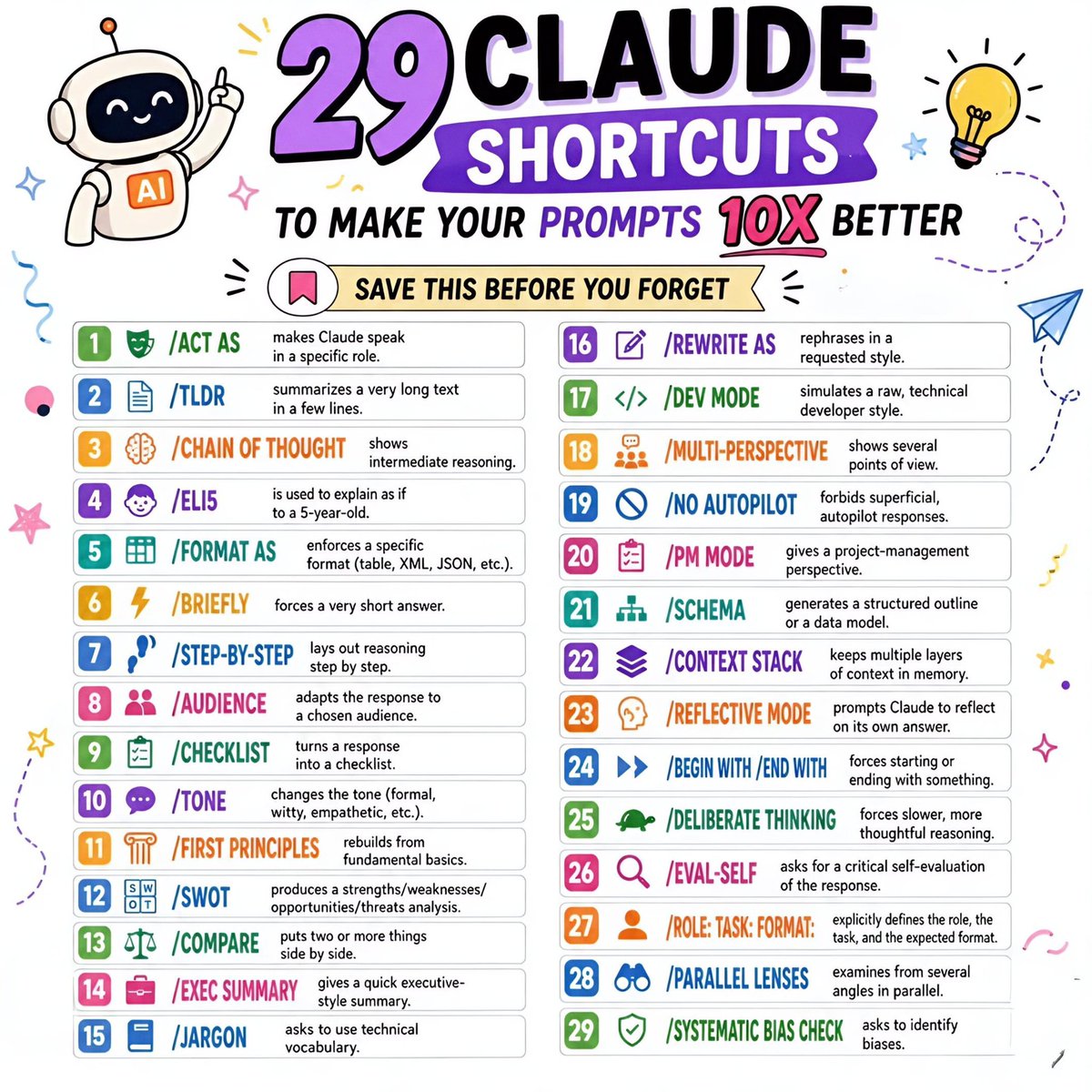
🤖 𝟮𝟵 𝗖𝗟𝗔𝗨𝗗𝗘 𝗦𝗛𝗢𝗥𝗧𝗖𝗨𝗧𝗦
🔖 𝗦𝗔𝗩𝗘 𝗧𝗛𝗜𝗦 𝗕𝗘𝗙𝗢𝗥𝗘 𝗬𝗢𝗨 𝗙𝗢𝗥𝗚𝗘𝗧
If you're using AI and not using these shortcuts, you're missing out on better prompts and better results.
1. 𝗔𝗖𝗧 𝗔𝗦 — makes Claude speak in a specific role.
2. 𝗧𝗟𝗗𝗥 — summarizes a very long text in a few lines.
3. 𝗖𝗛𝗔𝗜𝗡 𝗢𝗙 𝗧𝗛𝗢𝗨𝗚𝗛𝗧 — shows intermediate reasoning.
4. 𝗘𝗟𝗜𝟱 — is used to explain as if to a 5-year-old.
5. 𝗙𝗢𝗥𝗠𝗔𝗧 𝗔𝗦 — enforces a specific format (table, XML, JSON, etc.).
6. 𝗕𝗥𝗜𝗘𝗙𝗟𝗬 — forces a very short answer.
7. 𝗦𝗧𝗘𝗣-𝗕𝗬-𝗦𝗧𝗘𝗣 — lays out reasoning step by step.
8. 𝗔𝗨𝗗𝗜𝗘𝗡𝗖𝗘 — adapts the response to a chosen audience.
9. 𝗖𝗛𝗘𝗖𝗞𝗟𝗜𝗦𝗧 — turns a response into a checklist.
10. 𝗧𝗢𝗡𝗘 — changes the tone (formal, witty, empathetic, etc.).
11. 𝗙𝗜𝗥𝗦𝗧 𝗣𝗥𝗜𝗡𝗖𝗜𝗣𝗟𝗘𝗦 — rebuilds from fundamental basics.
12. 𝗦𝗪𝗢𝗧 — produces a strengths/weaknesses/opportunities/threats analysis.
13. 𝗖𝗢𝗠𝗣𝗔𝗥𝗘 — puts two or more things side by side.
14. 𝗘𝗫𝗘𝗖 𝗦𝗨𝗠𝗠𝗔𝗥𝗬 — gives a quick executive-style summary.
15. 𝗝𝗔𝗥𝗚𝗢𝗡 — asks to use technical vocabulary.
16. 𝗥𝗘𝗪𝗥𝗜𝗧𝗘 𝗔𝗦 — rephrases in a requested style.
17. 𝗗𝗘𝗩 𝗠𝗢𝗗𝗘 — simulates a raw, technical developer style.
18. 𝗠𝗨𝗟𝗧𝗜-𝗣𝗘𝗥𝗦𝗣𝗘𝗖𝗧𝗜𝗩𝗘 — shows several points of view.
19. 𝗡𝗢 𝗔𝗨𝗧𝗢𝗣𝗜𝗟𝗢𝗧 — forbids superficial, autopilot responses.
20. 𝗣𝗠 𝗠𝗢𝗗𝗘 — gives a project-management perspective.
21. 𝗦𝗖𝗛𝗘𝗠𝗔 — generates a structured outline or a data model.
22. 𝗖𝗢𝗡𝗧𝗘𝗫𝗧 𝗦𝗧𝗔𝗖𝗞 — keeps multiple layers of context in memory.
23. 𝗥𝗘𝗙𝗟𝗘𝗖𝗧𝗜𝗩𝗘 𝗠𝗢𝗗𝗘 — prompts Claude to reflect on its own answer.
24. 𝗕𝗘𝗚𝗜𝗡 𝗪𝗜𝗧𝗛 / 𝗘𝗡𝗗 𝗪𝗜𝗧𝗛 — forces starting or ending with something.
25. 𝗗𝗘𝗟𝗜𝗕𝗘𝗥𝗔𝗧𝗘 𝗧𝗛𝗜𝗡𝗞𝗜𝗡𝗚 — forces slower, more thoughtful reasoning.
26. 𝗘𝗩𝗔𝗟-𝗦𝗘𝗟𝗙 — asks for a critical self-evaluation of the response.
27. 𝗥𝗢𝗟𝗘: 𝗧𝗔𝗦𝗞: 𝗙𝗢𝗥𝗠𝗔𝗧: — explicitly defines the role, the task, and the expected format.
28. 𝗣𝗔𝗥𝗔𝗟𝗟𝗘𝗟 𝗟𝗘𝗡𝗦𝗘𝗦 — examines from several angles in parallel.
29. 𝗦𝗬𝗦𝗧𝗘𝗠𝗔𝗧𝗜𝗖 𝗕𝗜𝗔𝗦 𝗖𝗛𝗘𝗖𝗞 — asks to identify biases.
❤️ Like
🔁 Retweet
🔖 Bookmark
Follow @sonalshukla3377 for more such posts
Claude Code is (actually) easy.
The 12-step roadmap in plain English:
If you're totally new to Claude Code:
Beginner: https://t.co/2dPKJnEZMQ
Intermediate: https://t.co/HHtZFTfpq2
Advanced: https://t.co/tLKItVJZGR
PHASE 1: Context (what Claude knows about you)
Step 0: Install the CLI
One terminal command gets it running:
"npm install -g @anthropic-ai/claude-code"
Step 1: Projects
- Give Claude its own folder.
- Everything you build stays tied to it.
"I'm creating a new folder for my [project]. Create it for me and set it up so I can start working in it."
Step 2: claude .md
- Claude reads this before every chat.
- Role, voice, defaults. Set once, it sticks.
"Help me build my CLAUDE.md from scratch. Use Boris Cherny's CLAUDE.md as a starting template. Ask me about my business, voice, banned words, output defaults, and how I want you to work. Save the final file to ~/CLAUDE.md."
Step 3: Memory
- Every correction becomes a saved lesson.
- Same mistake never lands twice.
"From now on, whenever I correct you, save it as its own .md file at ~/.claude/projects/{project}/memory/, prefixed feedback_, user_, project_, or reference_. Index everything in MEMORY.md."
PHASE 2: Fire (how you trigger work)
Step 4: Skills
- Wrap a workflow in one keyword.
- Fire it from any chat, any folder, any time.
"Turn this workflow into a skill called /[name]. Set it up so I can fire it from any chat."
Step 5: /commands
Type the name and Claude fires the workflow.
"Save this prompt as a /[name] command. Set it up so I can run it any time."
Step 6: /plan
- Type /plan before starting any task.
- Claude lays out the steps. You approve it.
"/plan I want to [your task in plain English]."
PHASE 3: Extend (wire it to your stack)
Step 7: Hooks
- Auto-run something the moment an event fires.
- You never have to trigger it manually.
"Set up a hook that runs [thing you want] every time I [event]. Wire it up for me."
Step 8: MCP
- Plug Claude into Slack, Notion, Gmail, etc.
- You get live data from the tools you use.
"Connect Claude to [tool]. Set it up for me and walk me through it."
Step 9: Plugins
Install skills, agents, and MCPs in one command.
"/plugin install [plugin-name]"
PHASE 4: Scale (delegate and autopilot)
Step 10: Subagents
- Send out parallel workers.
- Get three jobs done at once.
"Use subagents to handle [task A], [task B] and [task C] in parallel."
Step 11: Agent Teams
- A pipeline of specialist AI agents.
- Each owns one job, hands off to the next.
"Build me an agent team for [process].
Step 12: Routines
- Schedule your agent team on the cloud.
- You set it once, walk away forever.
"/schedule [agent or skill] every [schedule]."
That's Claude Code from zero to autopilot.
12 steps with no coding background needed.
Repost ♻️ to help someone in your network.
Cc : Charlie
Anthropic just dropped a 31-page prompting guide.
Here's everything you actually need (in 10 rules):
1. You write "review this contract" and pray.
Fix: Name every output. "Review this contract. Flag risks per clause. Rate severity 1-5. Return as a table."
2: You say "summarize this" on a 40-page report.
Fix: 4.7 sizes the answer to the input. Cap it: "5 bullets. Each under 15 words. Start each with an action verb."
3: You write "don't use jargon. don't be salesy."
Fix: Negative instructions don't stick.
Flip them: "Write in plain English a 16-year-old could read aloud."
4: You type "can you help me with the email?"
Fix: Each verb ships something. For example: "Go to Gmail. Find [contact]. Write the send-ready reply. Under 90 words. Tone: confident, casual."
5: You wait for Claude to web search on its own.
Fix: Claude opus 4.7 calls fewer tools than 4.6.
Force it: "Use web search aggressively. Verify every claim with at least 2 sources."
6: You miss the warm tone from old Claude.
Fix: Claude opus 4.7 is direct. Almost zero emojis. Paste 2-3 sentences in the voice you want.
Tell Claude to match the rhythm.
7: You ask for "a landing page" & get bare minimum.
Fix: Drop this one line on every creative task
→ "Go beyond the basics."
It's from Anthropic's own doc.
8: You forget Claude 4.7 doesn't reason by default.
Fix: They call it "adaptive thinking."
Add this at the end: "Think before answering (maximum reasoning)." Free upgrade. Every time.
9: You rewrite the same prompt 14 times a week.
Fix: A skill is a command with instructions pre-built.
Write the same prompt twice? Make it a skill.
10: You assume Claude knows what you meant.
Fix: Old Claude 4.6 guessed.
New Claude 4.7 does exactly what you typed.
Spell it out. Output. Order. Length. Tone. Format.
If you don't say it, you don't get it.
To go even further & download my .md files directly:
Step 1. Go to https://t.co/psB7XxB2Y4.
Step 2. Subscribe for free. Don't pay anything.
Step 3. Open my welcome email (most skip this).
Step 4. Hit the automatic reply button inside.
Step 5. Download my .md files from my Notion.
Bonus. Enjoy my best copy-paste prompts, too.


![rubenhassid's tweet photo. Anthropic just dropped a 31-page prompting guide.
Here's everything you actually need (in 10 rules):
1. You write "review this contract" and pray.
Fix: Name every output. "Review this contract. Flag risks per clause. Rate severity 1-5. Return as a table."
2: You say "summarize this" on a 40-page report.
Fix: 4.8 sizes the answer to the input. Cap it: "5 bullets. Each under 15 words. Start each with an action verb."
3: You write "don't use jargon. don't be salesy."
Fix: Negative instructions don't stick.
Flip them: "Write in plain English a 16-year-old could read aloud."
4: You type "can you help me with the email?"
Fix: Each verb ships something. For example: "Go to Gmail. Find [contact]. Write the send-ready reply. Under 90 words. Tone: confident, casual."
5: You wait for Claude to web search on its own.
Fix: Claude opus 4.8 calls fewer tools than 4.6.
Force it: "Use web search aggressively. Verify every claim with at least 2 sources."
6: You miss the warm tone from old Claude.
Fix: Claude opus 4.8 is direct. Almost zero emojis. Paste 2-3 sentences in the voice you want.
Tell Claude to match the rhythm.
7: You ask for "a landing page" & get bare minimum.
Fix: Drop this one line on every creative task
→ "Go beyond the basics."
It's from Anthropic's own doc.
8: You forget Claude 4.8 doesn't reason by default.
Fix: They call it "Thinking." Effort: High
Add this at the end: "Think before answering (maximum reasoning)." Free upgrade. Every time.
9: You rewrite the same prompt 14 times a week.
Fix: A skill is a command with instructions pre-built.
Write the same prompt twice? Make it a skill.
10: You assume Claude knows what you meant.
Fix: Old Claude 4.6 guessed.
New Claude 4.8 does exactly what you typed.
Spell it out. Output. Order. Length. Tone. Format.
If you don't say it, you don't get it.
To go even further & download my .md files directly:
Step 1. Go to https://t.co/psB7XxAv8w.
Step 2. Subscribe for free. Don't pay anything.
Step 3. Open my welcome email (most skip this).
Step 4. Hit the automatic reply button inside.
Step 5. Download my .md files from my Notion.
Bonus. Enjoy my best copy-paste prompts, too.](https://pbs.twimg.com/media/HJoSjWJa0AA7KX8.jpg)
![Krishnasagrawal's tweet photo. Claude Code is (actually) easy.
The 12-step roadmap in plain English:
If you're totally new to Claude Code:
Beginner: https://t.co/2dPKJnEZMQ
Intermediate: https://t.co/HHtZFTfpq2
Advanced: https://t.co/tLKItVJZGR
PHASE 1: Context (what Claude knows about you)
Step 0: Install the CLI
One terminal command gets it running:
"npm install -g @anthropic-ai/claude-code"
Step 1: Projects
- Give Claude its own folder.
- Everything you build stays tied to it.
"I'm creating a new folder for my [project]. Create it for me and set it up so I can start working in it."
Step 2: claude .md
- Claude reads this before every chat.
- Role, voice, defaults. Set once, it sticks.
"Help me build my CLAUDE.md from scratch. Use Boris Cherny's CLAUDE.md as a starting template. Ask me about my business, voice, banned words, output defaults, and how I want you to work. Save the final file to ~/CLAUDE.md."
Step 3: Memory
- Every correction becomes a saved lesson.
- Same mistake never lands twice.
"From now on, whenever I correct you, save it as its own .md file at ~/.claude/projects/{project}/memory/, prefixed feedback_, user_, project_, or reference_. Index everything in MEMORY.md."
PHASE 2: Fire (how you trigger work)
Step 4: Skills
- Wrap a workflow in one keyword.
- Fire it from any chat, any folder, any time.
"Turn this workflow into a skill called /[name]. Set it up so I can fire it from any chat."
Step 5: /commands
Type the name and Claude fires the workflow.
"Save this prompt as a /[name] command. Set it up so I can run it any time."
Step 6: /plan
- Type /plan before starting any task.
- Claude lays out the steps. You approve it.
"/plan I want to [your task in plain English]."
PHASE 3: Extend (wire it to your stack)
Step 7: Hooks
- Auto-run something the moment an event fires.
- You never have to trigger it manually.
"Set up a hook that runs [thing you want] every time I [event]. Wire it up for me."
Step 8: MCP
- Plug Claude into Slack, Notion, Gmail, etc.
- You get live data from the tools you use.
"Connect Claude to [tool]. Set it up for me and walk me through it."
Step 9: Plugins
Install skills, agents, and MCPs in one command.
"/plugin install [plugin-name]"
PHASE 4: Scale (delegate and autopilot)
Step 10: Subagents
- Send out parallel workers.
- Get three jobs done at once.
"Use subagents to handle [task A], [task B] and [task C] in parallel."
Step 11: Agent Teams
- A pipeline of specialist AI agents.
- Each owns one job, hands off to the next.
"Build me an agent team for [process].
Step 12: Routines
- Schedule your agent team on the cloud.
- You set it once, walk away forever.
"/schedule [agent or skill] every [schedule]."
That's Claude Code from zero to autopilot.
12 steps with no coding background needed.
Repost ♻️ to help someone in your network.
Cc : Charlie](https://pbs.twimg.com/media/HJLYWzkbYAA0xwB.jpg)


![rubenhassid's tweet photo. Anthropic just dropped a 31-page prompting guide.
Here's everything you actually need (in 10 rules):
1. You write "review this contract" and pray.
Fix: Name every output. "Review this contract. Flag risks per clause. Rate severity 1-5. Return as a table."
2: You say "summarize this" on a 40-page report.
Fix: 4.7 sizes the answer to the input. Cap it: "5 bullets. Each under 15 words. Start each with an action verb."
3: You write "don't use jargon. don't be salesy."
Fix: Negative instructions don't stick.
Flip them: "Write in plain English a 16-year-old could read aloud."
4: You type "can you help me with the email?"
Fix: Each verb ships something. For example: "Go to Gmail. Find [contact]. Write the send-ready reply. Under 90 words. Tone: confident, casual."
5: You wait for Claude to web search on its own.
Fix: Claude opus 4.7 calls fewer tools than 4.6.
Force it: "Use web search aggressively. Verify every claim with at least 2 sources."
6: You miss the warm tone from old Claude.
Fix: Claude opus 4.7 is direct. Almost zero emojis. Paste 2-3 sentences in the voice you want.
Tell Claude to match the rhythm.
7: You ask for "a landing page" & get bare minimum.
Fix: Drop this one line on every creative task
→ "Go beyond the basics."
It's from Anthropic's own doc.
8: You forget Claude 4.7 doesn't reason by default.
Fix: They call it "adaptive thinking."
Add this at the end: "Think before answering (maximum reasoning)." Free upgrade. Every time.
9: You rewrite the same prompt 14 times a week.
Fix: A skill is a command with instructions pre-built.
Write the same prompt twice? Make it a skill.
10: You assume Claude knows what you meant.
Fix: Old Claude 4.6 guessed.
New Claude 4.7 does exactly what you typed.
Spell it out. Output. Order. Length. Tone. Format.
If you don't say it, you don't get it.
To go even further & download my .md files directly:
Step 1. Go to https://t.co/psB7XxB2Y4.
Step 2. Subscribe for free. Don't pay anything.
Step 3. Open my welcome email (most skip this).
Step 4. Hit the automatic reply button inside.
Step 5. Download my .md files from my Notion.
Bonus. Enjoy my best copy-paste prompts, too.](https://pbs.twimg.com/media/HI_cEF9aAAA3A4K.jpg)