'What Happened to Clementine?': New documentary exposes coerced 5-month abortion & fetal harvesting.
#WhatHappenedToClementine
https://t.co/LSfraEbeqo
Your Windows PC has been taking screenshots of everything you do.
For weeks.
Passwords. Bank accounts. Private DMs. Medical records.
Microsoft calls it a "productivity feature."
4 million people already have it enabled and don't know it.
Here's how to shut it down 👇
This is heroic and excellent of @jackconte and @Patreon. At least some people are still standing up in the face of lawfare. FU @bricks_minifig https://t.co/UqJFVLuzbU
@Villgecrazylady@anedot 's merchant fees depend on organization type and the payment method used. Accoring to their website - Credit/debit cards, Apple Pay, Google Pay, PayPal: 4.0% + $0.30 per transaction.
https://t.co/uxQxsXMmjM
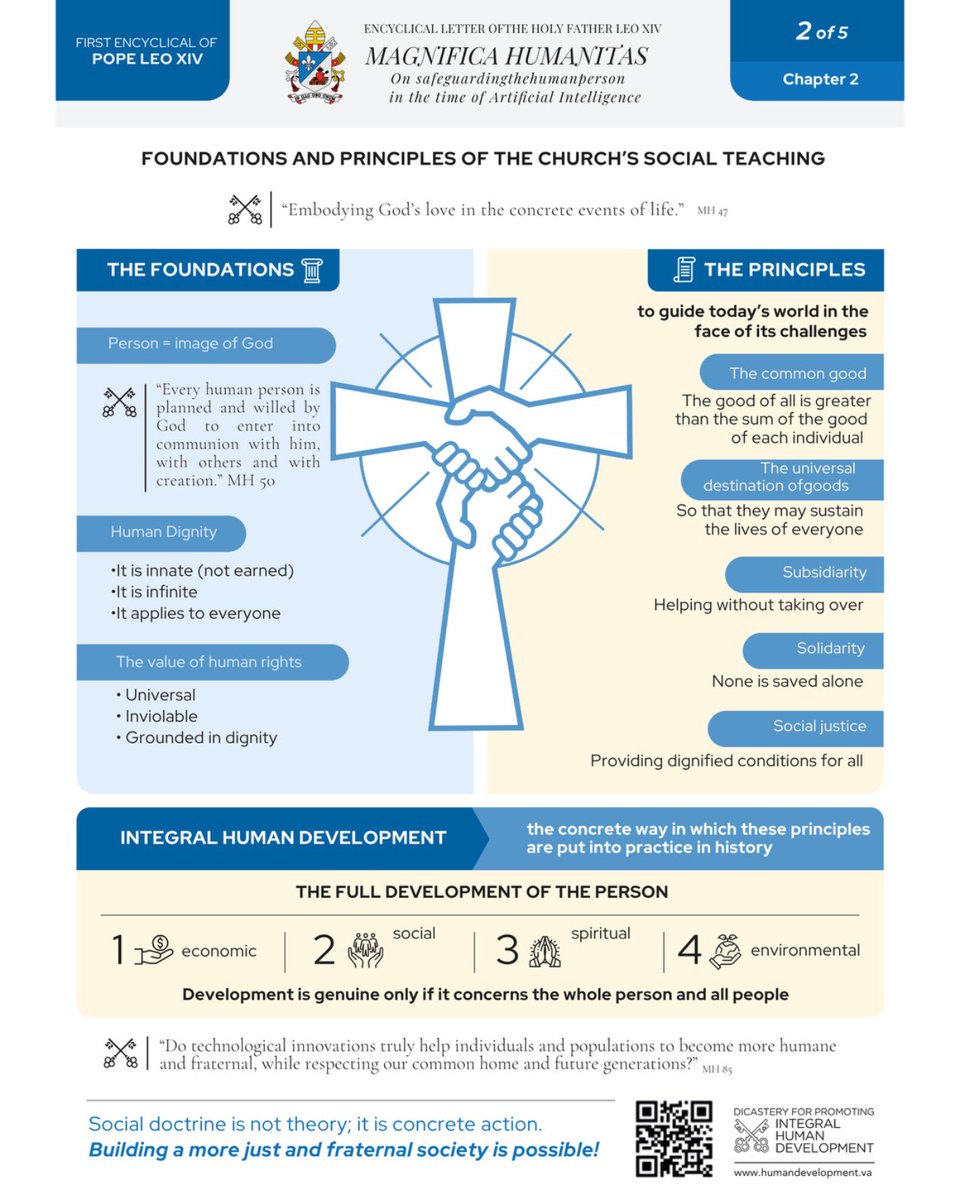
#MagnificaHumanitas /2
To understand our time’s res novae we must consider:
🔹The inviolable rights and inherent dignity of every human being
🔹The common good, the universal destination of goods, subsidiarity, solidarity and social justice
➡️ Chapter 2 https://t.co/IXPkhBXGNY
Magnifica Humanitas
🔹Technology and human dignity: “Babel” or “Jerusalem”? (Introduction)
🔹 Choosing the “right” path demands a dynamic approach: listening, discerning, and interpreting our times in light of the Gospel (chapter 1)
This is already what the 4th Amendment says, but the Surveillance Accountability Act actually defines "search" so that the government can no longer pretend that buying our data and searching it at will doesn't count.
If we actually want to fight back against the surveillance machine tightening around us, we need a coalition. Please contact your rep and ask them to co-sponsor HR 8470.
https://t.co/H0ceERhJre
On May 4th, a Swedish privacy lawyer caught Google Chrome silently installing a 4 GB AI model on every desktop computer it could reach.
If you delete the file, Chrome treats the deletion as a temporary error and downloads it again at the next opportunity.
The file is called weights.bin. It lives in a folder called OptGuideOnDeviceModel inside the Chrome user profile directory. It is the weights for Gemini Nano, Google's on-device large language model.
Hundreds of millions of devices now carry it. Two thirds of every desktop browser in the world is Chrome. Alexander Hanff, the Swedish privacy lawyer, installed a clean copy of Chrome on a fresh Mac, ran a script that visited a hundred webpages with no human input, and watched the system logs as Chrome silently wrote 4 GB to his disk.
Chrome 147 ships with an "AI Mode" pill rendered in the address bar. A reasonable user, knowing Chrome just installed an on-device AI model, would assume that visible AI Mode feature uses the model sitting on their hard drive. Local query. Local processing. Local privacy. Every part of that assumption is wrong.
The visible AI feature ships your queries to Google's servers. The 4 GB file on your hard drive does nothing visible. It powers obscure features buried in right-click menus that almost no Chrome user has ever clicked. The invisible binary sits on your disk and waits for the version that does.
Chrome is the most-installed surveillance product of all time. Two billion users. Every URL you visit, every search you type, every form you fill out, every site you stay on, every site you leave. The advertising model that pays for Chrome requires every one of those signals.
Chrome holds 64% of the global desktop browser market. Two-thirds of every reader of this sentence is reading it through software that just took 4 GB of their hard drive without asking.
Until last year, Chrome's surveillance ended at what you typed into the address bar and what your activity log showed. The model can now read the page you have open, the text you have selected, the draft you are writing inside a Gmail tab before you have decided whether to send it.
Google's "Help me write" feature requires that capability by definition. Help me write means read what I am writing. Locally. In real time. Pre-send.
It's time to switch browsers. The cartel cannot watch the screen it is not running on.
DUTY TO DISOBEY is a new film from CHD that highlights military members who refused the Covid shot.
The tip date for a theater showing near you is May 15h. If we don't sell enough tickets by then, theaters will PULL THE FILM.
PLEASE DON'T WAIT.
BUY TICKETS TODAY:
https://t.co/pLWo23BUU0
Stop using Microsoft products and paying annual fees! Here are just some of the open source free replacements for popular Microsoft products. I use MANY of these daily:
--- Alternatives to Microsoft Office (Word, Excel, PowerPoint, Access) ---
* LibreOffice (Writer, Calc, Impress, Base, Draw, Math)
The flagship suite. Reads/writes .docx, .xlsx, .pptx. Pre-installed
on most distros.
* OnlyOffice Desktop Editors
Closest visual match to modern Office; arguably the best .docx/.xlsx
compatibility.
* Apache OpenOffice
LibreOffice's predecessor; still maintained but slower-moving.
* Calligra Suite
KDE's office suite.
* CryptPad, Etherpad, Nextcloud Office
Real-time collaborative editing.
--- Microsoft Outlook (Email + Calendar + Contacts) ---
* Mozilla Thunderbird - Mature, extensible, built-in calendar/contacts.
* GNOME Evolution - Full PIM with best Exchange/Microsoft 365 support
on Linux.
* KMail / Kontact - KDE's email and PIM suite.
* Geary - Lightweight, conversation-focused GNOME client.
* Claws Mail - Fast and highly extensible.
* Betterbird - Thunderbird fork with extra polish.
--- Microsoft OneNote / Evernote ---
* Joplin - Closest direct OneNote replacement: notebooks, tags,
web clipper, end-to-end encryption, OneNote/Evernote
importer.
* Logseq - Local-first, Markdown-based outliner with bidirectional
links.
* Obsidian - Knowledge graph with plugin ecosystem (free but not
OSS; included because it comes up constantly).
* Zim Wiki - Desktop wiki for interconnected notes.
* Xournal++ - Best for handwritten notes, sketches, and PDF
annotation.
* CherryTree - Hierarchical rich-text notes.
* Trilium Notes - Powerful tree-structured knowledge base.
* Standard Notes - Privacy-focused encrypted notes.
* AppFlowy - Open source Notion-style workspace.
* SiYuan - Block-based notes with bidirectional linking.
--- Microsoft Visio (Diagramming) ---
* https://t.co/ZeE7i6Cz5U / https://t.co/FIAtb1dc5y - Free desktop and browser diagramming.
* Dia - Classic diagram editor.
* LibreOffice Draw - Built-in vector/diagramming.
* Pencil Project - GUI prototyping and diagrams.
--- Microsoft Project ---
* ProjectLibre - Direct Project replacement; reads/writes .mpp.
* GanttProject - Gantt-chart project planning.
* OpenProject - Web-based, team-oriented.
* Taiga - Agile project management.
--- Personal Finance (Quicken, Microsoft Money) ---
* GnuCash - Double-entry accounting, budgeting, investments.
* HomeBank - Friendly personal finance.
* KMyMoney - KDE-style personal finance.