I Built a Full CI/CD pipeline for this Anatomy project. It demonstrates a full GitOps workflow:
Developers push code to GitHub, Jenkins handles Continuous Integration (build & push Docker images), and ArgoCD handles Continuous Deployment to a Kubernetes cluster on AWS EKS, with Prometheus & Grafana for monitoring.
👉 Check the repo for the full step-by-step guide in the README: https://t.co/MFz9HgwVfY
Only if education could be this interactive ❤️🔥
I've had a looong wish to build something genuinely useful through vibe coding, and I finally did it.
A 3D human anatomy application built with @threejs using GPT 5.6 Sol.
It all started with a single design image that I created using GPT Image 2.0. I then used it to generate every 3D organ image, one by one.
Next, I converted each of those images into 3D models using @tripoai (and no, they didn't sponsor this 😄).
After that, I opened Codex, wrote a master prompt based on the design, and gave it the prompt, the design image, and all the 3D models.
Codex built the first version beautifully, but there was one big problem.
Every single 3D model was nearly 120-150 MB. That obviously wasn't practical for the web and was giving a performance of 16fps.
After a few iterations, Codex optimized each model down to roughly 2–5.5 MB while preserving the visual quality, reducing the total asset size from ~900 MB to just 28.6 MB. And each model loads on demand.
Along the way, Codex also generated those anatomical illustrations showing where each organ sits in the human body, and even created the interactive hotspot markers that explain different parts of every organ. It handled all of that.
The process wasn't exactly one shot, but it also wasn't difficult. You just have to do it step by step.
It genuinely felt like building something that could make learning anatomy much more engaging.
The inspiration came from @DilumSanjaya's 3D animal plant cell project. I remember seeing it and thinking, "I want to build something like this one day."
And I did it :D
Live: https://t.co/gIFgkj8UVB
Code: https://t.co/nijvyWcyxO
I Built a Full CI/CD pipeline for this Anatomy website project. It demonstrates a full GitOps workflow:
Developers push code to GitHub, Jenkins handles Continuous Integration (build & push Docker images), and ArgoCD handles Continuous Deployment to a Kubernetes cluster on AWS EKS, with Prometheus & Grafana for monitoring.
👉 Check the repo for the full step-by-step guide in the README: https://t.co/MFz9HgwVfY
Built a DevOps project for this webapp that shows a real-world DevOps workflow, from code commit to production deployment, using industry standard tools and practices.
Workflow:
GitHub push → Webhook Trigger Jenkins Pipeline (CI) →
Argo CD Sync → AWS EKS Deployment → LoadBalancer URL → Live Application → Prometheus → Grafana
👉 Check the repo for the full step-by-step guide in the README:
https://t.co/NQ0KE7aNnh
Made the project better, I over-engineered the deployment😀, built a CICD pipeline for it.
Workflow:
Docker → Jenkins → ArgoCD → EKS → Grafana.
Check the repo for the code and full step-by-step guide in the README: https://t.co/Wnv1Mzpc64
@HelloVyom Made the project better, I over-engineered the deployment😀, built a CICD pipeline for it. Workflow: Docker → Jenkins → ArgoCD → EKS → Grafana.
Check the repo for the code and full step-by-step guide in the README: https://t.co/Wnv1Mzpc64
Built a DevOps project for this webapp that shows a real-world DevOps workflow, from code commit to production deployment, using industry standard tools and practices. @thebuggeddev
Workflow:
GitHub push → Webhook Trigger Jenkins Pipeline (CI) →
Argo CD Sync → AWS EKS Deployment → LoadBalancer URL → Live Application → Prometheus → Grafana
👉 Check the repo for the full step-by-step guide in the README:
https://t.co/NQ0KE7aNnh
I genuinely think we're watching the beginning of the end of manually building frontend UIs ☠️
I vibe coded this entire website from a single design reference image using Kimi K3.
It handled SVGs, generated images, nailed animations, and built responsive layouts with far less iteration than I expected. And so more accurately.
I've found myself spending more time describing interfaces than building them.
It really feels that, "Frontend is changing faster than most people realize."
Live: https://t.co/W5v2DERJK9
Code: https://t.co/a9i65Wk9vi
Built a full CI/CD & monitoring pipeline for the Lens app. @thebuggeddev
Jenkins → SonarQube → Trivy → Docker → Kubernetes (EKS) → Prometheus & Grafana.
Started with a Docker deployment, then also deployed it to a full Kubernetes setup on AWS EKS.
Also wired up monitoring with Prometheus & Grafana for real-time visibility into the pipeline and infra.
👉 Check the repo for the full step-by-step guide in the README:
https://t.co/DcyukKrauh
Built a full CI/CD & monitoring pipeline for the Lens app. @thebuggeddev
Jenkins → SonarQube → Trivy → Docker → Kubernetes (EKS) → Prometheus & Grafana.
Also wired up monitoring with Prometheus & Grafana for real-time visibility into the pipeline and infra.
👉 Check the repo for the full step-by-step guide in the README: https://t.co/DcyukKqCEJ
Built a full CI/CD & monitoring pipeline for the Lens app. @thebuggeddev
Jenkins → SonarQube → Trivy → Docker → Kubernetes (EKS) → Prometheus & Grafana.
Started with a Docker deployment, then also deployed it to a full Kubernetes setup on AWS EKS.
Also wired up monitoring with Prometheus & Grafana for real-time visibility into the pipeline and infra.
👉 Check the repo for the full step-by-step guide in the README:
https://t.co/DcyukKqCEJ
Have you ever wondered how your glasses actually make the world look clear? 😵💫
Most of us learn lenses through ray diagrams in physics class. So I built a whole 3D optics lab with Fable 5 using @threejs.
That too in just THREE Prompts. All of it.
You can grab the object and slide it toward the lens. The image stretches, flips, then goes upright the instant it crosses the focal point.
And none of it is faked.
Every ray is traced through both curved glass surfaces using Snell’s law. The readouts are calculated from those same traced rays.
There's a vision mode too where you can see how things looks through that lens and adjust values to get proper clarity.
It's so good that it makes me wonder how much of science could be taught this way. Anyone can just develop this in one sitting and use it for learning or teaching.
Tbh, this is how use of AI should happen. To make things better than before.
Live: https://t.co/JtDxvxA1w3
Code: https://t.co/EZzqITheMm
Built a full CI/CD pipeline for the Football Stadium app. @thebuggeddev
Jenkins → SonarQube → Trivy → Docker → Kubernetes (EKS)
First deployed via Docker, then leveled up to a full Kubernetes deployment on AWS EKS , from git push to a live app behind an AWS Load Balancer, fully automated.
Next up: monitoring with Prometheus & Grafana, and GitOps with ArgoCD
👉 Check the repo for the full step-by-step guide in the README:
https://t.co/nhJ7CWg70k
Built a full CI/CD pipeline for the Football Stadium app.
Jenkins → SonarQube → Trivy → Docker → Kubernetes (EKS)
First deployed via Docker, then leveled up to a full Kubernetes deployment on AWS EKS , from git push to a live app behind an AWS Load Balancer, fully automated.
Next up: monitoring with Prometheus & Grafana, and GitOps with ArgoCD
👉 Check the repo for the full step-by-step guide in the README: https://t.co/nhJ7CWg70k
Built a full CI/CD pipeline for the Football Stadium app.
Jenkins → SonarQube → Trivy → Docker → Kubernetes (EKS)
First deployed via Docker, then leveled up to a full Kubernetes deployment on AWS EKS , from git push to a live app behind an AWS Load Balancer, fully automated.
Next up: monitoring with Prometheus & Grafana, and GitOps with ArgoCD
👉 Check the repo for the full step-by-step guide in the README: https://t.co/nhJ7CWg70k
Why do we still buy stadium tickets without ever seeing what the view from the seat actually looks like? ☠️
So I prototyped an idea.
A 3D seat view experience for a football stadium built with Fable 5 + @threejs, where you can preview exactly what you'll see from your seat before buying.
The entire 3D experience was working after the first prompt, and the whole prototype came together in just five prompts.
This is the kind of 3D experience I'd love to see more of, tbh. Feels so good.
Right now, buying a ticket gives you almost no sense of what the experience will actually feel like. We're still relying on static seat maps, charts, and boring UI layouts, when interactive 3D experiences could make that decision so much easier.
If you think, 3D development has the potential to create genuinely useful experiences. This feels like the direction we should be heading. 3D is the future.
I can already imagine this for cinemas, cricket stadiums, Wimbledon, concerts, and so many other venues.
I'm planning to take this further. What should I build next? More stadium features, or should I try another venue? Let me know :D
Code: https://t.co/6siJHap4fb
Live: https://t.co/n5eZfpf7Jw
Here’s a troubleshooting tip for your EC2 server when hosting Jenkins.
When launching an EC2 instance to install Jenkins, it’s easy to leave the root EBS volume at the default 8 GiB. At first, everything works perfectly. But as your CI/CD pipeline grows, Jenkins may suddenly take its Built-In Node offline and display this warning:
⚠️ Disk space is below threshold of 1.00 GiB
When this happens, your pipelines won’t run, because Jenkins has stopped scheduling builds due to critically low disk space. A Jenkins server stores much more than just your application code. Over time, disk space is consumed by:
•Jenkins plugins and updates
•The Java Runtime (JVM)
•Build tool caches (Maven, npm, Gradle, etc.)
•Docker images, containers, and layers
•Build artifacts, logs, and workspaces
These files accumulate quickly, and 8 GiB disappears much faster than you’d expect.
How to fix it
Increase your EC2 root EBS volume to 20GiB (or more, depending on your workloads). This simple change can prevent a lot of issues later.
A few things worth knowing if you run into this issue:
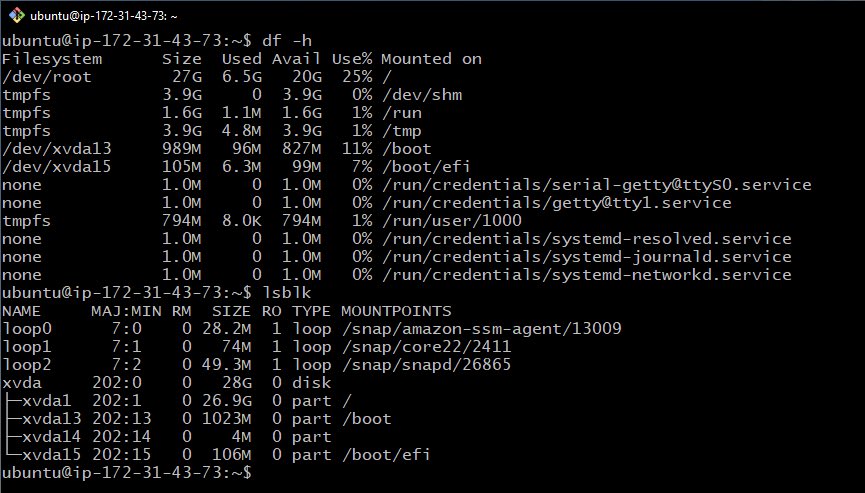
- Increasing the EBS volume size in the AWS Console isn’t enough. After resizing the volume, the operating system still uses the original partition size. You’ll also need to run growpart to extend the partition, run resize2fs to expand the filesystem.
- Verify the actual disk usage from the operating system. Two commands you can use are df -h, it Shows filesystem usage and available disk space. lsblk, this displays disks, partitions, and their sizes.
Starting with a larger root volume is a small decision that can save you from unexpected downtime and hours of troubleshooting when your CI/CD pipelines suddenly stop running.
This is one of those issues that’s easy to overlook until it stops your build.