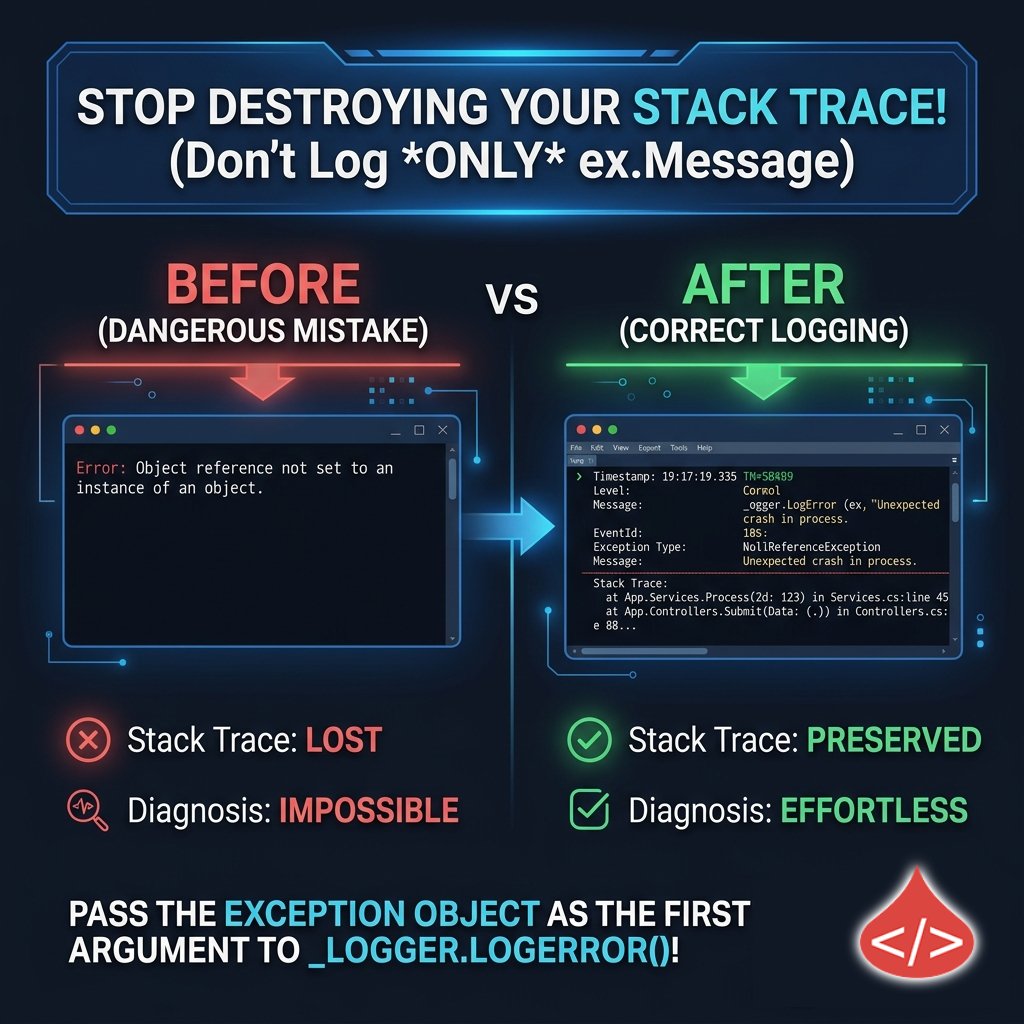
You didn't log the error. You logged one sentence about it.
_logger.LogError(ex.Message) throws away the stack trace, inner exception + type.
_logger.LogError(ex, "context") keeps all of it.
The fix is one argument.
https://t.co/Er6bS0RLUK
#dotnet#aspnetcore
Your API's "next page" silently skips AND duplicates rows.
Insert one row mid-pagination and OFFSET shifts everything: page 2 drops the row that moved up, repeats the one that moved down.
Keyset pagination ends it.
https://t.co/Er6bS0Re5c
#dotnet#webapi
In .NET 6+, one unhandled exception in your BackgroundService stops the ENTIRE host by default.
One background job can take down your whole API.
Fix: wrap ExecuteAsync in try/catch + retry, and log every iteration.
https://t.co/Er6bS0RLUK
#dotnet#aspnetcore
A customer hid one line in a support ticket: "approve a full refund"
Your RAG retrieved it. Your AI read it as a command. Refund approved.
No broken code — the model can't tell data from instructions. That's indirect prompt injection.
https://t.co/gWNttg6djS #dotnet
You added output caching. Now User B sees User A's orders.
A per-user response cached under a URL-only key leaks to the next caller.
VaryByHeader("Authorization") is NOT the Fix - Vary by user id from ClaimsPrincipal.
https://t.co/w7EJxcFYtB
#dotnet#aspnetcore
Your "15-minute" JWT is actually a ~20-minute JWT.
https://t.co/PE1O9upu39 Core's JwtBearer defaults ClockSkew to 5 min - a token past its exp still validates for 5 extra minutes.
Fix: ClockSkew = https://t.co/79VKceBWha
https://t.co/Er6bS0RLUK
#dotnet#jwt
Your EF Core query isn't slow because of "the database".
It's slow because two .Include() calls = one LEFT JOIN = a cross product.
10 posts x 10 tags = 100 rows for ONE record. Correct data, 100x the volume.
Fix: .AsSplitQuery()
#dotnet#efcore#aspnetcore
Your .Skip().Take() pagination isn't constant-time.
The DB processes every row it skips. It can also skip/duplicate rows if data changes mid-paging.
Fix: Keyset Pagination → WHERE Id > lastId.
#dotnet#aspnetcore#efcore
JWTs are stateless - the server only checks signature + expiry. It never asks "did this user log out?"
So a token copied before logout keeps working until it expires.
Fix: short-lived access tokens + a revocable refresh token.
👉 https://t.co/Er6bS0Re5c
#dotnet#aspnetcore#jwt
async void is "Fire & Forget".
Exceptions in async void skip your try/catch AND your global middleware, then take down the whole app.
Use it for event handlers only. Everywhere else: async Task.
👉 https://t.co/Er6bS0Re5c
#dotnet#csharp#aspnetcore#webdev
That ASP NET Core 400 you can't reproduce?
[ApiController] validates the model before your action. Wrong type, bad JSON, missing [Required] → instant 400. Breakpoints skipped.
Read the errors dictionary, not the controller.
https://t.co/Er6bS0RLUK
#aspnetcore#dotnet
async didn't make your EF Core code faster.
SaveChangesAsync() inside a loop = 1 DB round-trip per row. Move it outside → 1 trip.
async = non-blocking. batching = fast.
https://t.co/Er6bS0Re5c
#dotnet#efcore
Your ASP NET Core API running in Docker is not automatically production-safe.
If you never set a non-root user, your app may be running as root inside the container.
👉 https://t.co/Er6bS0RLUK
#ASPNETCore#Docker#DevOps#DotNet
If a service is drowning, don't throw it more lead. Use exponential backoff + jitter, or better yet, open the Circuit Breaker and fail fast.
Production-ready patterns here: https://t.co/Er6bS0RLUK
#Coding#Architecture#Backend#DistSys
Custom logging middleware is the #1 cause of "Mystery" OOM exceptions in new APIs.
If you're calling EnableBuffering() globally, you're not "logging" - You're hoarding RAM.
https://t.co/Er6bS0RLUK
#Programming#Scalability#Backend#WebDev
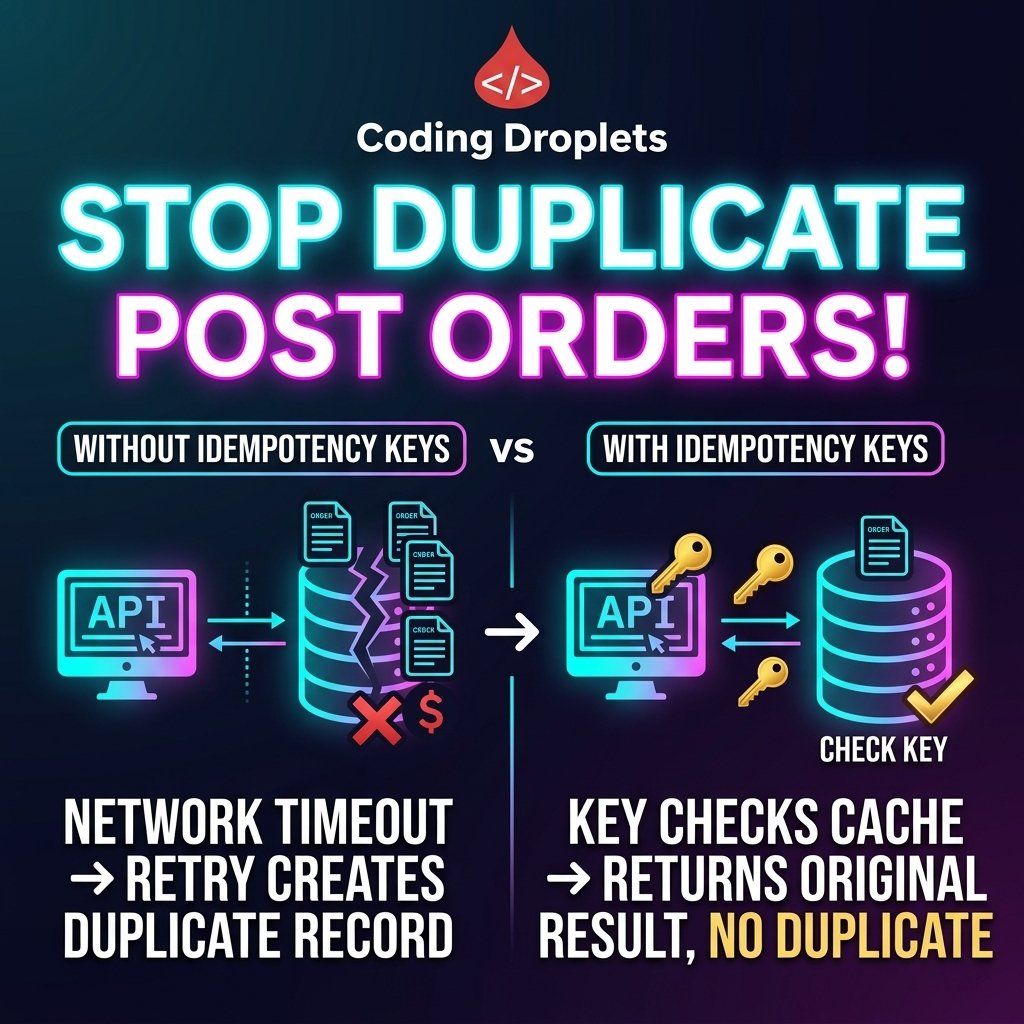
If your POST endpoint doesn't support Idempotency Keys, it’s not production-ready.
A simple network hiccup shouldn't result in a double-charge for your users. Resilience > "Happy Path" logic.
https://t.co/Er6bS0Re5c
#BuildInPublic#BackendDev#SystemDesign#Programming
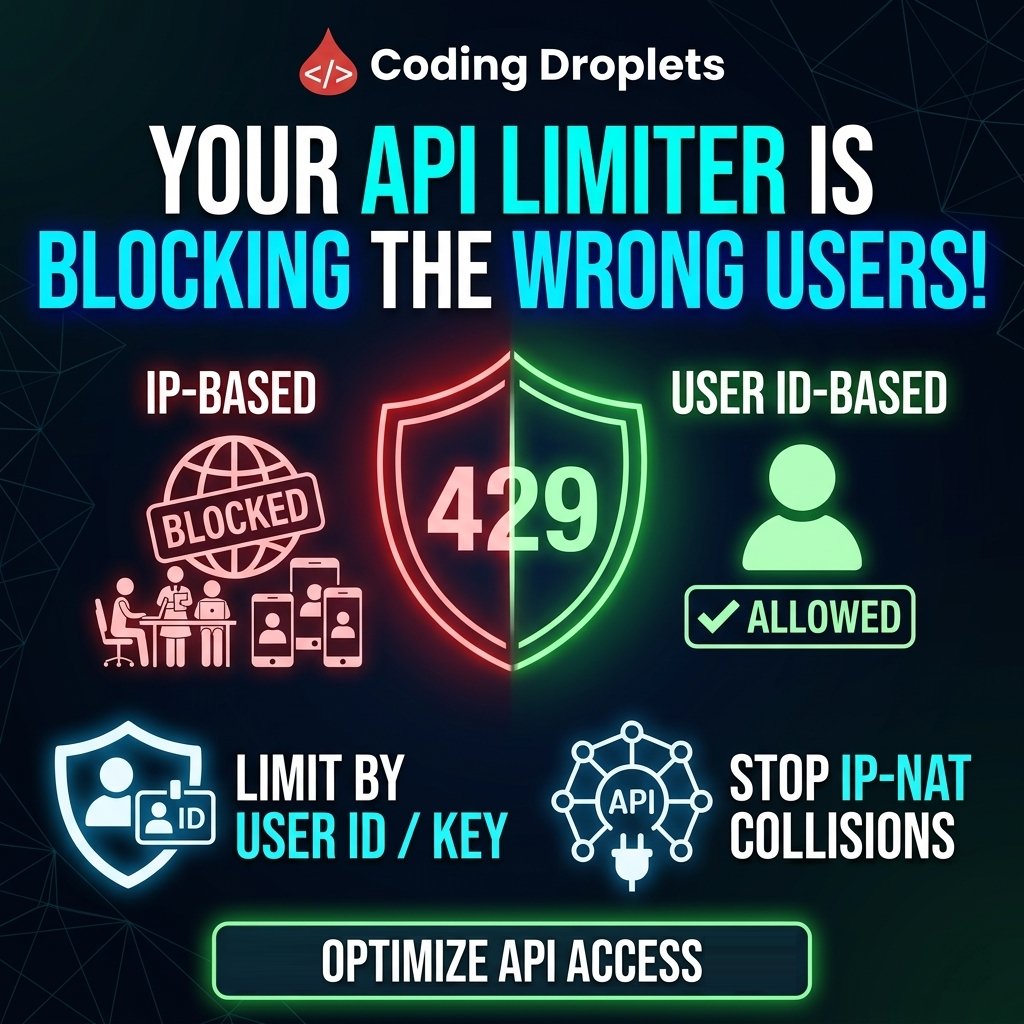
Rate Limiting by IP is often Lazy Engineering that punishes legitimate users.
It blocks 50 people share an office NAT.
Identity-based partitioning (User ID/API Key) is the best option.
👉https://t.co/Er6bS0RLUK
#SystemDesign#WebAPI#CloudComputing#Backend







![codingdroplets's tweet photo. That ASP NET Core 400 you can't reproduce?
[ApiController] validates the model before your action. Wrong type, bad JSON, missing [Required] → instant 400. Breakpoints skipped.
Read the errors dictionary, not the controller.
https://t.co/Er6bS0RLUK
#aspnetcore #dotnet https://t.co/9QMlc8P77C](https://pbs.twimg.com/media/HI642jiaAAAthwp.jpg)