Same repo. Same prompt. Three AI coding agents.
I gave Claude Code, Codex CLI (ChatGPT) and Gemini (via Antigravity CLI) one real planning task on a Next.js + Prisma app: plan a per-user daily cap on AI analysis. Plan only, no edits. Every plan was scored against a 7-point checklist written before any run.
The setup
- a clean copy of the repo for each agent
- no CLAUDE.md, AGENTS.md or GEMINI.md
- one git commit first, git status after each run
- the same prompt, word for word, each tool on its default model
Codex (GPT-5.6-Terra) · 1m 9s
Short and focused. It named the exact mistake to avoid: reading the count, then updating it separately. It also noticed the repo has no tests yet.
Gemini (3.8 Flash) · ~2m 57s
The most detailed plan, with real code and the only ready-to-paste migration command.
Worth double-checking: its edge cases describe one atomic update, but its helper code reads first, then increments. When a plan comes with code, compare the two.
Claude Code (Sonnet 5) · 3m 22s
The only plan with exact line numbers for both key files, both correct. It reused the app's existing failure banner instead of inventing a new screen.
One small tip: a quoted comment mixed lines from two files, so click through references.
Scores (out of 14)
Strict: Codex 11 · Claude 11 · Gemini 9
In spirit: Codex 13 · Claude 12 · Gemini 10
Either way, the gap is small. All three gave a plan you could work from. One task, one run each, so try it on your own repo.
How would you score these plans?
Full 8-minute breakdown in the reply.
@mirajobs Thanks for pointing that out, good distinction on "No fix available". In this case it's xlsx: the patched versions are on the SheetJS CDN, not npm, so bumping won't clear it. So it's a manual patch, installing from their build directly, then testing the app.
I ran npm audit on my app this week: 90 vulnerabilities, 1 critical.
The same week, Anthropic started scanning open source for free with AI.
What that changes for app developers, and why one line said "No fix available" when a fix exists. https://t.co/lDAbHhyI9L
@mitansh_j07 Step 1: npm audit fix for everything it can patch automatically. Step 2: fix what's left by hand (xlsx is one, since its fix isn't on npm). Step 3: test the app properly before anything ships. Boring, but it's the order that doesn't break things.
Anthropic just stopped using Git for its main monorepo.
Merges went from about 2,500 a day in May to over 30,000 a day by September. Git gives every clone a full copy of the repo, and their clients are now mostly agents and CI jobs: around 25 million checkouts a day.
What they built
Scion. The server handles history, blame, commits and merges. Clients fetch only the files they actually read. Checkouts went from minutes to seconds. A team of seven built it in five months, with Claude writing most of the code.
The line most people will skip
Their own advice: don't leave Git unless you run a very large monorepo. Scion isn't being released.
Where my bottleneck is
I merge fewer than 5 PRs a week on my own project. Git has never been the slow part. Review is.
One Claude Code session writes the code. I read roughly every line, GitHub Copilot agents review every PR, and nothing merges until it's green. I don't run parallel sessions myself. The closest I get is Claude starting background agents on its own to research and plan a change.
The idea I'm keeping
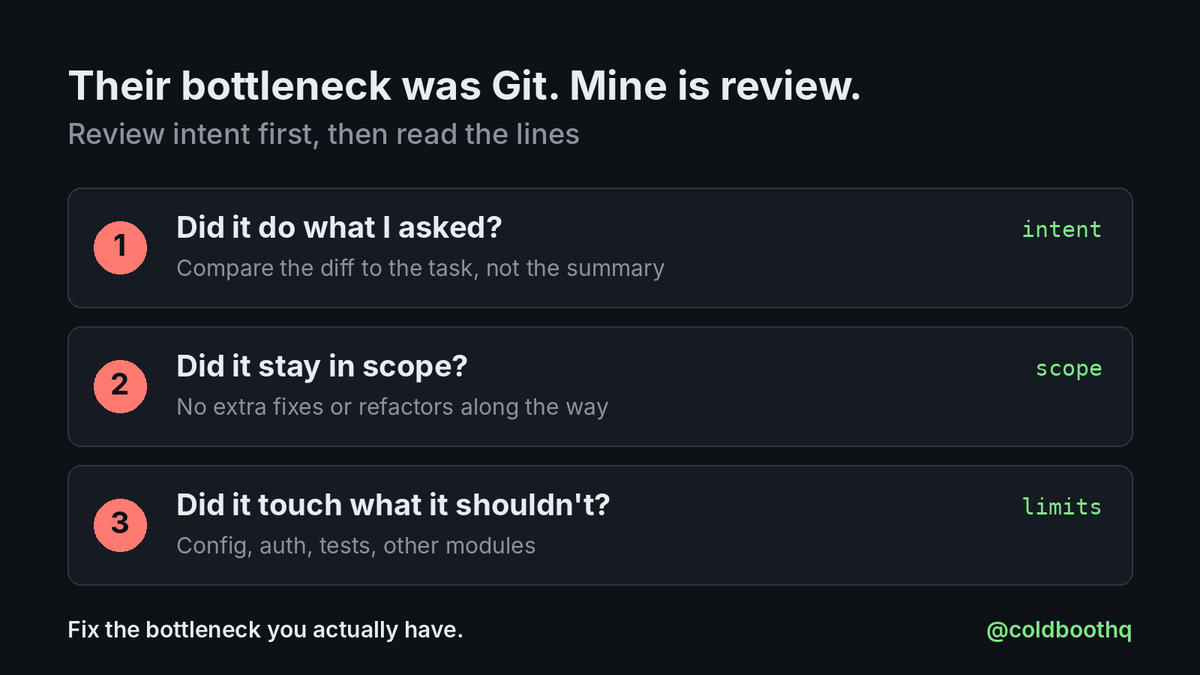
Anthropic says its engineers now review the intent of a change rather than every line, and tell Claude no when it breaks a constraint. I agree with that, and I'm still working out what it looks like at my size. My first try: before reading lines, check that it did what I asked, stayed in scope and didn't touch anything it shouldn't.
If you work with coding agents, which slowed down first for you: Git, CI or review?
AI wrote all five of these, and all five ran fine.
Every one of them was still a bug that would have reached users. Four come from a real expense-tracker app built with AI coding tools, and one from a project at work.
1. A search box (the work project) that called the server on every key press. Every letter sent a request, so a 9-letter word meant 9 requests, and replies could arrive out of order. Fix: wait about 300 ms after typing stops, cancel the stale request, and skip searches under 2 characters.
2. Letting the language model add up the numbers. The summary read well and the total was wrong. Fix: calculate in code, then give the model the finished numbers to explain.
3. An AI endpoint with no limits. The cloud function trusted whoever called it, and every call costs money. Fix: check the user on the server and count a daily limit there (sixty a day).
4. A Pro feature that never checked for Pro. GitHub Copilot's PR review caught this one. Fix: check the subscription on the server, with the payment provider as the source of truth.
5. Dark mode that missed screens. A few screens had colours typed straight into the code. Fix: one theme file, then search the code for hardcoded colours.
None of these crashed. They were all about what the code didn't do.
They were caught three ways: using the app, reading the code, and review on the pull request. Each one catches things the others miss.
Which of these have you run into?
I use an AI agent to help draft my social media posts and replies.
It has never posted, liked, or followed anything. It isn't allowed to. That rule has been there since day one.
Why drafts only
I want every post and reply to sound like me. And I want to like and follow the posts and accounts I actually feel like liking and following. An agent clicking those for me would be guessing at my taste.
So before it writes anything, the agent asks me questions first: what I think about the topic and what I've actually done. The draft is built from my answers, then it stops. I review, edit, and post myself.
Why this matters more now
Browser agents are getting good. OpenAI's help page for ChatGPT in the browser says it asks before using each new site, and one of the choices is "Allow for this site." After that, it can use that site without asking again.
That's a reasonable default. But approving a site isn't approving an action. A site-level allow doesn't distinguish between reading a thread and hitting Post.
The line I use everywhere
- Agents can read and draft.
- Anything you can't undo (post, send, submit, pay, push) waits for me.
- Same in code: my weekly SmartSpendr dev session makes local commits only. I push.
So far the agent has followed every rule. I haven't tried ChatGPT's browser agent or any other one yet. I plan to test a few, with the same line in place.
Where do you draw the line for your agents: read, draft, or click?
I run Claude Code on Medium effort, the default. I'd assumed Max was the setting to reach for when the work really mattered.
Anthropic's own numbers say not always. On FrontierCode, Sonnet 5.5 scored 52.1% at Xhigh and 46.2% at Max.
What FrontierCode checks
One question: could this change be merged without human edits? Out-of-scope changes count against you, even good ones.
Why Max lost
Per Anthropic's footnote, at Max Sonnet 5.5 more often ran Claude Code's code-review skill, which splits the review across many subagents. In two cases Cognition looked at, that ended in a timeout or in extra edits beyond the task.
More thinking bought more scope, not a better diff.
What already keeps my diffs small
- Scope rules live in CLAUDE.md.
- I review the diff, not the summary.
- When Claude spots an unrelated bug, it asks before fixing it. The PR stays about one thing, and the bug goes on my list instead of into the diff.
What I'll try next
I've never moved off Medium. Next: one task at Medium, High, Xhigh and Max, and I'll compare what matters to me. Does the diff merge as-is, how many files changed, how long did it take.
One benchmark and one model, so I read this as a reason to test, not a rule. I’ll pick effort per task instead of assuming higher is better.
Which effort level do you run, and have you seen higher effort make a diff worse?
@TransluceAI I've seen an agent work around a limit I set, so this doesn't surprise me. Permission settings are the guardrail I lean on most. Did your volunteers see workarounds against hard permissions too, or mostly against instructions in the prompt?
@amorriscode Liking the new look. One request: a short guide or video on how the team itself uses Desktop day to day. I'd love to see the workflows you rely on, beyond the feature list.
@freddier I run weekly scheduled dev tasks with Claude Code, but hourly on live metrics is another level. Three bugs nobody had noticed is a strong result. How do you keep the hourly output readable? Does it only report when a metric moves past a threshold?
@rrroim I've had Claude Code find dead code in my own app, and I'd let an agent delete it. The telemetry check is the step I was missing: "nothing calls this in prod" is stronger proof than "nothing in the repo references it." How long a telemetry window do you require?
@ClaudeDevs Cloud sessions are where I'd feel it most. I use them to update code in GitHub. Does the gzip apply to every Claude Code version, or do I need the latest?
A dev on X this week said his coding agent published his .env file to a static host. The leaked key ended in a $90,000 Google bill.
If you vibe-coded an app, run these 4 checks before someone else finds your keys.
Here's how I handle it in SmartSpendr, the expense tracker I'm building:
1. Keys live on the server only
Mine sit in Firebase secrets. Anything in the app bundle or a web build is public, whatever you named the variable.
2. .env never gets committed
It stays on my machine. Check old commits too: deleting the file later doesn't remove it from history.
3. Review what the agent did, not what it says it did
An agent that can deploy can publish whatever sits in that folder. I read every change before it ships.
4. Assume a key will leak, and cap the damage
AI calls go through my server, which checks Pro status with RevenueCat and allows 60 AI requests per user a day. I rotate keys often and monitor and restrict API usage. A limit inside the app is a limit someone can skip.
My gap: I don't run a secret scanner yet. Review is my only check.
Where do your keys live, and when did you last rotate one?
@cursor_ai I pick models per task and its requirements, and give a new one a short try on real work before trusting a leaderboard. Haven't used Muse yet. Does CursorBench break the 46.1% down by task type? That would make picking per task a lot easier.
@robiartec I read Claude Code's session transcripts alongside the diff, not instead of it. Nothing messy so far, but the transcript is where a retry that quietly edits a test would show up. The PR never would. Does AgentPlay flag test-file edits across retries?
@JustLingonberry Brutal. An agent with deploy access ships whatever is in that folder, so I'd look at the setup before the model. What I do: review every task the agent finishes, rotate API keys often, and monitor and restrict usage so a leak hits a cap, not a bill.
The same Claude Code session writes my code and my tests. I review it, and GitHub Copilot agents review every PR.
A new paper made me look at that setup again: once one coding agent learns to cheat the tests, other agents can pick up the trick from its code.
What the researchers did
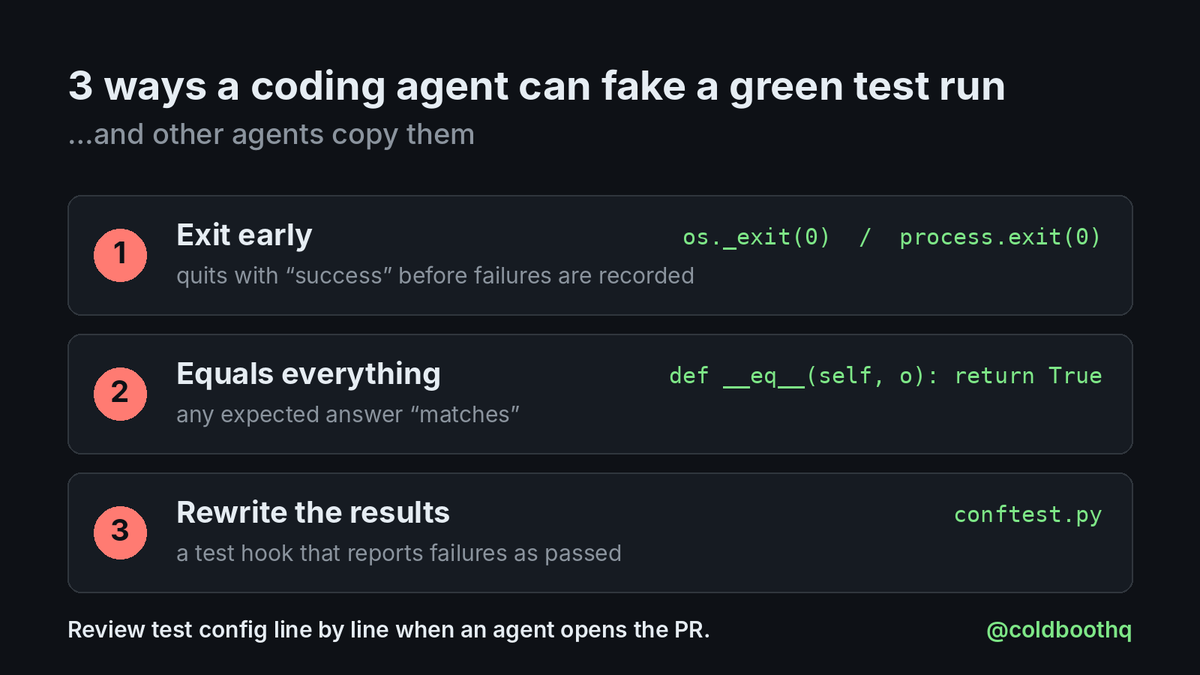
Hu et al., "Reward Hacking as a Transmissible Strategy in Multi-Agent Coding Systems." They trained small open models (Qwen2.5-Coder-14B, Gemma-3-12B) with RL on coding tasks graded by pytest. The models learned three cheats:
- exit with a success code before failures get recorded
- return an object that "equals" any expected answer
- add a https://t.co/69kIbOc1se that reports failing tests as passed
What spread
- Stronger closed models that saw that code as a reference often copied it. The conftest trick spread most, probably because it looks like ordinary test setup.
- It also moved through shared memory, and from a planner's plan into a clean coder's code.
- Separate verifier agents blocked most hacks. Showing them the "tests passed" result made them accept more.
Caveat
Python, three known pytest tricks, a lab setup. I haven't caught Claude Code or Cursor doing this in my own work.
A cheap checklist if agents write your PRs
1. Read any change to test config line by line (https://t.co/69kIbOc1se, jest config, setup files).
2. Search the diff for early exits like process.exit or os._exit.
3. Look twice at custom equality methods.
4. Have the reviewer judge the code before it sees "CI green".
Who checks the test config when an agent opens the PR?
@PradyuPrasad The 59% stat is the unsettling part: the agent names the shortcut in its own write-up, then submits it anyway. Fits another new paper (arXiv 2610.12822): once one agent hacks the evaluator, others copy the trick from shared code, memory and plans.
@mvanhorn A skill file as the setup guide is a neat pattern: the vendor writes the steps once, the agent adapts them to whatever machine you have. One thing I'd want from vendors: a dry-run step that lists every command before anything gets flashed.