Steal this Claude Skills guide
if you're not using claude skills you're missing out.
they can seem intimidating but they're actually stupid simple to set up. here's how (images in the link below):
1/ make sure claude skills are enabled within settings > capabilities > skills
2/ turn on the "skill-creator" skill under skills within settings. this is the meta-skill that you use to have claude build other skills for you
3/ open a new chat window and ask claude to use the "skill-creator" skill to help you create a new skill
4/ describe the skill you want to create in detail, be specific about the output you need (you can also have an existing project be turned into a skill by asking the project to use "skill-creator" to turn the project into a skill)
5/ claude will probably ask some clarifying questions, then build out the complete skill file and a read-me document
6/ read the read-me document and download the skill file it creates. this tells you what it created and your next steps to get it working
7/ go back to settings > capabilities > skills > upload skills. select the file you downloaded and upload it. it'll add it to your skills list. make sure the toggle is on so you know it's live
8/ test it in a new chat by asking claude to use your skill by name
9/ if your skill isn't creating the output you need, go back to the conversation you created the skill in and tell it what you want to change (if you make an edit, you'll need to upload the new version of the skills file in settings & turn the old version off)
start with something simple (something you already do regularly already). you'll figure out the rest as you go.
Most people don't know the difference between skills, subagents, and MCPs.
Here's the simple breakdown:
Skills:
Written guides that tell the LLM exactly how to do a task
"Analyze spreadsheets this way" or "write emails in this voice"
Reusable. Consistent output.
Subagents:
Extra copies of the LLM, each with its own job
- You review code.
- You write tests.
- You update docs.
Work happens in parallel. Stays organized.
MCPs:
- Universal power plug for external tools
- Need to update Linear tickets? Access your database
That's MCP.
Think:
- Skills = how to do something
- Subagents = who does what (in parallel)
- MCPs = what tools you can reach
Play around with all three.
That's where it clicks.
I gave Claude a skill to create presentations: Nano Banana Pro for the slides, Kling for transitions, and Eleven Labs for voiceover
Then I asked it to explain what Skills are. Here's the result:
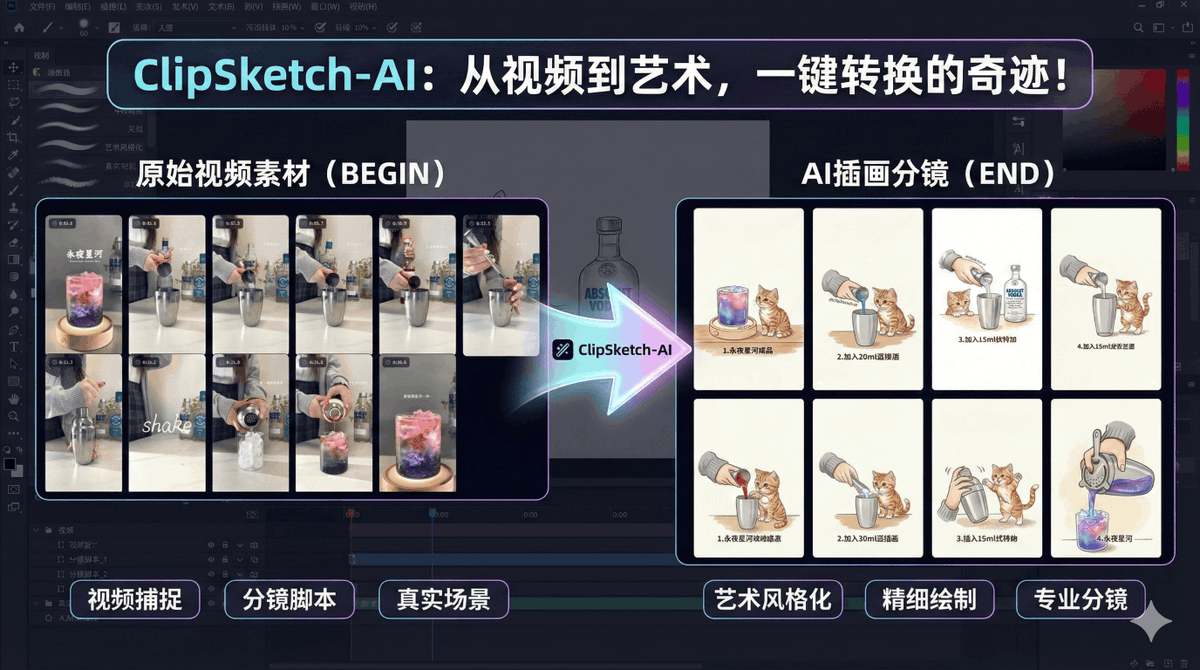
推荐一个开源工具:ClipSketch AI
一款面向视频创作者的内容整理工具。
它能直接解析 B 站、小红书链接,把视频里的关键画面自动抓取出来,再生成手绘风格的分镜图和可直接用的文案。
特别适合做系列内容、教程拆解、剧情类短视频或种草向账号,用起来很省时间。
https://t.co/sGRgBiX8yZ