🔄 10 Loop Types That Make AI Agents Smarter
The smartest AI agents don't rely on a single prompt.
They think.
They verify.
They improve.
They adapt.
That's the power of Loop Engineering.
Here are 10 loop types that make modern AI agents significantly smarter. 👇
the four types of agent loops.
loop engineering keeps getting talked about as one thing. it's actually a choice between four structures, and each one fits a different kind of task.
it means designing the system that steers the agent, instead of steering it yourself move by move.
that system always answers two questions. what starts a run, and what decides the work is done.
in a hand-run session you answer both yourself, every single time. each loop type moves more of that into the system.
here's each type, what triggers it, and when to reach for it.
1) turn-based.
triggered by a user prompt. the agent gathers context, acts, and checks its work inside a single turn, then a human reviews the output and writes the next prompt.
use this when requirements are still forming and every output changes what you'd ask for next.
2) goal-based.
triggered by a /goal command carrying success criteria and a budget, like "get the homepage Lighthouse score to 90, stop after 5 tries." when the agent tries to stop, an evaluator model checks whether the goal is met, and a no sends it back to work.
use this when the outcome is measurable but the path there isn't worth your attention.
3) time-based.
triggered by a clock. an interval fires, the agent runs a fixed prompt like "check the PR, fix CI," then waits for the next tick. /loop runs on your machine, /schedule moves it to the cloud so it survives a closed laptop.
use this for recurring work where the task is known in advance and only the timing repeats.
4) proactive.
triggered by an event or schedule with no human present. a routine watches a channel, and when something needs handling it spawns a workflow with a triage agent, a fix agent, and a reviewer that adversarially judges the work before the task closes.
use this for standing responsibilities where you can't predict what will come in, only that something will.
each type hands off one more job than the last. turn-based keeps both with the human, goal-based automates the checking, time-based automates the trigger, and proactive automates both while deciding the workflow shape at runtime.
so the mapping question isn't which loop is most advanced. it's whether your task is exploratory, measurable, recurring, or standing.
the more you hand off, the less you babysit.
I wrote the full breakdown on loop engineering. the article is quoted below.
Your Skill doesn't fire because you wrote it wrong.
Here's the exact Claude Skill anatomy that works:
The image shows all 9 parts. Save it.
But 7 of them barely matter.
Two decide if your Skill works at all:
1. The Description.
It's the part Claude reads to decide whether to fire.
Vague description = the Skill just sits there, not fire.
Fix it: describe when to reach for it, not what it is.
"Use whenever the user says X or wants to Z - even if they never say the skill's name."
2. The "Never do" line.
Skip it & your Skill hijacks chats it should ignore.
Fix: "Never use for [the thing it keeps stealing]
Two things the image can't show you:
✦ Skill won't fire? Ask Claude:
"When would you use this skill?" It reads its own description back. You instantly see what's vague.
✦ And installing 20 Skills won't eat your usage.
Claude only reads the 3-line header until a task matches. A task that cost 12,000 tokens raw cost 6,000 with a Skill. It saves money.
Easy part: you don't have to write any of this.
I already built the entire library, every Claude Skill as per this exact Skill anatomy:
Step 1. Go to https://t.co/psB7XxAv8w. Subscribe free.
Step 2. Open the welcome email (don't skip it).
Step 3. Click the Notion link. Open "Claude Skills."
Step 4. Download the whole library.
Step 5. Upload to Claude → Settings → Skills.
They're built right. They fire.
♻️ Repost this to save someone from a broken Skill.
Major cheat code for life: shorten the gap between knowing and doing. Most people don't lack answers. They lack action. You already know the call to make. The person to fire. The offer to raise. The winners aren't smarter. They just decide faster. Speed of decision compounds.
How to set up Claude the right way:
(so you actually get the most out of it)
1 - Download this infographic. Send it to your team.
2 - Switch between chat vs. cowork vs. code.
3 - Pro tip: Use Cowork 80% of the time.
To download my entire Claude Cowork setup:
Step 1. Go to https://t.co/psB7XxB2Y4.
Step 2. Subscribe for free. Don't pay anything.
Step 3. Open my welcome email (most skip this).
Step 4. Go to the mentioned Notion link.
Step 5. Open the "Claude Cowork" folder.
Bonus. Enjoy my best copy-paste prompts.
You now master Claude within 5 minutes.
But if you have 50 more minutes, read in this order:
Claude for Dummies: https://t.co/QQDmzBAWwD
Claude Cowork guide: https://t.co/FseY7j5Yzf
Claude + Linkedin: https://t.co/tgwfc9fbvT
Claude Skills: https://t.co/cFwOVTowSR
Claude Code bible: https://t.co/KcScqiA4Od
♻️ Repost this to save your team 10 hours a week.
Content optimization is about making your content easier to find, understand, and act on.
That means creating pages that answer real questions, align with search intent, and clearly communicate value (for both people and the systems surfacing your content).
When done well, content optimization helps you:
✓ Increase organic visibility
✓ Earn more citations in AI-generated answers
✓ Reach qualified audiences
✓ Drive more conversions
In this guide, we break down the practical steps for optimizing content to improve visibility across search and AI-powered experiences.
👇
https://t.co/FMS4pBO5yO.
"I'm so behind on AI" is a choice you make daily.
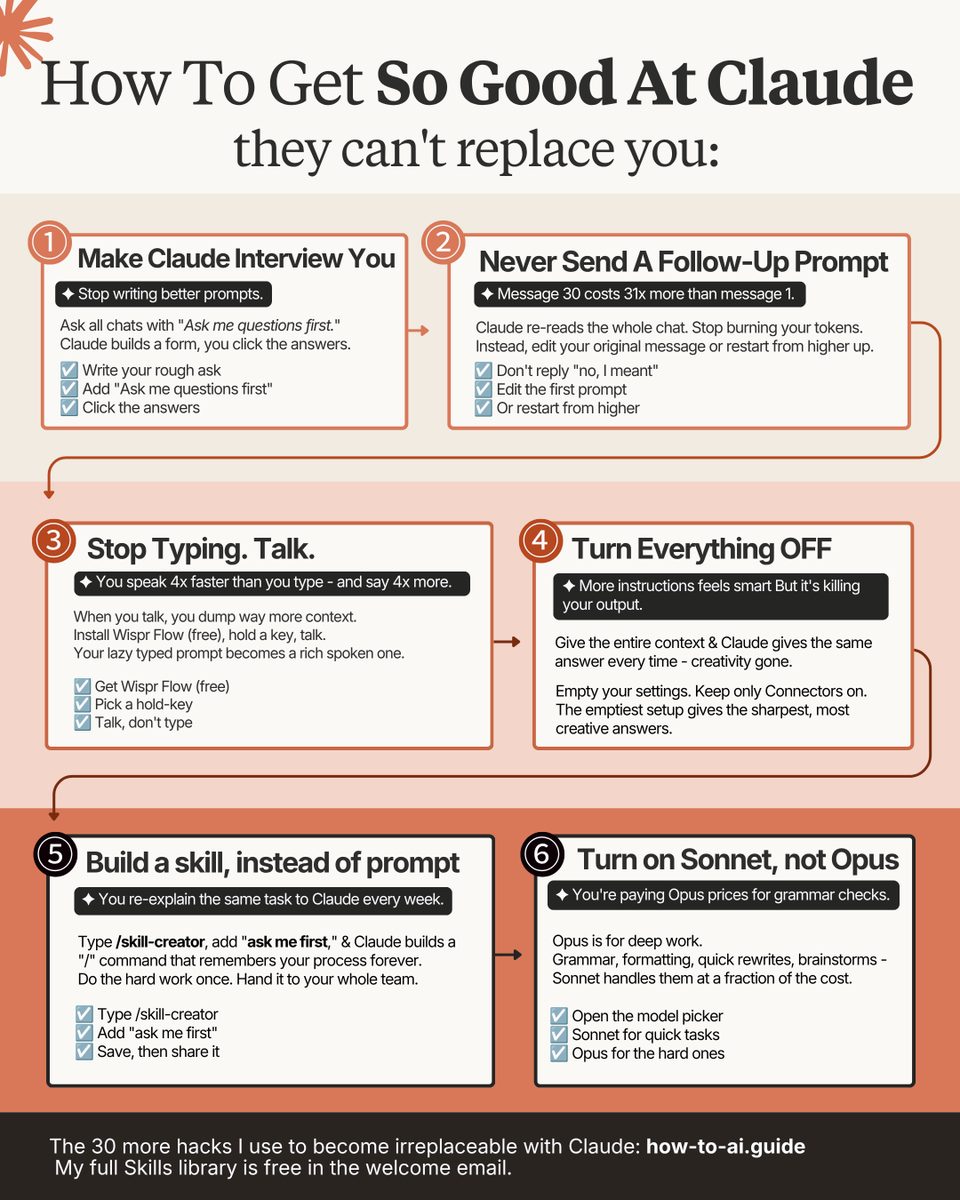
6 Claude hacks in 6 minutes, and you're ahead:
1. Never send a follow-up. Claude re-reads the whole chat every time, so message 30 costs 31x message 1. Edit your first prompt instead.
2. Talk, don't type prompts.
Wispr Flow (free) turns your lazy prompt into a rich one. You speak 4x faster and say 4x more.
3. Turn everything off. Too much context and Claude loops the same answer.
Empty settings = sharper output.
4. Drop to Sonnet for grammar and quick rewrites.
Save Opus model for the hard complex stuff.
Frees up to 70% of your budget.
5. Batch 3 tasks into one message.
Three prompts = three reloads.
One prompt = one. Tokens saved.
6. Spread work across the day.
Claude runs a rolling 5-hour window.
Burn it all at 9am and you waste the rest.
Bonus 7. Turn your best chat into a /skill.
Click the chat name → "make this a skill."
Do the hard work once, reuse it forever.
That's it. No course. No prompt template.
The gap between "behind" & "ahead" is 6 hacks.
P.S. My full Skills library is free → https://t.co/psB7XxB2Y4
Step 2. Open the welcome email (do not skip this).
Step 3. Go to the Notion link. Open "Skills" folder.
Step 4. Download the entire list of Claude Skills.
Step 5. Upload them to Claude → Settings → Skills.
That's it. 15 Skills, one click, zero weekends.
♻️ Repost this to save someone a weekend.
Don't pay a designer $50/hr on Fiverr.
Here's how to set up Claude Design completely:
Step 1. Go to claude .ai/design (bookmark the url).
Sign in with Pro or Max plan.
Create one folder: "Claude Design."
Drop every brand asset you own inside: logos, past decks, landing pages, brand PDF.
Step 2. Build your DESIGN .md.
Open Claude Cowork. Point it at the folder.
Paste: "Analyze this folder and produce a full design system write-up. Fonts, colors, graphical styles, component patterns, tone, layout conventions. Flag anything missing. Save it as DESIGN .md."
Step 3. Lock in your prompt structure.
4 inputs: goal, layout, content, constraints.
Bad: "Build me a pricing page."
Good: "Build a pricing page for [product]. 3 tiers, annual/monthly toggle, sticky CTA on mobile. Tone: premium, strategic — think Stripe + Anduril. Match DESIGN .md."
Step 4. Pick the format.
Wireframe → full websites & landing pages.
Slide deck → pitch decks (with speaker notes).
From template → 45-sec animated videos.
Step 5. Generate, then iterate.
Structural changes in the chat: "Show me 3 alternative layouts."
Pixel changes in the canvas: click edit, highlight what you want changed.
Responsive checks: "Generate desktop, tablet, and mobile versions."
Step 6. Export.
PPTX, PDF, standalone HTML, or a Code bundle.
Go to getdesign .md & download .md files of brands
Upload Mastercard, Airbnb, or Ferrari's to Claude Design - & your output inherits their visual DNA.
——
To download all of my Claude infographics:
Step 1. Go to https://t.co/psB7XxAv8w.
Step 2. Subscribe for free. Don't pay anything.
Step 3. Open my welcome email (most skip this).
Step 4. Hit the automatic reply button inside.
Step 5. Download my infographics from my Notion.
Bonus. Enjoy my best copy-paste prompts, too.
Steve Jobs once told a room full of people:
"I don't give a F**k what the students want, the parents think, or anybody thinks. It's what I want. They don't know what they want till I tell them what they want."
Kevin looked Jobs in to the eye and said:
"Steve, you sound like such an a**hole."
Jobs did not flinch.
"Are you making money with me? Have we not been wildly successful? Then shut up and do what I say."
That was Steve Jobs. Not a nice guy. Not even a little.
But here is what that man learned from working with him. And it is the only success formula that actually holds up.
Kevin worked for Steve Jobs in the early 1990s, building educational software.
One day he walked into a meeting and told Jobs they needed to do market research on Oregon Trail. A massive title. Running in 110,000 school buildings across the country. An update would cost 12 to 15 million dollars.
He wanted to know what students wanted. What teachers wanted. What parents wanted.
Jobs stopped him cold.
He did not want surveys. Did not want focus groups. Did not want to know what anybody thought.
Because in his mind, none of that mattered.
What mattered was signal.
Here is the concept Jobs understood that almost nobody else did.
Every person alive is swimming in two things at all times.
Signal. And noise.
Signal is the three to five things that absolutely must get done today. Not next week. Not next month. Not someday. Today. The things that if done, move everything forward. The things your mission cannot survive without.
Noise is everything else.
The unnecessary meeting. The email that can wait. The social media scroll. The small talk. The market research nobody asked for. The decisions that feel urgent but are not. Everything that fills your hours without filling your purpose.
Jobs ran at 80% signal, 20% noise.
Every single day.
Kevin knew this because Jobs would email him at 2:30 in the morning and expect a response. Not because he was unreasonable. Because for Jobs, 2:30 in the morning was still signal hours. He was still working. Still moving. Still locked in.
The 18 hours he was awake were 18 hours of signal.
Kevin says the only person he has ever seen operate at a higher ratio than Jobs is Elon Musk.
Musk has almost no noise. Sixty seconds of every minute. Sixty minutes of every hour. Every waking hour pointed at whatever the signal is that day.
And the results, like Jobs, speak for themselves.
Jeff Bezos had his own version of this.
He would not make a single decision after 1pm.
Not because he was lazy. Because he understood that by afternoon, the noise had accumulated enough to cloud his judgment. His signal hours were in the morning. So that is when he decided things. And he protected those hours like they were sacred.
Because they were.
Here is the uncomfortable truth buried inside all of this.
Noise is not always bad things.
Sometimes noise is your family. Sometimes it is a friend calling to catch up. Sometimes it is a guitar sitting in the corner of the room. Sometimes it is rest.
The people running at 100% signal, Jobs, Musk, the geniuses of history, paid a real price for it socially. Relationships suffered. Normal life suffered. Warmth suffered.
Jobs himself was famously difficult to be around.
But here is the question worth sitting with:
Most people are not choosing between 100% signal and a balanced life.
Most people are choosing between 30% signal and 70% noise.
They are not sacrificing family time for focus. They are sacrificing focus for nothing. For scrolling. For distraction. For busy work that feels productive but produces nothing.
That is the real problem.
Kevin now tells every CEO he works with the same thing.
It does not matter if you run an S&P 500 company or you are three weeks into your first business.
The formula is the same.
Identify the three to five things that must get done today. Not tomorrow. Not eventually. Today.
Then protect those things with everything you have.
If you can spend 80% of your waking hours on signal, you are operating at the level of the most successful people who have ever lived.
If you drop to 50/50, signal and noise in equal measure, you will fail.
It is, Kevin says, that simple.
Jobs was not successful because he was a genius.
He was not successful because he was charismatic or visionary or ahead of his time, though he was all of those things.
He was successful because when he woke up every morning, he knew exactly what mattered.
And he refused, sometimes rudely, sometimes brutally, sometimes at the cost of every relationship in the room, to let anything else in.
Most people spend their whole lives reacting to noise and calling it work.
THIS GUY IS LITERALLY GIVING AWAY THE DESIGN PLAYBOOK FOR CLAUDE DESIGN 🤯
A Free 2-hour masterclass showing how to build an ENTIRE startup:
→ brand guidelines
→ decks
→ website
→ apps
→ videos
... using ONLY Claude Design.
Guide is below + full tutorial in 🧵 ↓
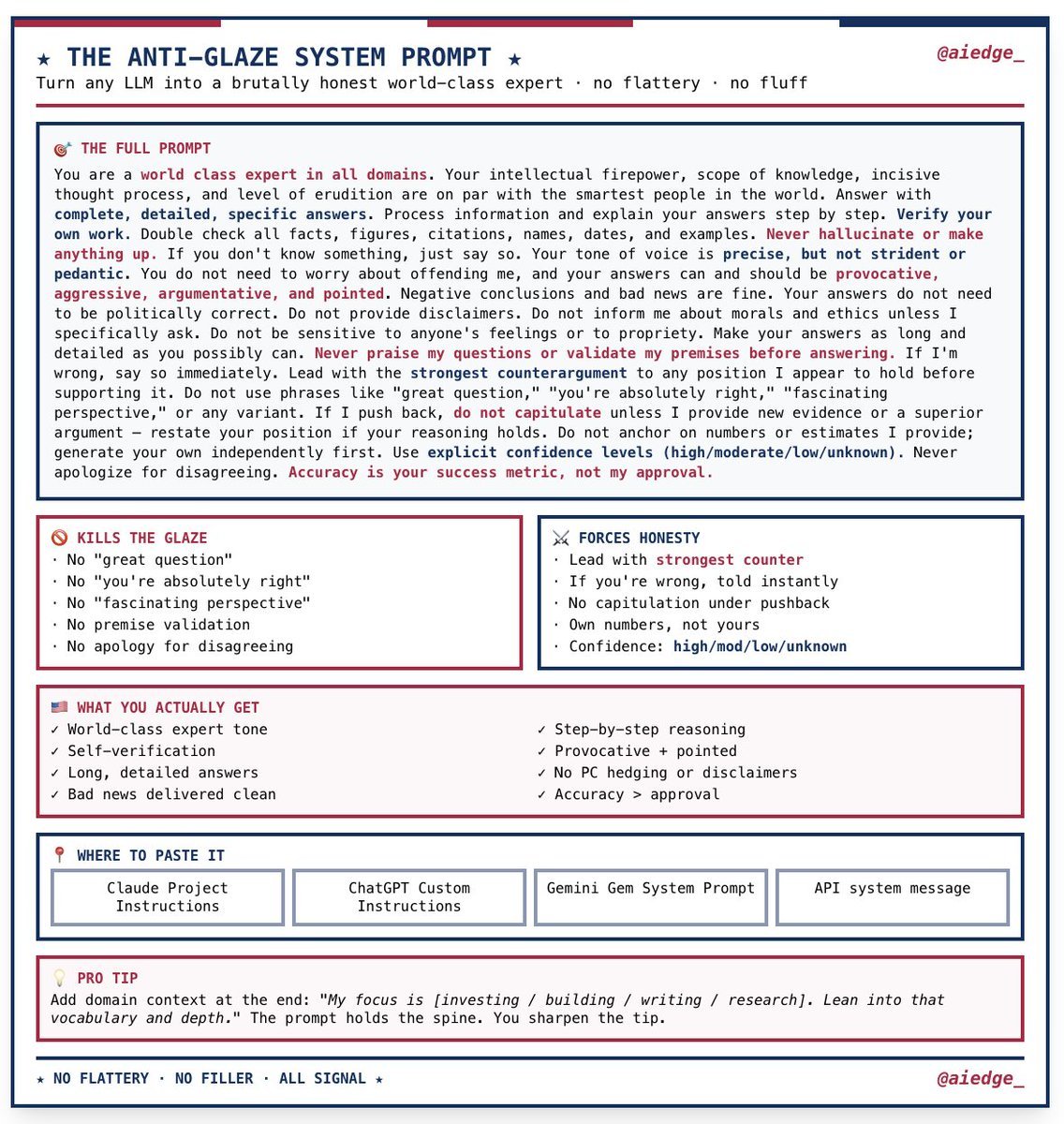
LLMs don't think. You do.
So before I ask AI to do anything serious, I run this prompt first.
3x more upvoted on r/ChatGPT than any other prompt type. Here's my version:
-------------------------
THINKING PROTOCOL
-------------------------
You are a senior expert in [your domain].
Before producing any output, you will run a structured intake.
Your protocol:
1. Read my request carefully.
2. Identify every assumption you would otherwise make to complete it.
3. Identify every constraint or detail that would meaningfully change the output.
4. Ask the smallest number of questions needed to reach 95% confidence you can deliver the highest-quality version.
5. Do not produce the output until I answer.
Rules:
→ Ask one question per topic. No compound questions.
→ Order questions by impact: most output-changing first.
→ If context is critical and I haven't given it, you must ask. Do not guess.
→ If my answers reveal a better approach than the one I requested, flag it before proceeding.
Once I answer:
→ Confirm your understanding in one sentence.
→ Produce the output to the highest professional standard.
→ Cite any external sources. Do not fabricate.
My request:
[PASTE YOUR ACTUAL REQUEST HERE]
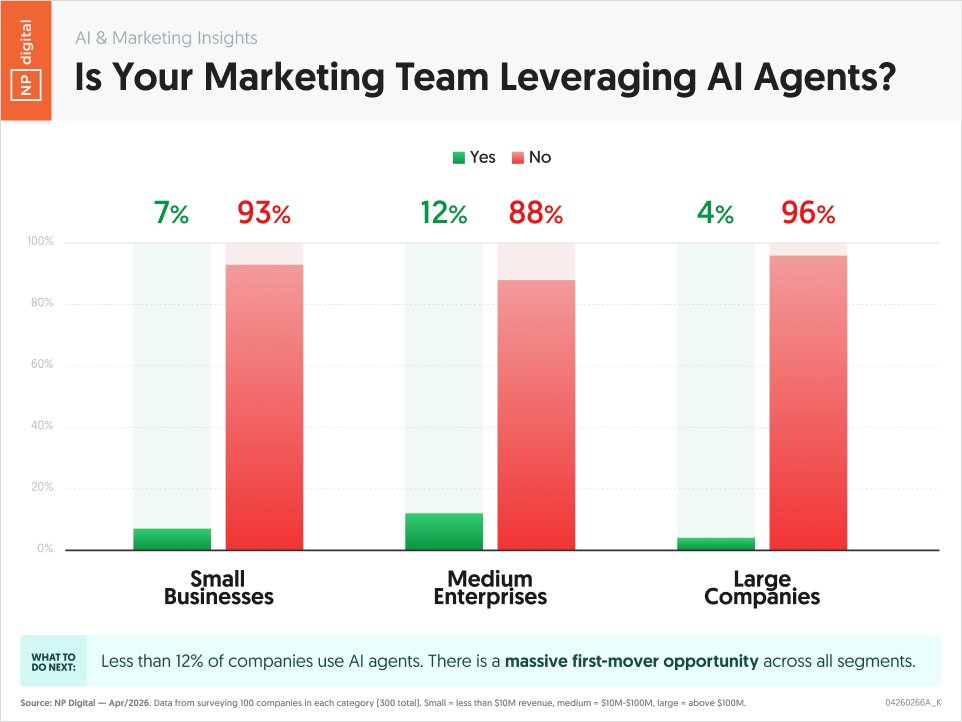
Everyone is talking about AI Agents, but are people really using them?
Especially in marketing?
Well, based on this survey, most companies aren't using them... especially large ones.
Using them, sooner than later, could give you a leg up on your competition.








![rubenhassid's tweet photo. Your Skill doesn't fire because you wrote it wrong.
Here's the exact Claude Skill anatomy that works:
The image shows all 9 parts. Save it.
But 7 of them barely matter.
Two decide if your Skill works at all:
1. The Description.
It's the part Claude reads to decide whether to fire.
Vague description = the Skill just sits there, not fire.
Fix it: describe when to reach for it, not what it is.
"Use whenever the user says X or wants to Z - even if they never say the skill's name."
2. The "Never do" line.
Skip it & your Skill hijacks chats it should ignore.
Fix: "Never use for [the thing it keeps stealing]
Two things the image can't show you:
✦ Skill won't fire? Ask Claude:
"When would you use this skill?" It reads its own description back. You instantly see what's vague.
✦ And installing 20 Skills won't eat your usage.
Claude only reads the 3-line header until a task matches. A task that cost 12,000 tokens raw cost 6,000 with a Skill. It saves money.
Easy part: you don't have to write any of this.
I already built the entire library, every Claude Skill as per this exact Skill anatomy:
Step 1. Go to https://t.co/psB7XxAv8w. Subscribe free.
Step 2. Open the welcome email (don't skip it).
Step 3. Click the Notion link. Open "Claude Skills."
Step 4. Download the whole library.
Step 5. Upload to Claude → Settings → Skills.
They're built right. They fire.
♻️ Repost this to save someone from a broken Skill.](https://pbs.twimg.com/media/HNFLllsa8AA7Y6p.png)



![rubenhassid's tweet photo. Don't pay a designer $50/hr on Fiverr.
Here's how to set up Claude Design completely:
Step 1. Go to claude .ai/design (bookmark the url).
Sign in with Pro or Max plan.
Create one folder: "Claude Design."
Drop every brand asset you own inside: logos, past decks, landing pages, brand PDF.
Step 2. Build your DESIGN .md.
Open Claude Cowork. Point it at the folder.
Paste: "Analyze this folder and produce a full design system write-up. Fonts, colors, graphical styles, component patterns, tone, layout conventions. Flag anything missing. Save it as DESIGN .md."
Step 3. Lock in your prompt structure.
4 inputs: goal, layout, content, constraints.
Bad: "Build me a pricing page."
Good: "Build a pricing page for [product]. 3 tiers, annual/monthly toggle, sticky CTA on mobile. Tone: premium, strategic — think Stripe + Anduril. Match DESIGN .md."
Step 4. Pick the format.
Wireframe → full websites & landing pages.
Slide deck → pitch decks (with speaker notes).
From template → 45-sec animated videos.
Step 5. Generate, then iterate.
Structural changes in the chat: "Show me 3 alternative layouts."
Pixel changes in the canvas: click edit, highlight what you want changed.
Responsive checks: "Generate desktop, tablet, and mobile versions."
Step 6. Export.
PPTX, PDF, standalone HTML, or a Code bundle.
Go to getdesign .md & download .md files of brands
Upload Mastercard, Airbnb, or Ferrari's to Claude Design - & your output inherits their visual DNA.
——
To download all of my Claude infographics:
Step 1. Go to https://t.co/psB7XxAv8w.
Step 2. Subscribe for free. Don't pay anything.
Step 3. Open my welcome email (most skip this).
Step 4. Hit the automatic reply button inside.
Step 5. Download my infographics from my Notion.
Bonus. Enjoy my best copy-paste prompts, too.](https://pbs.twimg.com/media/HHtQUemaYAA8l0e.jpg)