@ericvishria Thanks for giving our products a shot <3 My team at Anthropic is building Claude in Excel and Powerpoint, please feel free to tag us with any feedback and comments! Good, bad, and ugly - we welcome it all
👋 My team builds Claude for Excel. I agree spreadsheets as a paradigm will evolve over time. It's worth thinking about what needs to remain true.
Spreadsheets are pretty unique: they're back-end code rendered immediately in the front-end. Every cell expresses a structured relationship you can see and trace. This makes spreadsheets a thinking and auditing tool to:
1/ Provide inputs: Reason about hypotheses and assumptions
2/ Transform those inputs: Build and lay out logical relationships between data points
3/ Produce and audit outputs: See calculations render, then iterate from step 1
Claude or Codex's vibe-coded apps can make this loop far more powerful and flexible — and not all use cases are created the same. A public markets analyst running scenario analysis on a simple DCF may just need a front-end with dials to adjust assumptions. An auditor who needs to carefully examine every number still needs to see each line and the calculations behind it.
The form factor should and will evolve. The core loop probably needs to stay the same.
We find that Cowork is great for generating first drafts with all our context across your local files, while Excel using office APIs will be much stronger for fine grained control collaborating with Claude (esp as you can see exactly which changes claude is making in real time and make your own human edits together). there’re some differences in the harness but it’s pretty minor. Ideally you won’t need to think about it and the results are consistent and portable across surfaces (which we’re working on!)
Cowork should be able to do most things the chat can do!
@_ueaj@OfficialLoganK We’re certainly always improving Claude’s multi modal abilities. We can look into PDF editing - mind elaborating on your use case?
@benvargas Amazing, thanks Ben! We’ve been pushing through a lot of updates, especially on the token efficiency side. Appreciate you giving it a try. The session logging and MCP connectors features may be good for you to try as well.
Feel free DM me comments at any time!
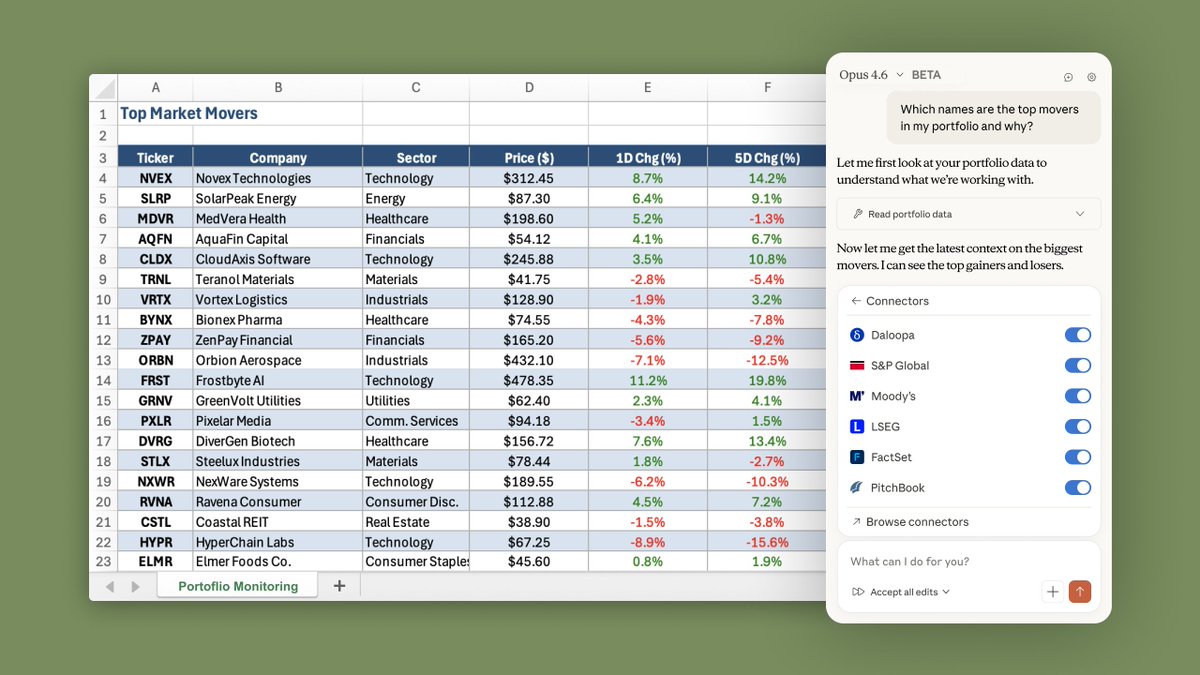
MCP connectors are now in Claude in Excel.
Claude can pull from your favorite finance data sources (S&P Capital IQ, FactSet, Daloopa, Pitchbook), enterprise knowledge (M365, Confluence, Atlassian), and many more - without ever leaving Excel.
No set up required - the connectors you've turned on in https://t.co/SGhgCU9VGF will work automatically in Excel.
We are shipping fast - let us know what you'd like to see next!
For Claude in Excel users, our add-in now supports MCP connectors, letting Claude work with tools like S&P Global, LSEG, Daloopa, PitchBook, Moody’s and FactSet.
Pull in context from outside your spreadsheet without ever leaving Excel.
@MisterMarket0@claudeai Claude can write CapIQ and FactSet formulas as well, which your other plug-ins can just refresh.
Or you can just tell Claude to refresh all the latest numbers :)
@jroebuck@BoringBiz_ Hey! Anthropic here - Thanks for this. Really curious what specifically Claude can’t do yet. Feel free to DM me some examples! We’ve only started training on Excel a few months ago and seen some pretty big gains already, but we definitely have room to improve!
@TechFundies Anthropic here :) I hosted the webinar - @TechFundies I’d love to spend an hour with you to show you what other customers have been doing and think are game changing. Would you be open to it?
Claude, build me a 90 page CIM on this company
Make sure to include a cumulative management experience page, some made up investment highlights, and every graph should go up to the right
Hide any bad things about this company in the footnotes
Make no mistakes, Claude
@DallasAptGP@TakesUnusual Thanks for the Claude in Excel love Barrett! Anthropic here - curious, how can we do better on Powerpoint?
We’re just getting started there (it’s in a research preview) - would love to get your feedback!
If you pay for Claude (the $20, $100, or $200/month plan) there is now an Excel add-in that puts AI directly inside your spreadsheets.
You can install it from the Microsoft Office Add-ins store in about 60 seconds.
Play with it today. Have your mind blown. Then use it to save real time and money on Monday.
Here are six simple steps to see what it can do.
Step 1: Pick a real file. Open a spreadsheet you actually use, like a budget, a proforma, a deal analyzer. Something with real formulas.
Step 2: Let the AI audit it. Don’t ask it to fix anything. Paste this prompt into the add-in:
“Do not change anything in this spreadsheet. Audit what you see and give me a detailed breakdown of: (1) the overall purpose and structure, (2) every formula and how it works, (3) the formatting and layout, (4) any errors, inefficiencies, or broken logic, and (5) how this could be rebuilt better from scratch. Be detailed and specific.”
You will be surprised what it catches.
Step 3: Use your judgment. Read the audit. You know your business better than the AI. Identify the three or four suggestions that would actually matter. Copy them.
Step 4: Take it to Claude Chat.
Paste the audit and say:
“Based on these recommendations, write me a detailed prompt I can paste back into Claude in Excel to build a new spreadsheet from scratch. It must be specific enough to execute without follow-up questions. Include structure, formulas, and formatting.”
Let Claude write the blueprint. That’s what it’s best at.
Step 5: Build. Open a blank sheet. Paste the prompt. Hit enter. Watch it work.🤯
Use the tools to analyze a template that you use all the time and how to make it better. Claude Chat will tell you how to make it better. Claude in Excel executes it.
If you follow this, I think you’ll become a raving fan of Claude in Excel.
Report back.