I'm so happy for this new certification in Prisma Cloud. It's a new beginning for this solution tool, and I'm very excited about what's next :)
View my verified achievement from @PaloAltoNtwks. https://t.co/K6o8C1jTri
𝐒𝐈𝐄𝐌 𝐯𝐬 𝐒𝐎𝐀𝐑
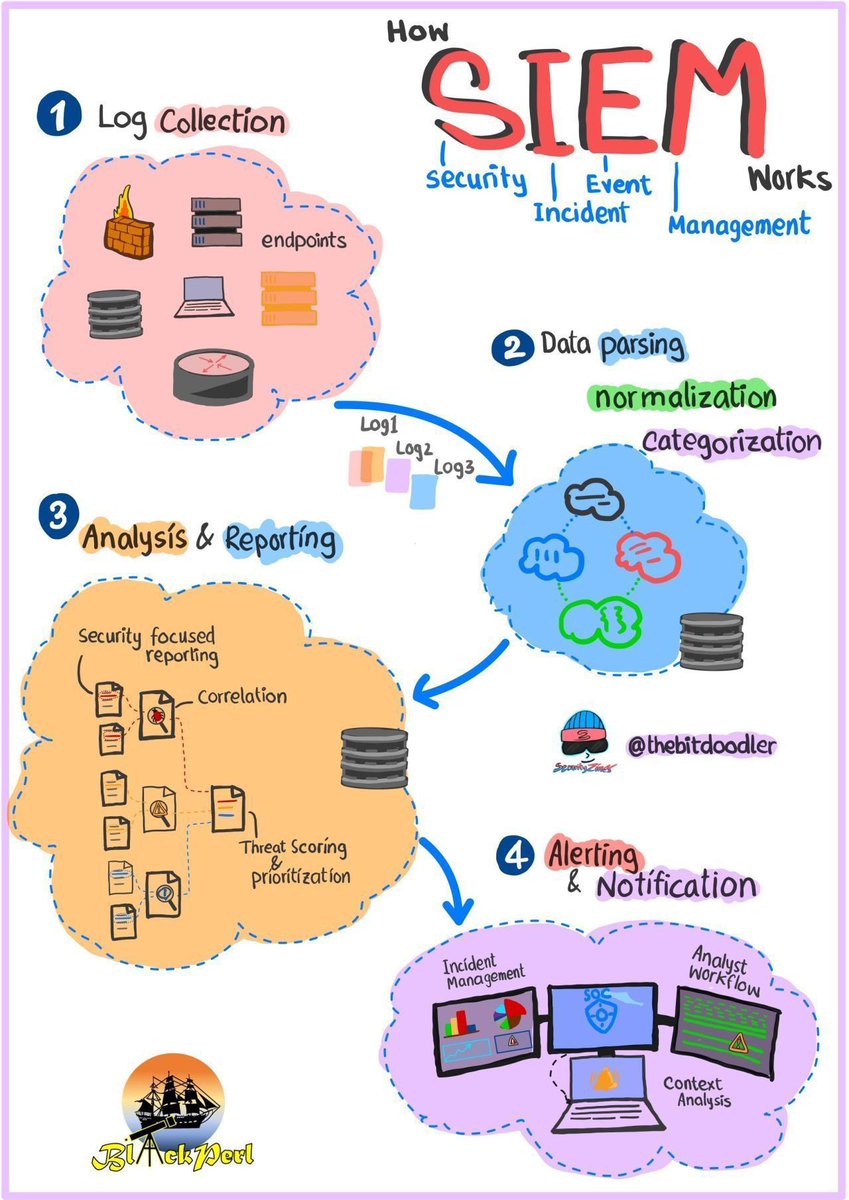
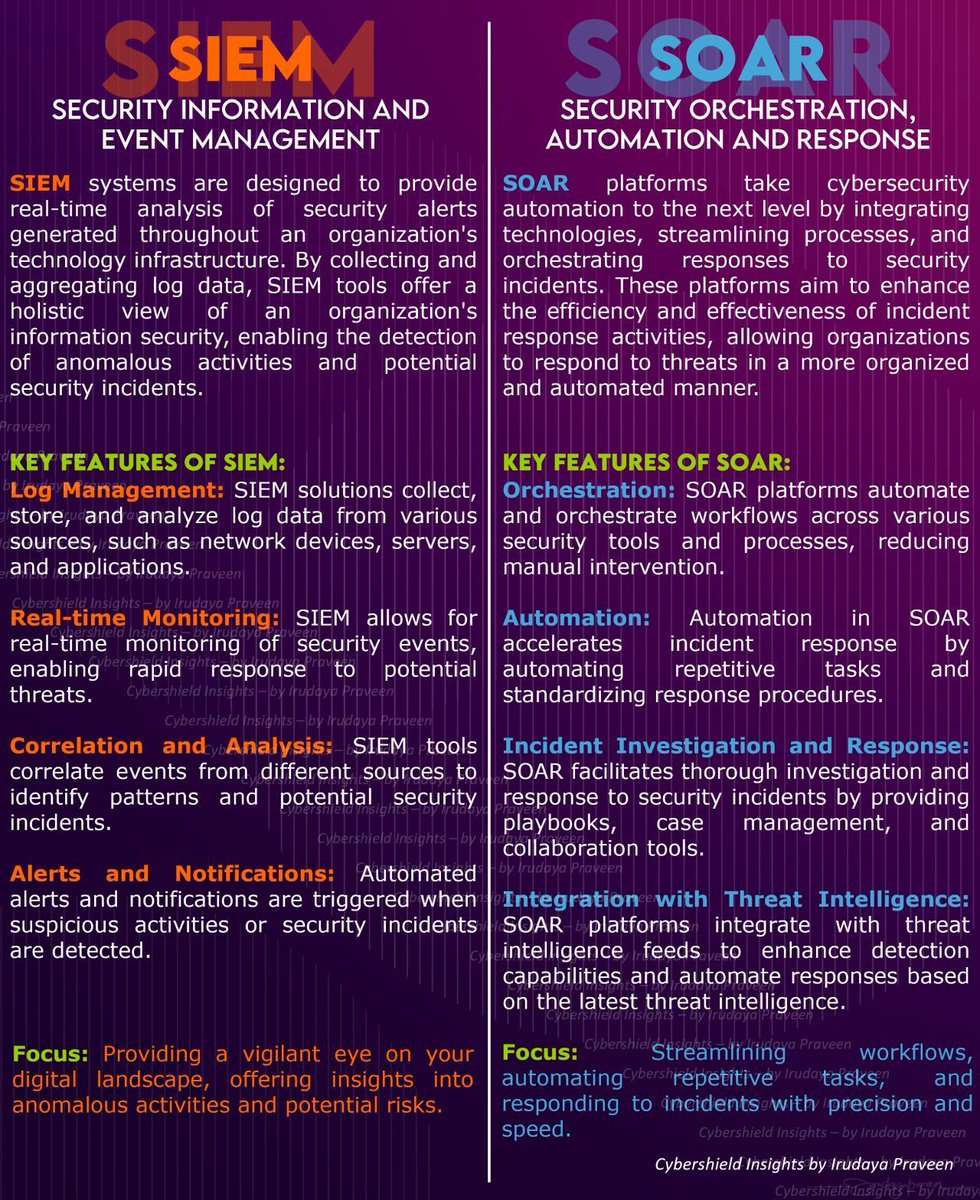
Un SIEM (Security information and event management), es una plataforma diseñada para proporcionar análisis en tiempo real de los eventos de seguridad que ocurren a través de la infraestructura tecnológica de una organización.
Al recolectar y agregar datos de registros/logs y alertas, las herramientas SIEM ofrecen una visión holística de la seguridad de la información, permitiendo detectar actividades anómalas y posibles incidentes de seguridad.
Las características clave de un SIEM incluyen:
𝐑𝐞𝐜𝐨𝐩𝐢𝐥𝐚𝐜𝐢𝐨́𝐧 𝐝𝐞 𝐝𝐚𝐭𝐨𝐬 𝐲 𝐜𝐞𝐧𝐭𝐫𝐚𝐥𝐢𝐳𝐚𝐜𝐢𝐨́𝐧: Un SIEM permite recopilar datos de múltiples fuentes como servidores, bases de datos, aplicaciones o dispositivos de red. Esto permite a una organización tener una visión unificada de su infraestructura.
𝐃𝐞𝐭𝐞𝐜𝐜𝐢𝐨́𝐧 𝐝𝐞 𝐚𝐦𝐞𝐧𝐚𝐳𝐚𝐬: Un SIEM implementa reglas que permiten analizar los datos recogidos, identificar patrones y detectar posibles amenazas. Las reglas de detección en un SIEM se denominan 𝐜𝐚𝐬𝐨𝐬 𝐝𝐞 𝐮𝐬𝐨.
𝐀𝐥𝐞𝐫𝐭𝐚𝐬 𝐝𝐞 𝐬𝐞𝐠𝐮𝐫𝐢𝐝𝐚𝐝: Cuando se detecta una posible amenaza, se generan alertas en tiempo real que suelen clasificarse en función de su criticidad.
𝐂𝐮𝐦𝐩𝐥𝐢𝐦𝐢𝐞𝐧𝐭𝐨 𝐧𝐨𝐫𝐦𝐚𝐭𝐢𝐯𝐨: Existen multitud de normativas de seguridad y privacidad como GDPR, PCI o HIPAA, cuyos requisitos pueden ser implementados con la ayuda de un SIEM.
𝐒𝐎𝐀𝐑 (𝐒𝐞𝐜𝐮𝐫𝐢𝐭𝐲 𝐨𝐫𝐜𝐡𝐞𝐬𝐭𝐫𝐚𝐭𝐢𝐨𝐧, 𝐚𝐮𝐭𝐨𝐦𝐚𝐭𝐢𝐨𝐧 𝐚𝐧𝐝 𝐫𝐞𝐬𝐩𝐨𝐧𝐬𝐞)
Un SOAR permite la automatización y orquestación de las respuestas a incidentes de seguridad. Esto incluye automatizar tareas de seguridad repetitivas y gestionar procesos de respuesta a incidentes.
Integra soluciones de seguridad dispares y utiliza flujos de trabajo automatizados para mejorar la eficiencia de las operaciones de seguridad. Normalmente se integra con uno o varios SIEM.
Las características clave de un SOAR incluyen:
𝐎𝐫𝐪𝐮𝐞𝐬𝐭𝐚𝐜𝐢𝐨́𝐧: Automatiza y coordina distintas herramientas y procesos de seguridad, reduciendo la necesidad de intervención manual.
𝐀𝐮𝐭𝐨𝐦𝐚𝐭𝐢𝐳𝐚𝐜𝐢𝐨́𝐧: Acelera la respuesta a incidentes automatizando tareas repetitivas y estandarizando procedimientos.
𝐈𝐧𝐯𝐞𝐬𝐭𝐢𝐠𝐚𝐜𝐢𝐨́𝐧 𝐲 𝐑𝐞𝐬𝐩𝐮𝐞𝐬𝐭𝐚 𝐚 𝐈𝐧𝐜𝐢𝐝𝐞𝐧𝐭𝐞𝐬: Facilita una investigación exhaustiva y respuesta a incidentes de seguridad proporcionando plataformas de gestión de casos y colaboración.
𝐈𝐧𝐭𝐞𝐠𝐫𝐚𝐜𝐢𝐨́𝐧 𝐜𝐨𝐧 𝐈𝐧𝐭𝐞𝐥𝐢𝐠𝐞𝐧𝐜𝐢𝐚 𝐝𝐞 𝐀𝐦𝐞𝐧𝐚𝐳𝐚𝐬: Integra feeds de inteligencia de amenazas (IoCs, TTPs...) para mejorar las capacidades de respuesta automáticas basadas en la inteligencia de amenazas más reciente.
𝐒𝐈𝐄𝐌 𝐯𝐬 𝐒𝐎𝐀𝐑
En resumen, un SIEM y un SOAR son soluciones complementarias en la gestión de las operaciones Ciberseguridad.
Mientras que el SIEM se centra en el análisis y la vigilancia de la seguridad en tiempo real a través de la agregación de datos y generación de alertas, el SOAR se enfoca en la automatización y orquestación de las respuestas a incidentes, integrando diversas herramientas y servicios para una gestión de seguridad más eficiente y rápida.
SSO (Single Sign-On) Explained.
SSO can be thought of as a master key to open all different locks. It allows a user to log in to different systems using a single set of credentials.
In a time where we are accessing more applications than ever before, this is a big help to mitigate password fatigue and streamlines user experience.
To fully understand the SSO process, 𝗹𝗲𝘁’𝘀 𝘁𝗮𝗸𝗲 𝗮 𝗹𝗼𝗼𝗸 𝗮𝘁 𝗵𝗼𝘄 𝗮 𝘂𝘀𝗲𝗿 𝘄𝗼𝘂𝗹𝗱 𝗹𝗼𝗴 𝗶𝗻𝘁𝗼 𝗟𝗶𝗻𝗸𝗲𝗱𝗜𝗻 𝘂𝘀𝗶𝗻𝗴 𝗚𝗼𝗼𝗴𝗹𝗲 𝗮𝘀 𝘁𝗵𝗲 𝗶𝗱𝗲𝗻𝘁𝗶𝘁𝘆 𝗽𝗿𝗼𝘃𝗶𝗱𝗲𝗿:
𝟭) 𝗨𝘀𝗲𝗿 𝗿𝗲𝗾𝘂𝗲𝘀𝘁𝘀 𝗮𝗰𝗰𝗲𝘀𝘀
First, the user would attempt to access the Service Provider (LinkedIn). At this point, a user would be presented with login options, and in this example, they would select "Sign in with Google".
𝟮) 𝗔𝘂𝘁𝗵𝗲𝗻𝘁𝗶𝗰𝗮𝘁𝗶𝗼𝗻 𝗿𝗲𝗾𝘂𝗲𝘀𝘁
From here, the Service Provider (LinkedIn) will redirect the user to the Identity Provider (Google) with an authentication request.
𝟯) 𝗜𝗱𝗣 𝗰𝗵𝗲𝗰𝗸𝘀 𝗳𝗼𝗿 𝗮𝗰𝘁𝗶𝘃𝗲 𝘀𝗲𝘀𝘀𝗶𝗼𝗻
Once the Identity Provider (Google) has received the request, it will check for an active session. If it doesn't find one, authentication will be requested.
𝟰) 𝗨𝘀𝗲𝗿 𝘀𝘂𝗯𝗺𝗶𝘁𝘀 𝗰𝗿𝗲𝗱𝗲𝗻𝘁𝗶𝗮𝗹𝘀
At this stage, the user will submit their login credentials (username and password) to the Identity Provider (IdP).
𝟱) 𝗜𝗱𝗣 𝘃𝗲𝗿𝗶𝗳𝗶𝗲𝘀 𝗰𝗿𝗲𝗱𝗲𝗻𝘁𝗶𝗮𝗹𝘀
The Identity Provider will then verify the submitted credentials against its User Directory (database). If the credentials are correct, the IdP will create an authentication token or assertion.
𝟲) 𝗜𝗱𝗣 𝘀𝗲𝗻𝗱𝘀 𝘁𝗼𝗸𝗲𝗻 𝘁𝗼 𝗦𝗲𝗿𝘃𝗶𝗰𝗲 𝗣𝗿𝗼𝘃𝗶𝗱𝗲𝗿
Once the token or assertion has been created, the IdP sends it back to the Service Provider confirming the user's identity. The user is now authenticated and can access the Service Provier (LinkedIn).
𝟳) 𝗔𝗰𝗰𝗲𝘀𝘀 𝗴𝗿𝗮𝗻𝘁𝗲𝗱 𝘂𝘀𝗶𝗻𝗴 𝗲𝘅𝗶𝘀𝘁𝗶𝗻𝗴 𝘀𝗲𝘀𝘀𝗶𝗼𝗻
Since the Identity Provider has established a session, when the user goes to access a different Service Provider (eg; GitHub), they won't need to re-enter their credentials. Future service providers will request authentication from the Identity Provider, recognize the existing session, and grant access to the user based on the previously authenticated session.
SSO workflows like the above operate on SSO protocols, which are a set of rules that govern how the IdP and SP communicate and trust each other. Common protocols include Security Assertion Markup Language (SAML), OpenID Connect, and OAuth.
CI/CD explained in simple terms.
— What is continuous integration
— What is continuous delivery
— Benefits and challenges
— What does CI/CD look like in practice
Tomorrow, thousands of subscribers will learn all about CI/CD.
Join us to get the issue: https://t.co/cdQACkYZ9V